|
Devil Davaj
|
Devil Davaj
Posted 7 Years Ago
|
|
Group: Forum Members
Last Active: 6 Years Ago
Posts: 7,
Visits: 70
|
Thank You So Much..
|
|
Edward (RL)
|
Edward (RL)
Posted 7 Years Ago
|
|
Group: Forum Members
Last Active: 2 Months Ago
Posts: 301,
Visits: 4.9K
|
Go to Scene Manager to choose the Image Layer and then the toolbar will appear the layer settings. 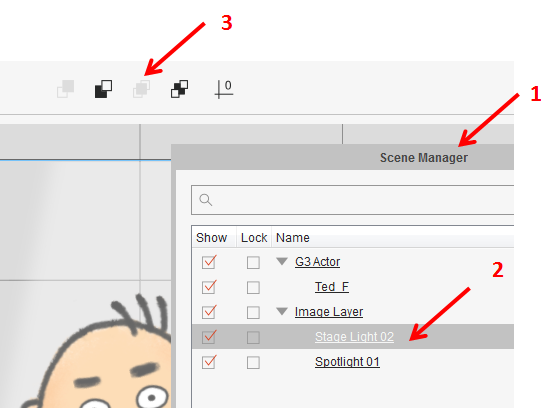
|
|
jlittle
|
jlittle
Posted 7 Years Ago
|
|
Group: Forum Members
Last Active: Last Year
Posts: 1.9K,
Visits: 17.3K
|
You can layer objects on the stage using the Z axis. Change the Z value in the toolbar at the top to set Z axis position. Jeff
Get my Plugin Manager and TaskNotes plugins for iClone.
Check out EZColors and Other products for CTA/CA. EZColors: the easy way to change Render Styled (RS) colors!
See my CTA Tutorials on the YouTube channel CTAStepByStep
|
|
Devil Davaj
|
 Devil Davaj
Posted 7 Years Ago
Devil Davaj
Posted 7 Years Ago
|
|
Group: Forum Members
Last Active: 6 Years Ago
Posts: 7,
Visits: 70
|
Hi I have a simple animation where I have to place "Click" over an Image Layer. Unfortunately, the Image layer is on top and it is hiding the "Click" Icon Thanks In advance..
|