|
Author
|
Message
|
|
Rampa
|
|
|
Group: Forum Members
Last Active: Last Week
Posts: 8.2K,
Visits: 62.6K
|
Excellent! :)
Glad to see you got it working.
|
|
|
|
|
Famekrafts
|
Famekrafts
Posted 7 Years Ago
|
|
Group: Forum Members
Last Active: 2 Years Ago
Posts: 332,
Visits: 2.0K
|
Ok got it, had to add PBR or traditional materials to all items.
CTA5, Iclone 7, 3D Exchange Pro, Character Creator 3, Popcornfx plugin, Zbrush, Blender, Vue 2014, Adobe cc suite, Spriter
Homebuild Workstation (Pretty old now but still working great) Win 10, Intel i7 950, 24 GB RAM DDR3, Gigabyte x58a-ud7 motherboard, AMD R9 390 sapphire 8GB VRAM.
Official Website Reallusion Store
|
|
|
|
|
Famekrafts
|
Famekrafts
Posted 7 Years Ago
|
|
Group: Forum Members
Last Active: 2 Years Ago
Posts: 332,
Visits: 2.0K
|
Rampa (5/9/2018)
You can get the CC templates for building your clothing here: https://www.reallusion.com/character-creator/custom-outfit.html
For Blender, import the CC FBX, build your clothing on it, and then export it as FBX following the tutorial.
There are templates for male, female, and neutral. There are also FBXKey files included. I am getting stuck on this step of the tutorial, once I import it inside CC the Appearance editor is not clickable. How do I solve this? 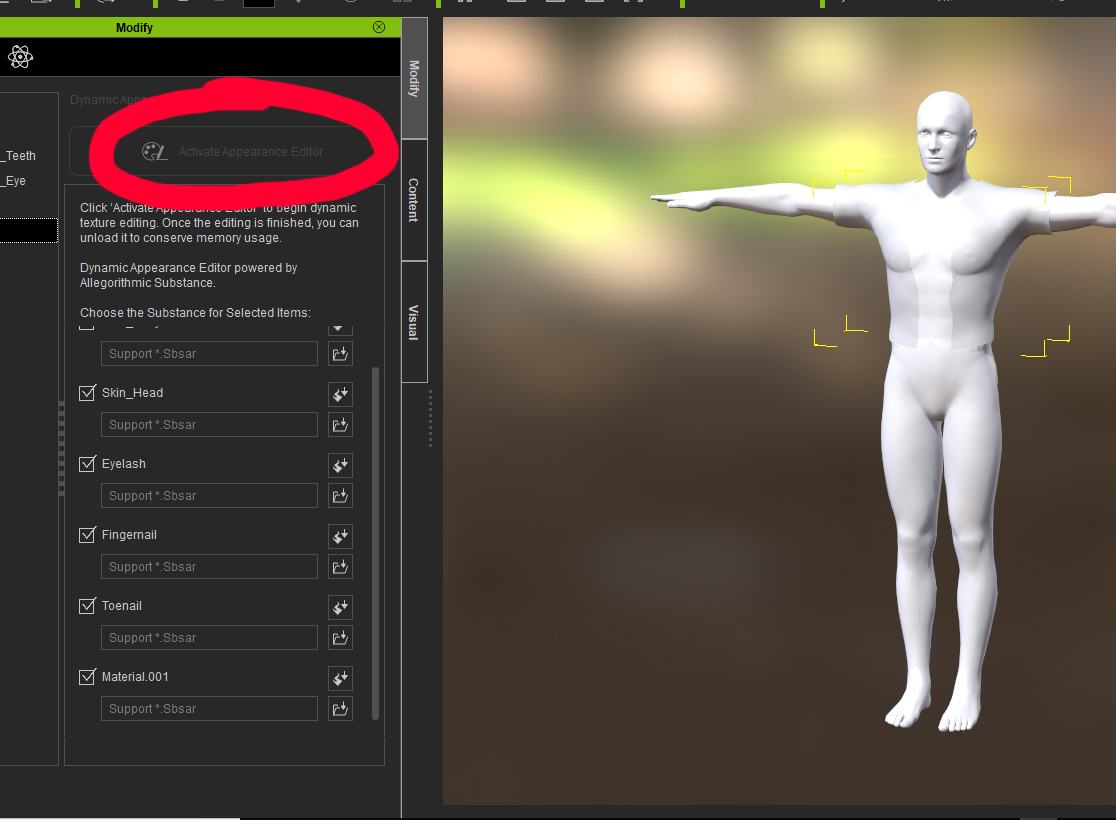 CTA5, Iclone 7, 3D Exchange Pro, Character Creator 3, Popcornfx plugin, Zbrush, Blender, Vue 2014, Adobe cc suite, Spriter
Homebuild Workstation (Pretty old now but still working great) Win 10, Intel i7 950, 24 GB RAM DDR3, Gigabyte x58a-ud7 motherboard, AMD R9 390 sapphire 8GB VRAM.
Official Website Reallusion Store
|
|
|
|
|
Famekrafts
|
Famekrafts
Posted 7 Years Ago
|
|
Group: Forum Members
Last Active: 2 Years Ago
Posts: 332,
Visits: 2.0K
|
Rampa (5/9/2018)
You can get the CC templates for building your clothing here: https://www.reallusion.com/character-creator/custom-outfit.html
For Blender, import the CC FBX, build your clothing on it, and then export it as FBX following the tutorial.
There are templates for male, female, and neutral. There are also FBXKey files included. Thanks, Man, that really helps.
CTA5, Iclone 7, 3D Exchange Pro, Character Creator 3, Popcornfx plugin, Zbrush, Blender, Vue 2014, Adobe cc suite, Spriter
Homebuild Workstation (Pretty old now but still working great) Win 10, Intel i7 950, 24 GB RAM DDR3, Gigabyte x58a-ud7 motherboard, AMD R9 390 sapphire 8GB VRAM.
Official Website Reallusion Store
|
|
|
|
|
Rampa
|
|
|
Group: Forum Members
Last Active: Last Week
Posts: 8.2K,
Visits: 62.6K
|
You can get the CC templates for building your clothing here: https://www.reallusion.com/character-creator/custom-outfit.html
For Blender, import the CC FBX, build your clothing on it, and then export it as FBX following the tutorial.
There are templates for male, female, and neutral. There are also FBXKey files included.
|
|
|
|
|
Famekrafts
|
Famekrafts
Posted 7 Years Ago
|
|
Group: Forum Members
Last Active: 2 Years Ago
Posts: 332,
Visits: 2.0K
|
I followed Rampa's tutorial on Quick Blender Bodysuit for cc. I created my own character and not use the base character and exported that as obj. because I cannot export as fbx without the pipeline. Now every time I try to import the character body suit it is saying I need fbx key. So How do i get this key without pipeline?
CTA5, Iclone 7, 3D Exchange Pro, Character Creator 3, Popcornfx plugin, Zbrush, Blender, Vue 2014, Adobe cc suite, Spriter
Homebuild Workstation (Pretty old now but still working great) Win 10, Intel i7 950, 24 GB RAM DDR3, Gigabyte x58a-ud7 motherboard, AMD R9 390 sapphire 8GB VRAM.
Official Website Reallusion Store
|
|
|
|