Profile Picture

Fortnite Project

Posted By will2power71 7 Years Ago
Rated 5 stars based on 1 vote.
1
2

Author
Message
will2power71
will2power71
Posted 5 Years Ago
View Quick Profile
Distinguished Member

Distinguished Member (9.6K reputation)Distinguished Member (9.6K reputation)Distinguished Member (9.6K reputation)Distinguished Member (9.6K reputation)Distinguished Member (9.6K reputation)Distinguished Member (9.6K reputation)Distinguished Member (9.6K reputation)Distinguished Member (9.6K reputation)Distinguished Member (9.6K reputation)

Group: Forum Members
Last Active: 2 Months Ago
Posts: 389, Visits: 2.8K
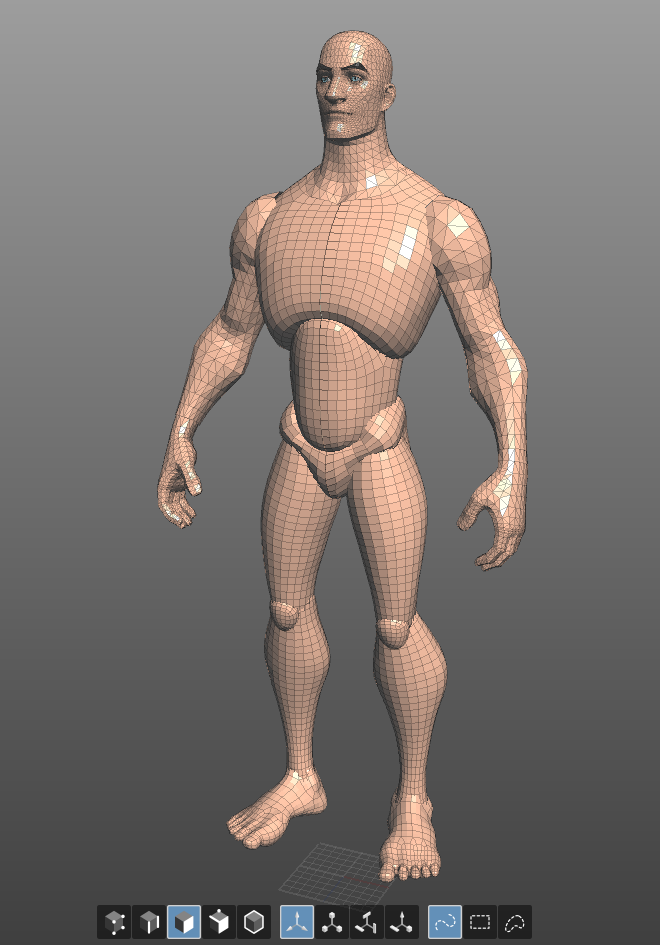
I had some stumbling blocks in a major way with the topology and I had to make some changes. The parts of the body I really wanted to implement I'm having to put aside for a little while. I still wanted to move ahead with my project so I reworked the male  body while I continued to work on the retopology of the heads. I am keeping the heads and bodies separate for the moment. The trouble I ran into was that the hand and feet topology was too dense to work. I'm still planning to use the shapes but I am having to retopologize those body parts in a big way to decrease the polycount. In the mean time I came out with a version 2 that has better topology. 

https://forum.reallusion.com/uploads/images/e2b77c1d-53ae-4a70-9e08-3db6.png

I worked out a heroic body and regular body for the different characters with the small/medium body types. I've decided I'm not going to do the Large frames at this point --their proportions are just too far out for my tastes. Work continues with the rest but I'm pleased with the results right now. Here are the male heads I've retopologized. 

https://forum.reallusion.com/uploads/images/38e39748-b190-4828-b4e6-d531.png
Work continues slowly but surely. I am doing the UV Maps for the base body this week. Since each head is the same topology, I only have to do one UV Map and I'm good to go. 
I've decided that I'm going to cheat a little. I'm going to be using Mixamo for the body rigging and I'm going to take the finished rig into Maya  and add the face bones to the face of the model when I'm ready to go forward. With this setup, I can use Akeytsu to do the animation. There are a couple of reasons for this --I would like to be able to move back and forth between Cinema 4D, Maya, iClone, and Unreal engine. I deliberated on this for a long time because I wanted to maximize my effectiveness when working with animations. iClone offers a lot in house but I've decided to do the animating favoring joints and morphs which they all support. The key factor that caused me to select Mixamo instead of the full iclone skeleton is that Mixamo offers control rig options in both Maya and Cinema 4D --and has a retargeting script in Unreal engine that makes things pretty painless. With joints for the face and morphs in the Morph animation section, I can have  pretty full feature set across all the applications with a minimum of hassle. The Mixamo rig is also supported in Anima 3.5 which works Natively in Cinema 4d. 

It wasn't an easy decision, but I had to balance the tools I needed to get the finished product. iClone isn't very strong with crowd sims and I wanted to minimize the amount of time working with them, while being able to setup and use custom content with Anima. There's another reason why I'm choosing this route rather than trying to work with Character Creator 3 at the moment. I love the iclone environment. It's easy to work with, the materials are simple and I think it can't be beat when it comes to special effects for a hobbyist. This is more something that affects me as an animator and the look I'm trying to achieve. Toon figures require a lot extra when it comes to animating that the CC3 figures can't give me right now, and that's rigging for custom geometry. Right now, if I want to put a toony set of eyebrows on a dwarf, I can add them as a piece of clothing, but I can't add extra rigging to them. If I create a custom character, I can create face bones that mirror Iclone, but then I can add those extra bones that give me the functionality that I need in order to make it work the way I want it to. I'd rather just go ahead and rig the clothes outside of iClone so that if I need a cape with bones for some reason, I have them. I can bring everything in as an fbx and just apply the materials and render it with some forethought. Worse comes to worse, I can rig the whole thing and just bring in the finished animation when I'm done and render it. It's not the ideal setup but it affords me options that I don't have in iClone at the moment. 
toystorylab
toystorylab
Posted 6 Years Ago
View Quick Profile
Distinguished Member

Distinguished Member (17.3K reputation)Distinguished Member (17.3K reputation)Distinguished Member (17.3K reputation)Distinguished Member (17.3K reputation)Distinguished Member (17.3K reputation)Distinguished Member (17.3K reputation)Distinguished Member (17.3K reputation)Distinguished Member (17.3K reputation)Distinguished Member (17.3K reputation)

Group: Forum Members
Last Active: 3 Months Ago
Posts: 4.6K, Visits: 29.9K
Respect for your project. And nice to see your results so far...

Toystorylab on Vimeo : https://forum.reallusion.com/uploads/images/ce44ea78-6984-47d8-9bf4-b783.png    Crassitudes (my "Alter Ego") on Youtube: https://forum.reallusion.com/uploads/images/fcc4df30-b3a8-40a5-a427-0735.png

will2power71
will2power71
Posted 6 Years Ago
View Quick Profile
Distinguished Member

Distinguished Member (9.6K reputation)Distinguished Member (9.6K reputation)Distinguished Member (9.6K reputation)Distinguished Member (9.6K reputation)Distinguished Member (9.6K reputation)Distinguished Member (9.6K reputation)Distinguished Member (9.6K reputation)Distinguished Member (9.6K reputation)Distinguished Member (9.6K reputation)

Group: Forum Members
Last Active: 2 Months Ago
Posts: 389, Visits: 2.8K
The really exciting thing is that it's easy to make a lot of different variants for what you want to do. I got a lot of mileage out of Topogun for creating the hair, beard and eyebrows as well as the clean topology. Hopefully this GIF will display properly so you can see what I mean.

https://forum.reallusion.com/uploads/images/114dcdd1-b9db-4bf1-b4ee-8d18.gif

Wrestling with someone else's geometry is it's own special nightmare but if you are willing to put in some effort, you can get exactly the results you want.
will2power71
will2power71
Posted 6 Years Ago
View Quick Profile
Distinguished Member

Distinguished Member (9.6K reputation)Distinguished Member (9.6K reputation)Distinguished Member (9.6K reputation)Distinguished Member (9.6K reputation)Distinguished Member (9.6K reputation)Distinguished Member (9.6K reputation)Distinguished Member (9.6K reputation)Distinguished Member (9.6K reputation)Distinguished Member (9.6K reputation)

Group: Forum Members
Last Active: 2 Months Ago
Posts: 389, Visits: 2.8K
I had to do a lot of rethinking when it came to working with the Fortnite Geometry. At first I thought I would be able to get away with using the DAZ body and making a custom head morph, but I've since had to re-think the whole thing. The DAZ Geometry is good, but it presented too many problems with trying to achieve the look I want. So What I ended up doing is creating the body Geometry from scratch using Topogun, and a lot of other tools, but I'm pleased to say that it was definitely for the best. This is the result:


https://forum.reallusion.com/uploads/images/0e4c2a9c-0ca4-4aa5-9565-9e2f.jpg


I ended up with much cleaner topology in the final result. The thing is that You can work with someone else's geo and end up frustrated because there's something just not right here or there. This also made it possible for me to set things up where for each size figure, all I have to do is import the head Geometry as a morph/blendshape so that I can essentially have one geometry for each size figure. In the end I decided not to try to match the Fortnite shapes entirely, but found the best features of each size and fill in the blanks with my own take on each. This guy is ready for UVs and rigging, and I'm going to do the same thing for the larger sized figures. It's taught me a lot about topology and the end result is exactly what I wanted instead of being "close enough". I'm looking forward to diving into the rigging process for each one and seeing the result on screen. I am planning to animate them in iClone so I'm looking at a good joint based rig. Depending on the result, I may try to do a more fully realized work in Maya but for right now because it's just me --I think iClone is still one of the better fits.
will2power71
will2power71
Posted 6 Years Ago
View Quick Profile
Distinguished Member

Distinguished Member (9.6K reputation)Distinguished Member (9.6K reputation)Distinguished Member (9.6K reputation)Distinguished Member (9.6K reputation)Distinguished Member (9.6K reputation)Distinguished Member (9.6K reputation)Distinguished Member (9.6K reputation)Distinguished Member (9.6K reputation)Distinguished Member (9.6K reputation)

Group: Forum Members
Last Active: 2 Months Ago
Posts: 389, Visits: 2.8K
I'm going to try this again tonight with a CC3 base, but it was really encouraging to see that you can get a pretty decent rendition with the tools that are out there now. Ken is my personal favorite, so I want his to look as good as I can make it. Here's the first test render with a DAZ topology

https://forum.reallusion.com/uploads/images/675df733-b781-41e5-89ce-ce6a.png
ToKoMotion
ToKoMotion
Posted 6 Years Ago
View Quick Profile
Distinguished Member

Distinguished Member (9.3K reputation)Distinguished Member (9.3K reputation)Distinguished Member (9.3K reputation)Distinguished Member (9.3K reputation)Distinguished Member (9.3K reputation)Distinguished Member (9.3K reputation)Distinguished Member (9.3K reputation)Distinguished Member (9.3K reputation)Distinguished Member (9.3K reputation)

Group: Forum Members
Last Active: 2 Months Ago
Posts: 678, Visits: 31.1K
Thanks for the clarification. I can imagine all the efforts in creating such characters. The hand looks great and it's indeed hard to create something like that in CC3. I think a lot of work has to be done on the normal maps to get similar results in CC3. Nevertheless keep up the good work and I'm looking forward to see the final characters. 

________________________________________________
FOLLOW ME:
https://forum.reallusion.com/uploads/images/43a4ac7b-bd85-430a-aa3e-e3f7.png    https://forum.reallusion.com/uploads/images/9cbb0370-ee1b-4f58-9b3d-6930.png    https://forum.reallusion.com/uploads/images/e84e0ec9-aa91-47d0-ae07-d519.png
FIND MORE:
https://forum.reallusion.com/uploads/images/17a1d227-c563-4ece-a41a-257a.jpg

will2power71
will2power71
Posted 6 Years Ago
View Quick Profile
Distinguished Member

Distinguished Member (9.6K reputation)Distinguished Member (9.6K reputation)Distinguished Member (9.6K reputation)Distinguished Member (9.6K reputation)Distinguished Member (9.6K reputation)Distinguished Member (9.6K reputation)Distinguished Member (9.6K reputation)Distinguished Member (9.6K reputation)Distinguished Member (9.6K reputation)

Group: Forum Members
Last Active: 2 Months Ago
Posts: 389, Visits: 2.8K
ToKoMotion (3/12/2019)
Amazing work!!! Do I understand right that these characters will be available as CC3 morphs?


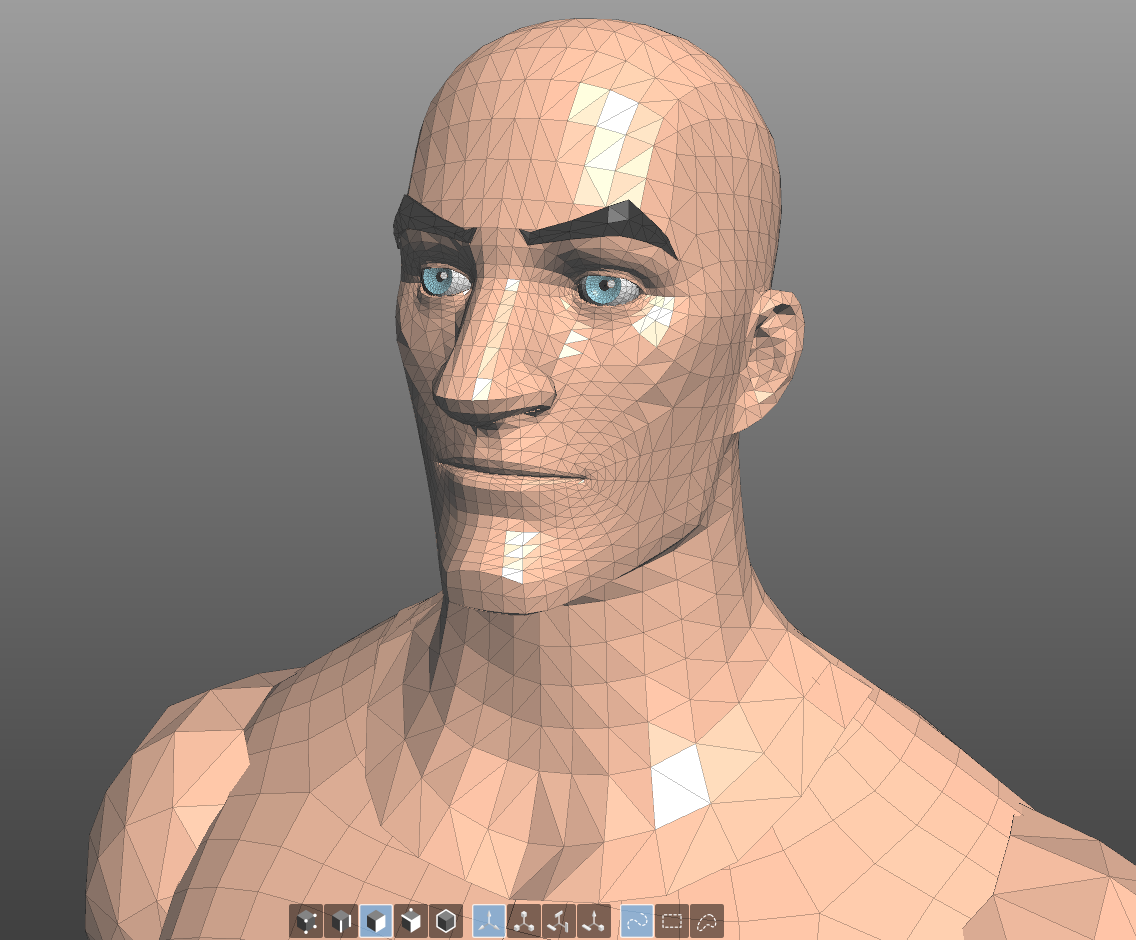
I've never done a morph for Character Creator 3. I am doing these right now as custom geometry mostly because I don't want to be constrained by someone else's idea of what you can do and can't. I am going to use the iClone Gamebone setup to use this with iClone. The head Geometry comes out of Fortnite as tris and I'm redoing them in quads, or rather I am manually removing the triangles to arrive at all quad based geometry. I saw your video one time about custom heads, so I might try that approach. 

https://forum.reallusion.com/uploads/images/f8eefa2a-2c2e-44ca-8580-ec00.png

It's a lot of work to return the head to all quads. I basically do it manually because none of the de-triangulate features seem to give me a satisfying result and I ended up wasting more time undoing mistakes in the topology than just doing it myself. It takes about an hour to an hour and a half per head but once you get the flow of the geometry going it's pretty straightforward. I would have to take a look at the topology of the Content Creator characters and see if it's doable. The real trouble is the hands and feet. I modified them somewhat because I wanted a bit more detail in the hands and feet because I want to be able to do nails.If I can get the kind of look I have here on the CC3 figure to the same detail, then I would definitely not mind going with the figure:

https://forum.reallusion.com/uploads/images/c745fdb1-4205-42af-a968-e629.png

 I'm not opposed to doing CC3 morphs but I want to make sure that the end result is satisfying. 

ToKoMotion
ToKoMotion
Posted 6 Years Ago
View Quick Profile
Distinguished Member

Distinguished Member (9.3K reputation)Distinguished Member (9.3K reputation)Distinguished Member (9.3K reputation)Distinguished Member (9.3K reputation)Distinguished Member (9.3K reputation)Distinguished Member (9.3K reputation)Distinguished Member (9.3K reputation)Distinguished Member (9.3K reputation)Distinguished Member (9.3K reputation)

Group: Forum Members
Last Active: 2 Months Ago
Posts: 678, Visits: 31.1K
Amazing work!!! Do I understand right that these characters will be available as CC3 morphs?

________________________________________________
FOLLOW ME:
https://forum.reallusion.com/uploads/images/43a4ac7b-bd85-430a-aa3e-e3f7.png    https://forum.reallusion.com/uploads/images/9cbb0370-ee1b-4f58-9b3d-6930.png    https://forum.reallusion.com/uploads/images/e84e0ec9-aa91-47d0-ae07-d519.png
FIND MORE:
https://forum.reallusion.com/uploads/images/17a1d227-c563-4ece-a41a-257a.jpg

will2power71
will2power71
Posted 6 Years Ago
View Quick Profile
Distinguished Member

Distinguished Member (9.6K reputation)Distinguished Member (9.6K reputation)Distinguished Member (9.6K reputation)Distinguished Member (9.6K reputation)Distinguished Member (9.6K reputation)Distinguished Member (9.6K reputation)Distinguished Member (9.6K reputation)Distinguished Member (9.6K reputation)Distinguished Member (9.6K reputation)

Group: Forum Members
Last Active: 2 Months Ago
Posts: 389, Visits: 2.8K
I blocked out the prototype for the small framed males. I'm going to do some addional sculpting this evening, but I think it's about where I want it to be. I put together a version for the small and Medium sized figures and I will be finishing a female version  after I am done with the males. When I'm done, I will have a body for each size capable of interchanging heads in order to have a lot of different options for people that all share the same artistic style. I don't like mixing and matching figures because they always put me off when it comes to the final presentation. 

https://forum.reallusion.com/uploads/images/e72b91bf-4b24-4ecd-a00c-6c5b.png

This way when I start filming, my OCD will not trigger, causing me to scrap everything because it doesn't look like I think it should. 
will2power71
will2power71
Posted 6 Years Ago
View Quick Profile
Distinguished Member

Distinguished Member (9.6K reputation)Distinguished Member (9.6K reputation)Distinguished Member (9.6K reputation)Distinguished Member (9.6K reputation)Distinguished Member (9.6K reputation)Distinguished Member (9.6K reputation)Distinguished Member (9.6K reputation)Distinguished Member (9.6K reputation)Distinguished Member (9.6K reputation)

Group: Forum Members
Last Active: 2 Months Ago
Posts: 389, Visits: 2.8K
Kelleytoons (12/13/2018)
If it truly is a Gen 8 figure (using the Gen 8 base) you can bring it in via CC3 (and then use all the CC3 clothes, hair, etc).

I'm not quite ready to transfer to CC3 yet. I'm still working out the body sculpts for the small, medium and large figures both male and female. I'm actually toying with the idea of doing the topology 100%  from scratch and rigging to the iclone skeleton, or I may just use the CC3 skeleton and sculpt each base from that rather than bring it over from DAZ. This is pretty much a long term project which I am making more complicated by the minute. 

https://forum.reallusion.com/uploads/images/aa57a8f6-6773-43d6-9c84-f98a.png

It's taken me quite a bit of time, but I wanted to make sure that I had as many of the figure shapes as I could lay hands on because once I get started, I don't want to keep going back to look for this figure or that. I'm fortunate that the game has three basic body shapes so you can come up with a satisfying representation of each and then just exchange the heads.

https://forum.reallusion.com/uploads/images/657f99ca-10b6-48c0-bb54-2267.png


It's a thing where the first part is a big time effort but once that's done the rest of it is pretty straight forward. I spent the last couple of months acquiring the geometry so that when I'm finished I'll have more than 30 or 40 different characters to work with that all function in the same way and have a consistent look to them. 

1
2


Reading This Topic