Profile Picture

My iClone Content Shortcuts Workflow

Posted By Delerna 8 Years Ago
Rated 5 stars based on 1 vote.
1
2
3

Author
Message
Delerna
Delerna
Posted 8 Years Ago
View Quick Profile
Distinguished Member

Distinguished Member (8.5K reputation)Distinguished Member (8.5K reputation)Distinguished Member (8.5K reputation)Distinguished Member (8.5K reputation)Distinguished Member (8.5K reputation)Distinguished Member (8.5K reputation)Distinguished Member (8.5K reputation)Distinguished Member (8.5K reputation)Distinguished Member (8.5K reputation)

Group: Forum Members
Last Active: 4 Years Ago
Posts: 1.5K, Visits: 14.8K
Thought I might as well add these too

In reallusion/iClone folder I have added some extra folders of my own.
This is very basic because I haven't done that much with them yet. Mainly the World Potter one.
It has all the folders that are needed by iClone in it.  eg Accessories, Characters, Props, Motion etc etc
I have copies of all the shortcuts to contents suitable for any Harry Potter projects I want to make within those folders.
Some of the shortcuts are shortcuts to a folder rather than a content file. That saves me having to create shortcut copies for the files in that folder.
1 Shortcut to a folder shows up in iClone as a folder and clicking that shows everything in that folder. 

Anyway, the point is, when I want to work on one of my Harry Potter projects I
     1) Rename the 'iClone Template' folder in 'iClone 7 Template' to 'iClone Template Orriginal'
     2) Remove World Potter from 'iClone Template World Potter' so it is now ''iClone Template' 
     3) Open iClone and it now accesses my harry potter contents and projects without including tons of contents that are not needed for Potter Projects.
The benefit of this, for me anyway, is speeding up iClones reaction to searching for contents in its content panel. 
I find the more contents you have in the ''iClone Template'  the slower the content panel responds when you click on its links to folders.

https://forum.reallusion.com/uploads/images/37cc740c-85b5-4247-a739-ce0f.png


One more thing
In my '02 iClone folder' I have my contentShortcuts folder which is the one I showed in my previous post. Those shortcuts are to the files in the 3 other primary files.
'External Stores' is contents I got from outside of reallusion. For example iCloneZero and KernalTopal 's utube channel
'Maketplace' is the contents I have purchased from Reallusion Marketplace
'Reallusion' is the contents I have purchased from reallusion's store.

When I buy a content pack I rename the 'iClone Template' folder in 'iClone 7 Template' to 'iClone Template Orriginal'
Then I download the pack I bought which creates a new 'iClone Template' folder with that packs contents in it.
I then rename that  'iClone Template' folder to the name of the pack I bought
Then I move the folder into the Marketplace or Reallusion folder.
When done I remove Orriginal from 'iClone Template Orriginal'
Finally I make shortcuts for the contents I donloaded and put them where I want them

Also notice in Marketplace I have folders for the developers I have bought contents from. I can look at the link in my shortcuts so I can find out who made it if I need to.
https://forum.reallusion.com/uploads/images/d79ead82-bc29-494b-817b-f571.png


i7-3770 3.4GHz CPU 16 GB Ram   
GeForce GTX1080 TI 11GB
Windows 10 Pro 64bit
Delerna
Delerna
Posted 8 Years Ago
View Quick Profile
Distinguished Member

Distinguished Member (8.5K reputation)Distinguished Member (8.5K reputation)Distinguished Member (8.5K reputation)Distinguished Member (8.5K reputation)Distinguished Member (8.5K reputation)Distinguished Member (8.5K reputation)Distinguished Member (8.5K reputation)Distinguished Member (8.5K reputation)Distinguished Member (8.5K reputation)

Group: Forum Members
Last Active: 4 Years Ago
Posts: 1.5K, Visits: 14.8K
Ok, here are screenshots of how I have organised my shortcuts so far.
I have them organised well enough for me to find items I am looking for but it is still something I am working on.
I do it regularly but don't spend too much time on it. Generally I have regular times where I feel like doing something but not making anything and that is when I look at what I have so far and organise them more
1 thing is I organise these in a way that suits me. These may or may not suit you but maybe it will help you to workout the organisation that suits you.
Another thing is I am 63 and I have a huge issue with remembering words, especially names. These names I use are suitable for me but I had to search a lot in google to remember many of them.

And if anyone else has ideas for organising iClone contents I would like to see them. Some of them might appeal to me and help me organise mine even better?

Geometrical Folder is where I organise all simple shapes 
Special Effects Folder is where I was organising the partical effects but seriously thinking of separating them into the other folder
            For example all rain particles moved into the Aerial folder because that's what they are related to.
Celestial Folder is for anything relating to space
Aerial Folder is for anything relating to the sky. Thinking about moving the planes, helicopters etc here too
            All animals used to be in the characters folder but now all flying animals is in the Aerial Folder
https://forum.reallusion.com/uploads/images/5d012c95-e97c-462a-83a1-50e8.png

Aquatics Folder is where I put anything to do with water. Animals in here are fish, sharks Dolphins etc. I also have Coastal which is everything relating to beaches including certain architecture.
                          One good thing about shortcuts is things like architecture can be used in so many places that organising the actual files is complex. By having shortcuts I can just copy them 
                          and place them in as many folders as I want and they don't use up too much disk space. Also, if ever a content gets updated by its developer then providing the name remains 
                          the same I can just replace the original with the new and all shortcuts to it will automatically use it.
Terrestrial Folder is for everything relating to nature including wild animals like Lions, Girrafes etc
Agricultural Folder is for everything relating to growing plants and animals for food or decorations
Urbanoidal Folder is for everything relating to cities, towns, villages etc

https://forum.reallusion.com/uploads/images/3a07fbfe-0989-43e5-92ac-1bcc.png


Interial Folder is for everything relating to inside buildings. The furniture folder is the primary place for furniture but certain furniture can also be used outside. 
                       Copy theshorcuts that apply to that and put them wherever needed
Lighing Folder is for all lighting elements
Characters Folder is something I am still working on and trying to decide how to do it
Locations Folder is complete scenes and not just a single item for creating scenes
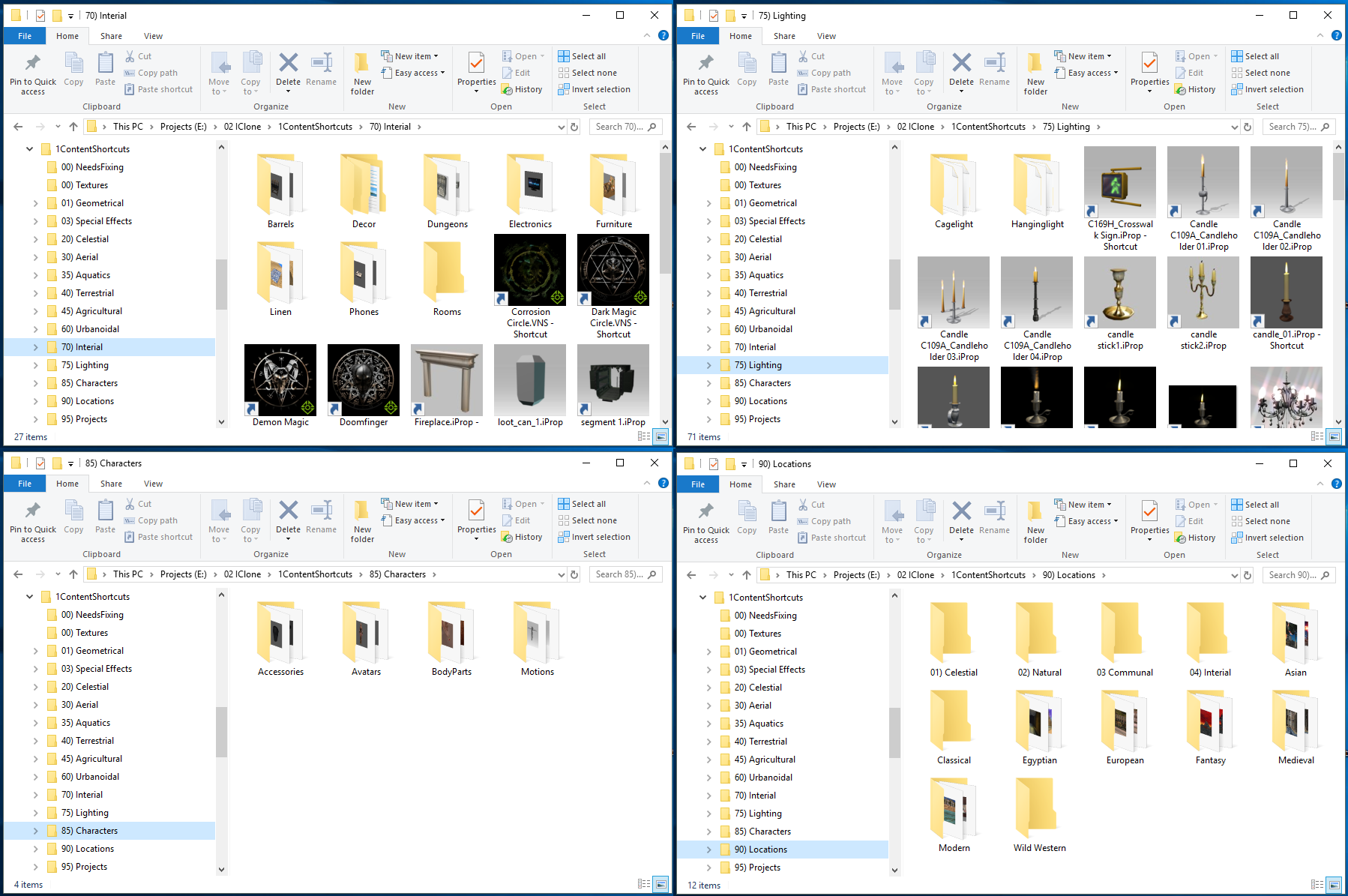
https://forum.reallusion.com/uploads/images/52912a3b-c309-4b95-b21e-65eb.png


One thing I don't like is having too many sub folders. I find it difficult to remember which folders things are in when there are too many.
So I have been working on starting the name of the shortcut with name I used to have as a subfolder and have all the shortcuts in a single folder.
That way I can just look through all the shortcuts in that 1 folder to find what I am after and they are organised by the start name to help me find it. It also means I can
easily see other things and I might find something better than what I am looking for but had forgotten I had it.
For example these lights used to be in folders called Candles, Chandaliers, Flashlights, Flourescents,  Lamps, Lanterns and Streets.
Now they are all in a single folder and added those folder names to the start of the shortcuts names.
https://forum.reallusion.com/uploads/images/8b4412cb-8aa3-4ebf-9675-7d4f.png


i7-3770 3.4GHz CPU 16 GB Ram   
GeForce GTX1080 TI 11GB
Windows 10 Pro 64bit
Delerna
Delerna
Posted 8 Years Ago
View Quick Profile
Distinguished Member

Distinguished Member (8.5K reputation)Distinguished Member (8.5K reputation)Distinguished Member (8.5K reputation)Distinguished Member (8.5K reputation)Distinguished Member (8.5K reputation)Distinguished Member (8.5K reputation)Distinguished Member (8.5K reputation)Distinguished Member (8.5K reputation)Distinguished Member (8.5K reputation)

Group: Forum Members
Last Active: 4 Years Ago
Posts: 1.5K, Visits: 14.8K
almost bed time for me so I will look into adding things tomorrow
not sure what your question is about 'should subfolders be created'

if memory serves me correctly I think I made it so it creates subfolders for the file types so it organises it a bit for my purposes.
I like to keep the motion shortcuts in their own file which is what the motion subfolder is.

you can change the code a little so it doesn't do that if that's what you prefer.
I will help you with any changes you want to make so it operates according to your preferences.
just let me know what your preferences are and I will help if you need help.


anyway I will post the rest tomorrow.  too tired right now   lol


i7-3770 3.4GHz CPU 16 GB Ram   
GeForce GTX1080 TI 11GB
Windows 10 Pro 64bit
Delerna
Delerna
Posted 8 Years Ago
View Quick Profile
Distinguished Member

Distinguished Member (8.5K reputation)Distinguished Member (8.5K reputation)Distinguished Member (8.5K reputation)Distinguished Member (8.5K reputation)Distinguished Member (8.5K reputation)Distinguished Member (8.5K reputation)Distinguished Member (8.5K reputation)Distinguished Member (8.5K reputation)Distinguished Member (8.5K reputation)

Group: Forum Members
Last Active: 4 Years Ago
Posts: 1.5K, Visits: 14.8K
almost bed time for me so I will look into adding things tomorrow
not sure what your question is about 'should subfolders be created'

if memory serves me correctly I think I made it so it creates subfolders for the file types so it organises it a bit for my purposes.
I like to keep the motion shortcuts in their own file which is what the motion subfolder is.

you can change the code a little so it doesn't do that if that's what you prefer.
I will help you with any changes you want to make so it operates according to your preferences.
just let me know what your preferences are and I will help if you need help.


anyway I will post the rest tomorrow.  too tired right now   lol


i7-3770 3.4GHz CPU 16 GB Ram   
GeForce GTX1080 TI 11GB
Windows 10 Pro 64bit
dogged2003
dogged2003
Posted 8 Years Ago
View Quick Profile
Distinguished Member

Distinguished Member (5.5K reputation)Distinguished Member (5.5K reputation)Distinguished Member (5.5K reputation)Distinguished Member (5.5K reputation)Distinguished Member (5.5K reputation)Distinguished Member (5.5K reputation)Distinguished Member (5.5K reputation)Distinguished Member (5.5K reputation)Distinguished Member (5.5K reputation)

Group: Forum Members
Last Active: 3 Years Ago
Posts: 418, Visits: 4.5K
Delerna (4/14/2018)
SHORTCUTS CREATER
Thank you so much. I'm trying to figure it out with your work.
I ran the program with the following parameters:
https://forum.reallusion.com/uploads/images/8ec47904-e901-494c-bcfa-c38d.jpg

Got a lot of shortcuts and two subfolders. Should subfolders be created?

https://forum.reallusion.com/uploads/images/b8e5686f-2d48-4245-8d7e-5245.jpg


Delerna (4/16/2018)
I will give a fuller display of how I currently have it organised (folder naming) if that is helpful.

I would really appreciate it if you share it.


Thank you.


My YouTube channel.
Delerna
Delerna
Posted 8 Years Ago
View Quick Profile
Distinguished Member

Distinguished Member (8.5K reputation)Distinguished Member (8.5K reputation)Distinguished Member (8.5K reputation)Distinguished Member (8.5K reputation)Distinguished Member (8.5K reputation)Distinguished Member (8.5K reputation)Distinguished Member (8.5K reputation)Distinguished Member (8.5K reputation)Distinguished Member (8.5K reputation)

Group: Forum Members
Last Active: 4 Years Ago
Posts: 1.5K, Visits: 14.8K
Was talking about another HTA file I use for adjusting the naming of my files where I have many with similar naming.
Decided I would publish it here incase anyone might find it useful for their methods of organizing content files or shortcuts

i7-3770 3.4GHz CPU 16 GB Ram   
GeForce GTX1080 TI 11GB
Windows 10 Pro 64bit
Delerna
Delerna
Posted 8 Years Ago
View Quick Profile
Distinguished Member

Distinguished Member (8.5K reputation)Distinguished Member (8.5K reputation)Distinguished Member (8.5K reputation)Distinguished Member (8.5K reputation)Distinguished Member (8.5K reputation)Distinguished Member (8.5K reputation)Distinguished Member (8.5K reputation)Distinguished Member (8.5K reputation)Distinguished Member (8.5K reputation)

Group: Forum Members
Last Active: 4 Years Ago
Posts: 1.5K, Visits: 14.8K
Im prepared to do this slowly because like you said. I want to a project and not do this. At the start I didn't even use the shortcuts to work on projects. But now I am getting it organised well enough to help me find things so I use it this way more and more. I want to have things organised so I am prepared to spend some time doing it. Took several months and changes to get things organised good enough for me to find things easily. So before I had that I left iClones way of doing it alone. I will give a fuller display of how I currently have it organised (folder naming) if that is helpful. I am still not fully satisfied with what I have but its getting there


i7-3770 3.4GHz CPU 16 GB Ram   
GeForce GTX1080 TI 11GB
Windows 10 Pro 64bit
Delerna
Delerna
Posted 8 Years Ago
View Quick Profile
Distinguished Member

Distinguished Member (8.5K reputation)Distinguished Member (8.5K reputation)Distinguished Member (8.5K reputation)Distinguished Member (8.5K reputation)Distinguished Member (8.5K reputation)Distinguished Member (8.5K reputation)Distinguished Member (8.5K reputation)Distinguished Member (8.5K reputation)Distinguished Member (8.5K reputation)

Group: Forum Members
Last Active: 4 Years Ago
Posts: 1.5K, Visits: 14.8K
Hi The Schema.
Yes I was the same as you. I have been a user of iclone since iClone4 in 2011 and I have purchased a lot of content over these 7 years.
iClone got the ability for using shortcuts in iClone6 and it wasn't until just before iClone7 that I started doing this.
I actually renamed the original iClone folders with all the content in them and reinstalled iClone to start from fresh. But I can still rename the original with all the contents in it before starting iClone so I can still have everything.
I am getting very close now where I will get rid of that altogether. Don't use it much anymore.

I do projects and don't want to loose time by having to work with this. But I also have times when I want to do something but don't feel like animating or modelling.
That's when I work on sorting this out how I want. That's why I created the updater program. To help me speed resetting everything If I decide to change what I have done with where the contents are saved.
Re-organising the shortcuts is not a problem and that is the thing I change the most. Deciding what to call folders so I can organise them so I can find things easiest is the most difficult thing for me.
But as said, I occasionally feel like doing something but not a project or modelling. So that is when I work on this. I spend about 2 days each month doing this stuff and I think i've been doing it now for about 6 to 8 months.

Initially I just put the shortcuts into folders and when I work on a project I didn't access them from iClones contents interface. I have 2 screens so I have the shortcuts folder in 1 screen and iClone in the other and when I wanted to add a content to the project I would just find its shortcut and drag and drop it into iClone. I only started adding the shortcuts into iClones contents folders a couple of months ago.
As said I don't try to get it all done at once. I just work on it when I want to do something but I'm too tired or worn out for projects or modelling. It hasn't taken me all that long to work on it I think.


i7-3770 3.4GHz CPU 16 GB Ram   
GeForce GTX1080 TI 11GB
Windows 10 Pro 64bit
theschemer
theschemer
Posted 8 Years Ago
View Quick Profile
Distinguished Member

Distinguished Member (7.6K reputation)Distinguished Member (7.6K reputation)Distinguished Member (7.6K reputation)Distinguished Member (7.6K reputation)Distinguished Member (7.6K reputation)Distinguished Member (7.6K reputation)Distinguished Member (7.6K reputation)Distinguished Member (7.6K reputation)Distinguished Member (7.6K reputation)

Group: Forum Members
Last Active: 3 Years Ago
Posts: 1.4K, Visits: 2.9K
Delerna (4/16/2018)
I don't like this next line much. Hear it in sports so often but oh well, here it goes
Ausie Ausie Ausie ........... Oi Oi Oi

No comments
Yea that's pretty common for me. I occasionally get spoken too but I pretty much get ignored here. I wonder if its because of how I spoke to Swoooop several times.?
Maybe because I'm not very good at saying things in text and I sound bad?
I like to try and help people and I notice lots of reading on the 3 workflows I have posted so I am guessing some people might be finding it helpful. Or maybe I'm just being looked at how silly I am?

I try not to make comments in other peoples posts anymore but cant help myself sometimes. I will get there though. Just shutup Taylor

◇◇◇ Good, better, best. Never let it rest. 'Til your good is better and your better is best. ◇◇◇  - St. Jerome

We never get best. The day we stop getting better is the day we die LOL
I never want to stop improving


Hi Delerna,
  I have been watching this thread with interest but I have not had time to really study and fully understand it yet, as I have too many irons in the fire at the moment. After a quick read it looks like it can be very useful but I wonder how much time it would really take, to sort out *everything* I have purchased over the years. The main reason being I probably don't remember who created everything I purchased. And I purchased a lot. :D But I still would like to attempt to try this when I get caught up. Any suggestions on using this on years worth of mess?
Thanks,
TS

Delerna
Delerna
Posted 8 Years Ago
View Quick Profile
Distinguished Member

Distinguished Member (8.5K reputation)Distinguished Member (8.5K reputation)Distinguished Member (8.5K reputation)Distinguished Member (8.5K reputation)Distinguished Member (8.5K reputation)Distinguished Member (8.5K reputation)Distinguished Member (8.5K reputation)Distinguished Member (8.5K reputation)Distinguished Member (8.5K reputation)

Group: Forum Members
Last Active: 4 Years Ago
Posts: 1.5K, Visits: 14.8K
Oh, And I said I like to try and help people
By Try I mean I can only speak according to what I know and I definitely do not know everything and unlike some people I won't deny that.
But even If what I say might not be fully correct for what other people want. Maybe it will help them to discover what will work for them? 


i7-3770 3.4GHz CPU 16 GB Ram   
GeForce GTX1080 TI 11GB
Windows 10 Pro 64bit

1
2
3


Reading This Topic