|
Author
|
Message
|
|
justaviking
|
justaviking
Posted 7 Years Ago
|
|
Group: Forum Members
Last Active: Last Year
Posts: 8.2K,
Visits: 26.5K
|
Inspired by a recent comment, I thought I'd toss out my quick attempt at glass and chrome. STARTING POINT:Sample project template --> GI --> Loft Scene CHROME (See the counter):Prop --> Kitchen Cabinet Material = KitchenCabinet_B Base color = Gray-ish is fine (will have very little effect) Metallic = 1 (="White" = Metallic) Roughness = 0 (="Black" = No roughness = Smooth) Diffuse Color = Black Opacity = 99 (so reflection will work) Reflection = "On" and value near or equal to 100 GLASS (See the chairs):Prop --> Scene --> Dining Table Material = DiningChair Material settings same as for Chrome, but with one addition... Opacity = 29 (in my picture) COMMENTS:As Guy said recently, "Plausible" is a good goal. For me, I think the results in my picture are plausible for Chrome and Glass. Of course you can vary the values I used. For example, if you reduce the "Reflection" value, the Base Color will start to show through, but it's subtle when the Diffuse Color is black, or more pronounced as Diffuse Color gets closer to white. QUESTIONS:1) I can't remember, but needed to set Opacity<100 to enable Reflection, is that by design? Or just an odd quirk? 2) I only tried for about 5 seconds, but I did not get "Refraction" to work on the glass chairs. Any suggestions for that? MY RESULT:
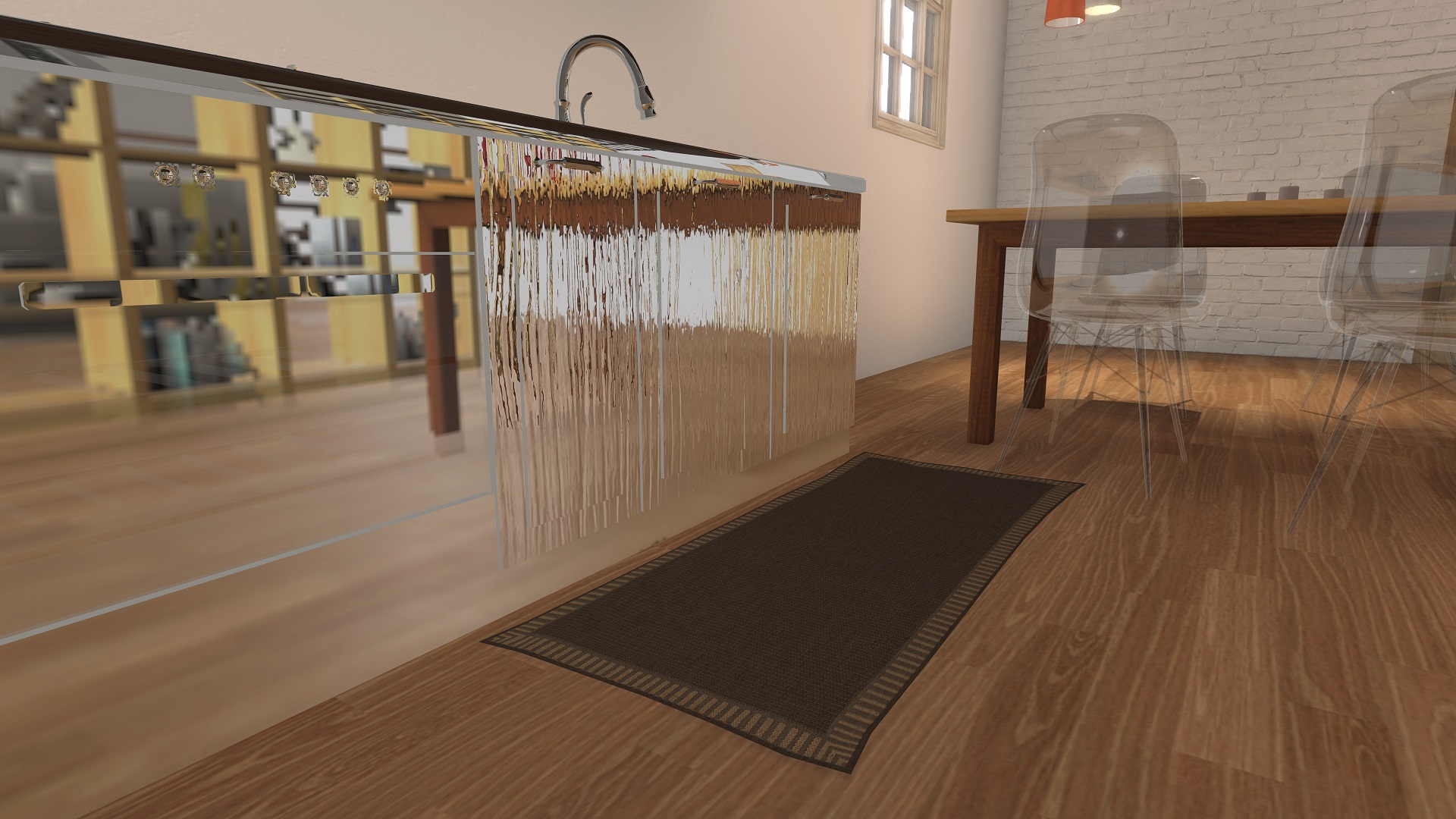 (Edited - Merely put in a lower-resolution JPEG rather than a extra-large PNG file.)
iClone 7... Character Creator... Substance Designer/Painter... Blender... Audacity...
Desktop (homebuilt) - Windows 10, Ryzen 9 3900x CPU, GTX 1080 GPU (8GB), 32GB RAM, Asus X570 Pro motherboard, 2TB SSD, terabytes of disk space, dual monitors.
Laptop - Windows 10, MSI GS63VR STEALTH-252, 16GB RAM, GTX 1060 (6GB), 256GB SSD and 1TB HDD
|
|
|
|
|
wires
|
|
|
Group: Forum Members
Last Active: 4 Months Ago
Posts: 5.7K,
Visits: 26.5K
|
Interesting pic. One question, do you hunt food in the kitchen? The Kitchen Cabinet appears to have Bullet holes in the upper left. :):D:hehe::laugh::w00t:
Gerry
System: Win 10 Pro (21H2), Asus X99-E WS, CPU i7-5930K -3,5 GHz, 32 GB DDR4 2666-16 RAM, NVidia GTX 1080 Ti GPU - 11 GB VRAM(Driver Studio-536.99), Samsung 850 Pro 512 GB SSD, 6 TB HD storage.
|
|
|
|
|
GOETZIWOOD STUDIOS
|
GOETZIWOOD STUDIOS
Posted 7 Years Ago
|
|
Group: Forum Members
Last Active: 4 Years Ago
Posts: 1.2K,
Visits: 7.2K
|
I have to admit, iClone is very confusing in its current state when it comes to reflection and refraction. PBR ReflectionLot of people do not realize that with PBR materials, you don't need to activate the *Reflection* slider in order to get reflections, because it is automatic depending on the Metal and Roughness settings. But, here is the catch, this is not true reflection, it will only reflect the environment map. So it wont reflect nearby objects, UNLESS you bake a new environment map from the position (pivot position) of your reflecting HERO object. And I said hero on purpose because you wont satisfy the reflection needs of many reflecting objects scattered apart. You have to choose. You can activate the Reflection slider but this is useless in PBR mode, better use the Traditional mode. PBR RefractionRefraction does not work with PBR materials. Period. So when it comes to Glass and Chrome (or perfect mirror), you should, currently, definitively switch to *Traditional* material, black diffuse, nothing else except optionally bump/normal map, TRAD Reflection 01You can use reflection map but then you are back with the same problem as with PBR: False reflection, no nearby objects reflected, UNLESS you create your reflection map yourself from the object position. This is always possible even if this requires more work and this is, actually, the ONLY way to solve the situation where you have scattered reflective objects across your scene. TRAD Reflection 02Not using the reflection map you can activate the *Reflection* slider. But from what I recall - and feel free to correct me if I'm wrong - this is supposed to work properly/correctly only with planar surfaces. Yet it does not reflect objects with Opacity < 100. I don't remember if there is a way to control the resolution of the generated reflection map though, because by default it is way too low.TRAD RefractionFor Glass, lower the Opacity to 1 for clear Glass, then activate the *Refraction* and the *Reflection* sliders. Set their value so they complement each other - to be as *PBR* as possible - so for instance Refraction to 80 and Reflection to 20. Then you can cheat a little with specular (color white) and glossiness.That is my current knowledge of the Reflection/Refraction features in iClone v7.2, Do not hesitate to correct me if I forgot something or if you think I am wrong on some point.Here is an example with the Loft scene:

Chrome:
Traditional, black diffuse, original normal map, nothing else.
Specular: 0
Reflection: 100
Glass:
Traditional, black diffuse, original normal map, nothing else.
Refraction: 80
Reflection: 20
Specular Color: White
Specular: 900
Glossiness: 100
--
guy rabiller | GOETZIWOOD STUDIOS
"N.O.E." (Nations Of Earth) Sci-Fi TV Show, Showrunner.
|
|
|
|
|
Kelleytoons
|
Kelleytoons
Posted 7 Years Ago
|
|
Group: Forum Members
Last Active: Last Year
Posts: 9.2K,
Visits: 22.1K
|
Guy's settings for glass are effectively what I use for any glass other than plate -- for that I'm satisfied with 100% reflections because I don't need to "see" the glass, but just the reflections on it. Otherwise, his settings are spot on. Chrome is frustrating to me. I said it in the other thread, though, that iClone is very backward when it comes to both of these things given the state of the art in GPU technology. There's no reason we shouldn't be able to get fantastic looking glass for these objects even if the reflections aren't "real" (in Real Life you seldom actually notice whether reflections are accurate anyway -- the glossiness of things just makes them seem alive. If you stop and analyze things sometimes you will actually be surprised at what is reflecting what).
Alienware Aurora R16, Win 11, i9-149000KF, 3.20GHz CPU, 64GB RAM, RTX 4090 (24GB), Samsung 870 Pro 8TB, Gen3 MVNe M-2 SSD, 4TBx2, 39" Alienware Widescreen Monitor
Mike "ex-genius" Kelley
|
|
|
|
|
justaviking
|
justaviking
Posted 7 Years Ago
|
|
Group: Forum Members
Last Active: Last Year
Posts: 8.2K,
Visits: 26.5K
|
Thanks, Guy.
I did not turn Reflection=On at first. I didn't think I had to. Metal=1 and Roughness=0 should have done it, and you confirmed that. I must have made a little error in my haste to start this topic.
I knew about the "reflection" only reflecting the environment map, but it was good to mention it for those who might not have already been aware. One of the Reallusion videos did a great job demonstrating that with a sphere or kettle in a kitchen. (I'd look for it right now, but I have to go.)
Your glass is better than mine. I think my glass chairs were plausible, and yours are even more plausible. ;)
iClone 7... Character Creator... Substance Designer/Painter... Blender... Audacity...
Desktop (homebuilt) - Windows 10, Ryzen 9 3900x CPU, GTX 1080 GPU (8GB), 32GB RAM, Asus X570 Pro motherboard, 2TB SSD, terabytes of disk space, dual monitors.
Laptop - Windows 10, MSI GS63VR STEALTH-252, 16GB RAM, GTX 1060 (6GB), 256GB SSD and 1TB HDD
|
|
|
|
|
Rogue Anime
|
Rogue Anime
Posted 7 Years Ago
|
|
Group: Forum Members
Last Active: 2 Years Ago
Posts: 548,
Visits: 3.4K
|
justaviking (2/6/2018)
2) I only tried for about 5 seconds, but I did not get "Refraction" to work on the glass chairs. Any suggestions for that?
@Viking - First - thanks for this step-by-step - OK - I went through your steps, and I got the following result for the chrome cabinets & the glass chairs, which as you can see, all are very reflective, and the glass is clearly transparent. :laugh: (I placed an object near them for reference)

HOWEVER - When I added the 'Refraction' element @ intensity 1 to the mix, it WORKED! And with some NEAR-MIrror like chrome effects which came out looking like this - also with a dummy object to show the end reflective surface result:
~V~
Val RogueAnanda
|
|
|
|
|
justaviking
|
justaviking
Posted 7 Years Ago
|
|
Group: Forum Members
Last Active: Last Year
Posts: 8.2K,
Visits: 26.5K
|
@Val, Thanks for trying it, and thanks for sharing your results. I tried again, and indeed got refraction to work this time. Obviously I had some user error on my part. In this picture, you can clearly (pun noted) see the distorted coffee pot and other things such as the brick wall in the background chairs. PBR shader... 
iClone 7... Character Creator... Substance Designer/Painter... Blender... Audacity...
Desktop (homebuilt) - Windows 10, Ryzen 9 3900x CPU, GTX 1080 GPU (8GB), 32GB RAM, Asus X570 Pro motherboard, 2TB SSD, terabytes of disk space, dual monitors.
Laptop - Windows 10, MSI GS63VR STEALTH-252, 16GB RAM, GTX 1060 (6GB), 256GB SSD and 1TB HDD
|
|
|
|
|
GOETZIWOOD STUDIOS
|
GOETZIWOOD STUDIOS
Posted 7 Years Ago
|
|
Group: Forum Members
Last Active: 4 Years Ago
Posts: 1.2K,
Visits: 7.2K
|
Seeing that you have managed to have Refraction working in PBR mode I've investigated a bit more on this and indeed now Refraction can work with PBR. Something must have changed since the beta tests because I don't recall it was working this way (but I may be wrong). It works granted you set the Metal channel with values higher than 0, so basically with a White Metal map. It works even with Opacity at 100%. But I see four issues: 1) It work with Opacity at 100% but the surface will be reflected as black opaque surface. 2) The resulting material is not PBR anymore, you still have to balance the Reflection/Refraction values manually in order to maintain energy conservation. 3) You loose the possibility to use the Specular/Glossiness to get highlights from non visible lights. 4) You waste one texture slot (Metallic) to get the White color, and even if you use a micro map it will still trigger a map transfer call from CPU to GPU. My advice is that there is no benefit to use Refraction with PBR mode (your material is not PBR anymore), you better stick with the Traditional mode.
--
guy rabiller | GOETZIWOOD STUDIOS
"N.O.E." (Nations Of Earth) Sci-Fi TV Show, Showrunner.
|
|
|
|
|
justaviking
|
justaviking
Posted 7 Years Ago
|
|
Group: Forum Members
Last Active: Last Year
Posts: 8.2K,
Visits: 26.5K
|
@Guy,
Great comments. Thanks.
About the extra CPU-to-GPU "call" for the extra texture... that would be a one-time thing, wouldn't it? So any performance hit would be trivial I'd assume. Correct me if I'm wrong.
About the material "not being PBR anymore," I see what you're saying. Does this reveal any deficiency in how Reallusion implemented their PBR shader? There might not be a benefit in using the PBR shader in that case, but what would be the advantage of using the traditional shader for the clear/refractive materials?
At this point, I don't believe there's any performance difference to discuss, but possibly some "artistic control" and "subtle results differences" that might cause an animator to lean one way or the other.
Looking forward to more enlightenment from you. (I'm being sincere, not sarcastic. :) )
iClone 7... Character Creator... Substance Designer/Painter... Blender... Audacity...
Desktop (homebuilt) - Windows 10, Ryzen 9 3900x CPU, GTX 1080 GPU (8GB), 32GB RAM, Asus X570 Pro motherboard, 2TB SSD, terabytes of disk space, dual monitors.
Laptop - Windows 10, MSI GS63VR STEALTH-252, 16GB RAM, GTX 1060 (6GB), 256GB SSD and 1TB HDD
|
|
|
|
|
GOETZIWOOD STUDIOS
|
GOETZIWOOD STUDIOS
Posted 7 Years Ago
|
|
Group: Forum Members
Last Active: 4 Years Ago
Posts: 1.2K,
Visits: 7.2K
|
justaviking (2/7/2018)
../..About the extra CPU-to-GPU "call" for the extra texture... that would be a one-time thing, wouldn't it? So any performance hit would be trivial I'd assume. Correct me if I'm wrong../..Yes you are absolutely right, that's still an optimization at loading time though, but I admit I am a bit biased toward optimization, that comes from back in the days when we only had 32 bits machines at work with only 2 GB of memory max (3 by tweaking Windows NT), no GPU and we still had to do CGI and VFX at 2K for movies, commercial and tv shows. Imagine that ;) justaviking (2/7/2018)
../.. About the material "not being PBR anymore," I see what you're saying. Does this reveal any deficiency in how Reallusion implemented their PBR shader?../..
No because you are not supposed to use the Reflection and Refraction sliders with PBR shaders, as: 1) Reflection is automatic depending on the Roughness and Metal settings. But the iClone PBR reflection is currently limited to the environment map. That's the issue. 2) Refraction should work implicitly with the Opacity (or perhaps a Transmition parameter which would be more PBRish than *Opacity*) and a missing *Index of Refraction* parameter. So it is not a PBR issue per say, but rather a reflection/refraction techniques/integration issue.justaviking (2/7/2018)
../.. There might not be a benefit in using the PBR shader in that case, but what would be the advantage of using the traditional shader for the clear/refractive materials?../..The following point mentioned in my previous message: * 3) You loose the possibility to use the Specular/Glossiness to get highlights from non visible lights.* ( with PBR) This is important because in a PBR environment you are not supposed to use point lights - meaning invisible lights - but always lights that have some visible surface (area lights) and that create shadow of course. In iClone you currently have to choose: Either use point lights (Spot, Distant, Point) that produce shadows or Emissive surfaces (surface areas that emit light) that do not produce shadows. This is far from ideal. The next improvement in this are would be to get ride of the first 3 types of light and introduce area lights that produce shadows. Also, by using the Metal/Roughness workflow for PBR shaders, you loose some control over the material specularity/glossiness unless the material *Index of Refraction* parameter is exposed (and correctly interpreted). Usually in a Metal/Roughness PBR workflow the IOR - when not exposed as a parameter - is somehow hardcoded to ~1.4/1.6, it depends of the engine. And even for non-transparent object this parameter has an impact on the specularity.and the glossiness aspects of the material surfaces. For instance, the Unreal engine PBR material has a Specular parameter for this, from 0.0 to 1.0 but this is not the ior value, it is coded as such 0.5 is 1.5 ior (Glass). A bit odd, why not use specific IOR but.. anyway, at least you can control that. As you can see there is till a lot of room for improvement in the iClone PBR shading and lighting system (not to mention transmittance color and depth, volumic/SSS, clear coat..). (my personal opinion being that Reallusion should skip this part and save its resources to, instead, directly integrate the Brigade engine (granted commercial/licence agreement with Otoy), but that's another story ;) ).
--
guy rabiller | GOETZIWOOD STUDIOS
"N.O.E." (Nations Of Earth) Sci-Fi TV Show, Showrunner.
|
|
|
|