|
Author
|
Message
|
|
AasmundSchei
|
AasmundSchei
Posted 9 Years Ago
|
|
Group: Forum Members
Last Active: 5 Years Ago
Posts: 225,
Visits: 2.0K
|
When I apply a cloth material to the character it sometimes clipping. How can I fix that? I bought the G5 Next Gen female pack. Some materials works, some not. Heres what I mean: This pant worked: 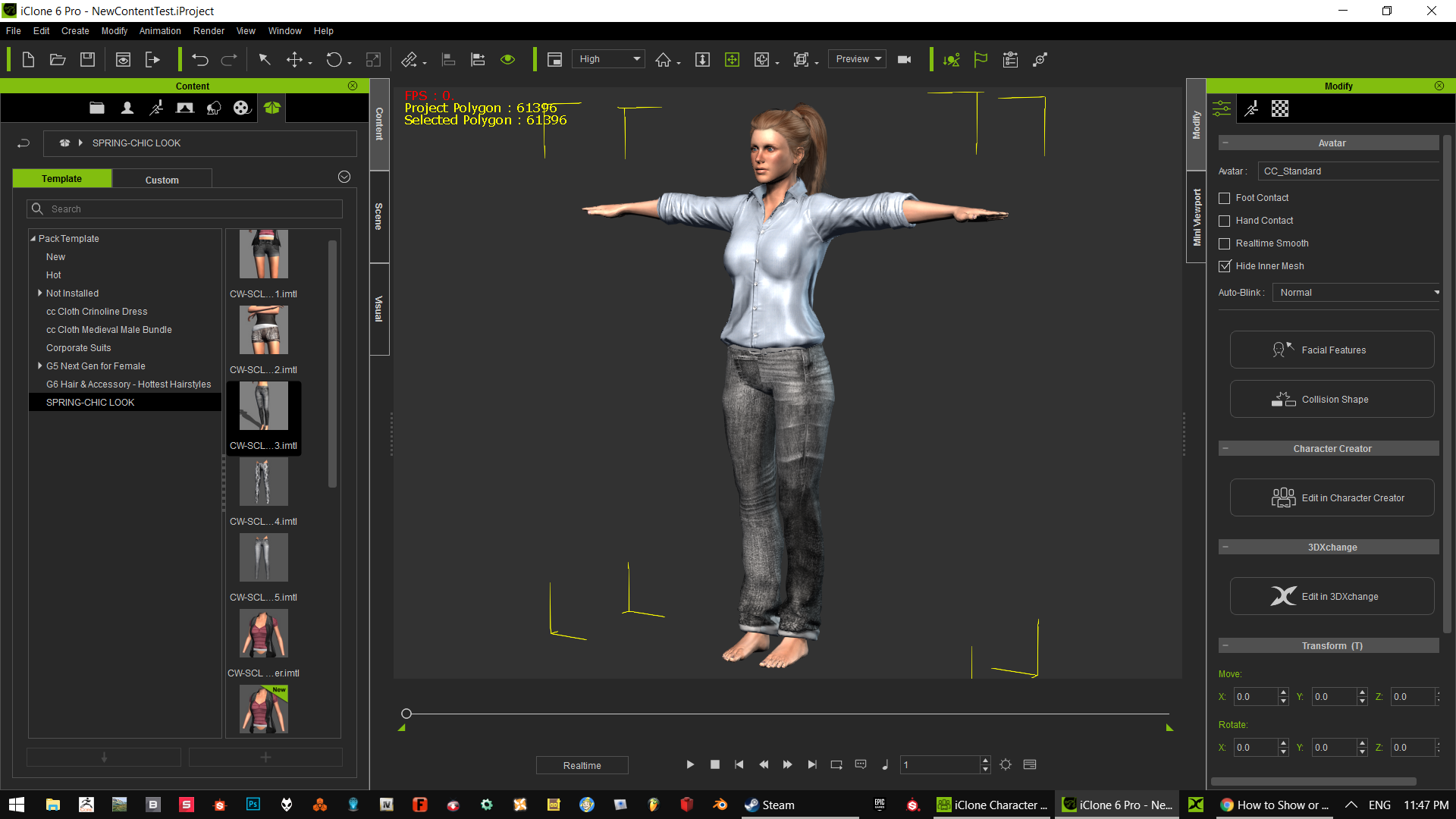 And heres what happening sometimes:  _______________________________________________________________________
CGI, VFX and 3D enthusiast
Tools: iClone - Character Creator - 3DXChange pipeline - Photoshop - Maya - UnrealEngine and CryEngine
Laptop: [RIP 2014-2017] ASUS ROG G550JK - 12GB ram - I7 4700HQ @ 3.0ghz - Nvidia GeForce 850 2GB vram - Windows 10 pro
Desktop: ASUS ROG Maximus IX Formula - 16GB ram - i7 7700K Kaby Lake @ 4.2ghz - ASUS GeForce ROG 1080 8GB Strix advanced - M.2 NVMe: Samsung 960 500GB - Windows 10 home
|
|
|
|
|
Snarp Farkle
|
Snarp Farkle
Posted 9 Years Ago
|
|
Group: Forum Members
Last Active: 2 Years Ago
Posts: 770,
Visits: 3.6K
|
Have you tried unchecking the "Hide Inner Mesh" checkbox? I didn't know these items could be used on CC characters.
Dell XPS 8900, Intel(R) Core(TM) i7-6700 CPU @ 3.40GHz, 3408 Mhz, 4 Core(s), 8 Logical Processor(s), 16 GB RAM, - 4 GB GeForce GTX 745, NVIDIA compatible.
Acer Aspire V Nitro Laptop, 2.5GHz Intel Core i5-7300HQ processor with 6MB cache, 256GB solid state drive, 16GB Ram, 4 GB NVIDIA GeForce GTX 1050 Ti graphics.
|
|
|
|
|
AasmundSchei
|
AasmundSchei
Posted 9 Years Ago
|
|
Group: Forum Members
Last Active: 5 Years Ago
Posts: 225,
Visits: 2.0K
|
I tried that now, no luck. I also tried with differens characters. Can compitability be an issue? Is it a way to fix that, if so?
_______________________________________________________________________
CGI, VFX and 3D enthusiast
Tools: iClone - Character Creator - 3DXChange pipeline - Photoshop - Maya - UnrealEngine and CryEngine
Laptop: [RIP 2014-2017] ASUS ROG G550JK - 12GB ram - I7 4700HQ @ 3.0ghz - Nvidia GeForce 850 2GB vram - Windows 10 pro
Desktop: ASUS ROG Maximus IX Formula - 16GB ram - i7 7700K Kaby Lake @ 4.2ghz - ASUS GeForce ROG 1080 8GB Strix advanced - M.2 NVMe: Samsung 960 500GB - Windows 10 home
|
|
|
|
|
animagic
|
animagic
Posted 9 Years Ago
|
|
Group: Forum Members
Last Active: Last Month
Posts: 15.8K,
Visits: 31.4K
|
The G5 materials are incompatible with CC characters, so the results can be unexpected. There is no fix for that.
|
|
|
|
|
AasmundSchei
|
AasmundSchei
Posted 9 Years Ago
|
|
Group: Forum Members
Last Active: 5 Years Ago
Posts: 225,
Visits: 2.0K
|
So I need to use G5 characters for G5 materials? Can I import DAZ G5 characters into iClone? Will the imported G5 DAZ characters work with Character Creator morphs? I own the 3DXchange pipeline.
_______________________________________________________________________
CGI, VFX and 3D enthusiast
Tools: iClone - Character Creator - 3DXChange pipeline - Photoshop - Maya - UnrealEngine and CryEngine
Laptop: [RIP 2014-2017] ASUS ROG G550JK - 12GB ram - I7 4700HQ @ 3.0ghz - Nvidia GeForce 850 2GB vram - Windows 10 pro
Desktop: ASUS ROG Maximus IX Formula - 16GB ram - i7 7700K Kaby Lake @ 4.2ghz - ASUS GeForce ROG 1080 8GB Strix advanced - M.2 NVMe: Samsung 960 500GB - Windows 10 home
|
|
|
|
|
AasmundSchei
|
AasmundSchei
Posted 9 Years Ago
|
|
Group: Forum Members
Last Active: 5 Years Ago
Posts: 225,
Visits: 2.0K
|
I tried with the a G5 characte and the same thing is happening.
_______________________________________________________________________
CGI, VFX and 3D enthusiast
Tools: iClone - Character Creator - 3DXChange pipeline - Photoshop - Maya - UnrealEngine and CryEngine
Laptop: [RIP 2014-2017] ASUS ROG G550JK - 12GB ram - I7 4700HQ @ 3.0ghz - Nvidia GeForce 850 2GB vram - Windows 10 pro
Desktop: ASUS ROG Maximus IX Formula - 16GB ram - i7 7700K Kaby Lake @ 4.2ghz - ASUS GeForce ROG 1080 8GB Strix advanced - M.2 NVMe: Samsung 960 500GB - Windows 10 home
|
|
|
|
|
animagic
|
animagic
Posted 9 Years Ago
|
|
Group: Forum Members
Last Active: Last Month
Posts: 15.8K,
Visits: 31.4K
|
iClone clothing of a specific generation, such as G5, needs to be used with iClone characters from the same generation. The DAZ character generations may have the same designator, but they are completely different from iClone characters. So the clothing will not be compatible. You can import DAZ characters via 3DXchange, with the Genesis characters being the easiest to convert as the necessary profile is already built into 3DXchange. In addition, by applying the special DUF file provided by RL to the Genesis character before exporting it, the character will be recognized in 3DXchange as a speaking character and the necessary visemes for lip-synching will be assigned. Note that there are different DUF files for each of the three Genesis generations (G1, G2, and G3). There are tutorials to explain this in more detail.
|
|
|
|
|
animagic
|
animagic
Posted 9 Years Ago
|
|
Group: Forum Members
Last Active: Last Month
Posts: 15.8K,
Visits: 31.4K
|
aasmund22 (4/5/2017)
I tried with the a G5 characte and the same thing is happening. Let my try this and I will report back.
|
|
|
|
|
animagic
|
animagic
Posted 9 Years Ago
|
|
Group: Forum Members
Last Active: Last Month
Posts: 15.8K,
Visits: 31.4K
|
OK, there is an extra step. In order to apply a CloneCloth material, you need to load the appropriate CloneCloth first. In your case, this is located under Avatar Template/BodyPart/Upper/G5 Next Gen for Female:  You will see a G5 Female_Upper_Hoodie CloneCloth file. Double-click to load it. Now you are ready to apply the Upper material, so go there:  Drag and drop the material on the Upper CloneCloth and the material will be applied.
|
|
|
|
|
AasmundSchei
|
AasmundSchei
Posted 9 Years Ago
|
|
Group: Forum Members
Last Active: 5 Years Ago
Posts: 225,
Visits: 2.0K
|
That worked :) Some cloths still dont works, like the thights. So I guess I have to model a mesh to fit te character and apply the material on the thight mesh. Thanks for your help!
_______________________________________________________________________
CGI, VFX and 3D enthusiast
Tools: iClone - Character Creator - 3DXChange pipeline - Photoshop - Maya - UnrealEngine and CryEngine
Laptop: [RIP 2014-2017] ASUS ROG G550JK - 12GB ram - I7 4700HQ @ 3.0ghz - Nvidia GeForce 850 2GB vram - Windows 10 pro
Desktop: ASUS ROG Maximus IX Formula - 16GB ram - i7 7700K Kaby Lake @ 4.2ghz - ASUS GeForce ROG 1080 8GB Strix advanced - M.2 NVMe: Samsung 960 500GB - Windows 10 home
|
|
|
|