|
Snarp Farkle
|
Snarp Farkle
Posted 8 Years Ago
|
|
Group: Forum Members
Last Active: Last Year
Posts: 770,
Visits: 3.6K
|
I assumed that the Physics Toolbox would work in iClone 6 with the bullet settings when I read this before I bought it ...but I haven't had too much luck so far. When I brought in my first tool I saw the physics warning but there's a statement there that suggests one could reset the physics for the object, is this true and if it is how do I do that? 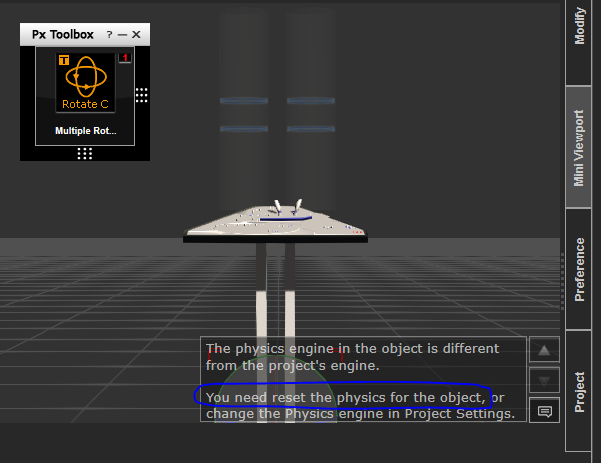 I can reinstall iClone 5 on my desktop if I have to but will any of the props I make in it with the Physics Toolbox run in iClone 6? I got a little disappointed after starting a new project, so I wouldn't blow up the one I was working on for hours and hours, and with just a single prop and the simple slider tool, bullet engine selected, running in Frame mode, I started to see some progress then it just crashed iClone so I gave up for now.
Bummer. :(
Acer Aspire V Nitro Laptop, 2.5GHz Intel Core i5-7300HQ processor with 6MB cache, 256GB solid state drive, 16GB Ram, 4 GB NVIDIA GeForce GTX 1050 Ti graphics.
|
|
Snarp Farkle
|
Snarp Farkle
Posted 8 Years Ago
|
|
Group: Forum Members
Last Active: Last Year
Posts: 770,
Visits: 3.6K
|
I assumed that the Physics Toolbox would work in iClone 6 with the bullet settings when I read this before I bought it ...but I haven't had too much luck so far. When I brought in my first tool I saw the physics warning but there's a statement there that suggests one could reset the physics for the object, is this true and if it is how do I do that? I can reinstall iClone 5 on my desktop if I have to but will any of the props I make in it with the Physics Toolbox run in iClone 6? I got a little disappointed after starting a new project, so I wouldn't blow up the one I was working on for hours and hours, and with just a single prop and the simple slider tool, bullet engine selected, running in Frame mode, I started to see some progress then it just crashed iClone so I gave up for now.
Bummer. :(
Acer Aspire V Nitro Laptop, 2.5GHz Intel Core i5-7300HQ processor with 6MB cache, 256GB solid state drive, 16GB Ram, 4 GB NVIDIA GeForce GTX 1050 Ti graphics.
|