|
genao87
|
genao87
Posted 9 Years Ago
|
|
Group: Forum Members
Last Active: Last Year
Posts: 175,
Visits: 1.0K
|
Hey this happen...I just open Iclone and this happen...what the hell. Is there a way to fix this besides rolling back/System Restore? Installed so much in Iclone that I lost count...dont want to uninstall either. Can this file be just put in or something.. 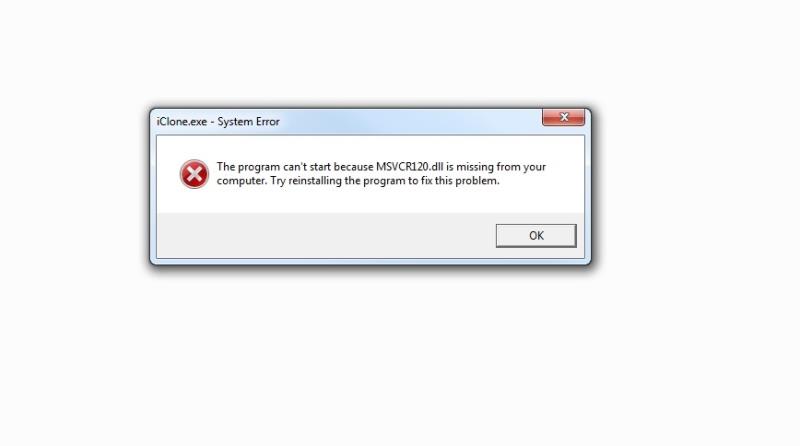
|
|
Group: Forum Members
Last Active: 4 Months Ago
Posts: 5.7K,
Visits: 26.5K
|
MSVCR120.dll is a Windows system file. Take a look at some of the links in this search query to find out how to resolve the issue.
Gerry
System: Win 10 Pro (21H2), Asus X99-E WS, CPU i7-5930K -3,5 GHz, 32 GB DDR4 2666-16 RAM, NVidia GTX 1080 Ti GPU - 11 GB VRAM(Driver Studio-536.99), Samsung 850 Pro 512 GB SSD, 6 TB HD storage.
|
|
animagic
|
animagic
Posted 9 Years Ago
|
|
Group: Forum Members
Last Active: Last Month
Posts: 15.8K,
Visits: 31.4K
|
This was mentioned a few days ago as well. It seems that the latest iClone patch does not always install this file if it's not there already. Go to: https://www.microsoft.com/en-US/download/details.aspx?id=40784. Download and install.
|
|
genao87
|
genao87
Posted 9 Years Ago
|
|
Group: Forum Members
Last Active: Last Year
Posts: 175,
Visits: 1.0K
|
this is a just a Microsoft Visual Studio missing file? why did the update remove that.....thank you by the way...i installed the 64 bit version and Iclone started working.
|