|
Author
|
Message
|
|
woody173
|
woody173
Posted 10 Years Ago
|
|
Group: Forum Members
Last Active: 3 Years Ago
Posts: 177,
Visits: 571
|
Hi has I have recently said I'm really new to iclone and its varying facets so bare with me if this is a really dumb question. I would like to put a logo on a tank top I purchased from the store. I have recently (within the last couple of days) purchased the essentials pack which I thought I would be able to use to do this. I have looked on the manual and it says I can do it. BUT how do I get other logos other than the supplied ones into CC. I see the input section put cant find where to select my png file or jpeg. Do I have to save it in a certain place or save it in a certain format that the manual doesn't explain. The manual is pretty inadequate in some respects when it comes to doing the simplest of things. Saying ...yeh you can do this isn't really an instruction manual. If you can only add the decals provided what use is this. If you can add other decals created in photoshop for instance, what's the big secret? why don't they tell you how to use them....So frustrating to have to keep bothering you guys for such simple matters.
Many thanks
Woody
|
|
|
|
|
Rampa
|
Rampa
Posted 10 Years Ago
|
|
Group: Forum Members
Last Active: 2 days ago
Posts: 8.2K,
Visits: 62.6K
|
This should help. :) When you open the file browser to load a decal, you can then navigate to any folder where you stored your decal (logo).
|
|
|
|
|
woody173
|
woody173
Posted 10 Years Ago
|
|
Group: Forum Members
Last Active: 3 Years Ago
Posts: 177,
Visits: 571
|
wow that was a quick response.
When I open up my decal 1 I don't have the diffuse, specular etc panels as I was expecting to find.
Could I have not installed the essentials pack correctly or something.
I have aslo noticed that my decals only go on certain parts of the body like the torso or hesd but act like the arms are on a different mesh
|
|
|
|
|
woody173
|
woody173
Posted 10 Years Ago
|
|
Group: Forum Members
Last Active: 3 Years Ago
Posts: 177,
Visits: 571
|
Hi Rrampa. Reinstalled essentials pack just in case but still no joy. Here is a screen shot of my decal1 settings....no diffuse etc. 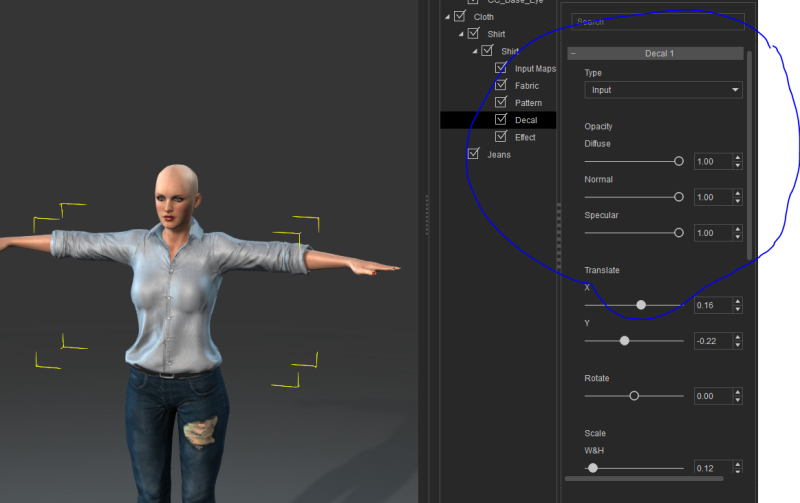 I do get some diffuse etc. settings on some of my essentials characters. I can just use those with loads of morphs to re create my character with his tattoos but this logo eludes me.
|
|
|
|
|
Peter (RL)
|
Peter (RL)
Posted 10 Years Ago
|
|
Group: Administrators
Last Active: 2 Years Ago
Posts: 23.1K,
Visits: 36.6K
|
woody173 (6/14/2016)
Hi Rrampa. Reinstalled essentials pack just in case but still no joy. Here is a screen shot of my decal1 settings....no diffuse etc. I do get some diffuse etc. settings on some of my essentials characters. I can just use those with loads of morphs to re create my character with his tattoos but this logo eludes me. The CC Essentials Complete Bundle is made up of three separate packs. These are the CC Essential Morphs & Skin, CC Essential Clothing & Fabric and the CC Essentials Learning Resource which also includes a separate zip file containing a number of sample decals. Do ensure you have installed all the packs that make up the complete bundle. Do also ensure you have updated Character Creator to the latest version which is 1.43. This should allow you to see the input map channels shown below. 
Peter
Forum Administrator www.reallusion.com
|
|
|
|
|
woody173
|
woody173
Posted 10 Years Ago
|
|
Group: Forum Members
Last Active: 3 Years Ago
Posts: 177,
Visits: 571
|
I only was told by a member that I needed the CC essentials morph and skin ($69) because at the time I just was more interested in scaling a character to the size of a child. I was just assuming all the other bits were part of the essentials morph and skin pack. Looking at an email I received today though it looks like I have to buy essentials clothing and fabric to get these effects.......Yet more money I cant afford. This software is becoming very very expensive. I wish I just stayed with Poser now to be perfectly honest.
Very very perturbed
Woody
|
|
|
|
|
Peter (RL)
|
Peter (RL)
Posted 10 Years Ago
|
|
Group: Administrators
Last Active: 2 Years Ago
Posts: 23.1K,
Visits: 36.6K
|
woody173 (6/16/2016)
I only was told by a member that I needed the CC essentials morph and skin ($69) because at the time I just was more interested in scaling a character to the size of a child. I was just assuming all the other bits were part of the essentials morph and skin pack. Looking at an email I received today though it looks like I have to buy essentials clothing and fabric to get these effects.......Yet more money I cant afford. This software is becoming very very expensive. I wish I just stayed with Poser now to be perfectly honest.
Very very perturbed
WoodyHi Woody, We are sorry to hear of your disappointment. We do try to explain what is included in each pack on the individual product pages. The CC Essentials Morph & Skin pack only includes decal options for the skin. For clothing decals you will need the CC Essentials Clothing and Fabric pack. You can see this explained in some detail HERE.
Peter
Forum Administrator www.reallusion.com
|
|
|
|
|
woody173
|
woody173
Posted 10 Years Ago
|
|
Group: Forum Members
Last Active: 3 Years Ago
Posts: 177,
Visits: 571
|
Unfortunately I know that now. But I have already saved and purchased Essentials Morph and skin After I was told it was what I needed to just even scale a character. This software as become far too expensive to keep having to buy additional packs just to continue with my project. This software 'System' is ideal for people with deep pockets or professionals who are willing to pay many hundreds of dollars to buy the complete package, but for hobbyists like myself this is becoming far to expensive. Its a shame because my initial reaction was that iClone was the best thing since sliced bread, but it seems if its too good to be true then usually it isn't. I cant keep on paying anything up to $149 a month just to improve with yet more addons. I'm afraid I will have to call it a day and just either stick with what I have and do my best or go back to poser where I know I can create something more to my personal needs.
|
|
|
|
|
Lord Ashes
|
Lord Ashes
Posted 10 Years Ago
|
|
Group: Forum Members
Last Active: 2 Months Ago
Posts: 1.3K,
Visits: 1.6K
|
Anyone please correct me if I am wrong (I don't have CC Essentials to try with) but I believe when you bring your CC clothing into iClone, the CC materials get converted to regular iClone Diffuse, Opacity, etc maps that are used by all objects in iClone. CC just helps you combine different layers / effects into these baked textures.
So, if I am not mistaken, you should be able to achieve the logo without buying CC Essentials. Just grab the CC clothing that you are interested in, bring it into iClone, export the resulting Diffuse texture, edit it in a paint program to add the logo and import it back in. This was basically the process prior to CC but it should still work with CC clothing. You may run into an issue if you even take the clothing back into CC (the logo will then likely disappear) but as long as you stay in iClone after that it should be fine.
"We often compare ourselves to the U.S. and often they come out the best, but they only have the right to bear arms while we have the right to bare breasts"
Bowser and Blue, Busting The Breast
|
|
|
|