|
incendy
|
incendy
Posted 10 Years Ago
|
|
Group: Forum Members
Last Active: 9 Years Ago
Posts: 3,
Visits: 27
|
I feel like this is probably a very silly question and I am missing something obvious, but is there a way to make that checkbox for Enable GPU Rendering to be checked by default? Right now I have to stop each render and check the box, I can't seem to make it stay. Thank you in advance!
|
|
justaviking
|
justaviking
Posted 10 Years Ago
|
|
Group: Forum Members
Last Active: 2 Years Ago
Posts: 8.2K,
Visits: 26.5K
|
Yes, on the Indigo settings panel, near the bottom... On the " Tracing Method," select " GPU Rendering." (Strangely, when I pick it, iClone crashes. Three times in a row. I didn't even render. It was an *empty* project, but all I did was pick the menu option, planning to get a screen shot. Let me know if it works okay for you.) 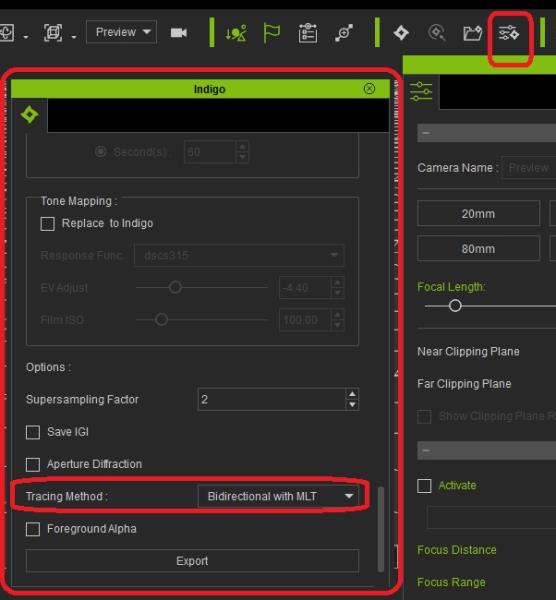
iClone 7... Character Creator... Substance Designer/Painter... Blender... Audacity...
Desktop (homebuilt) - Windows 10, Ryzen 9 3900x CPU, GTX 1080 GPU (8GB), 32GB RAM, Asus X570 Pro motherboard, 2TB SSD, terabytes of disk space, dual monitors.
Laptop - Windows 10, MSI GS63VR STEALTH-252, 16GB RAM, GTX 1060 (6GB), 256GB SSD and 1TB HDD
|
|
incendy
|
incendy
Posted 10 Years Ago
|
|
Group: Forum Members
Last Active: 9 Years Ago
Posts: 3,
Visits: 27
|
Thank you! You are awesome. Worked with no issues!
|
|
justaviking
|
justaviking
Posted 10 Years Ago
|
|
Group: Forum Members
Last Active: 2 Years Ago
Posts: 8.2K,
Visits: 26.5K
|
Glad I could help.
Post a picture. :)
My Indigo plug-in works, and I can render.
I have not exhaustively explored all the options yet, but at least some of them work. I just can't pick the "Tracing Method" option.
I'm still on 6.3. Maybe it will work better in 6.4, but I'm dragging my feet on that one.
iClone 7... Character Creator... Substance Designer/Painter... Blender... Audacity...
Desktop (homebuilt) - Windows 10, Ryzen 9 3900x CPU, GTX 1080 GPU (8GB), 32GB RAM, Asus X570 Pro motherboard, 2TB SSD, terabytes of disk space, dual monitors.
Laptop - Windows 10, MSI GS63VR STEALTH-252, 16GB RAM, GTX 1060 (6GB), 256GB SSD and 1TB HDD
|
|
incendy
|
incendy
Posted 10 Years Ago
|
|
Group: Forum Members
Last Active: 9 Years Ago
Posts: 3,
Visits: 27
|
Will definitely post a picture once I have my characters finished haha. I am just getting started with iClone, only 3d software I am familiar with is Blender so it is a bit of a learning curve but so far I am really enjoying it.
|