I was working with Iclone last night and became visibly frustrated with facial performances. Most of this is because of the puppet tool. Moving my mouse around for big movements like turning the head or looking up and down is fine, but for finer, more subtle movements --it seems unnecessarily difficult. What occurred to me is that you can't key frame the facial performance in any precise way. Then it occurred to me that you have all of these expressions, but no way to precisely mix them during a performance. But then as I was looking over Persona and the Perform menu option, it dawned on me that we should have a specialized Persona Studio for the face. This is something where you can see the face in Perspective or orthographic view. When you select the iAvatar, a list of their facial expressions are listed to the left or right, with the timeline for the face below.Before you start the performance, you should be able to scroll through the list of expressions and check the ones you're going to use and add them to the performance tab, so you only have to scroll through the stuff you need and not the whole list.
Then you start the vocal track and instead of clicking and dragging with the mouse, you click on each item through the take. So you can set when they blink just by clicking on the blink button, which adds a keyframe for the action. Here's where it gets interesting. Once you've gone through the blink track, you can click on the keyframe and then add any other facial change at the time. which adds an entry for it that you can offset, plus you get the strength slider for the action so that you can make it subtle or exaggerated. If you like the combination of dials, you can save the expression to a quick expression that's can be saved to each actor. You can also stretch/squash the time it takes to perform the action so that you can have a slow blink or fast blink -as you prefer, or if you want them to smile from this point all the way through the dialogue you can set the expression to remain through the performance and just adjust it subtly by adding facial ticks. If the character is bone based, then you would have visual locators for the face bones so that you could do the same thing in a bone based character. The idea is not to re-invent anything but to give you access to what's already there in a more precise fashion.
The idea is to use what's already available to the character. What makes it even more powerful is that if the character has custom facial expressions already, you don't have to do anything but dial it in during the performance. So if you brought in a custom morph for say Vampire fangs and added it to the character's custom facial expressions --you could now keyframe it and have them dial in slowly or quickly. I think that it's a better way to get a character performance because it is more precise than doing take after take with the puppeteer. I've done a mockup of what I have in mind.
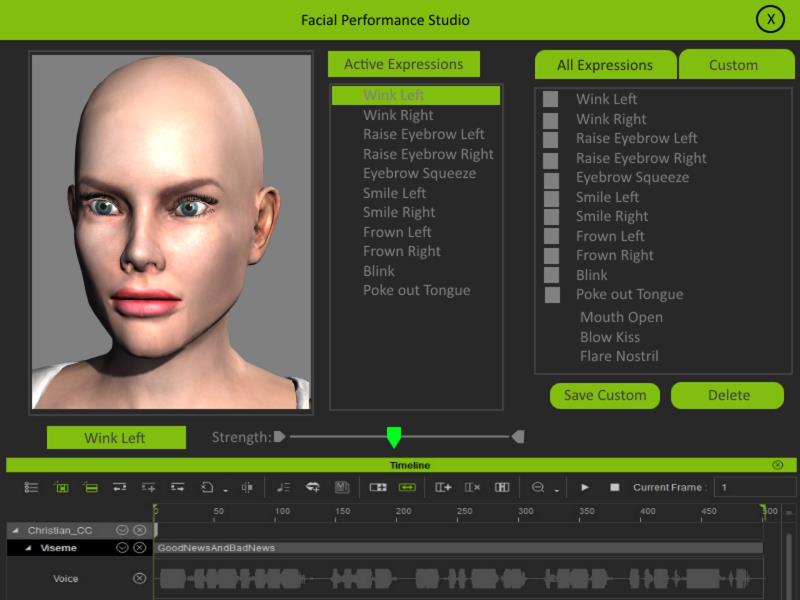
Now keep in mind, I envision this as a tool for imported characters --not a replacement for crazytalk, but the idea is that anything in the facial presets of whatever character you are working with should be available to you when you launch the performance studio. This means if the character has bones, or morphs --it doesn't matter. Whatever is available to that character should be listed when you launch the Facial Performance studio. What this is is a way to precisely tweak your character performances using what you already have, and allowing you to combine them in new ways while keeping more control. In addition, I think this would be a great place to put facial motion capture for companies like Face Shift, Faceware,Brekel Kinect or Mycap Studio.
I wouldn't even mind seeing something like this as an add-on like Mocap Kinect or the Physics Toolbox.