|
Author
|
Message
|
|
Cricky
|
Cricky
Posted 10 Years Ago
|
|
Group: Forum Members
Last Active: 3 Years Ago
Posts: 2.8K,
Visits: 13.8K
|
|
|
|
|
|
JIX
|
|
|
Group: Forum Members
Last Active: Last Year
Posts: 1.1K,
Visits: 1.3K
|
I'm also missing the thumbs for importing decals. All the "input" options are not available.
If you have the Super Substance Tools, you can use that decal tool inside iClone. Just made a quick test. Seems to work for the CC clothing.
|
|
|
|
|
Bigboss
|
Bigboss
Posted 10 Years Ago
|
|
Group: Forum Members
Last Active: 10 Months Ago
Posts: 3.6K,
Visits: 9.4K
|
The Avatar Toolkit 2 does not recognize the characters from the Avatar Creator so I am unable to associate facial profiles to the Avatar Controller :(
Come and visit my store by clicking on the banner below. 
|
|
|
|
|
Cricky
|
Cricky
Posted 10 Years Ago
|
|
Group: Forum Members
Last Active: 3 Years Ago
Posts: 2.8K,
Visits: 13.8K
|
Something is getting dropped on return trips between iClone and CCStep One: I created a CC Character, then sent it to iClone. Step Two: I added a Soft Cloth Accessory and tested it, and it worked fine, and sent it back to Character Creator, made a few material changes to the Base CC character, not the accessory. Step Three: I returned the character back to iClone, and the Soft Cloth which worked fine before, will no longer work. Applying the same weight maps and Collision shapes that were saved prior to sending to CC, does not help, as they no longer work on essentially the same model.
SKYPE ID: rc.650
http://city.reallusion.com/store/ModuleExpand.aspx?id=GS634545170497417354&mdid=18866
http://city.reallusion.com/ContentTag.aspx?tagname=Cricky&AuthorID=20081020688550191201#]Reallusion Store Content
" If I had Alzheimer's (Old Timers), would I know it? "
|
|
|
|
|
Agonos
|
Agonos
Posted 10 Years Ago
|
|
Group: Forum Members
Last Active: 6 Years Ago
Posts: 1.1K,
Visits: 3.1K
|
Cricky (2015-09-05)
Something is getting dropped on return trips between iClone and CC
Step One: I created a CC Character, then sent it to iClone.
Step Two: I added a Soft Cloth Accessory and tested it, and it worked fine, and sent it back to Character Creator, made a few material changes to the Base CC character, not the accessory.
Step Three: I returned the character back to iClone, and the Soft Cloth which worked fine before, will no longer work. Applying the same weight maps and Collision shapes that were saved prior to sending to CC, does not help, as they no longer work on essentially the same model.
Indeed. It would be nice if the software "Character Creator" includes accessories, clothes and haircut installed in the software "iClone 6" to avoid "round trips". Or perhaps should we reinstall the clothes and accessories to see them appear in "Caracter Creator" ? It is clear that the bridge between the two software is not yet at the top. But I must admit that the team of "Reallusion" already promising a great job.
|
|
|
|
|
justaviking
|
justaviking
Posted 10 Years Ago
|
|
Group: Forum Members
Last Active: Last Year
Posts: 8.2K,
Visits: 26.5K
|
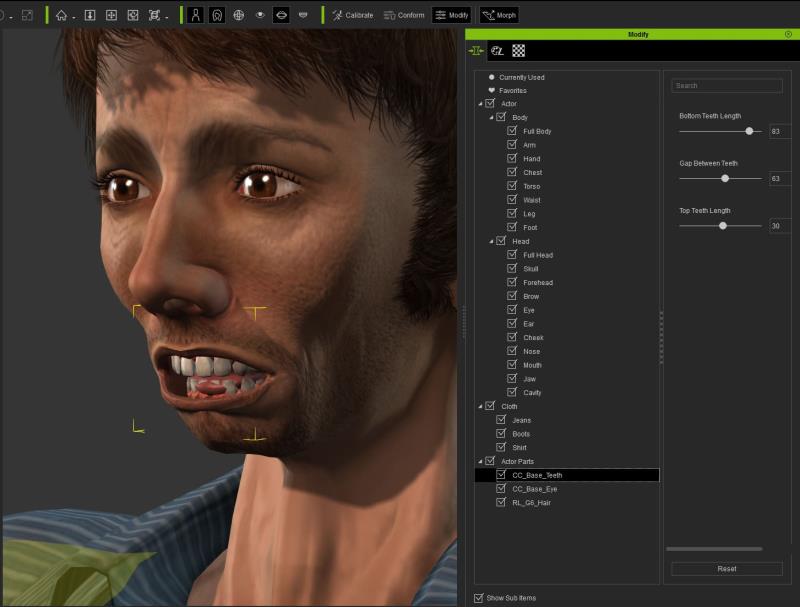
I wasn't sure where best to post this. I can turn this into multiple posts if someone wants to make recommendations. - Some sliders seem "backward." Usually sliding "left" (negative) would make something smaller. But in "Actor Parts --> CC_Base_Teeth --> Bottom Teeth Length" for example, smaller numbers make large teeth, and large values make small teeth. Odd.
- When you pull the jaw back (Full Head --> Face Angle, for example) the teeth and tongue can protrude though the lips and chin. It is fixable in other areas (Head --> Cavity) but I was surprised the inner parts of the mouth did not follow the exterior. In my attached picture, I have pulled the lower teeth back, but not the tongue.
- Where do you adjust the tongue position? I want to pull that back, but I cannot find anything (other than color) for the tongue. Hopefully I'm just missing it. If it's not there, then it should be added as a control, just like how you can move the teeth.
- Where would I go to adjust the texture? Eyebrows, in particular. In this picture, I don't like the "smeared" eyebrow that goes way down to the eyelid, and would like to paint that out, making it "skin." I was expecting to see an "Edit image" button to launch an external paint program, like Photoshop or GIMP. I can view the UV maps, but not the textures. Do I need to get a more expensive version of CC to do that? Or watch a training tutorial?
I may have overloaded this post, but I didn't want to overwhelm the CC forum section with too many little individual posts yet, either.
I'm enjoying the tool. :)
iClone 7... Character Creator... Substance Designer/Painter... Blender... Audacity...
Desktop (homebuilt) - Windows 10, Ryzen 9 3900x CPU, GTX 1080 GPU (8GB), 32GB RAM, Asus X570 Pro motherboard, 2TB SSD, terabytes of disk space, dual monitors.
Laptop - Windows 10, MSI GS63VR STEALTH-252, 16GB RAM, GTX 1060 (6GB), 256GB SSD and 1TB HDD
|
|
|
|
|
Cricky
|
Cricky
Posted 10 Years Ago
|
|
Group: Forum Members
Last Active: 3 Years Ago
Posts: 2.8K,
Visits: 13.8K
|
I agree, the sliders are in need of attention as they are not consistent. Next issue is the Eyes: Someone needs to check the Cornea as it doesn't stay connected with the eyeball, or it sticks out above the eyelid when the character blinks. I'm sure this is related to the eye shape, but it should be accounted for as eye shape is an option in the CC. I also noticed that the Visemes are completely different for the CC Characters than any others in iClone/3dXchange under the expression editor. The invisibility of the skin, to edit the tongue, doesn't work so well either. The Visemes option inside iClone shows the full range or available edits, yet they can't be corrected inside 3dXchange. I did a few edits to the material of a character inside iClone, and although changes are seen, there are no keys on the time line to indicate these changes, in order to correct them later. Not one key is visible for the CC Character materials in iClone6 except the 1st key; I made constant changes thinking it had a magic number that had to be edited before it recognized changes , but it didn't work.. no keys are recorded. .
SKYPE ID: rc.650
http://city.reallusion.com/store/ModuleExpand.aspx?id=GS634545170497417354&mdid=18866
http://city.reallusion.com/ContentTag.aspx?tagname=Cricky&AuthorID=20081020688550191201#]Reallusion Store Content
" If I had Alzheimer's (Old Timers), would I know it? "
|
|
|
|
|
Peter (RL)
|
Peter (RL)
Posted 10 Years Ago
|
|
Group: Administrators
Last Active: Last Year
Posts: 23.1K,
Visits: 36.6K
|
rguy (9/3/2015)
I don't qualify for the update today ( 6.2.2102 ) but my systems been running pretty well with the other versions - I had a mad blitz of company while I was trying to install this am and installed it anyway in that quagmire of that activity - UGH ! I Know - But anyway The Character Builder is the only thing that doesn't work - Hopefully it's in error of the program and theirs a fix because I was looking forward to getting the new upgrades. I'm posting here in case any one else has a similar problem being that it's the first day of the release ! System Data Attached - The Exchange upgrade was fine -
but
The main lesson I've found in life is that if it's Bigger and Better , I don't qualify ! lol ! Do you run iClone 6 in DirectX 11 mode or DirectX 9 mode? The Character Creator is DirectX 11 only and so if your graphics card doesn't support DX11 you won't be able to run the Character Creator unfortunately.
Peter
Forum Administrator www.reallusion.com
|
|
|
|
|
Agonos
|
Agonos
Posted 10 Years Ago
|
|
Group: Forum Members
Last Active: 6 Years Ago
Posts: 1.1K,
Visits: 3.1K
|
Why I can not use the "Activate Appearance Editor" function without seeing this message appear ? 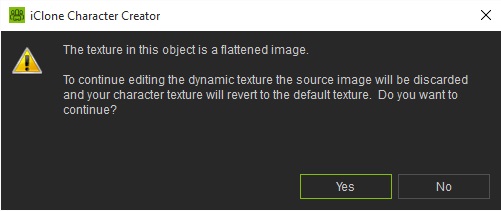
|
|
|
|
|
sterlingy
|
sterlingy
Posted 10 Years Ago
|
|
Group: Forum Members
Last Active: Last Year
Posts: 206,
Visits: 709
|
I made a character, which I played with in iClone, then I loaded the project back into CC, and deleted the clothes so I could use it as a base to make a similar, but different character. When I deleted the clothes, specifically, the shirt, I got this flashing pattern in the background If I put ANY top back on, the flashing stops. Remove it,and the flashing returns. -Sterling 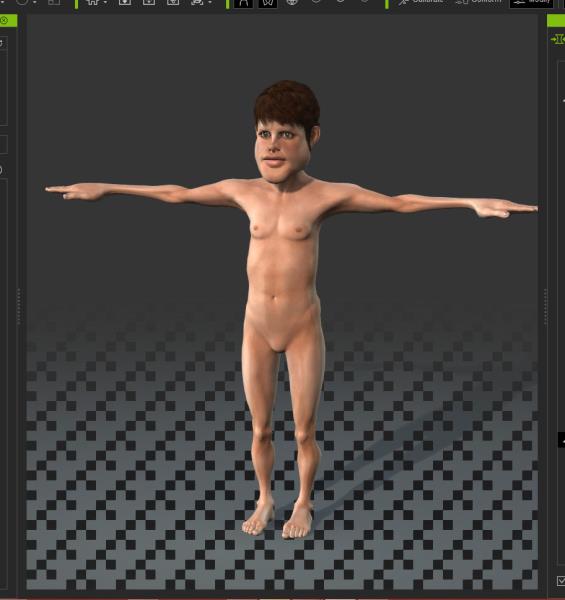 Stick with the flock, end up a lamb chop!
www.ShivooStudios.com
|
|
|
|