|
gentledragon
|
gentledragon
Posted 10 Years Ago
|
|
Group: Forum Members
Last Active: 5 Years Ago
Posts: 12,
Visits: 28
|
How do I add voice and SFX to IClone 6?
|
|
justaviking
|
justaviking
Posted 10 Years Ago
|
|
Group: Forum Members
Last Active: Last Year
Posts: 8.2K,
Visits: 26.5K
|
SOUND EFFECTS:- You can simply drag-and-drop WAV or MP3 files from a Windows Explorer window onto a prop.
- I'm pretty sure MA files don't work.
VOICE: - You can do the same thing as above for an avatar, and it will act like a sound effect
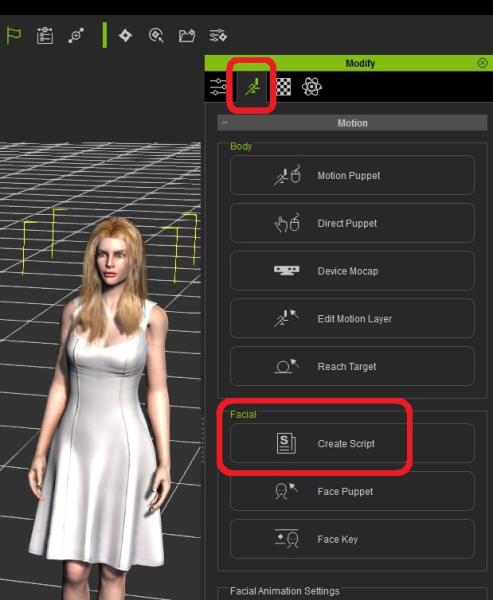
- For talking... On the avatar, in the Facial section, you can "Create Script" to make your avatar talk
- Either record speech, use Text-to-speech, or bring in a WAV file
- This is separate (in addition to) the sound effects
- You can find it in the Viseme layer in the timeline
- (I wish they called it "speech" instead of "script," since I think of "automated scripts" when I see "Create Script")
iClone 7... Character Creator... Substance Designer/Painter... Blender... Audacity...
Desktop (homebuilt) - Windows 10, Ryzen 9 3900x CPU, GTX 1080 GPU (8GB), 32GB RAM, Asus X570 Pro motherboard, 2TB SSD, terabytes of disk space, dual monitors.
Laptop - Windows 10, MSI GS63VR STEALTH-252, 16GB RAM, GTX 1060 (6GB), 256GB SSD and 1TB HDD
|