|
Author
|
Message
|
|
justaviking
|
justaviking
Posted 10 Years Ago
|
|
Group: Forum Members
Last Active: Last Year
Posts: 8.2K,
Visits: 26.5K
|
Spiny Norman (1/8/2015)
Thanks everyone for for your feedback. justaviking your hunch was absolutely right. I found a 5 project which was just an avatar on a blank stage that gave me just one of the same messages. By deleting items one by one I traced the problem to a cravat prop which I had heavily and (probably carelessly) modified together with the texture map. Voila!
It would seem that heavily modified texture maps can cause problems in Iclone 6. All I need to do now is go through my more complex projects and hunt down the culprits.
Thanks a lot, all is do-able...:D
That's awesome news!!! We'll have to be sure Reallusion gets that information so they can make a fix. I might make an entry in the "Issues" thread, stating that some textures cause the Indigo plug-in to fail, and just link back to this thread. They'll probably ask for a copy of a "problem" project. I don't know how people send them, but we'll worry about then when the time comes. Great job, and 10 points to you for working constructively on the problem! ADDED... I entered a bug report in the Issues thread: https://forum.reallusion.com/FindPost216980.aspx @Norman, can you define what you mean by "heavily modified" texture maps? Just curious. I wonder if a person could start with a fresh, new iClone 6 project and intentionally cause the error you're getting. But I'm getting a bit deep here. I suspect Reallusion either already has a fix in hand or will be requesting a copy of one of your problem projects.
iClone 7... Character Creator... Substance Designer/Painter... Blender... Audacity...
Desktop (homebuilt) - Windows 10, Ryzen 9 3900x CPU, GTX 1080 GPU (8GB), 32GB RAM, Asus X570 Pro motherboard, 2TB SSD, terabytes of disk space, dual monitors.
Laptop - Windows 10, MSI GS63VR STEALTH-252, 16GB RAM, GTX 1060 (6GB), 256GB SSD and 1TB HDD
|
|
|
|
|
Spiny Norman
|
Spiny Norman
Posted 10 Years Ago
|
|
Group: Forum Members
Last Active: 2 Weeks Ago
Posts: 56,
Visits: 2.1K
|
Thanks everyone for for your feedback. justaviking your hunch was absolutely right. I found a 5 project which was just an avatar on a blank stage that gave me just one of the same messages. By deleting items one by one I traced the problem to a cravat prop which I had heavily and (probably carelessly) modified together with the texture map. Voila! It would seem that heavily modified texture maps can cause problems in Iclone 6. All I need to do now is go through my more complex projects and hunt down the culprits. Thanks a lot, all is do-able...:D
iClone 7.93/8.01, 6.0 Pro, 5.5 Pro, 3DXchange Pro, Character Creator 3/4, CrazyTalk Animator 2.5 Pro
Homebuilt computer - Windows10, 13th Gen Intel(R) Core(TM) i9-13900K 3.00 GHz Nvidia RTX 3090 Graphics, 64GB DDR5 RAM, MS-7306 motherboard, 12 terabytes of disk space, 28” monitor and Optoma UJHD65-LV projector. Update
|
|
|
|
|
justaviking
|
justaviking
Posted 10 Years Ago
|
|
Group: Forum Members
Last Active: Last Year
Posts: 8.2K,
Visits: 26.5K
|
Sorry to hear about the flu. I heard once that the best thing for the flu is to dedicate yourself to iClone. Work on it about 21 hours a day. Do not get any good sleep. Eat poorly, such as some chips or a candy bar. Don't drink many fluids, as they would only cause extra trips to the toilet which would take away from your iClone time. I'm not sure it's entirely accurate, but it sounds like it's worth trying. Oh well, whatever treatment you use, I hope you'll be all better soon.
iClone 7... Character Creator... Substance Designer/Painter... Blender... Audacity...
Desktop (homebuilt) - Windows 10, Ryzen 9 3900x CPU, GTX 1080 GPU (8GB), 32GB RAM, Asus X570 Pro motherboard, 2TB SSD, terabytes of disk space, dual monitors.
Laptop - Windows 10, MSI GS63VR STEALTH-252, 16GB RAM, GTX 1060 (6GB), 256GB SSD and 1TB HDD
|
|
|
|
|
Spiny Norman
|
Spiny Norman
Posted 10 Years Ago
|
|
Group: Forum Members
Last Active: 2 Weeks Ago
Posts: 56,
Visits: 2.1K
|
Sorry about not being right on the ball with this, I am fighting a very ugly flu virus which is kicking my $&*# at the moment. Will do all of the above...and I'm not giving up yet...I am just curious about what is going wrong, although your texture map thing sounds on the money. I have adjusted quite a few. So, thanks once again for the reply and please be patient with me while I try and conquer this filthy disease!:sick:
iClone 7.93/8.01, 6.0 Pro, 5.5 Pro, 3DXchange Pro, Character Creator 3/4, CrazyTalk Animator 2.5 Pro
Homebuilt computer - Windows10, 13th Gen Intel(R) Core(TM) i9-13900K 3.00 GHz Nvidia RTX 3090 Graphics, 64GB DDR5 RAM, MS-7306 motherboard, 12 terabytes of disk space, 28” monitor and Optoma UJHD65-LV projector. Update
|
|
|
|
|
planetstardragon
|
planetstardragon
Posted 10 Years Ago
|
|
Group: Forum Members
Last Active: 4 Months Ago
Posts: 11.5K,
Visits: 46.0K
|
don't believe the hype, I'm just a noob with 150 more crashes under my belt! Everything I'm sharing, was from randomly moving any slider that could be moved ...they are labeled with a skilled photographer in mind that gives fancy names to things like "Lighter" "A lot lighter" - "color changer" etc....I'm sure if I picked up a book on everything I wanted to know about photography but was scared to ask, i'd actually know what i'm doing lol. but here goes Enable Aperature Defraction - I'm sure it does something, -shrug- Method - not sure what it changes, but camera looks best - most detailed. Others look flat / computer generated. response func - from the way it's labeled it seems to emulate different film types - I call it a color theme changer EV Adjust - no idea what ev means - but I know when i turn this fader up stuff gets brighter Film ISO - another moment of #Derp - I just know it makes things even brighter than that. Preset - a suck button, every time i select something from this list the render starts from scratch ...and it doesn't do much for me ...so i avoid using it white point x, white point y - I'm sure those references mean something to someone, but to me they adjust the colors. so there's my perfessional explanation of how I view this panel.... 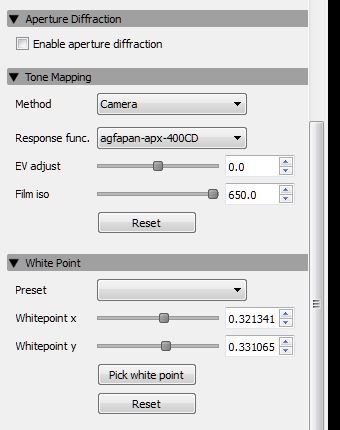
☯🐉 "To define Tao is to defile it" - Lao Tzu
|
|
|
|
|
Ibis Fernandez
|
Ibis Fernandez
Posted 10 Years Ago
|
|
Group: Forum Members
Last Active: 11 Months Ago
Posts: 1.2K,
Visits: 4.3K
|
planetstardragon (1/6/2015)
Ibis, just curious - can you turn up the EV adjust and Film ISO - this will make the shot brighter ...Im a n00b at this still LOL, post a quick screencap of which buttons to click on and I'll do it LOL

Ibis Fernandez | (available for hire)
----------------------------------------------------------------------------------------
Professional Animator, Filmmaker | Creator of the highest quality (modular) G2 rigs for cartoon animator and developer of Toon Titan and Puppet Producer
Author of Flash Animation and Cartooning: A Creative Guide
>>> be sure to check out http://toontitan.com for professional grade assets, templates, and custom tools for Cartoon Animator and more.
|
|
|
|
|
planetstardragon
|
planetstardragon
Posted 10 Years Ago
|
|
Group: Forum Members
Last Active: 4 Months Ago
Posts: 11.5K,
Visits: 46.0K
|
Ibis, just curious - can you turn up the EV adjust and Film ISO - this will make the shot brighter ... In some enclosed shots, I start out pitch black, and have to raise those values to get more light ... in my scenarios, the skyglobe was blocking the sun / sky settings ....and the regular lights weren't bright enough. try the same scene without the skyglobe or anything else that may be blocking any global illumination, and set it to sun / sky lights - this if for nothing else, is to test if your project is not getting any light at all, or the lights are simply not interpreting correctly from Iclone to indigo. For example, this shot , started completely black for me - I had to brighten it up like crazy because the whole scene was depending on the light leaking through the grids - which was very little on initial settings - 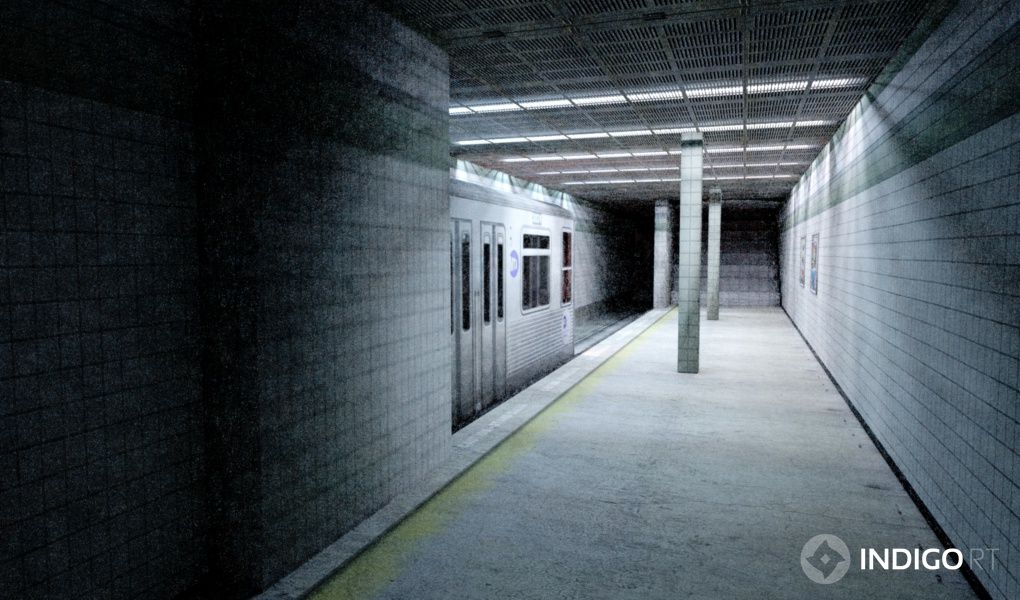
☯🐉 "To define Tao is to defile it" - Lao Tzu
|
|
|
|
|
Ibis Fernandez
|
Ibis Fernandez
Posted 10 Years Ago
|
|
Group: Forum Members
Last Active: 11 Months Ago
Posts: 1.2K,
Visits: 4.3K
|
works great for me! 
Ibis Fernandez | (available for hire)
----------------------------------------------------------------------------------------
Professional Animator, Filmmaker | Creator of the highest quality (modular) G2 rigs for cartoon animator and developer of Toon Titan and Puppet Producer
Author of Flash Animation and Cartooning: A Creative Guide
>>> be sure to check out http://toontitan.com for professional grade assets, templates, and custom tools for Cartoon Animator and more.
|
|
|
|
|
justaviking
|
justaviking
Posted 10 Years Ago
|
|
Group: Forum Members
Last Active: Last Year
Posts: 8.2K,
Visits: 26.5K
|
@Animagic, Thanks for that valuable information. (I'm feeling really good about my theory, too.) I wonder what makes one "blend texture" work and another not work? Maybe some odd combination, like when a specific file type (jpeg, tif, bmp, gif, png) is used as a texture file. But this really narrows it down a lot, and potentially gives the OP (original poster - Spiny Norman) a chance of patching up his project while we wait for a real fix from Reallusion.
Thinking out loud... Some applications use the top-left pixel for special things like determining a transparency color. For example, if the top-left pixel is green, then all the green areas are transparent. What if the file was a png file, but with a transparency layer, and that top-left pixel had a "null" color because it was transparent? Something like that, could maybe cause the error message. Just brainstorming with no actual knowledge of how the plug-in works.
iClone 7... Character Creator... Substance Designer/Painter... Blender... Audacity...
Desktop (homebuilt) - Windows 10, Ryzen 9 3900x CPU, GTX 1080 GPU (8GB), 32GB RAM, Asus X570 Pro motherboard, 2TB SSD, terabytes of disk space, dual monitors.
Laptop - Windows 10, MSI GS63VR STEALTH-252, 16GB RAM, GTX 1060 (6GB), 256GB SSD and 1TB HDD
|
|
|
|
|
animagic
|
animagic
Posted 10 Years Ago
|
|
Group: Forum Members
Last Active: Last Month
Posts: 15.8K,
Visits: 31.4K
|
As it happens, I ran into this today for a specific iClone 6 project, actually. It turned out that I had a Blend texture. When I removed it, the rendering worked. So see if there are any Blend textures in your project. What is weird though is that I have rendered iClone 5 projects with Blend textures without problems. Of course, this should still be reported as an issue. RL may ask you provide a project.
|
|
|
|