|
Author
|
Message
|
|
cgi_468384
|
cgi_468384
Posted 5 Years Ago
|
|
Group: Forum Members
Last Active: 2 Years Ago
Posts: 42,
Visits: 146
|
I'm also looking for a solution, to hide objects and to cast the real shadows.
In my case I need this for render passes where the shadows of the scene must be the same, regardless if shadow casting objects (in the front) were visible or hidden.
This should be basic feature, it's used in all other softwares.
|
|
|
|
|
Ibis Fernandez
|
Ibis Fernandez
Posted 11 Years Ago
|
|
Group: Forum Members
Last Active: 11 Months Ago
Posts: 1.2K,
Visits: 4.3K
|
Ah! Yeah I understand it now. Thanks man.

Ibis Fernandez | (available for hire)
----------------------------------------------------------------------------------------
Professional Animator, Filmmaker | Creator of the highest quality (modular) G2 rigs for cartoon animator and developer of Toon Titan and Puppet Producer
Author of Flash Animation and Cartooning: A Creative Guide
>>> be sure to check out http://toontitan.com for professional grade assets, templates, and custom tools for Cartoon Animator and more.
|
|
|
|
|
animagic
|
animagic
Posted 11 Years Ago
|
|
Group: Forum Members
Last Active: Last Month
Posts: 15.8K,
Visits: 31.4K
|
Ibis Fernandez (12/30/2014)
Those are some great suggestions. I'm still wondering what this self cast shadow thing is, cant quite wrap my head around it. In that example with the green background, it looks like there is an object selected "but invisible" and it's shadow is showing, is that whats going on? If so, how was that done?In iClone there used to be different types of shadows. The drop shadow would cast a shadow in space without the necessity of something to cast the shadow on. In iClone 6, there is only the so-called self-cast shadow, which is the shadow one objects casts on another object. In my original iClone 5 project, I used a drop shadow, which didn't work in iClone 6. So I redid the project with a self-cast shadow. I was trying to explain my procedure: - I have a character for which I just want the shadow. Let's call her Character A. In my scene this character is situated at the origin and casts a specific shadow.
- I place a second identical character (Character B) up and behind the camera, such that the shadow of Character B matches the shadow of Character A. If you look at my first image you see Character B floating in the air. You also see the location of the camera.
- Once the shadows of Characters A and B match, you hide Character A. In the image Character A is hidden but selected, hence the yellow outline. This was just to illustrate the location of Character A.
I hope this clarifies what I'm doing. It's easier to do than to describe. What may be best is for me to upload the project file for you to look at. I think that's alright if I just use standard content.
|
|
|
|
|
justaviking
|
justaviking
Posted 11 Years Ago
|
|
Group: Forum Members
Last Active: Last Year
Posts: 8.2K,
Visits: 26.5K
|
Ibis, That was really cool. Thanks!.
iClone 7... Character Creator... Substance Designer/Painter... Blender... Audacity...
Desktop (homebuilt) - Windows 10, Ryzen 9 3900x CPU, GTX 1080 GPU (8GB), 32GB RAM, Asus X570 Pro motherboard, 2TB SSD, terabytes of disk space, dual monitors.
Laptop - Windows 10, MSI GS63VR STEALTH-252, 16GB RAM, GTX 1060 (6GB), 256GB SSD and 1TB HDD
|
|
|
|
|
Rampa
|
Rampa
Posted 11 Years Ago
|
|
Group: Forum Members
Last Active: Last Week
Posts: 8.2K,
Visits: 62.6K
|
That is looking quite good!
Being that it's a 2D character, does it work to just stack them, and darken the front one a little bit? Or does that come out to sharp?
|
|
|
|
|
Ibis Fernandez
|
Ibis Fernandez
Posted 11 Years Ago
|
|
Group: Forum Members
Last Active: 11 Months Ago
Posts: 1.2K,
Visits: 4.3K
|
Those are some great suggestions. I'm still wondering what this self cast shadow thing is, cant quite wrap my head around it. In that example with the green background, it looks like there is an object selected "but invisible" and it's shadow is showing, is that whats going on? If so, how was that done? Anyhee, basically I accidentally stumbled into what could turn out to be a great way to cel shade characters...
Ibis Fernandez | (available for hire)
----------------------------------------------------------------------------------------
Professional Animator, Filmmaker | Creator of the highest quality (modular) G2 rigs for cartoon animator and developer of Toon Titan and Puppet Producer
Author of Flash Animation and Cartooning: A Creative Guide
>>> be sure to check out http://toontitan.com for professional grade assets, templates, and custom tools for Cartoon Animator and more.
|
|
|
|
|
animagic
|
animagic
Posted 11 Years Ago
|
|
Group: Forum Members
Last Active: Last Month
Posts: 15.8K,
Visits: 31.4K
|
@Viking: YOU did have an idea how to do it that would have worked! That is very encouraging!
|
|
|
|
|
justaviking
|
justaviking
Posted 11 Years Ago
|
|
Group: Forum Members
Last Active: Last Year
Posts: 8.2K,
Visits: 26.5K
|
@Animagic, Wow, that looks just like my sketch (only a lot better, of course). :w00t: You're a genuine wizard. Thanks!
iClone 7... Character Creator... Substance Designer/Painter... Blender... Audacity...
Desktop (homebuilt) - Windows 10, Ryzen 9 3900x CPU, GTX 1080 GPU (8GB), 32GB RAM, Asus X570 Pro motherboard, 2TB SSD, terabytes of disk space, dual monitors.
Laptop - Windows 10, MSI GS63VR STEALTH-252, 16GB RAM, GTX 1060 (6GB), 256GB SSD and 1TB HDD
|
|
|
|
|
animagic
|
animagic
Posted 11 Years Ago
|
|
Group: Forum Members
Last Active: Last Month
Posts: 15.8K,
Visits: 31.4K
|
This was asked a while ago, which of course challenged some of us to find a solution. My approach at the time was what Viking is suggesting now: placing the character outside of the camera range. To make sure that the shadow would be believable, I matched the shadow that was cast be the remote character with the shadow that would have been emitted with the character in place. This was the setup: the yellow markers indicate the character in place (now hidden). 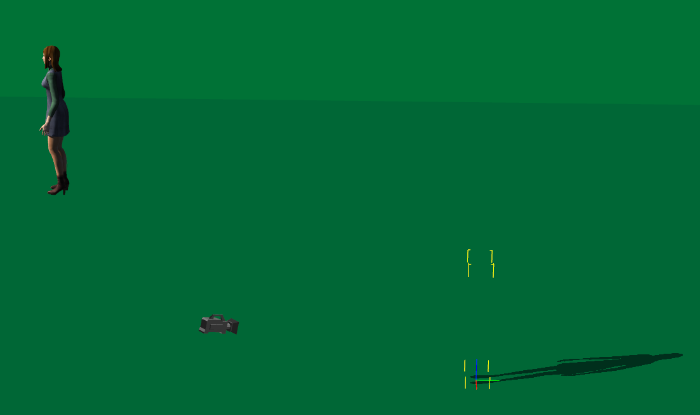
This was originally done with a drop shadow, but IC6 doesn't have that anymore. However, a self-cast shadow works also, as shown here. The light is a directional light. Here is the resulting shadow: 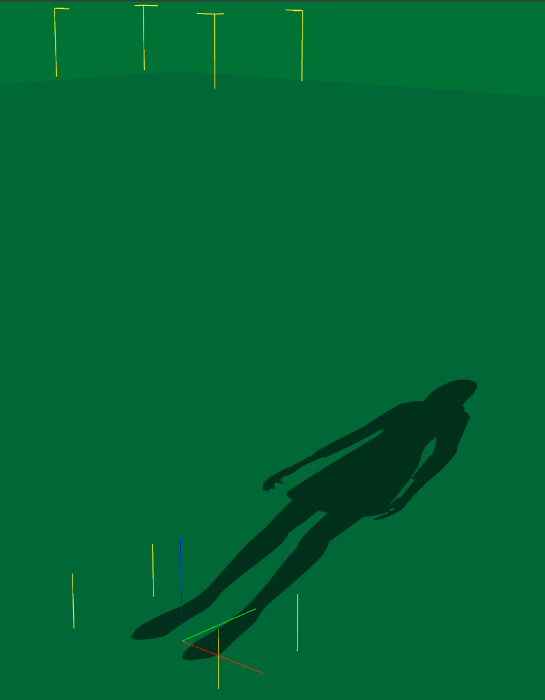
The green background is there because of the original request, I believe.
|
|
|
|
|
rcsinger29
|
rcsinger29
Posted 11 Years Ago
|
|
Group: Forum Members
Last Active: 3 Months Ago
Posts: 782,
Visits: 3.2K
|
Not sure if this will work in IC6, but in IC5 if you moved an item "below the floor" it would cast a shadow onto the floor or terrain.

|
|
|
|