Hi All,
Some time ago I posted topic about SkinHelper script for 3ds Max.
By my opinion this script very useful for character rigging, but it has some issues and, most important, it is not compatible with the latest versions of 3ds Max (from 2013).
So I decided to find something similar and found SkinTools_v7 script by Ofer Zelichover
(see link http://www.polycount.com/forum/showthread.php?t=63107).
This script has even more features and works fine with latest version of 3ds Max, but, by my opinion, user interface of this tool is not so suitable for working with as SkinHelper UI.
So I reconstructed UI and removed some "dangerous" feature using which You can occasionally destroy whole rigging information. I call it "SkinTune", but in fact it is revised version of SkinTools script.
For me this script is one of basic tools in my character creating pipeline, so I decided to share it and maybe You will find it useful (see attachment).
Few words about script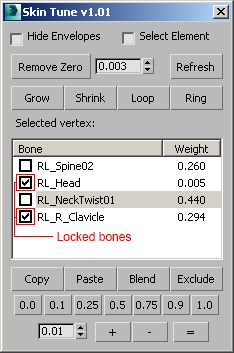
As You can see this script very close to standard "Weight tool", but has very important feature to "lock" influence (weights) from several bones and tune balance between unlocked bones only.
I'm not an expert in Maxscript language, I just rebuild UI and made minimal changes, and some minor issues from original script (SkinTools) is still here.
Known issues:
1. You are not able to undo/redo changes You made using this script. So I recommend to save the file (or skin information) before You start to make skin tune.
2. Bone selecting in 3ds Max window does not affect on bone selection in SkinTune window.
3. Script does not restored original "Hide Envelopes" setting on exit. If You hide envelopers working with script, but prefer to see envelopers after, You should uncheck this feature before closing script.
I'm not planning to do any support or modification of this script (my Maxscript knowledge not so good), so You can use this script "as is" on your own risk, but for me it's works fine. ;)
In addition I can recommend another useful script for rigging - "Copy Paste Transforms"
http://www.scriptspot.com/3ds-max/scripts/copy-paste-transforms
This script will help You to create absolutely symmetrical poses much faster.
For G5 skeleton You should use this settings in rotation section:
X,Y = ON; Z=OFF; Exclude - All= OFF.
Good luck :)
Vit