|
Author
|
Message
|
|
bluemidget666
|
bluemidget666
Posted 11 Years Ago
|
|
Group: Forum Members
Last Active: 9 Years Ago
Posts: 3.5K,
Visits: 13.8K
|
In Iclone I can create a tarrain from a hight map, but everyone says that displacement maps can not be used because Iclone is a real time enviroment. So whats the difference ? a hight map creates geometry from a bitmap and so does a displacement map .. or am i missing something ? Also specular maps, why in Iclone do I not get the same result as i do in other packages? The specular maps in Iclone seem to have very little effect. Unity is real time as well but uses several maps Iclone does not handle .. Why ? I have got so far with finding the easy button, but maps I am getting lost with .. Anyone know about how to make the best maps for Iclone ?

I Make My Mates Do The CanCan For The Amusement Of Killer Robots:D
|
|
|
|
|
Cricky
|
Cricky
Posted 11 Years Ago
|
|
Group: Forum Members
Last Active: 3 Years Ago
Posts: 2.8K,
Visits: 13.8K
|
http://www.3dtutorialzone.com/tutorial?id=10That explains it enough. I just pasted your Topic Title in the Bing Search Engine, and it popped right up. Should answer the question without repeating what is already out there.
SKYPE ID: rc.650
http://city.reallusion.com/store/ModuleExpand.aspx?id=GS634545170497417354&mdid=18866
http://city.reallusion.com/ContentTag.aspx?tagname=Cricky&AuthorID=20081020688550191201#]Reallusion Store Content
" If I had Alzheimer's (Old Timers), would I know it? "
|
|
|
|
|
bluemidget666
|
bluemidget666
Posted 11 Years Ago
|
|
Group: Forum Members
Last Active: 9 Years Ago
Posts: 3.5K,
Visits: 13.8K
|
Hi The link just gives the difference between normal maps or bump maps over displacement maps. I want to know the difference between displacement maps and hight maps. From what I can work out, hight maps and displacement maps are alike, as in they produce geometry from a bitmap. Also why am I getting poor results from my specular maps in Iclone when in other apps they really show up. I'm just interested in hight maps v displacement maps but really could use specular maps, I just can not see much difference when applied in Iclone. Cheers :D
I Make My Mates Do The CanCan For The Amusement Of Killer Robots:D
|
|
|
|
|
Vit3D
|
Vit3D
Posted 11 Years Ago
|
|
Group: Forum Members
Last Active: 9 Months Ago
Posts: 917,
Visits: 15.1K
|
Hi bluemidget666, I agreed with You that Specular maps in iClone is rather specific, but You can get good result using them. In my models I always use specular map for more realistic human skin and clothes fabric imitation. First of all can say that for good working specular maps for iClone should be rather contrast. Just make small test -- load sphere in iClone and apply contrast gray scale noise map as specular map -- You will see how it works ;) And I should remark that specular (and specular maps) in iClone works good with Directional and Spot light, but has practically no effect with Point light. It's hard to recommend how to make "perfect" specular map because it's depends of model and for each model specular map should be tuned individually.
Vit
 
|
|
|
|
|
kurzal
|
kurzal
Posted 11 Years Ago
|
|
Group: Forum Members
Last Active: 5 Years Ago
Posts: 627,
Visits: 10.4K
|
There are two technical terms: "displacement mapping" and "heightmap". - Displacement mapping is an alternative computer graphics technique in contrast to bump mapping, normal mapping, and parallax mapping, using a (procedural-) texture- or height map. - A heightmap or heightfield is a raster image. So first one is a technique, second one is an image. And "displacement map"="heightmap". That's it :D --- I think the problem with understanding arise from the fact that computer graphics is relatively young, there are many producers of 3D software ("As I will so I command", " I do as I please" etc :) ), so the terminology is not yet firmly established.
--------
Igor

|
|
|
|
|
bluemidget666
|
bluemidget666
Posted 11 Years Ago
|
|
Group: Forum Members
Last Active: 9 Years Ago
Posts: 3.5K,
Visits: 13.8K
|
Thanks for the info. I think I was expecting too much from the spec maps in Iclone, I wanted to have metal and leather on a single meshed character. I hope in the future RL make a more robust spec map.:)
I Make My Mates Do The CanCan For The Amusement Of Killer Robots:D
|
|
|
|
|
vidi
|
|
|
Group: Forum Members
Last Active: Last Month
Posts: 10.8K,
Visits: 40.2K
|
I wanted to have metal and leather on a single meshed character. Why should this not be possible already? For that you make a specular map Texture or you can create shader domains
-------------------------------------------------------------------
liebe Grüße vidi
|
|
|
|
|
Vit3D
|
Vit3D
Posted 11 Years Ago
|
|
Group: Forum Members
Last Active: 9 Months Ago
Posts: 917,
Visits: 15.1K
|
Here example of leather, metal, plastic, fabric and human skin in single mesh (and single material) - 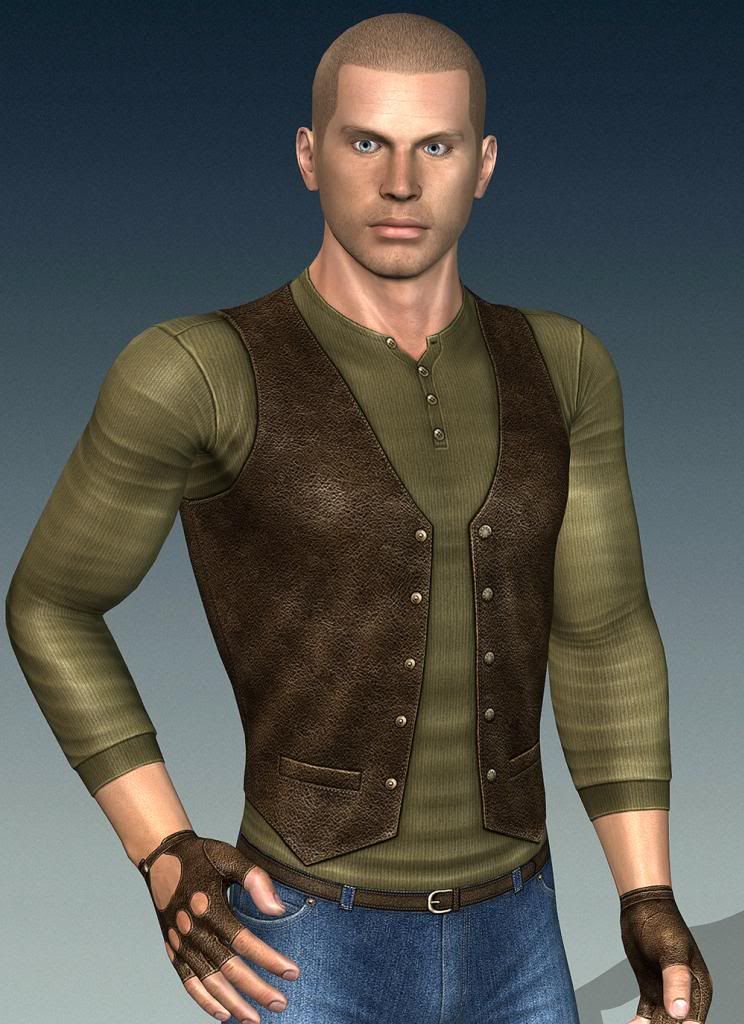 So it's possible ;) And the same Specular Map (and other maps created for iClone) good fit for Unity 3D too - http://www.youtube.com/watch?v=pQBYNDn8eXs
Vit
|
|
|
|
|
bluemidget666
|
bluemidget666
Posted 11 Years Ago
|
|
Group: Forum Members
Last Active: 9 Years Ago
Posts: 3.5K,
Visits: 13.8K
|
We'll that looks like the effect I'm after. I think a bit of playing in Photoshop might be needed to get the results I'm looking for. I'm glad to see it can be done.
I Make My Mates Do The CanCan For The Amusement Of Killer Robots:D
|
|
|
|
|
Vit3D
|
Vit3D
Posted 11 Years Ago
|
|
Group: Forum Members
Last Active: 9 Months Ago
Posts: 917,
Visits: 15.1K
|
Really it's not too hard if You already made diffuse map... Here the specular map for character's body shown above (half of original resolution) - 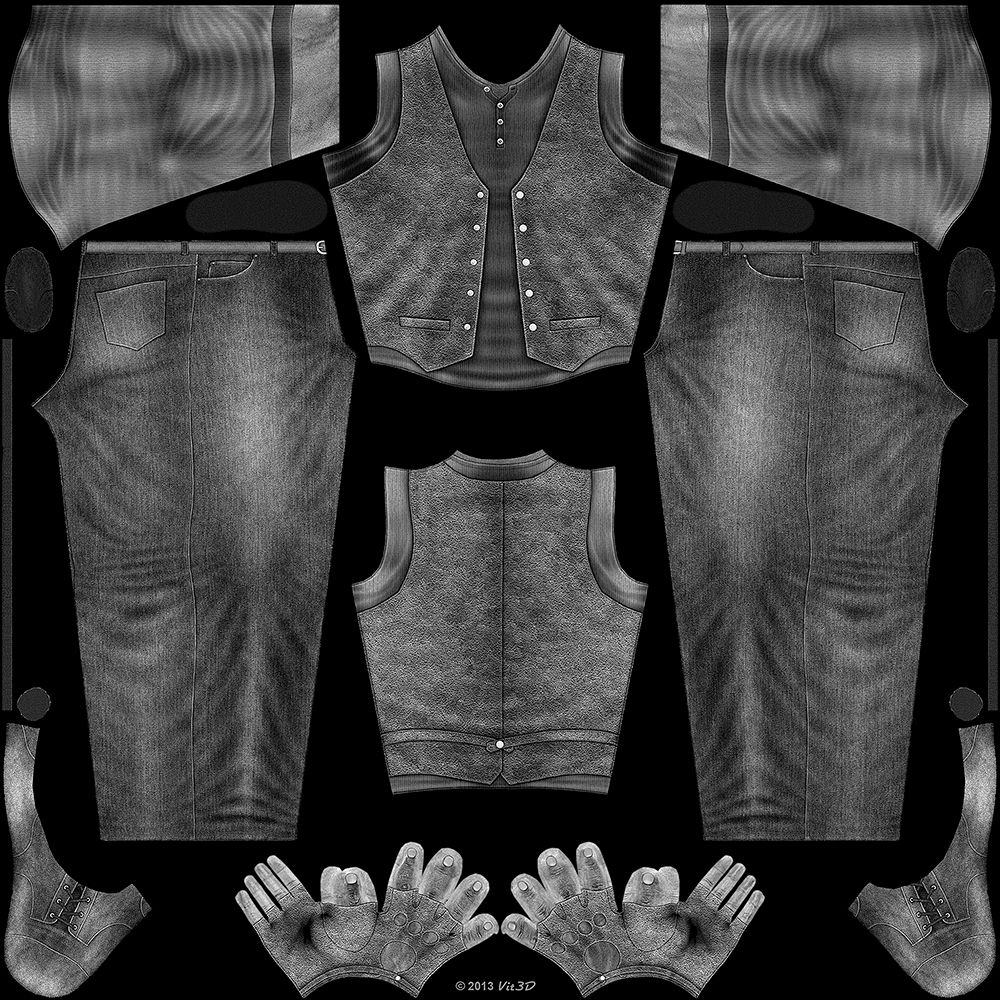 As You can see it's gray scale unsharped version of diffuse map, but zones for metal, plastic and leather have overage value, skin zones close to middle, fabric zones have a bit lower tone.
Vit
|
|
|
|