Profile Picture

ICLONE4, How do you duplicate a character or object

Posted By jrre00 13 Years Ago
You don't have permission to rate!
Author
Message
jrre00
jrre00
Posted 13 Years Ago
View Quick Profile
Junior Member

Junior Member (186 reputation)Junior Member (186 reputation)Junior Member (186 reputation)Junior Member (186 reputation)Junior Member (186 reputation)Junior Member (186 reputation)Junior Member (186 reputation)Junior Member (186 reputation)Junior Member (186 reputation)

Group: Forum Members
Last Active: 2 Years Ago
Posts: 2, Visits: 21
I can't find how to Duplicate in ICLONE4 anywhere!! What is the command to duplicate a character or object in ICLONE4 (to make two of a kind after you've put the finishing touches on the object). If anyone knows, I'd appreciate it.

Thanks
colour
colour
Posted 13 Years Ago
View Quick Profile
Distinguished Member

Distinguished Member (12.1K reputation)Distinguished Member (12.1K reputation)Distinguished Member (12.1K reputation)Distinguished Member (12.1K reputation)Distinguished Member (12.1K reputation)Distinguished Member (12.1K reputation)Distinguished Member (12.1K reputation)Distinguished Member (12.1K reputation)Distinguished Member (12.1K reputation)

Group: Forum Members
Last Active: 2 Years Ago
Posts: 5.2K, Visits: 8.1K
Welcome to the Forum:)

IMO, you can't Duplicate Characters. Only Props.

Select the Prop in Scene Manager while holding-down Ctrl Key, for the first Duplicate. If you want to Multi-Duplicate, Select the Original & Duplicate, while holding-down Ctrl Key & so-on.

Then Select the Move Tool (While still holding-down Ctrl Key). The Duplicate then appears in Scene Manager & Drag the Duplicate(s), while holding-down the Shift Key, to Postion it/them.

It's a bit fiddly & needs some practise.

BTW - iC5 has a new Multi-Duplicate Tool Feature.

I'll double-check the above in iC5, here, without using the Multi-Duplicate Tool.

Done - See Screenshot:
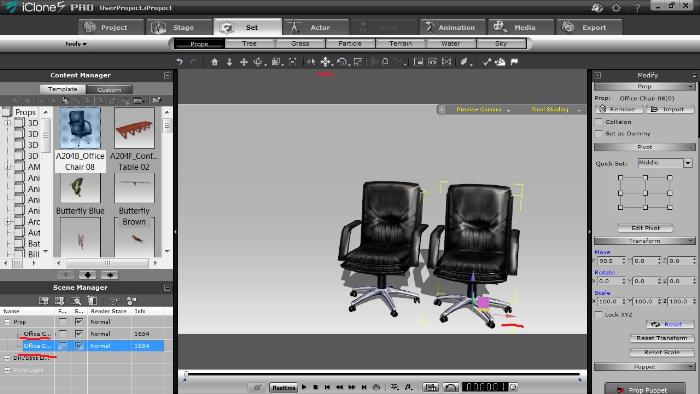
Anyone-else?.

-----------------------------------------------------------------------------------------

      REALLUSION FORUM ANNUAL PINHEAD COMMUNITY PROJECTS.

       New Pinhead Website & Project to be announced in September 2015

-----------------------------------------------------------------------------------------


jrre00
jrre00
Posted 13 Years Ago
View Quick Profile
Junior Member

Junior Member (186 reputation)Junior Member (186 reputation)Junior Member (186 reputation)Junior Member (186 reputation)Junior Member (186 reputation)Junior Member (186 reputation)Junior Member (186 reputation)Junior Member (186 reputation)Junior Member (186 reputation)

Group: Forum Members
Last Active: 2 Years Ago
Posts: 2, Visits: 21
Colour You are the man!! Thanks, I duplicated a prop by accident and could never figure out how I did it. Thanks for the perfect help!

Jr
colour
colour
Posted 13 Years Ago
View Quick Profile
Distinguished Member

Distinguished Member (12.1K reputation)Distinguished Member (12.1K reputation)Distinguished Member (12.1K reputation)Distinguished Member (12.1K reputation)Distinguished Member (12.1K reputation)Distinguished Member (12.1K reputation)Distinguished Member (12.1K reputation)Distinguished Member (12.1K reputation)Distinguished Member (12.1K reputation)

Group: Forum Members
Last Active: 2 Years Ago
Posts: 5.2K, Visits: 8.1K
jrre00 (10/16/2012)
Colour You are the man!! Thanks, I duplicated a prop by accident and could never figure out how I did it. Thanks for the perfect help!

Jr

Thanks for your thanks:)

BTW-You only need to hold-down the Shift key when Dragging a Prop Snapped to Grid. If you don't, the Prop will jump to the next Grid line & not where you want it.

-----------------------------------------------------------------------------------------

      REALLUSION FORUM ANNUAL PINHEAD COMMUNITY PROJECTS.

       New Pinhead Website & Project to be announced in September 2015

-----------------------------------------------------------------------------------------


Reading This Topic