|
Rampa
|
Rampa
Posted 13 Years Ago
|
|
Group: Forum Members
Last Active: 2 Weeks Ago
Posts: 8.2K,
Visits: 62.6K
|
Does anyone know the trick to creating an iTree? Being able to use other objects besides just trees with the tree planter/feller would be really neat. The "wind sway" might be interesting for far off crowd scenes as well.
|
|
Group: Forum Members
Last Active: Last Month
Posts: 10.8K,
Visits: 40.2K
|
Does anyone know the trick to creating an iTree?
That is not possible, and since years ago on my wishlist. Only what we need, is a option to change the texture of the trunk and leafs or a second proposal , Flex billboards (wind sway) with face cam roatate for to create own trees Here is my request (Date 10/18/2010) on MAX Developer or RL but without any feedback . Also for the toonrender(cel shading) are the itrees unsuitable, therefore customizable iTrees are so needed. https://forum.reallusion.com/Topic65880-248-1.aspx
-------------------------------------------------------------------
liebe Grüße vidi
|
|
RobertoColombo
|
RobertoColombo
Posted 13 Years Ago
|
|
Group: Forum Members
Last Active: 4 Years Ago
Posts: 1.6K,
Visits: 3.0K
|
Hi,
I hope RL will extend a bit 3DSXchange SW, inserting some new functionalities that coudl support what we want to do.
Some ideas for RL, which could greatly help for our needs, are:
1. a way to reduce the poly counts before an item is exported (today this applies to the texture only, but I could not see so much benefit, in terms of performance, once imported back into iClone)
2. be able to replicate the object in 3DSXchange and link them together into one single object, as much as it can be done in iClone (actually I am not sure if this is already possible... I will check later on)
3. ... open for new ideas :-)
I was thinking about another way to do the swinging: assign physic properties to the objects and find a way to move them according to some force.
The idea is that the wind could be simulated by a set of small balls, with no opacity, which bounces against the characters and create some slight, swinging movement to the characters.
Does this make sense? :-)
Anyway, whatever we conceive, the problem that I am facing now is how to make the whole process fast.
We can imagine many different this tricks and work-arounds, but at the end of the day, we want to fill many characters in a reasonable short time.
Let´s say 100+ characters... we should find a way to replicate them and put in place, with all the right properties, in a fast way.
In my case, I have to do:
1. insert the avatar
2. change its proportion and face (I want to have them looking a bit different... otherwise my army will end up to be a matrix Agent Smith army...)
3. set up a pose
4. add some iAccessories
5. export into 3DSXchange
6. save as .obj
7. import it again into 3DSXchange
8. save it as a prop
9. import into iClone
10. apply some tricks to make it swing/slightly moving
Well... this multiplied per 100+ characters is going to end up by the release of iClone 6 or 7...
RL, if you are here, whack on this thread and let us know how to fill a scene with many characters...
My PC:
OS: Windows 10 Pro English 64-bit / CPU: Intel i7-9700 3.6GHz / MB: ASUS ROG Strix Z390 RAM: 32GB DDR4 2.6GHz / HD: 2TB+3TB / SSD: 2x512GB Samsung 860 EVO + 1x2TB Samsung
VB: Palit GTX2080 TI GamingPro 11GB / AB: embedded in the MB and VB (audio from the MOTU M4 I/F) / DirectX: 12
|
|
Group: Forum Members
Last Active: Last Month
Posts: 10.8K,
Visits: 40.2K
|
after further Translation I'm sorry, I think I misunderstood your question.I thought you mean how to make itrees
-------------------------------------------------------------------
liebe Grüße vidi
|
|
Rampa
|
Rampa
Posted 13 Years Ago
|
|
Group: Forum Members
Last Active: 2 Weeks Ago
Posts: 8.2K,
Visits: 62.6K
|
vidi (7/4/2012)
after further Translation I'm sorry, I think I misunderstood your question.I thought you mean how to make itreesYou translated perfectly Vidi.:)
|
|
STooldio
|
STooldio
Posted 13 Years Ago
|
|
Group: Forum Members
Last Active: 5 Years Ago
Posts: 39,
Visits: 653
|
I also like to know how to create itrees. The 3dsMax plugin does not have that option. :(

|
|
Artman009
|
Artman009
Posted 13 Years Ago
|
|
Group: Forum Members
Last Active: 4 Months Ago
Posts: 106,
Visits: 1.4K
|
Check out this free Tree generator: http://www.frecle.net/index.php?show=treed.aboutIt'll take some tweaking to get it looking right in 3DXchange--namely the scale and putting the proper textures in the same directory as the OBJ (check C:\Program Files (x86)\gile[s]\plugins\tree[d]\Textures)--but the results aren't too bad. In the program:  In Clone:  -- Artman009
|
|
wendyluvscatz
|
wendyluvscatz
Posted 13 Years Ago
|
|
Group: Forum Members
Last Active: Last Year
Posts: 2.5K,
Visits: 19.4K
|
the DirectX export is animated, no textures though 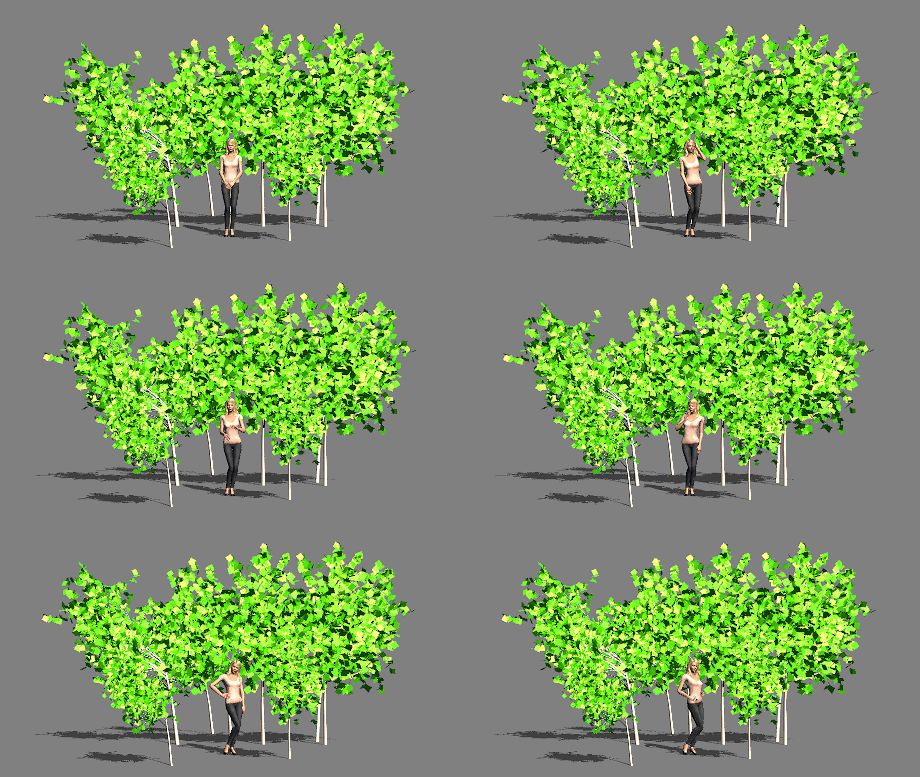
and I had to stretch the keyframes in Carrara as they were veryy close and brief the FBX exported 3DX5 converted iProp is easily duplicated but you need to apply the animation stack to each tree.
|
|
Johtace
|
Johtace
Posted 13 Years Ago
|
|
Group: Forum Members
Last Active: 12 Years Ago
Posts: 2,
Visits: 16
|
STooldio (7/11/2012)
I also like to know how to create itrees.
The 3dsMax plugin does not have that option. :(you can always ask on CG Persia Mr. "Stoolsadoon" !
|