Armstrong (11/5/2009)
[quote]
great discussion on techniques
Well, Ive been bogged in with Forum header Movie stuff and really I want to crack on with my Short now rendering the sets.... BUT.... I have a moment free time now..... after playing with snow. :D
Set Building...
"Regarding Sets and multiple sets in one scene, I HAVE done this. But as follows.
I make forest or woodland scenes. I make the North, South, East and West view totally different and simply save this as a template if you liike."
Misinterpetation was perhapstoo loose aterm on my part as I didnt fully explain the volume of the environment I would do this within.
Here is the procedure I use many times.
Take one land mass.
Edge design each of the four faces. In my case pretty much woodlands and forestry.
Instead of having four sets I CAN make one scene work as four.
The payoff of this is that many other elements are easily draggable into the "current" shot from the surrounds (As trees dont duplicate on CTRL click yet) but moreover by making four "sets" (sets in so far as 'working environments for the characters LESS the characters) I personally DONT have to wait for one set to close down as I open another blank set to clear ram BEFORE opening another chunky set.
For me on this machine with 2x2 gigs of nVidea ram on two cards and 4 gigs onboard I stuff it as full of trees as I can before I watch the memory manager start to choke on swapfile borderline.
When I open and close a set I can sometimes wait up to 40 seconds to over a minuteor so for a good three gig set to open. Also some sets crash and thats a full 2 minute crash report and memory dump issue WITH a reboot and blue screen if it hits me hard enough. (Just love those olden days dossy blue screens!!!)
Flicking in one and out to another can rake up the hours. So, my solutionwas, expand the land masses. Make a four viewpoint landmass. And work inside that.
IN PRACTICE!!!!
Using this system means I dont wait for file opena nd close.
It also means I can sit back and wait while memory management cuts in and frees up say 300 megs free into a stonking 1.5 gigs free ram as it plays with the mass.
Now I can work, not always, but mostly, in at least three arenas on one board. I add characters as I need them, play with lights as I need them and simply work un stalled by open/close timelags.
This should work for anyone who uses alot of kit in their scenes and wants to skip set switching when theyre working hard.
For me, I can sit down here and commercially work for anything up to twelve hours in a stint.
If I can cut down three or four set changes an hour I can save almost an hour in a day.
That might sound tight, but believe me, some sets I put together suck the clock dry.
Currently I am working thin on my MCPE... but I hope this explains where I was coming from.
It isnt practical in all cases as sometimes you need to shoot long and compress the elements and the lenses in iClone work exactly as they do in real life. And if you cant back up far enough because of another quarter set, youre stuffed.
... but working tight, it IS effective.
Armstrong.
2) Reguarding your second advice. And I quote: "Anyway, your system will tell you when you've reached your maximum."
Seriously? are you advicing to create a set until your computer tells you no more? what about the rest of the movie.
OH Yes. Stuff it full. Pile it high! Stick in everything you need. If theres room!
Else, go as FAR as you can.
If you DONT, someone else will. And if you DONT someone else will deliver a more impressive set than yours and win the box office basically.
Wheres the beenfit of that.
Play hard, study long, deliver best.
Memory Managers like CACHEMAN will take your system and shunt the mass about until it frees up alot of Ram again. But in the mean time, YES. Dont play easy safe. Wheres the excitement in that.
Wheres the sense of achievement by making sure youre working nice and fast because a gig of ram is free or you couldnt wait a few seconds to pan round the set!!!!!!
You HAVE to work hard and tear your hair out or you'll deliver dilute.
I work all out or nothing. The fans on the cards cut in and start whining and all Im doing is panning round with the camera. Theres SO MUCH STUFF sometimes they complain and whine like tiny jet engines. :D
Theyre my lil early warning that I am getting close to the limit. HAH!
Of COURSE leave enough for your characters... :P But if they take, say, 1 gig and youre on a three gig system.... !!!!!!!!!!!!!!! You know your playing field size.
Long post BUT................................................................ I use short words!!! :P
Woow with a system like yours I can see why you would put so much into one scene, however for us mere mortals, the specs are much lower and optimizing is a must. Also you mention your scene take 40 seconds to load? Well if you would have optimized it, it would take 10 at the most, maybe less.
I get what you are saying but when you are giving advice to new users, you have to think about the average iclone user, and most of them have one video card with 512mb to 1 gig of ram on the card and 2 to 6gigs of system memory, that is why I'm trying to stress that efficiency is essential in order to gain performace and actually get things done in iclone.
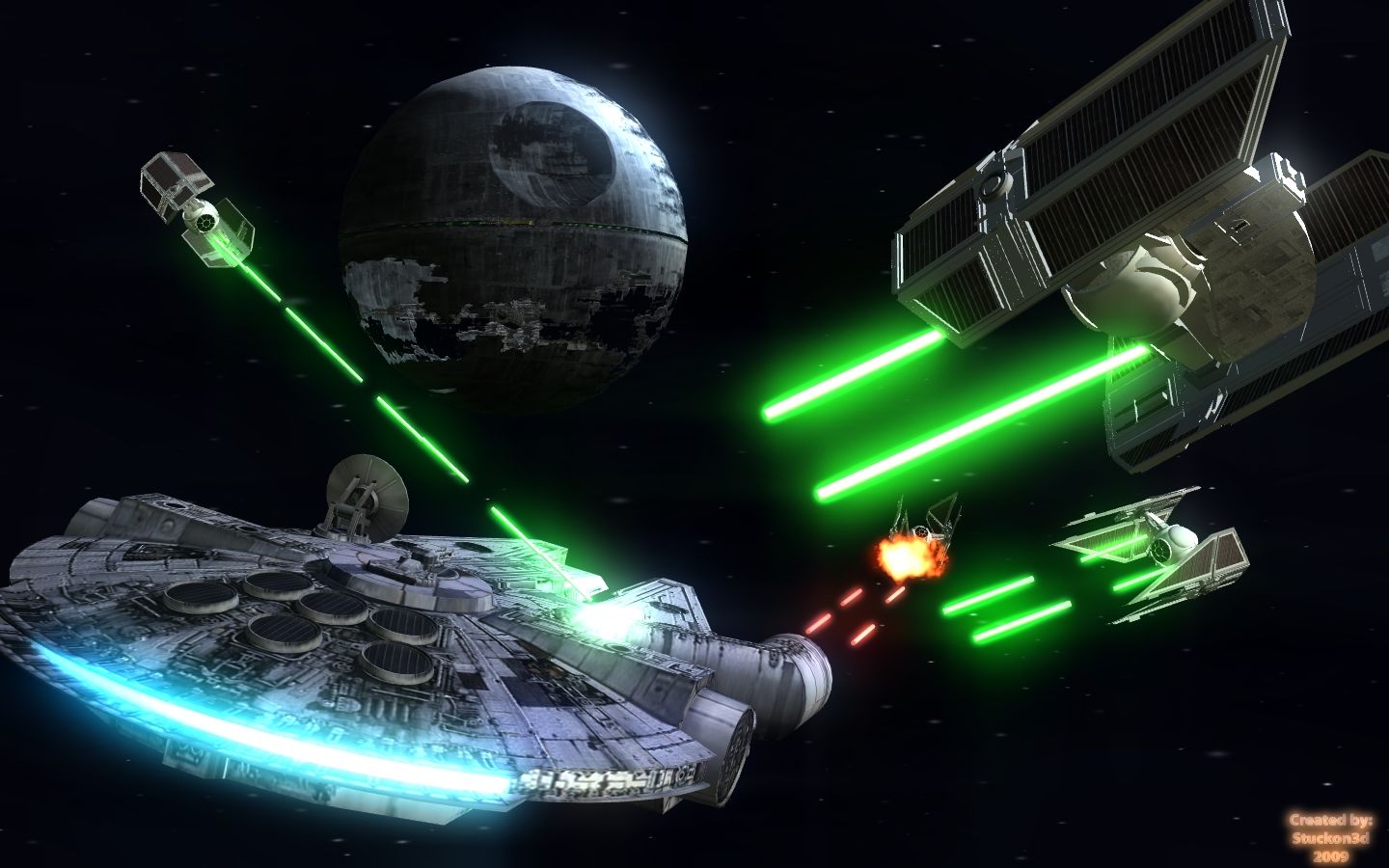
Reguarding your take on jamming stuff in, I'm a true believer that less is more if you know what you are doing, by having the right composition in your scene, you can simulate huge worlds without having to put what a real huge world would require. Putting everything you got (as far as models you have available) in a scene it will just make it look too busy and make your audience loose perspective of what the story is all about. Bottom line for me is: " keep it simple" , and do not make your backgrounds compete with your character.
This image the perfect example of simplicity describing infinite space. And with what, six or seven pieces of geometry? See what I mean.
Peace,
stuckon3d
PS: reguarding your image of the naked chicks, I think Disney woud have a huge lawsuit in his hands if he displayed that to kids. :P
you are it! :P

Product Specialist
My iClone 7 gallery
My IMDB