|
By Peter (RL) - 3 Years Ago
|
|
Dear iClone Users,
We have now released iClone 8.22 with the new Dynamic Wrinkles for your characters. However, as with all updates there may be a few bugs, glitches or other annoying issues that remain.
Important: If you do find any bugs, issues or glitches in iClone 8.22, please can you report them first in the Feedback Tracker. Then feel free to discuss the issues in this thread but do try to include a link back to the original Feedback Tracker report or your tracker number.
As always it will help us greatly if we can keep all technical issues in the one place (this thread). This will help the development team keep track of any problems.
Please do try to provide your full system specifications and a detailed description of the problem when reporting issues and include screenshots and/or a workflow video whenever possible. If you can provide specific steps so we can try and reproduce the problem that will be even better.
Many thanks and have fun with iClone 8.
|
|
By animagic - 3 Years Ago
|
I don't know yet if this is a repeatable bug, but if I try to load some older props into an existing project, I get a prompt asking me to convert the prop to make it compatible with the version of iClone.
If I let it convert, it sometimes converts and sometimes the progress is at 26% and iClone crashes.
I don't quite understand why I get the prompt because they are just props.
|
|
By gordryd - 3 Years Ago
|
|
Yes, I've used iClone since Version 4 and this seems like the least stable release (8.2) I've ever used. iClone has crashed several times, mostly when loading a "new" or existing project while a current project is already loaded. It seems like having Motion Live window open aggravates the problem, but it isn't 100% repeatable. One time it even locked up my computer requiring a reboot.
|
|
By ade.p - 3 Years Ago
|
We have a couple of licences. On one install, it crashes when you have a project loaded and try to load another project. Happens every single time, absolutely killing batch rendering! On the second computer, it won't load any of the projects created in 8.2 on the first computer. Both are up to date/patched, and have all the content assets downloaded.
These projects are 1 avatar, around 1 min long.
Computer 1 - RTX 3080 (laptop, 2022, i7 11th gen)
Computer 2 - GTX something I think, (laptop, 2022, i5 11th gen)
|
|
By Leowald - 3 Years Ago
|
Hello,
I've noticed some problems since the update.
1 = The face texture of my character disapear when I make a render photo or video. I think it happens when I've added a substance tool layer with the new wrinkles tool. (without the substance tool layer it's working fine but I need it for my animation)
2 = When I render a project (about 6min30 of animations) for many hours, when it's finish I get a box to tell me that's over and I can read the video. When I click "Yes" nothing happen and when I check my video it's empty (0Mo) It's very strange, because this situation is totally random (I already get this problem some months ago, but it's also working fine on others projects). I noticed that I don't get this problem anymore if I disable the compression. But for a big project, my video will be too big :blink:
3 = I still have the problem about the fact I can't read my video after 44 700 frames in 60FPS (but I can read if the project is in 30FPS)
|
|
By yepkoo - 3 Years Ago
|
Maybe I'm doing something wrong as this feature is new.
However, when I tested it;
The wrinkle feature is imported to UE if you export the character in fbx format.
However, if you transfer the character to UE via live link, unfortunately it doesn't work.
|
|
By johnsongaric1 - 3 Years Ago
|
|
just downloaded 8.21 viewing area is significantly reduced
|
|
By Peter (RL) - 3 Years Ago
|
iClone 8.21 has been released today. Please update using the Reallusion Hub.
However, if you still have issues after the update, please remember to report them in the Feedback Tracker first and then feel free to discuss here. Thanks.
|
|
By 4u2ges - 3 Years Ago
|
Since the release of IC8, the routine for caching Iray images has changed.
In IC7, project load routine would only cache Iray images if the Iray Render Setting window is opened.
Otherwise, if Iray window was closed during the project load and you bring it up later on, the caching process would start at that moment.
Not the case in IC8. It would start caching Iray images regardless on all projects opening.
I rarely use Iray and keep Iray Settings window closed. But on heavily textured projects, the caching takes a long time on opening and a lot of disk space.
And then I suppose it does refresh Iray cache every time I change something. Extremely inefficient and unnecessary. Should be reverted back to IC7 way.
Unless someone knows the setting to control Iray caching process, I will post a ticket in FT later on....
FT: https://www.reallusion.com/FeedBackTracker/Issue/Unnessesary-Iray-images-caching-on-every-project-load
|
|
By ade.p - 3 Years Ago
|
Here's a new one - anybody seen this before? see https://www.reallusion.com/FeedBackTracker/Issue/Render-fails-on-final-frame-and-weirds-up-the-hair
I've got an iproject file which fails to render. There is one avatar, no background (plain colour) and intricate lighting. The render is 2755 frames at 1080p60. During the render, strange lines project from behind the avatar's head. 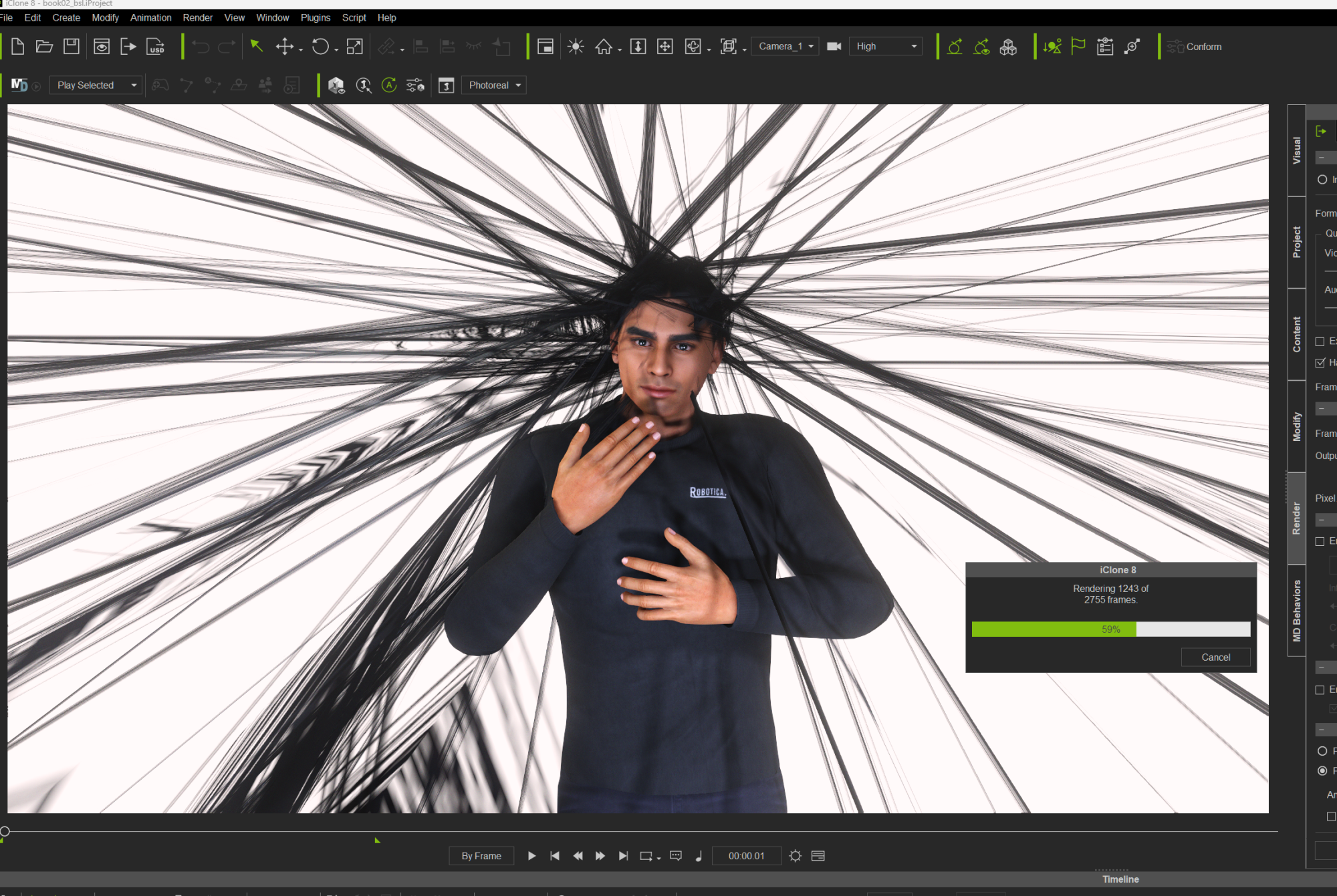 And on the final frame, iClone just hangs or crashes out (terminates). I've tried removing the last frame, the last two frames, batch render and stand-alone render, and rendering on two different computers from different manufacturers (Gigabyte, 11th gen i7, RTX, Win11; HP, 9th gen i7, GTX, Win10). Same behaviour each time.
|
|
By animagic - 3 Years Ago
|
In my experience the latest version of iClone (8.21) is very unstable. There is no clear pattern why it crashes but it does so frequently.
For example, I wanted to update the materials from a prop from the Military Outpost pack to PBR and had a crash...:unsure:
|
|
By gordryd - 3 Years Ago
|
|
Agreed about 8.21 being unstable -- mine crashes at least a couple of times a day, quite often when trying to load a new prop into a scene after the computer has been idle for a while. It loads to ~26% and hangs, then shuts down iClone. My PC has 32GB RAM and RTX 3090, so memory shouldn't be an issue.
|
|
By animagic - 3 Years Ago
|
It just happened to me as well when loading a prop. I have 128 GB and an RTX 3090, so the system is not the problem. I have had the same issue a few version ago with iClone 8, and it seems to have come back unfortunately.
I don't know how to create a repeatable test case because as you said it's pretty random. It is annoying though. I have to completely uninstall iClone and start fresh as it is hard to get any work done.
EDIT: I checked Event Viewer and the error states that the faulty module is ucrtbase.dll. Googling further tells us that it happens with other applications as well. No clear solution, though.
|
|
By mark - 3 Years Ago
|
Looks like my procrastination is paying off. I've already got enough wrinkles... :D
|
|
By TheDCB1985 - 3 Years Ago
|
|
animagic (3/30/2023)
In my experience the latest version of iClone (8.21) is very unstable. There is no clear pattern why it crashes but it does so frequently.
For example, I wanted to update the materials from a prop from the Military Outpost pack to PBR and had a crash...:unsure:
I have exactly the same problem. Since I updated Character Creator and Iclone to version 4.2 and 8.2 a few weeks ago, both apps crash more often than usual and even without the possibility to restore the projects. I reported this Issue on the Feedback Tracker already. Issue 9368.
|
|
By gordryd - 3 Years Ago
|
|
I tried to vote on this FT #9368) and it was not in the database?
|
|
By TheDCB1985 - 3 Years Ago
|
|
gordryd (3/31/2023)
I tried to vote on this FT #9368) and it was not in the database?
It's listed under Character Creator 4.2. Try this Link:
https://www.reallusion.com/FeedBackTracker/Issue/Character-Creator-4-2-Iclone-8-2-crash-since-Update
|
|
By hansolo007 - 3 Years Ago
|
Hi all,
Unless I am missing a setting somewhere, the viewport is incorrectly cropping the edges of the frame in the latest iClone 8 update, when viewed through a camera.
The cameras film back is set to 40.96 x 17.15 (2.39 crop equivalent FOV to Red Monstro sensor) and in the viewport I am getting pillar boxing that shouldn't be there. When I render the frame, everything looks correct.
I have tried adjusting render settings but no setting fixes it (however this DOES change the viewport and I imagine it shouldn't?), as well as playing with the Fit Render Region and Fit FOV and can't get any combination to work.
Anyone else having this issue? How can I go about filing a bug report?
Images attached (both current frame render + viewport view)
Viewport

Render Preview

|
|
By animagic - 3 Years Ago
|
ActorCore characters have "loose" limbs when placed on some traditional iClone terrains. A traditional terrain is created by converted a prop into a terrain, so it is different from the newer heightmap terrains.
NOTE: Further testing seems to indicate that this problem occurs with a very specific terrain (see FT entry #9495, which has the terrain as an attachment).
Here is a render of two ActorCore characters on a traditional terrain with a pose applied to them. Notice that the bent arms curve rather than hinge:

When recreating the scene with the terrain converted to prop, everything is fine:

BTW, it is not sufficient to just convert the terrain to a prop; the characters remain distorted.
Finally, I tried the scene with a heightmap terrain, in which case there is no distortion.

Entered this in FT as issue #9495.
|
|
By w7media - 3 Years Ago
|
Well, to me it looks like they want to please everyone again. Iclone is supposed to work with unreal, blender, daz, iray, actorcore and other programs together.
Could this be the reason for the frequent crashes ?...I don't know.
But why should i learn many other programs to then transfer the avatars, or whatever back and forth. just because the render-engine is better or something.
(So far nobody could explain the render-engine to me in a plausible way).
I've been using iclone since version 3. Of course there weren't the great light and mirror functions etc. and of course the introduction and integration of the CC avatars is great, if not ingenious.
But then it's already over. I am fully satisfied with the workflow and the results are also impressive. Without any other additional programs or gimmicks.
But unfortunately, the crashes also accumulate with me and then the hobby is unfortunately less fun.
Translated with www.DeepL.com/Translator (free version)
|
|
By depredor2018 - 3 Years Ago
|
There is a bug in iClone 8 that has been around since it was released. When I first discovered this bug I was still new to all of this and wasn't sure what was going on but knew that something wasn't right.
I wanted to add that I have placed about half a dozen tickets since iClone 8 was released on this very bug, it would be nice to see it fixed one day.
Today I am able to at least explain what the problem is and so far I have failed to reverse it. Even on a simple animation that I created to simply prove this was a bug was not recoverable, even after putting the curves back where they belonged after using the feature there was still an offset that under normal circumstances ironically....introduces foot sliding which in turn requires me to use the very tool that caused the problem to begin with.
That tool is 'Flatten All Motion With Constraints'
any X,Y position offset on the Hips will be added to the Root
any Z Rotational offset between the Hip and the Root will be added to the Root Z Rotation as well
To say the least it completely destroys the animation and even if you try to bring it back you can't because it does this frame by frame across the entire animation.
I made a video with proof https://youtu.be/BSjkE6u5hXA
|
|
By depredor2018 - 3 Years Ago
|
|
Note: You don't actually need to use that method to Bake the Constraints, I forgot that doesn't seem to be needed anymore. However, I still believe this should be fixed to prevent others from falling into this trap. I personally keep falling victim to it because I forget that it's not actually needed anymore.
|
|
By animagic - 3 Years Ago
|
|
AccuLips works as it should when the project framerate is set to 60 FPS. However, when the project framerate is set to 30 FPS, many vowel visemes are assigned incorrectly. (This may occur at any project framerate other than 60 FPS, I did not check that.) The attached image below illustrates the issue:
 For the character on the left, AccuLips was run at 60 FPS and vowel visemes are assigned correctly. Shown is the point when the character says "sounds". Notice how open the mouth is. For the character on the right, AccuLips was run at 30 FPS and some vowels are assigned incorrectly. Notice that the character's mouth is barely open when saying "sounds" because the wrong viseme has been assigned at this point: "Ih" instead of "Ah".
For more information, see the feedback entry: #9516.
|
|
By JeffJ - 3 Years Ago
|
|
Agree-crashes, hangs, "not responding"
|
|
By hansolo007 - 3 Years Ago
|
w7media -- I can't speak to the crashes, but the reason for using something like Unreal as part of the pipeline, is that the quality of the final image ends up far superior. For my part, I use iClone to refine the motion capture, or to animate, and then send everything to Unreal where I have the benefit of operating virtual cameras, using real world accurate lights and cameras (which is necessary for what I am doing) + access to the vast array of assets, textures/materials and plugins that have been created for Unreal. iClone is fantastic, but in the same way you CAN animate in Unreal, but it's not the best option. That's where I choose iClone. Similarly you CAN finish in iClone, but there are better render engines and additional professional functionality available via something like Unreal.
Does the crashing still need to be fixed? Sure does.
|
|
By depredor2018 - 3 Years Ago
|

I don't know why iClone8 and CC4 both do this....but when I bring a model in to make animations for it I normally plan on using those on a model already setup inside of Unreal Engine.....the problem is that you guys are changing the Hierarchy of the skeletons when we import them....parenting the actual Root bone to your RL_BoneRoot but when you export it, the hierarchy remains like this....which complicates things because sometimes such as Vehicles for example....the animations are 100% incompatible....which means now I am forced to spend extra time setting up an IK Rig for the Original and your messed up version...and an IK Retargeter as well. Only then can I retarget the animation so that I can actually use it. Sometimes, for example when making a driving animation I need to animate both at the same time.
Me and several others have complained about this problem on several occasions, and we feel like were just being ignored.
|
|
By johnsongaric1 - 3 Years Ago
|
|
iclone 8.23. Bump map does not appear to be working on clothing. Character creator is ok. I tried several outfits, everything is flat, no bump.
|
|
By animagic - 3 Years Ago
|
|
I'm sorry to say that I still have frequent crashes with 8.23. I'm adding a prop to scene for example, it shows the 26% load progress bar and then crashes. Fortunately, we have crash recovery, but still...:unsure:
|
|
By barca-8 - 3 Years Ago
|
Somewhat confused by the statement below. You want everything in one place, but we're to report the problem first in Feedback Tracker and then discuss the problem in this thread(?)
Which place is "the one place"? This thread or Feedback Tracker?
Important: If you do find any bugs, issues or glitches in iClone 8.21, please can you report them first in the Feedback Tracker. Then feel free to discuss the issues in this thread but do try to include a link back to the original Feedback Tracker report or your tracker number.
As always it will help us greatly if we can keep all technical issues in the one place (this thread). This will help the development team keep track of any problems.
|
|
By barca-8 - 3 Years Ago
|
Application crash. Using iClone 8.23.
1) Create a keyframed clip using Face Key. Can be anything - any set of expression keyframes. Make clip 10-20 seconds.
2) With the clip selected and the time scrubber near the start of the clip, open Face Puppet and set mode to "Replace". Pick control set "Eyes Head Look". Select the eyes and "head rotation" on the Puppet window's mask.
3) Hit the record button, press space, and begin moving the mouse. iClone will hang and then crash after 10 seconds or so.
|
|
By Peter (RL) - 3 Years Ago
|
barca-8 (5/30/2023)
Somewhat confused by the statement below. You want everything in one place, but we're to report the problem first in Feedback Tracker and then discuss the problem in this thread(?)
Which place is "the one place"? This thread or Feedback Tracker?
Important: If you do find any bugs, issues or glitches in iClone 8.21, please can you report them first in the Feedback Tracker. Then feel free to discuss the issues in this thread but do try to include a link back to the original Feedback Tracker report or your tracker number.
As always it will help us greatly if we can keep all technical issues in the one place (this thread). This will help the development team keep track of any problems.
All issues should be posted in the Feedback Tracker first if you want the development team to look into the problem. You can then optionally discuss with other users in this thread here as sometimes others may have workarounds for problems that may help until a permanent fix is found. By "one place" we also mean not creating separate threads for issues.
So to summarise:
1. Report the issue in the Feedback Tracker (very important)
2. Optionally post here in the issues thread if you wish to seek help or advice from your fellow iClone users.
|
|
By TheDCB1985 - 3 Years Ago
|
|
animagic (5/26/2023)
I'm sorry to say that I still have frequent crashes with 8.23. I'm adding a prop to scene for example, it shows the 26% load progress bar and then crashes. Fortunately, we have crash recovery, but still...:unsure:
I still have the same problem but no crash recovery. It happens on both machines I'm using.
|