|
By Miranda (RL) - 5 Years Ago
|
Hi Character Creator Users, Character Creator and Omniverse Create are developed in progress, there are some limitations and known issues you shall know before start experiencing the solution of Character Creator and Omniverse Create.
System Requirements
NVIDIA Omniverse™ is an open platform built for virtual collaboration and real-time photorealistic simulation, which requires higher specifications of GPU to run system smoothly. Please check full list of system requirements from the link below. https://www.reallusion.com/character-creator/nvidia-omniverse/*If an incompatible driver is detected the Omniverse RTX Renderer will not be enabled. Visual Differences - Light & IBL
- Material & Texture
Visuals - Known Issues & Tips - SSS shader tends to create abnormal highlights and line segments.
- Opacity map defects in Omniverse Create with certain hair content.
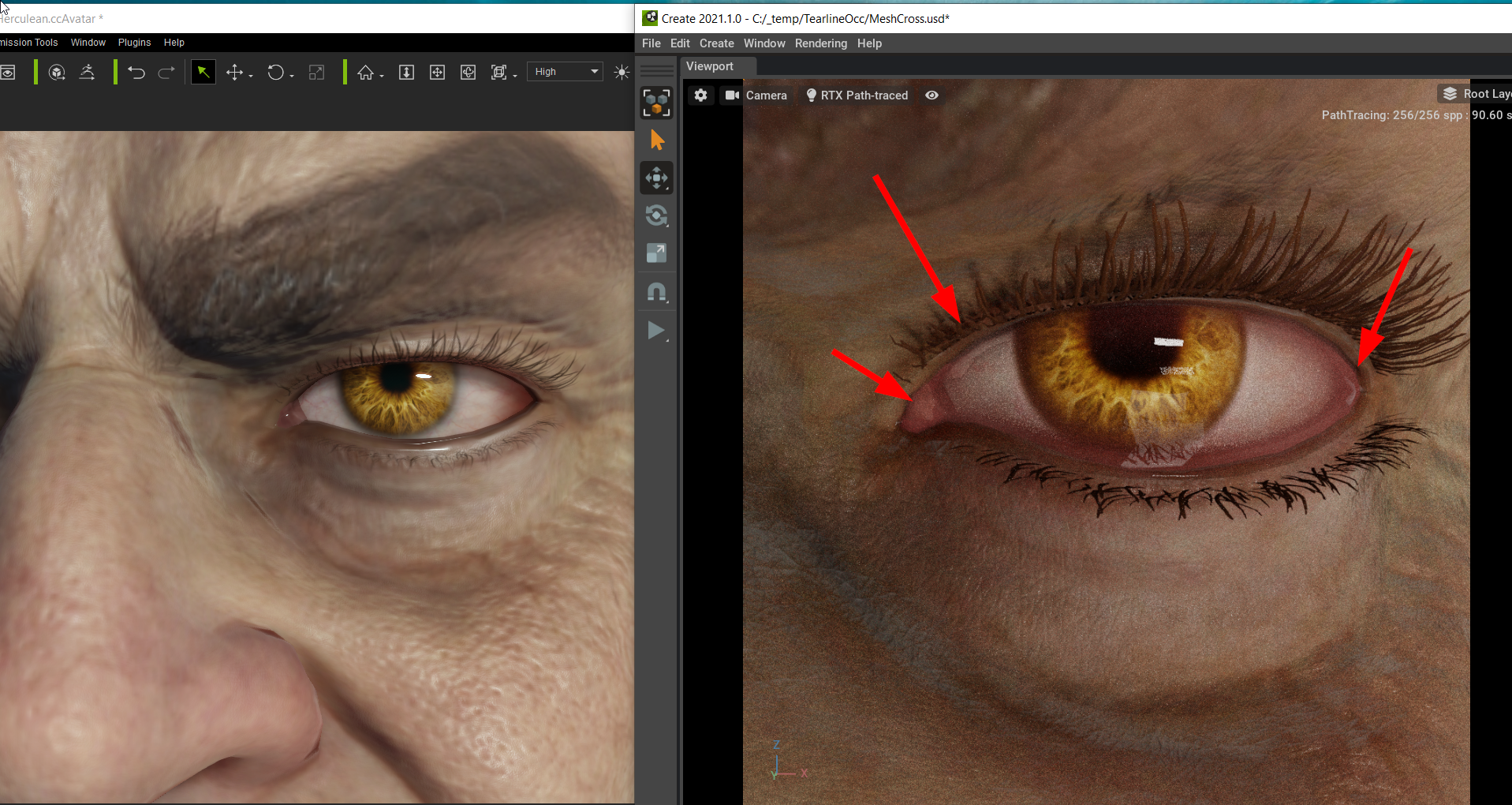
- Mesh intersection among eye components (Tearline, Eye Occlusion, etc.) caused by the lack of suitable Omniverse shader.
- Do not support export CC character USD from Unreal Engine to Omniverse Create due to lack of complex MDL support in Omniverse. Please always export character from Character Creator.
- Shadows cast from meshes with alpha textures onto a non-flat surface will have jagged edges. >> Know More (added on Jan. 17th)
- Strange black spots on the character’s eyeballs. >> Know More (added on Jan. 17th)
Animation - Known Issues & Limitations- Morph/blend-shape animations (facial Animations can not be transferred due to lack of support morph/blend-shape animations.)
- The character should be exported with the animation for the best possible result
- Physics soft-cloth and collision shapes not exportable to Omniverse
- Spring simulation not exportable to Omniverse
- Physics rigid-bodies and constraints not exportable to Omniverse
- Accessory animation not exportable to Omniverse
|
|
By Miranda (RL) - 5 Years Ago
|
Visual Differences: Light & IBL
Light - Rudimentary light settings such as rotations, translations, multiplier, and light textures can be brought into Omniverse Create.
- Discrepancies in the light intensity can happen as a result of translating the Multiplier value.
IBL - The IBL map will carry over to Omniverse, basic matching will be applied to the IBL dome's rotation and image strength.
- Mismatch between the IBL dome position and brightness can still occur.
As mentioned before, parameters value are transferred, however, visual discrepancies still exist.
For example, applying embedded lights and IBL in Character Creator and performing Omniverse Create > Render Mode: Path-Traced (picture right) gives a different visual result.
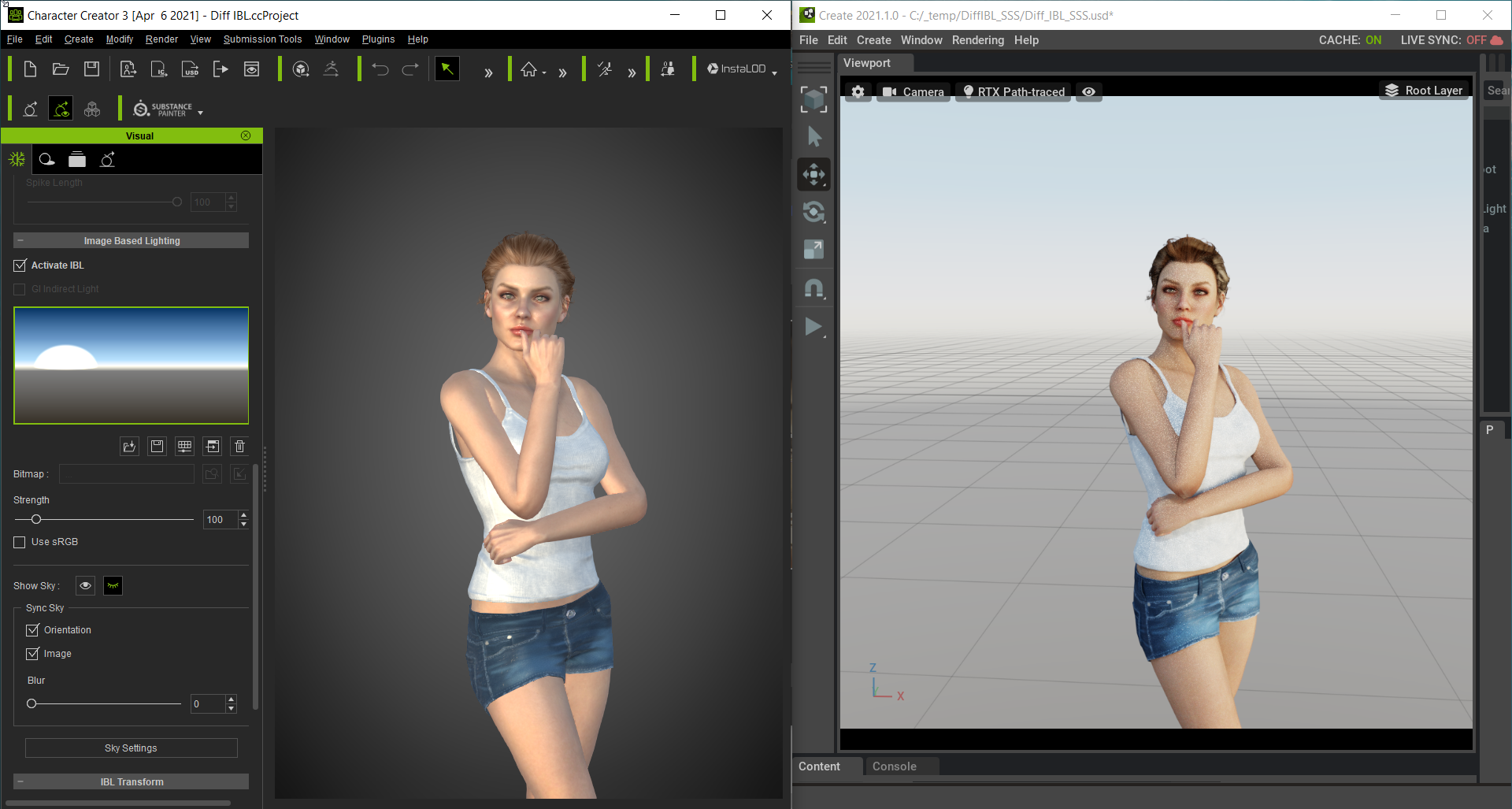
[Tips]
Users will need manually enable Dome Light after exporting USD format to Omniverse, with included lights and IBL (Omniverse Create > Path-Traced Render Mode).
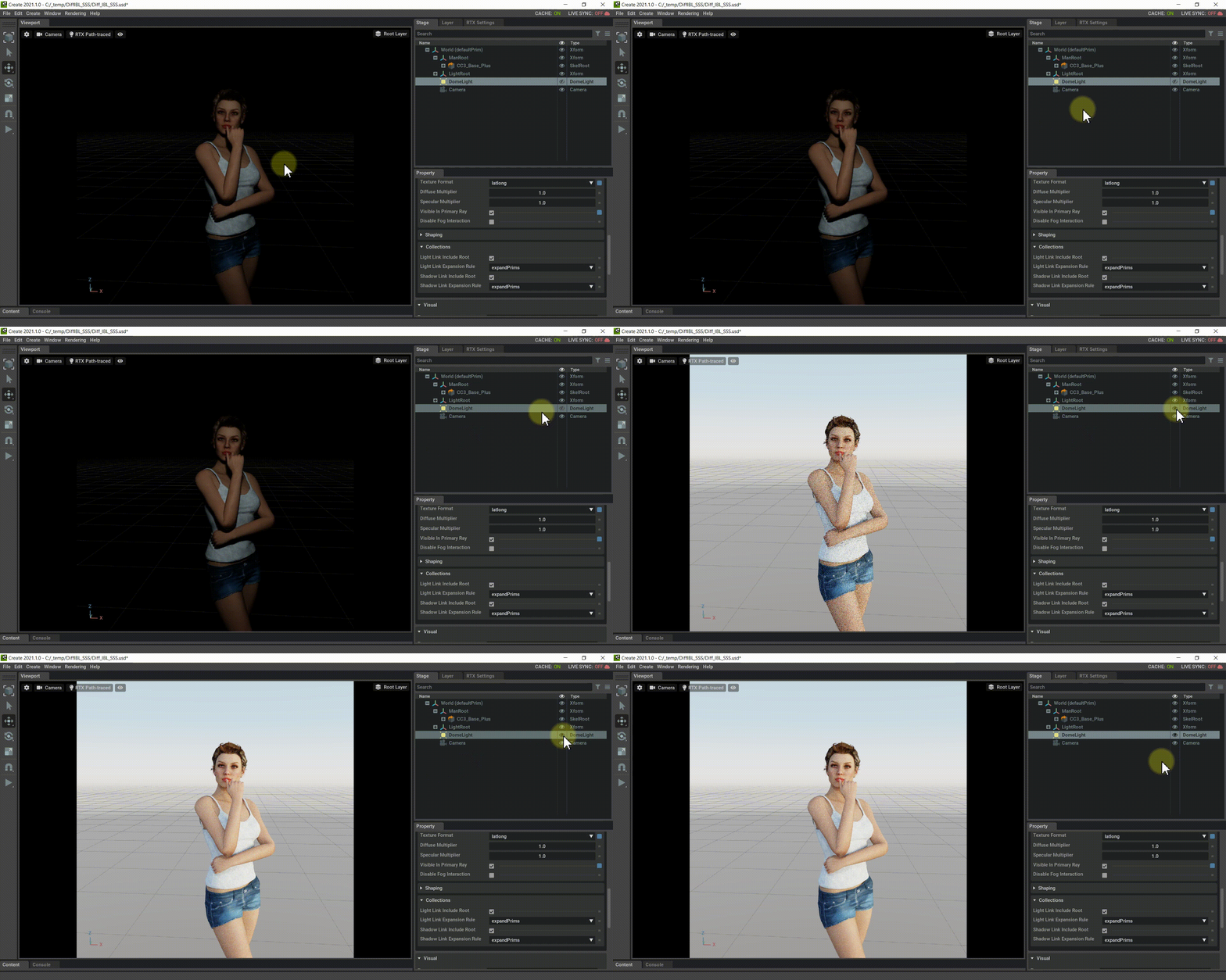
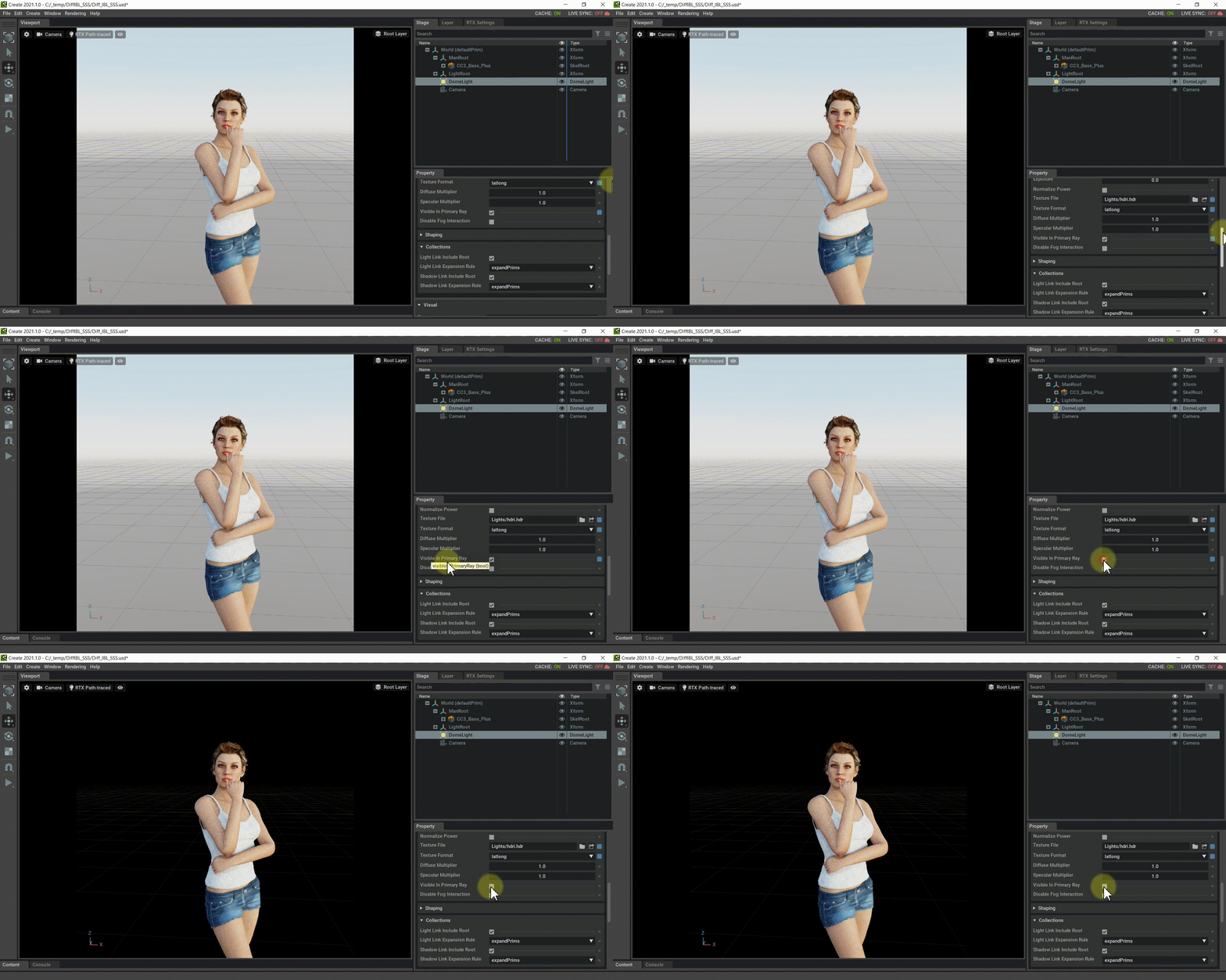
In order to keep the lighting from the Dome Light without the accompanying background, one can disableDome Light > Visible Primary Ray.
|
|
By Miranda (RL) - 5 Years Ago
|
Visual Differences: Material & Texture
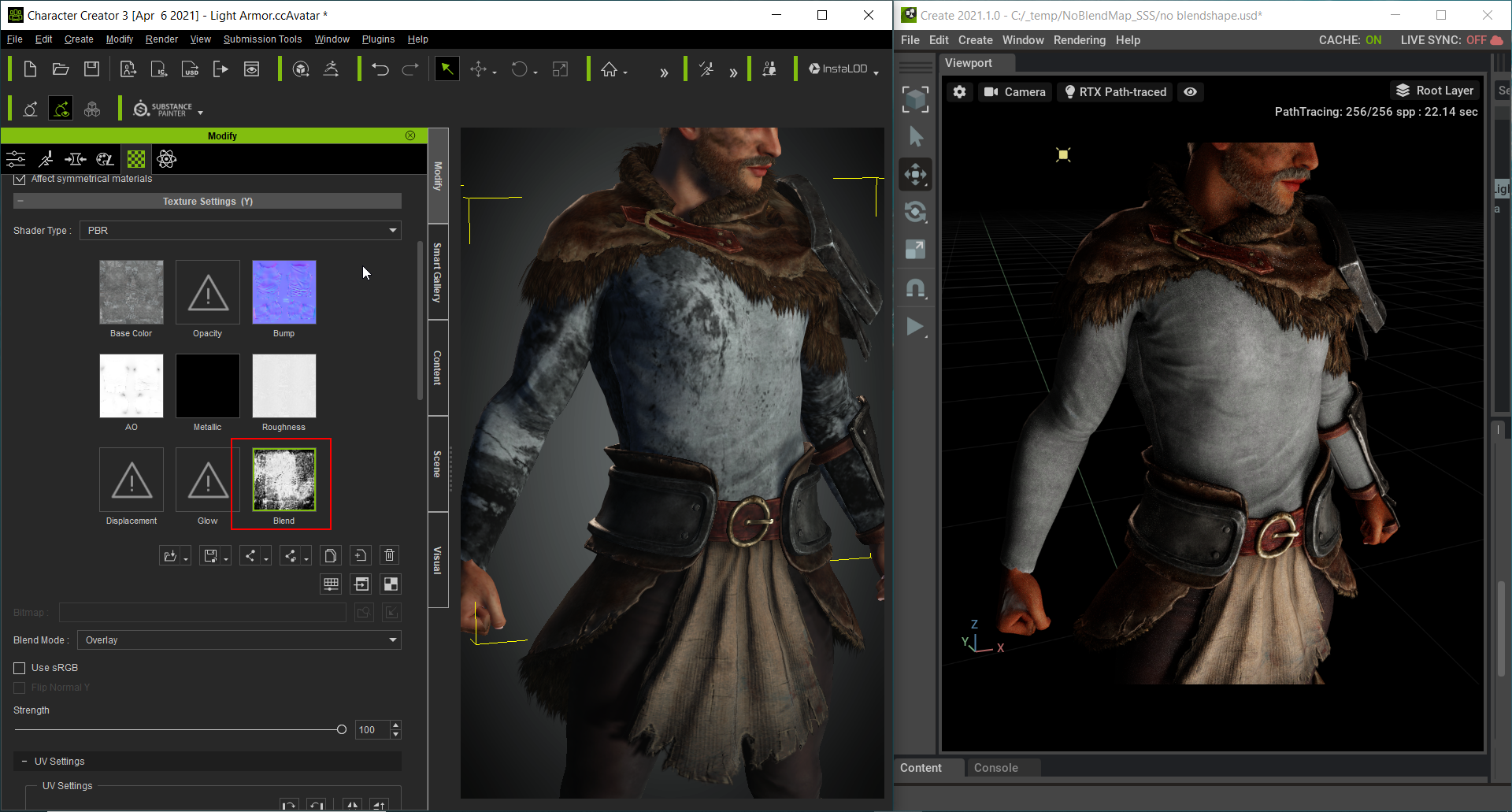
1. Displacement map and Blend map do not carry from Character Creator to Omniverse. - Left picture: A Blend map is applied to the armor.
- Right picture: Once the CC character is sent to Omniverse, the Blend map disappears.
2. Material settings, with the exception of Opacity Strength parameter, do not carry from Character Creator to Omniverse.- Case 1 - Diffuse Color value, Texture Strength does not carry into Omniverse.
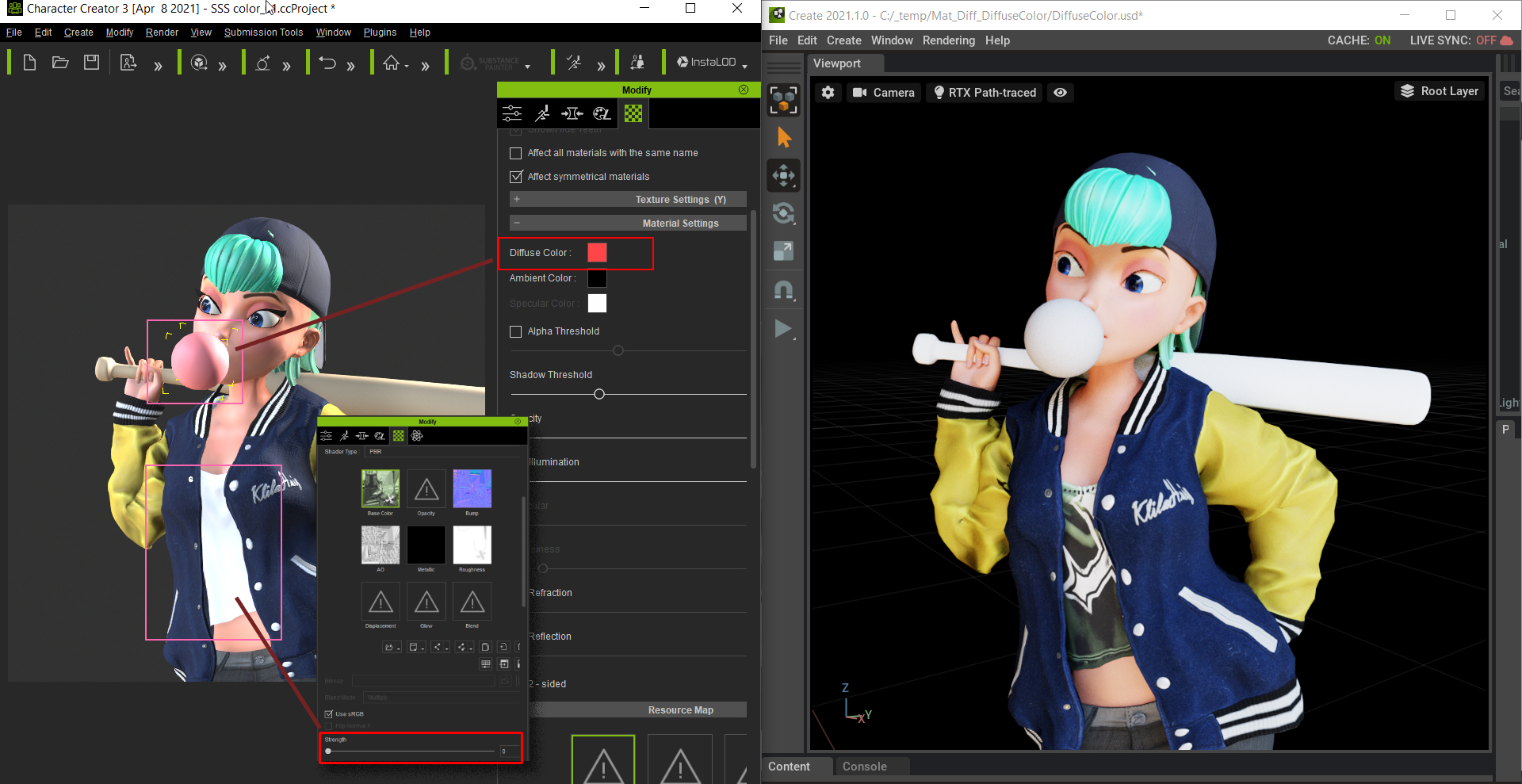
- Case 2 - Glow Textures behave different between the two software.
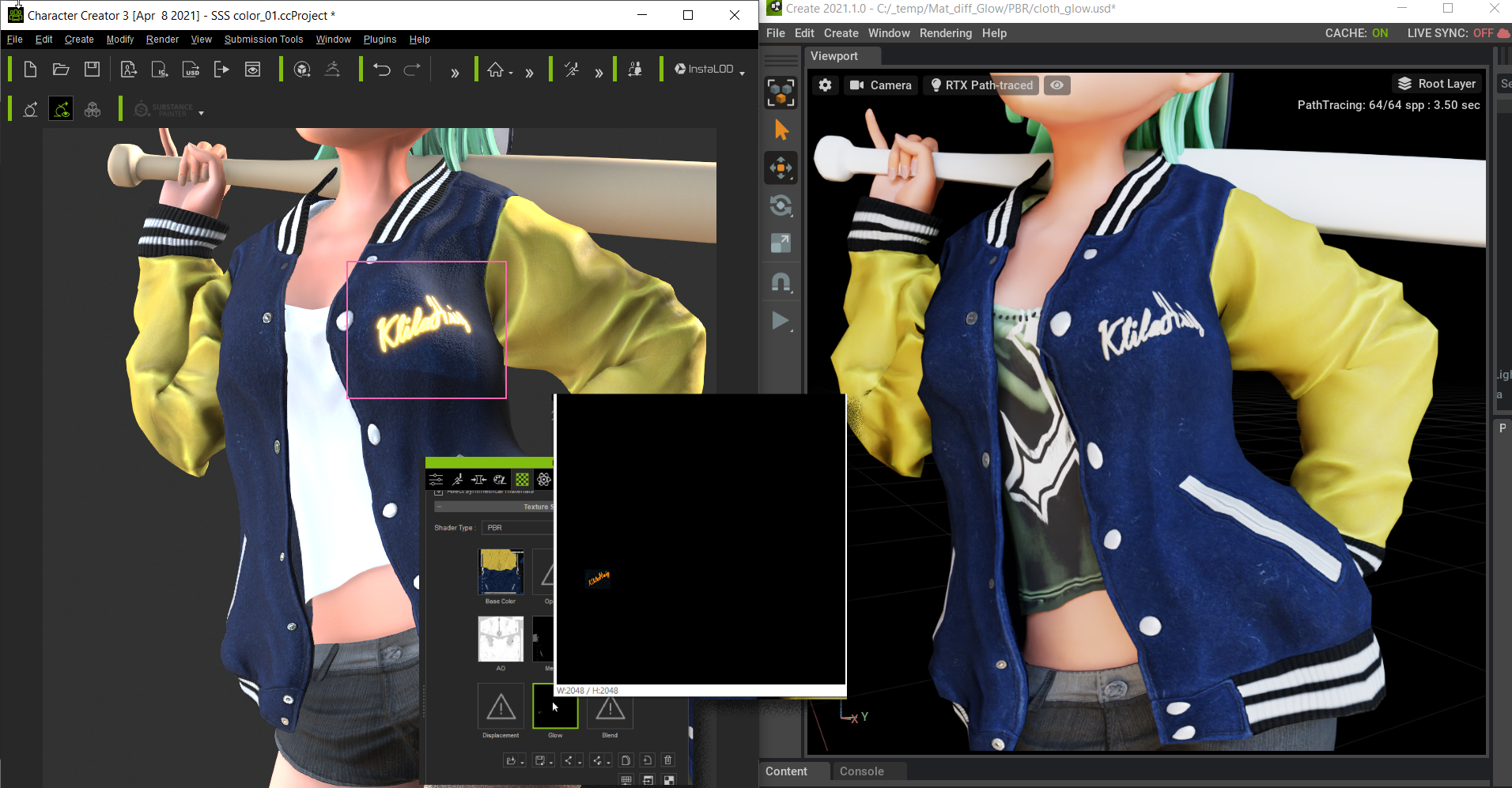
|
|
By Miranda (RL) - 5 Years Ago
|
Visuals - Known Issues & Tips (1)
SSS shader tends to create abnormal highlights and line segments
CC Omniverse Connector was developed for Omniverse Create 2021.1. There are some known issues with this version that will be subsequently addressed and resolved with the release of Omniverse Create 2021.2:
1. Appearance of excessively bright highlights with the SSS shader, e.g. oily lips.
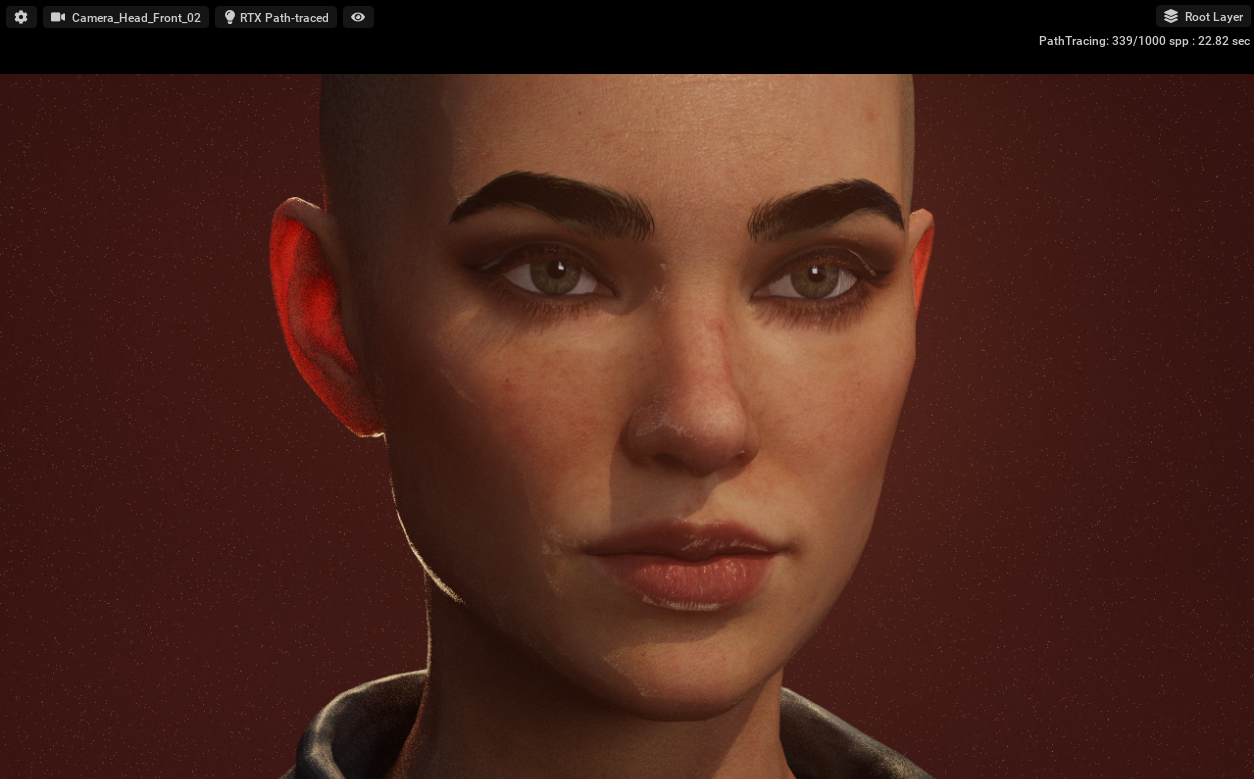
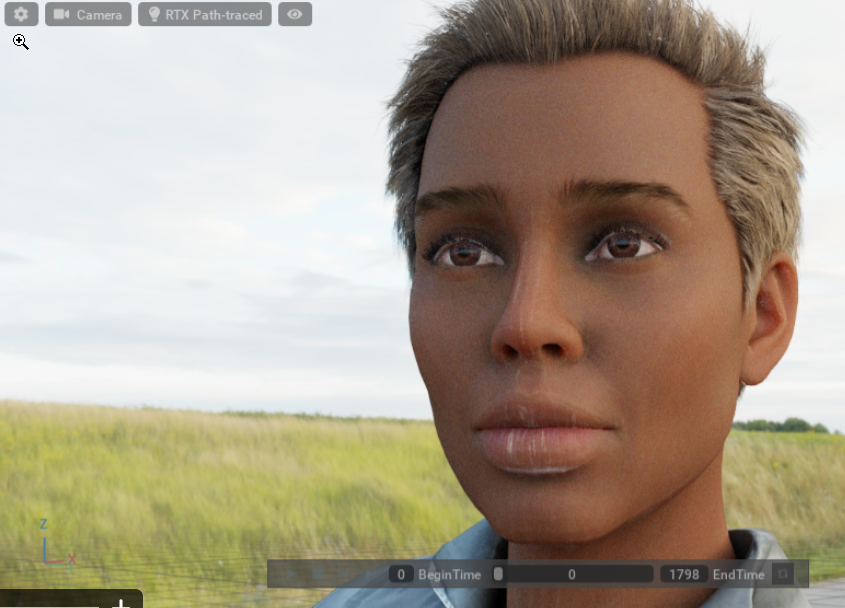
2. Appearance of line segments with the SSS shader, especially on the nose and jawline with the presence of an HDR enabled light dome.
|
|
By Miranda (RL) - 5 Years Ago
|
Visuals - Known Issues & Tips (2)
Opacity map defects in Omniverse Create with certain hair content
You will get the following results when exporting Caleb in USD format viaMaterial > Render Mode > RTX Real-Time:- Picture left: the original look in Character Creator.
- Picture right: the rendered result of the exported USD in Omniverse
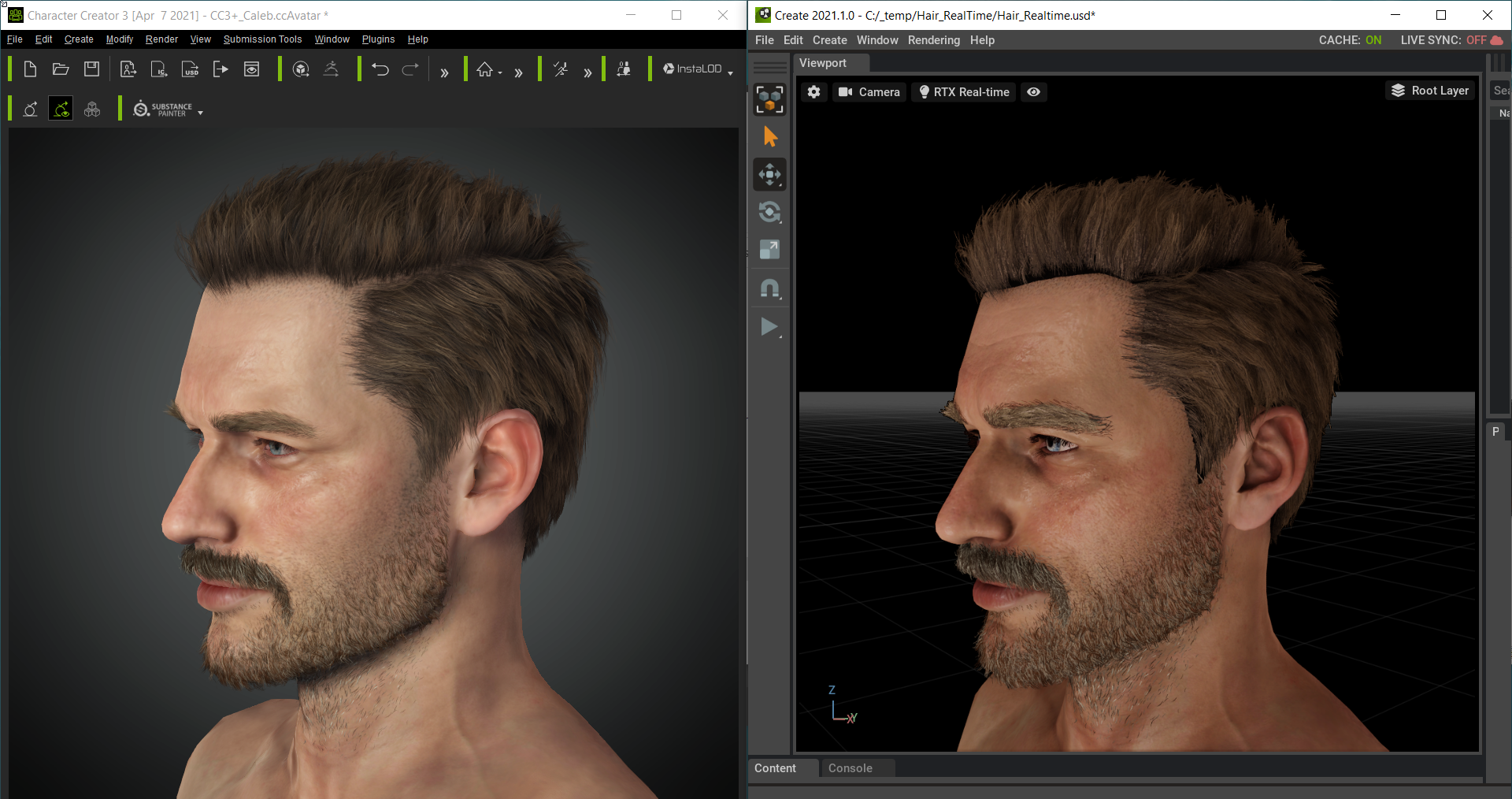
Tip: You can increase the transparency of the scalp by increasing the Opacity Threshold value.
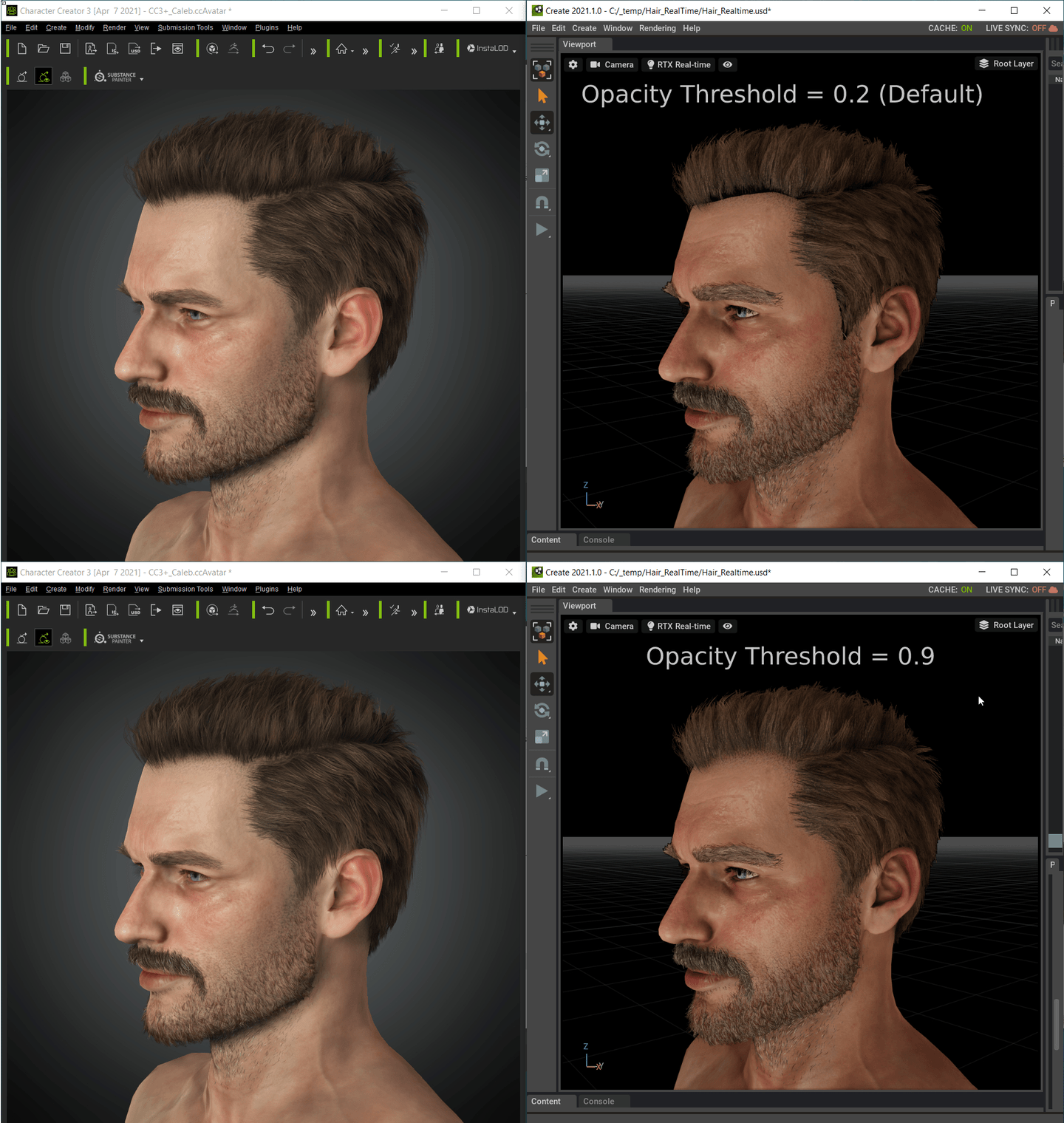
Watch the following video on how to adjust the Opacity Threshold value:
You will get the following results when exporting Caleb in USD format via Material > Render Mode > RTX Path-Traced:- Picture left: the original look in CC.
- Picture right: the rendered result of the exported USD in Omniverse.
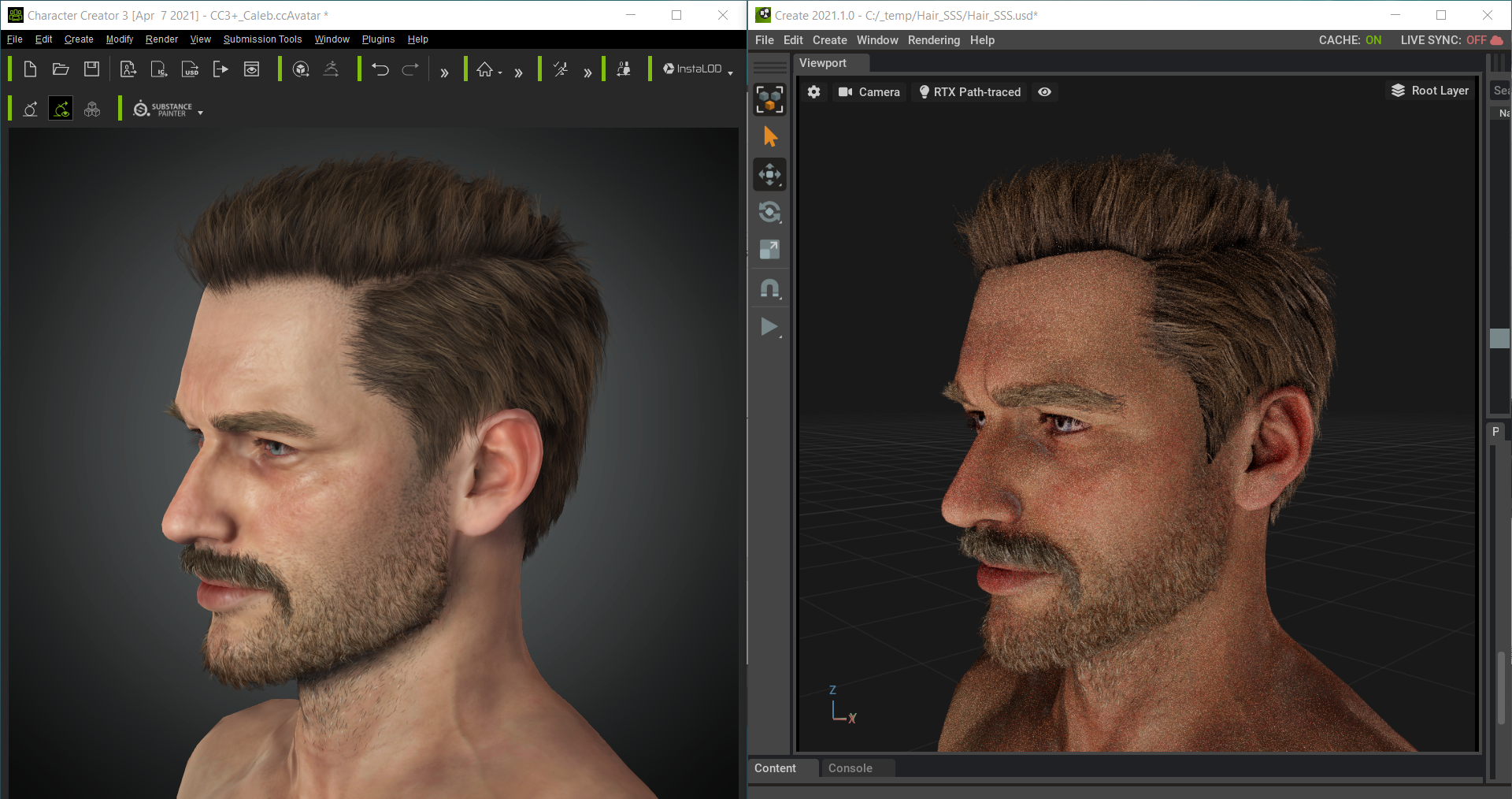
Tip: Disable the Enable Opacity Cutoff parameter.
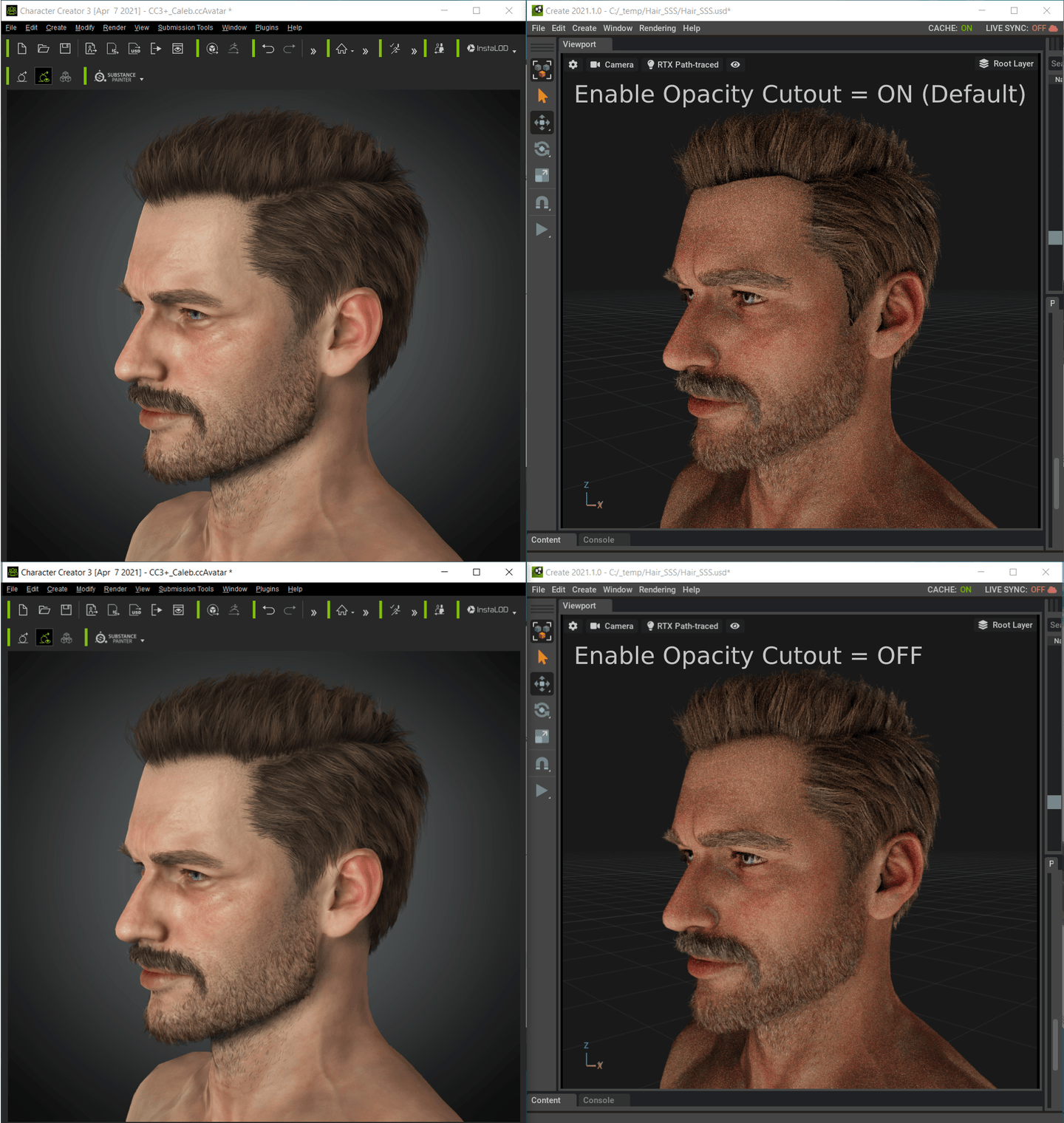
Watch the following video on how to disable the Enable Opacity Cutout option in Omniverse Create.
Note: Setting the default Enable Opacity Cutout value to OFF for the PBR hair shader as a work-around will reduce hair density by 90% in Omniverse Create. Therefore, it's recommended to counter each defect by manually adjusting the Cutout value.
|
|
By Miranda (RL) - 5 Years Ago
|
Visuals - Known Issues & Tips (3)
Mesh intersection among eye components (Tearline, Eye Occlusion, etc.) caused by the lack of suitable Omniverse shader
- Bottom left picture: A character in Character Creator.
- Bottom right picture: The same character brought over to Omniverse Create.
If you look carefully, you'll notice that parts of the Eye Occlusion mesh has intersected into the eyeball geometry.
|
|
By Miranda (RL) - 5 Years Ago
|
Animation - Known Issues & Limitations (1)
The character should be exported with the animation for the best possible result
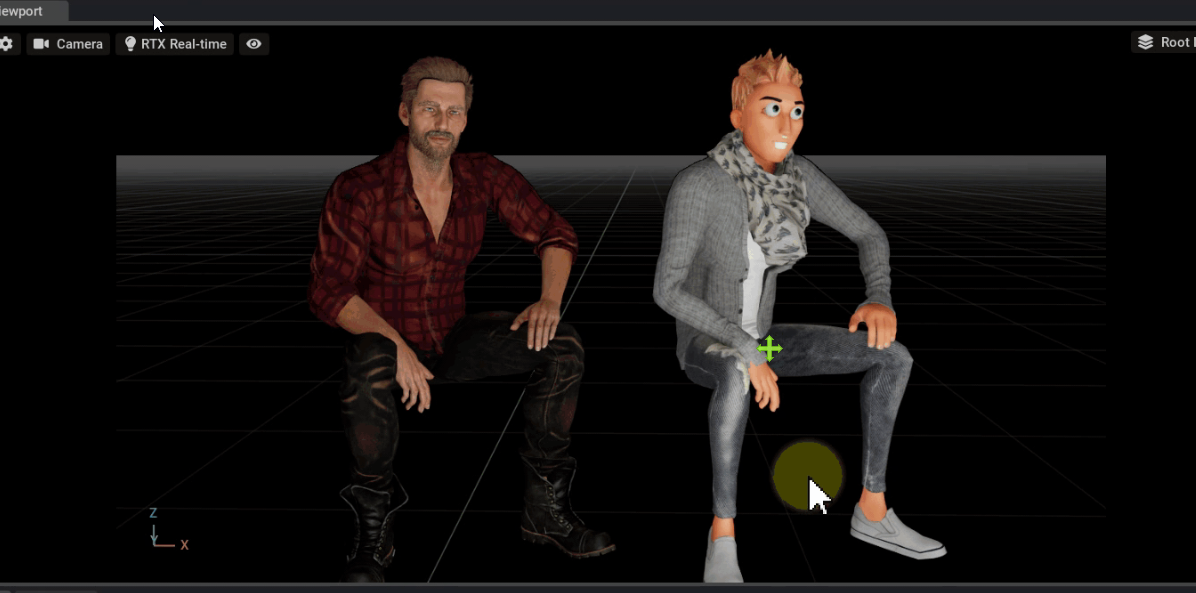
For example, animation applied from a standard proportion to a smaller character will give unexpected/erroneous results.
By exporting the character with the accompanying motion, the correct results can be had:
When a smaller character like "Slacker" is given a motion that was created for a standard sized character like "Caleb", we get the following abnormalities:
Cross-generational application of motion files will cause the eyes and teeth to offset.
A CC3 Plus motion is applied to a CC3 Plus character (on the left) and a CC3 cartoon character (on the right). Notice the teeth and eyes of the cartoon character have all displaced from their original positions.
|
|
By Miranda (RL) - 5 Years Ago
|
Animation - Known Issues & Limitations (2)
Physics soft-cloth and collision shapes not exportable to Omniverse
- Left side of the video: the physics soft-cloth simulation in iClone.
- Right side of the video: lose of soft-cloth simulation when exported to Omniverse.
|
|
By Miranda (RL) - 5 Years Ago
|
Animation - Known Issues & Limitations (3)
Spring Simulation not exportable to Omniverse
- Left side of the video: The spring simulation in iClone.
- Right side of the video: Loss of spring effects when exported to Omniverse.
|
|
By Miranda (RL) - 5 Years Ago
|
Animation - Known Issues & Limitations (4)
Physics rigid-bodies and constraints not exportable to Omniverse
Example: earring props from the G6 HAIR & ACCESSORY - HOTTEST HAIRSTYLES content pack.
- Left side of the video: Physics rigid-body and constraint effects in iClone.
- Right side of the video: Lose of physic rigid-body and constraint effect when exported to Omniverse.
|
|
By Miranda (RL) - 5 Years Ago
|
Animation - Known Issues & Limitations (5)
Accessory Animation Not Exportable to Omniverse
Example: tie accessory from the Toon Maker content pack.
- Left side of the video: accessory animation in iClone.
- Right side of the video: lose of accessory animation when exported to Omniverse.
|
|
By wires - 5 Years Ago
|
Very serious limitation for average user:
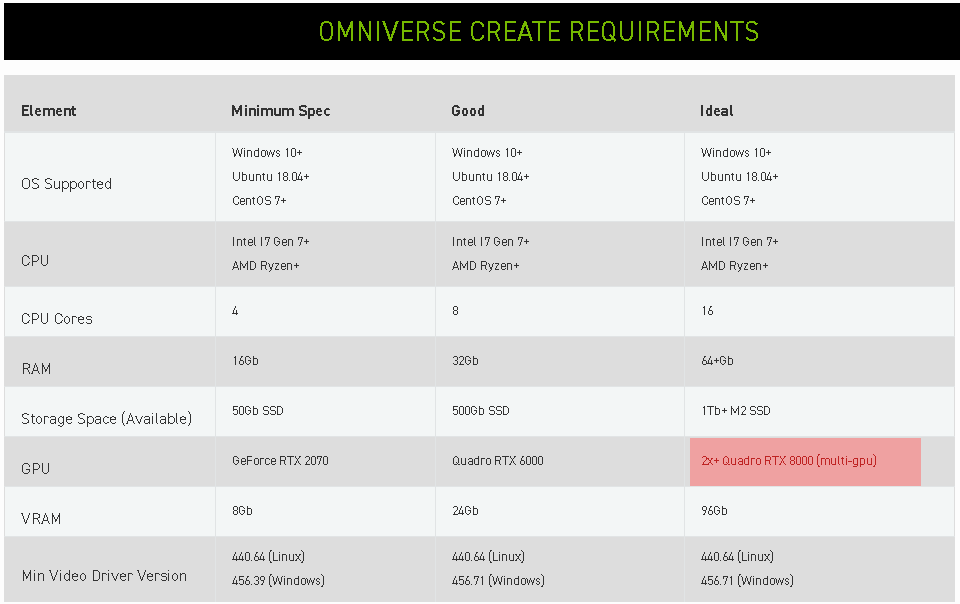
2 Quadro RTX 8000 for "Ideal" results = €13,000.00 + a PC box to run them in. :w00t::crying::pinch:
|
|
By Peter (RL) - 5 Years Ago
|
wires (4/12/2021)
Very serious limitation for average user:2 Quadro RTX 8000 for "Ideal" results = €13,000.00 + a PC box to run them in. :w00t::crying::pinch:
Well I'm using an RTX 2080 (which is only just above minimum by that Nvidia chart) and I haven't encountered any serious performance issues in my testing. Of course just like iClone and any other realtime software you have to learn how much you can add to a scene before performance starts getting affected. If you don't get too ambitious I think an RTX 2070/80 or RTX 3060/70/80 will still give excellent results.
|
|
By wires - 5 Years Ago
|
|
Peter (RL) (4/12/2021)
Well I'm using an RTX 2080 (which is only just above minimum by that Nvidia chart) and I haven't encountered any serious performance issues in my testing. Of course just like iClone and any other realtime software you have to learn how much you can add to a scene before performance starts getting affected. If you don't get too ambitious I think an RTX 2070/80 or RTX 3060/70/80 will still give excellent results.
Good grief, why would anyone want to get ambitious with their creative work? :Whistling: Less than "Good" and way below "Ideal" should be OK, I dread to think just what Nvidia consider to be adequate for fully fledged broadcast results. :w00t:
|
|
By Miranda (RL) - 4 Years Ago
|
Visuals - Known Issues & Tips (5)
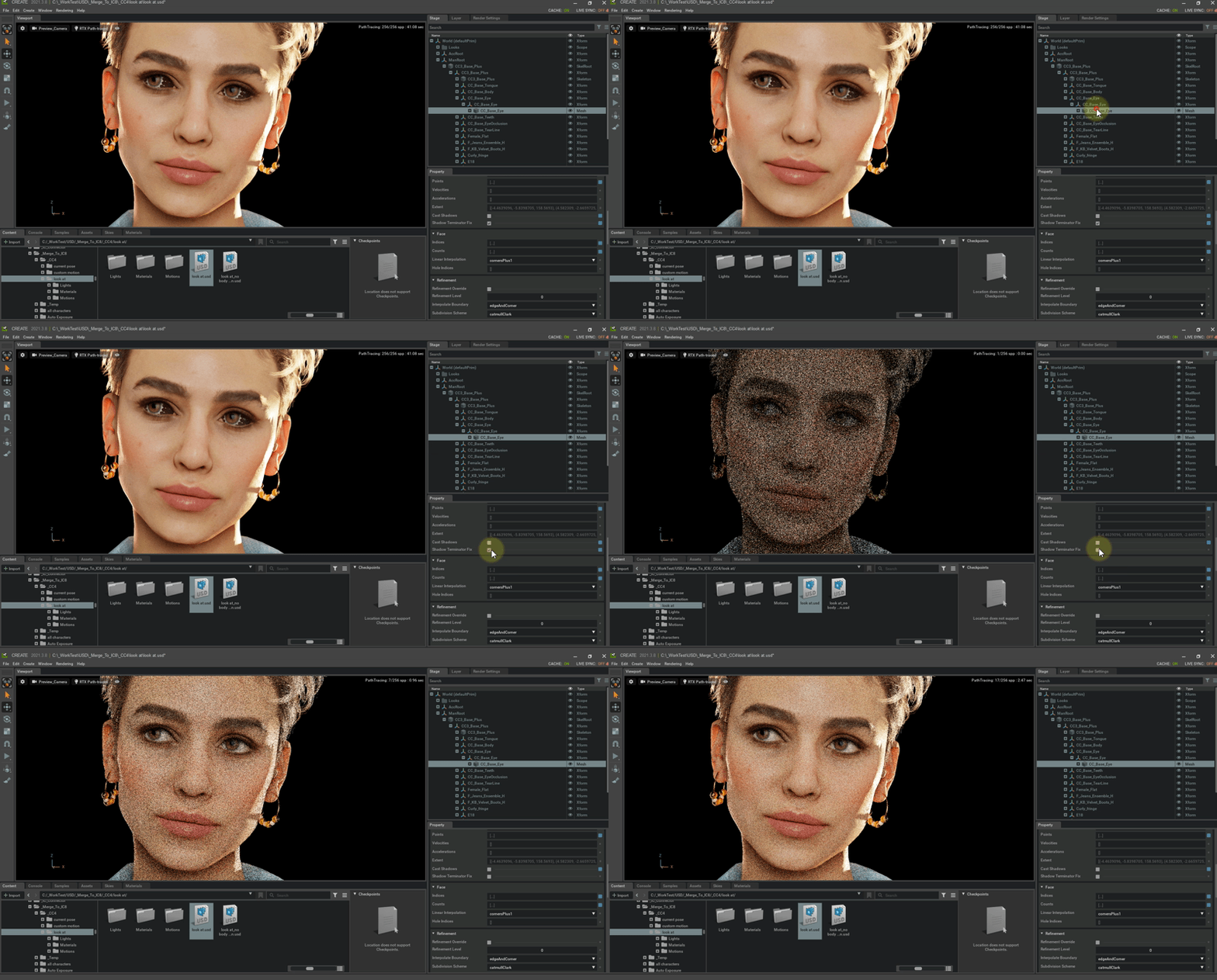
Shadows cast from meshes with alpha textures onto a non-flat surface will have jagged edges.
This issue persists for Create 3.7 and 3.8, and we have reported it to NVIDIA Omniverse team.
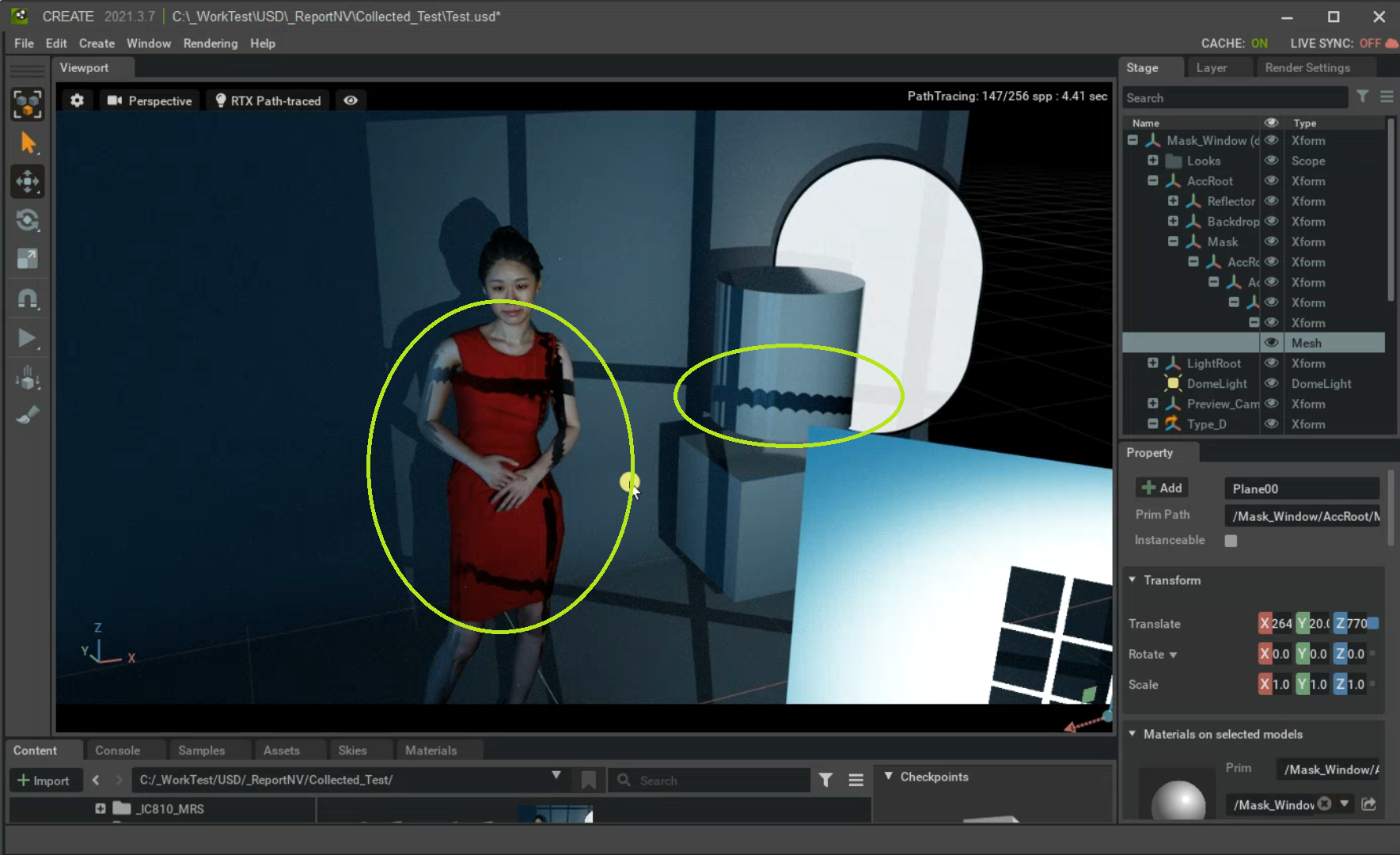
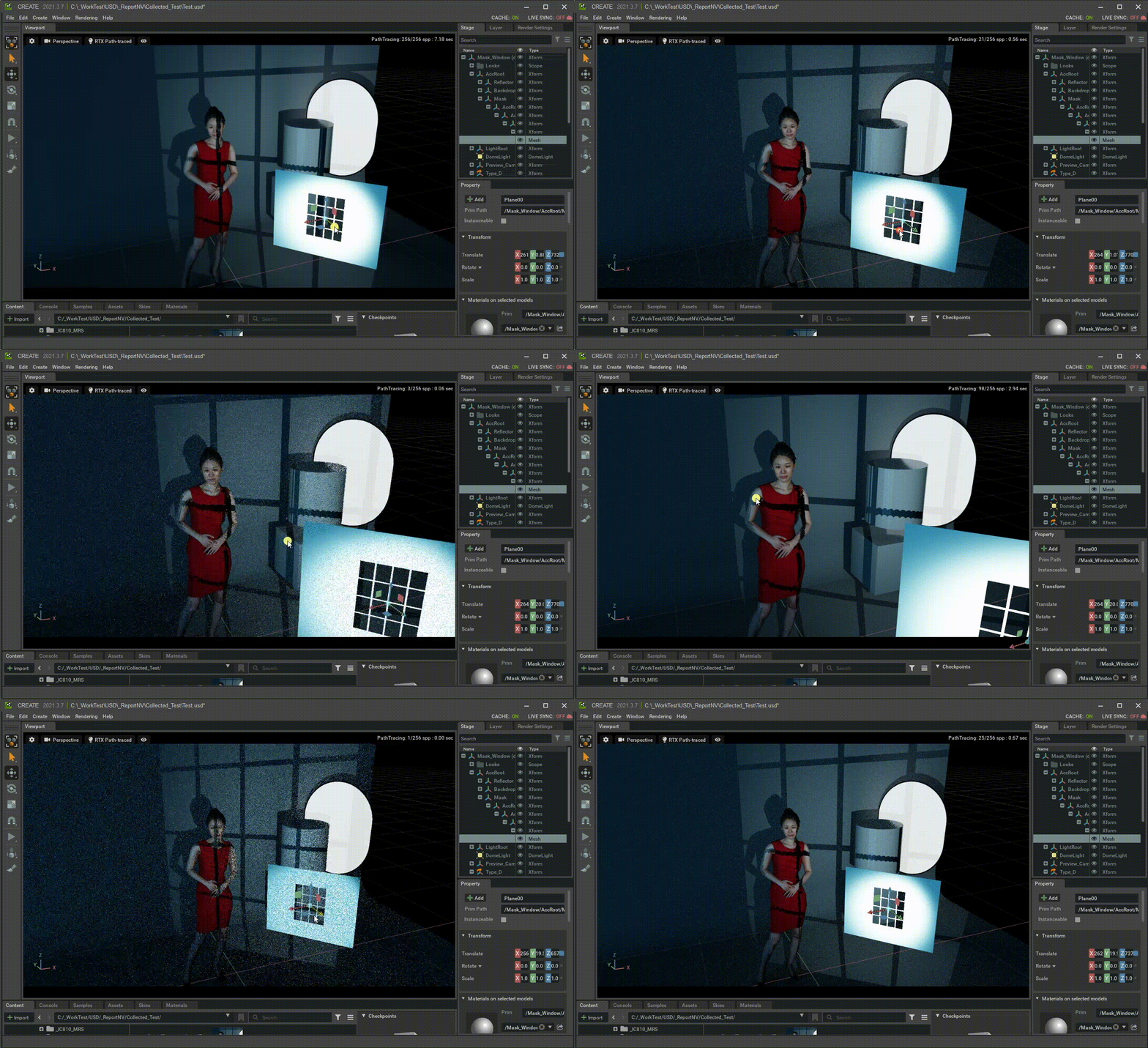
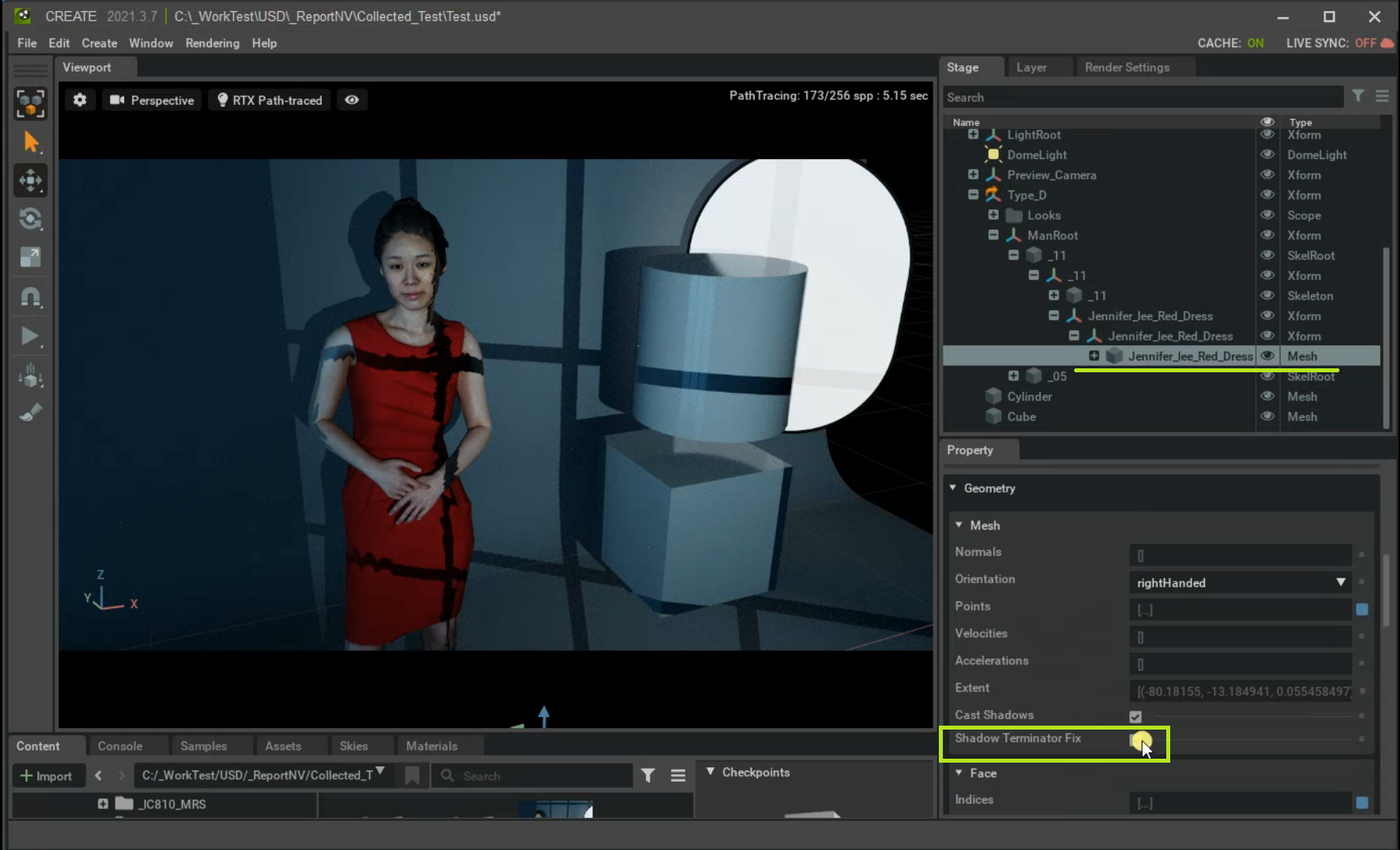
[Workaround]
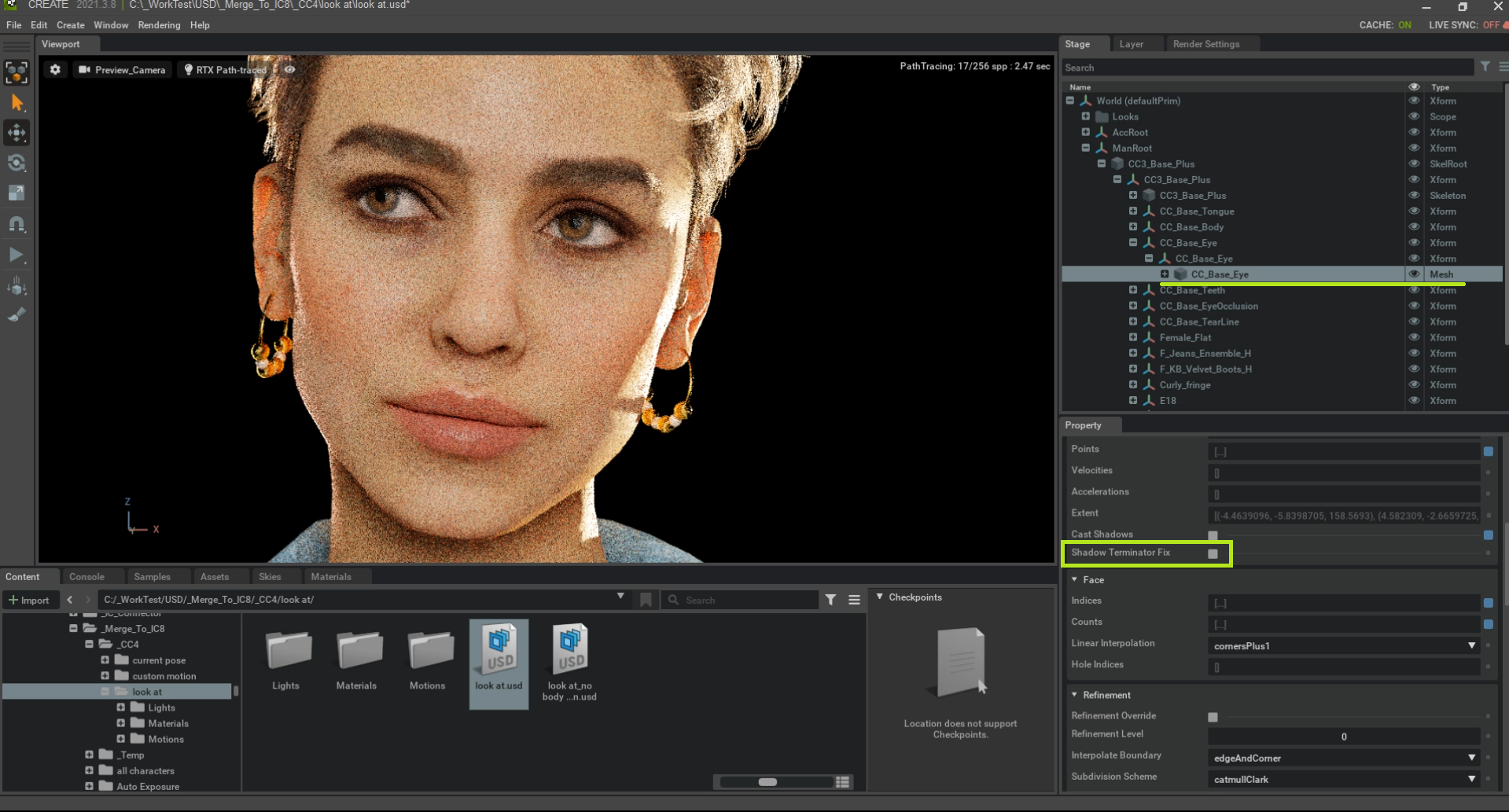
Select the problematic object’s mesh node and turning off Shadow Terminator Fix.
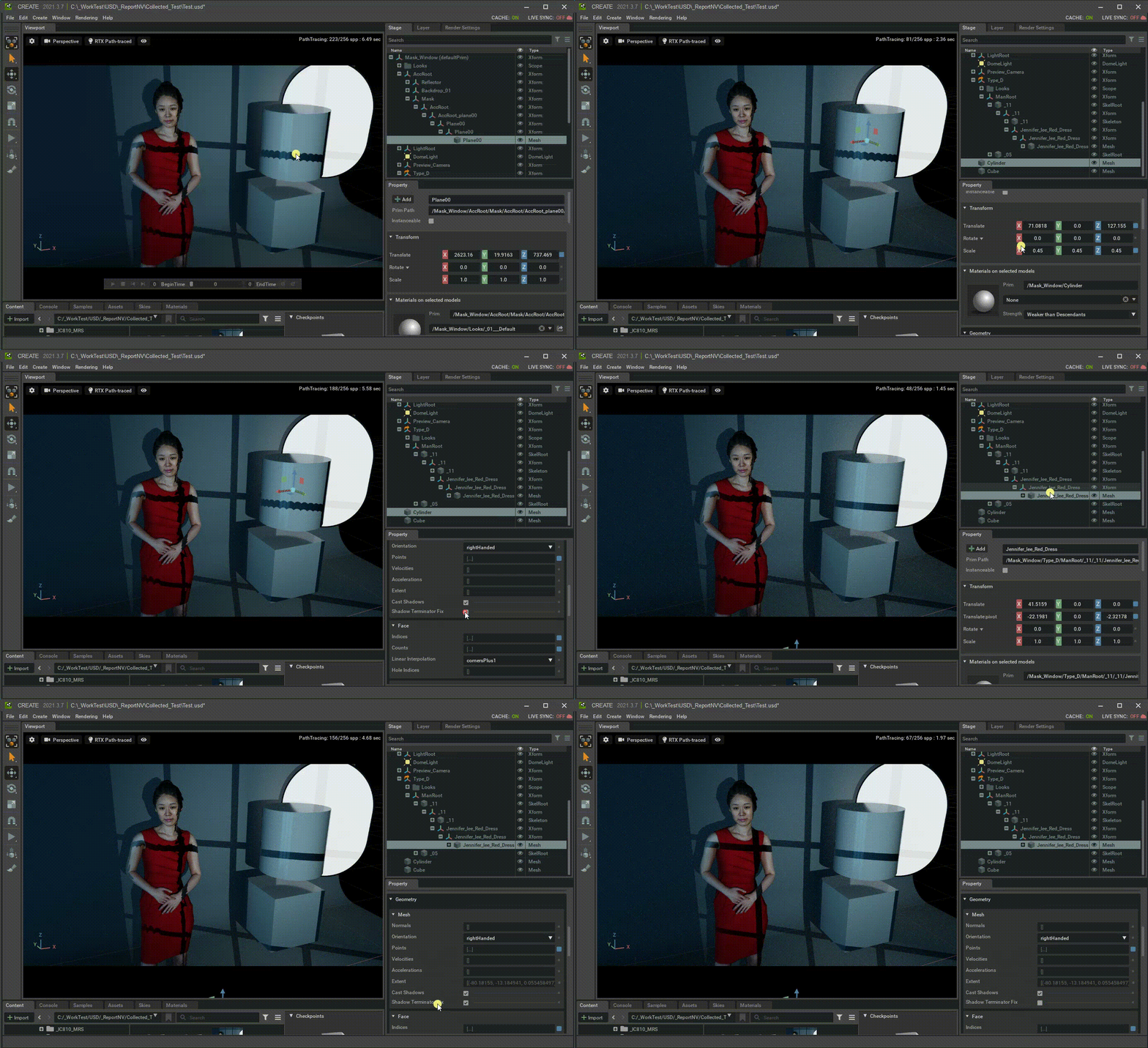
|
|
By Miranda (RL) - 4 Years Ago
|
Visuals - Known Issues & Tips (6)
Strange black spots on the character’s eyeballs.
This issue persists for Create 3.8, and we have reported it to NVIDIA Omniverse team.
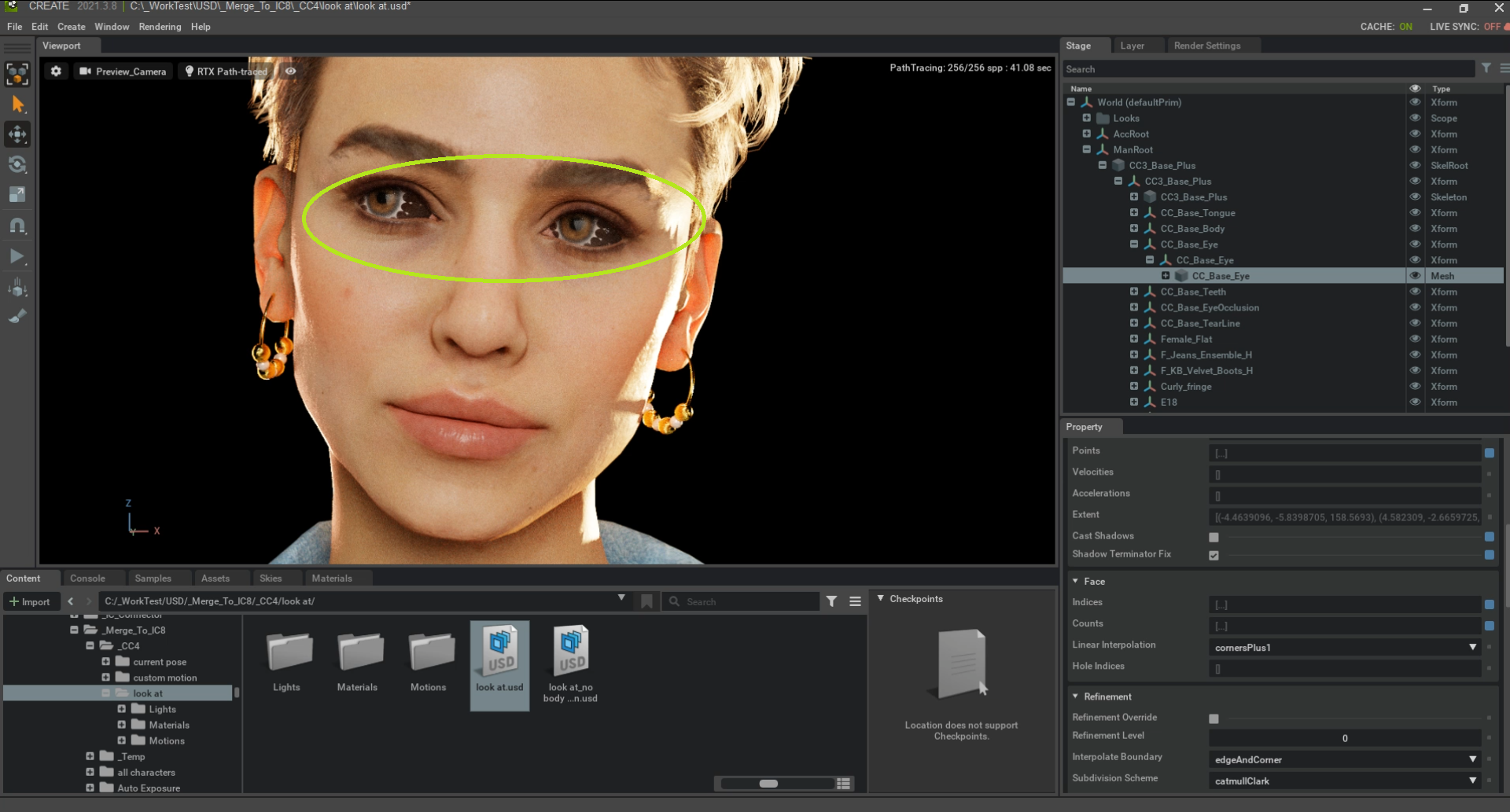
[Workaround]
Select the problematic object’s mesh node and turning off Shadow Terminator Fix.
|
|
By Jean-Sé - 4 Years Ago
|
Miranda (RL) (4/12/2021)
Animation - Known Issues & Limitations (2)Physics soft-cloth and collision shapes not exportable to Omniverse - Left side of the video: the physics soft-cloth simulation in iClone.
- Right side of the video: lose of soft-cloth simulation when exported to Omniverse.
,
Is this something that will be possible in the (near) future ?
Thanks.
|
|
By wintoons - 4 Years Ago
|
I know that Omniverse is working on their own cloth physics, which would probably explain why cloth physics on iClone can't be transferred to Omniverse.
I'm guessing you would have to do the cloth physics (as well as hair physics) in Omniverse instead.
|
|
By animagic - 4 Years Ago
|
It's more a limitation in what is currently exported. USD is a geometry cache format (like Alembic), so everything is baked on export. Once RL figures out how to export vertex animation, you would have cloth and hair physics.
The alternative that you bring up would require that physics is applied in Omniverse to hair and clothing. It should be possible.
I believe hair and clothing come in as separate items, and if that is so, physics could be applied provided that the body mesh can function as collision shape. Just speculating here though...:unsure:
|