|
By jerome.dipietro - 4 Years Ago
|
Is there any way to flip Element normals (I know there's an 'Edit Normals' menu that allows you to flip an entire object but I have DAZ clothes that have just parts of an item flipped.
I'm a bit too far down the rabbit hole to go back to the original DAZ FBX. Would there be an easy way to go into Blender and then straight back into CC3 without having to redo all my skin weights and mesh conforming?
|
|
By 4u2ges - 4 Years Ago
|
Blender is a way to go. General workflow:
Save all materials for cloth which you need to amend. Save Project.
Export to FBX with Blender option, as Mesh only, uncheck "Embed Texture". This would create an FBX key so you can bring avatar back to CC.
Import to Blender, do what you need to do with piece of cloth fixing the problem.
Export out of Blender overriding original import (just easier to have FBX key loaded automatically). All default setting except uncheck "Add Leaf Bones" in Armature section.
Import back to CC with "Create Cloth, Hair, Acc (with FbxKey)". Make sure to select the same layer number for amended cloth at the prompt.
Save amended cloth.
Load original project.
Apply amended cloth (overriding existed).
Reapply saved materials to the amended cloth.
Done!
|
|
By jerome.dipietro - 4 Years Ago
|
|
Such clear and useful information . Thank you!
|
|
By jerome.dipietro - 4 Years Ago
|
Sorry, but I'm stuck with regards to the FBXKey.
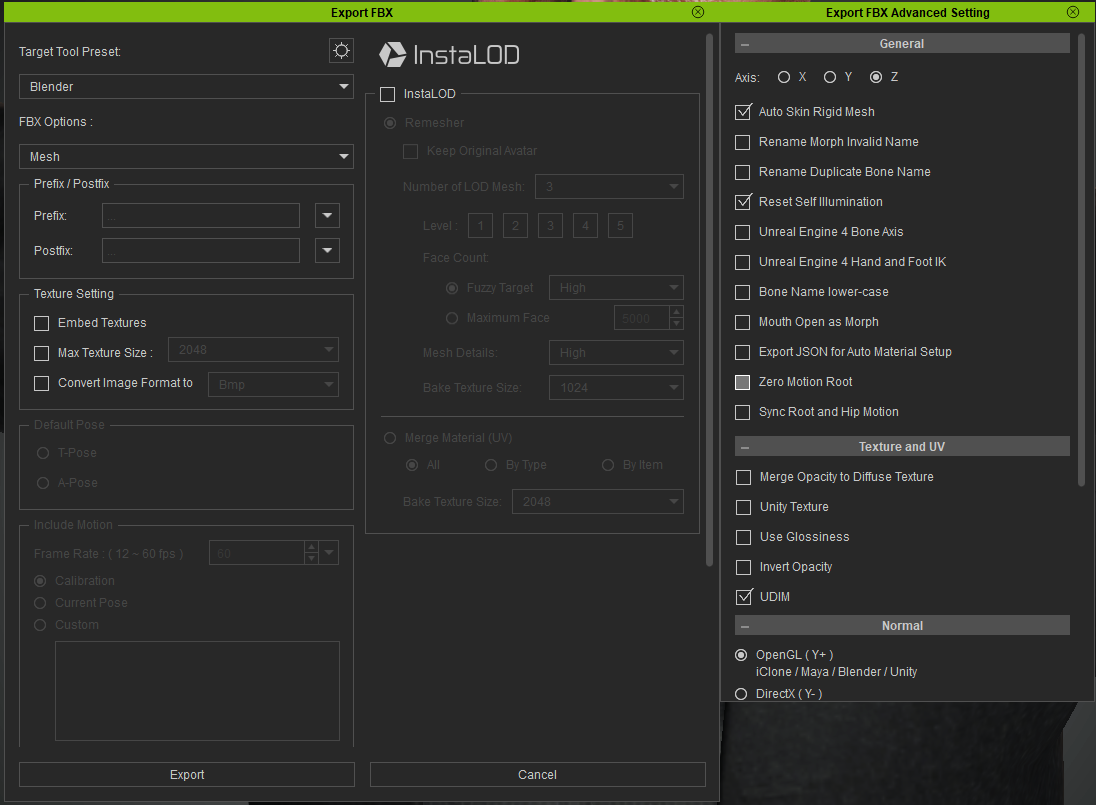
I've tried exporting the FBX (Blender Preset, mesh only) with both Embed textures, and without, and both times I only get the FBX, no sign of an FBXKey file being generated.
Then when I try to reimport (after working in Blender) using "Create Cloth, Hair, Acc (with FbxKey)" I get 'FBXKey file path is empty' as an error and can't proceed. It obviously wants the Decrypt Key File but none is being generated. I'm on CC3.4 Pipeline.
Is there some additional setting I need to tick?
|
|
By 4u2ges - 4 Years Ago
|
Scroll down the FBX applet and see if you have Delete Hidden Faces Checked. If you do, export would not create a key. You need to uncheck it.
|
|
By jerome.dipietro - 4 Years Ago
|
|
It's already unchecked :ermm:
|
|
By 4u2ges - 4 Years Ago
|
You mean you go to the export folder in Windows Explorer and do not see the key?
I just created it exporting with the same setting as you have tried.
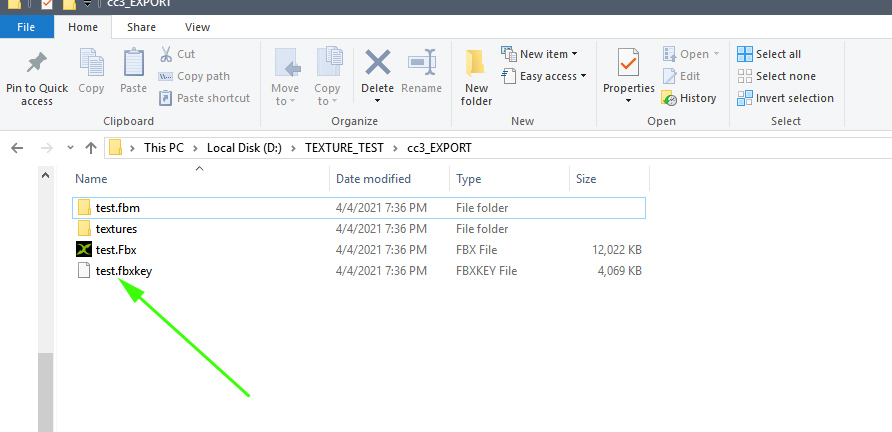
One more thing, which I am not sure whether it would stop generating the key or not. That is, do you have a Pipeline version?
|
|
By jerome.dipietro - 4 Years Ago
|
|
Thanks 4u2ges. Really appreciate all your help with this.
So yes I have the Pipeline version, and no definitely no FBXKey is being generated but I now know why, although it's a bit of a pain...
I'm exporting a GameBase character and I'd decimated the clothes using InstaLOD. Seems that either or both of these means that no FBX key is generated on export, which means apparently no way to bring things back in from Blender. When working from the original highpoly CC3+ and Cloth items, then everything works as you describe.
What a shame!
|
|
By 4u2ges - 4 Years Ago
|
Ahh, yeah. Game base is only for the export.
There maybe another way. You may transfer weight paint data between same cloth items attached to different avatars (if that can help in any way) in Blender.
Select cloth on the destination avatar (the one you can bring back to CC), Shift + select cloth on Source Avatar (game base I suppose), Ctrl+L > Object Data
Or you can simply save cloth, attach to different avatar, round trip to Blender and Save/attach cloth the game base.
|
|
By jerome.dipietro - 4 Years Ago
|
Will try that. Second option seems the simplest :)
Thanks again. Much appreciated
|
|
By Rampa - 4 Years Ago
|
3DXchange has individual normal flipping. See here:
https://manual.reallusion.com/3DXchange_7/ENU/Default.htm#3DXchange_7/Pipeline_7.0/04_Modify_Page/Normal_Section/The_Concept_Of_Normal.htm%3FTocPath%3DSection%2520Details%2520in%2520Modify%2520Page%7CNormal%2520Section%7C_____1
https://manual.reallusion.com/3DXchange_7/ENU/Default.htm#3DXchange_7/Pipeline_7.0/04_Modify_Page/Normal_Section/Flipping_The_Normal.htm%3FTocPath%3DSection%2520Details%2520in%2520Modify%2520Page%7CNormal%2520Section%7C_____3
|
|
By 4u2ges - 4 Years Ago
|
Oh, and one more (I keep forgetting about this one :)). You can bring back cloth only as an accessory and then transfer weight paint by selecting the same saved cloth item with weight paint in Transfer Weight Paint applet.
@Rampa
You can do this in CC too (almost). But unfortunately with object only. Yes 3DX has an option to select a mesh, but not individual faces, where sometimes only a few faces are imported flipped for the object/mesh as a result of developer or others negligence.
|
|
By jerome.dipietro - 4 Years Ago
|
"transfer weight paint by selecting the same saved cloth item with weight paint in Transfer Weight Paint applet"
Genius! I'd never spotted that applet. That's got to be the best option. Thanks again
|