|
By path.to.the.future - 6 Years Ago
|
Hi RL staff, I have recently updated to CC3.3 and bought your 3-in-1 morph/skingen/makeup pack. However, I encountered multiple issues that need to be fixed ASAP.
1. I use Blender 2.83 and the 3.3+ female default base, and when I import the OBJ with Z up, the feet aren't on the ground plane.
2. The imported OBJ's texture is totally misplaced UPON IMPORT, ie: face is on the neck, the rest of body looks like frankenstein.
3. For morph slider creation purposes, the import/export settings changed again. The past solutions posted in the forum aren't working anymore. Please post an official instruction for this.
4. What is the big idea to put a big opaque watermark in middle of the screen when using those purple named ultimate morph sliders?! That is very very annoying when trying to make characters. I paid for the package, don't give me such free tier treatment please.
5. This is from CC3.2, but I highly suspect that the problem still exists. I exported a male clothed character as OBJ and the head and body (minus legs and arms) textures are linked to reflection map by default. Linking to correct maps also doesn't give correct appearance.
6. Why does 3.3+ base mesh has such unnaturally thick nose? It took me a lot of time to try to fix it with all the watermarks and the morph slider creation issue.
For me, the only good side of 3.3 update is that 3.3+ base mesh looks more professional.
Edit1: It appears that the software's DRM is broken. It doesn't recognize that I purchased the ultimate morphs.
|
|
By 4u2ges - 6 Years Ago
|
|
1. I use Blender 2.83 and the 3.3+ female default base, and when I import the OBJ with Z up, the feet aren't on the ground plane
The entire Import/Export routine needs an overhaul. Starting with that Z-offset and ending with new Bind-pose, which supposed to substitute a T-pose, but it is not.
Wait till you try to do anything with FBX export - fitting something in Blender and try to bring it to CC separately, or tweaking some existed item...
2. The imported OBJ's texture is totally misplaced UPON IMPORT, ie: face is on the neck, the rest of body looks like frankenstein.
Check the source of the texture files in Blender: https://forum.reallusion.com/FindPost454898.aspx
3. For morph slider creation purposes, the import/export settings changed again. The past solutions posted in the forum aren't working anymore. Please post an official instruction for this.
Yes, it does not work anymore, updated: https://forum.reallusion.com/FindPost454125.aspx
|
|
By path.to.the.future - 6 Years Ago
|
Thanks for the reply, at least the frankenstein skin can be manually fixed for now and morph creation works.
Edit1: my old CC3.2 male character is pulling maps from the right fodder, but it's still mismatched
|
|
By 4u2ges - 6 Years Ago
|
No problem.
Did you convert your male to 3.3+? Because mismatch caused by wrong texture for the given base.
|
|
By path.to.the.future - 6 Years Ago
|
I just converted the male character to 3.3+, and the problem persists! Manually relinking map still doesn't work!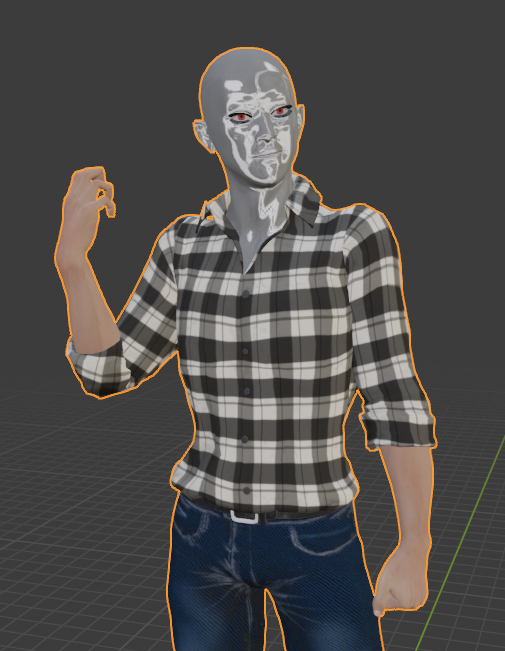 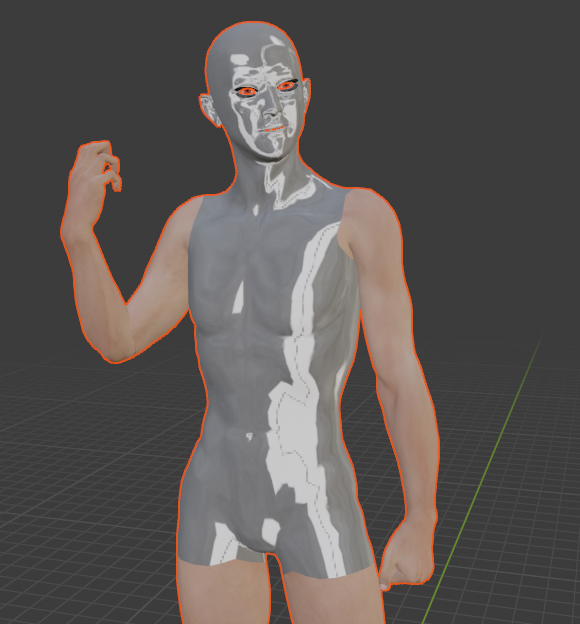 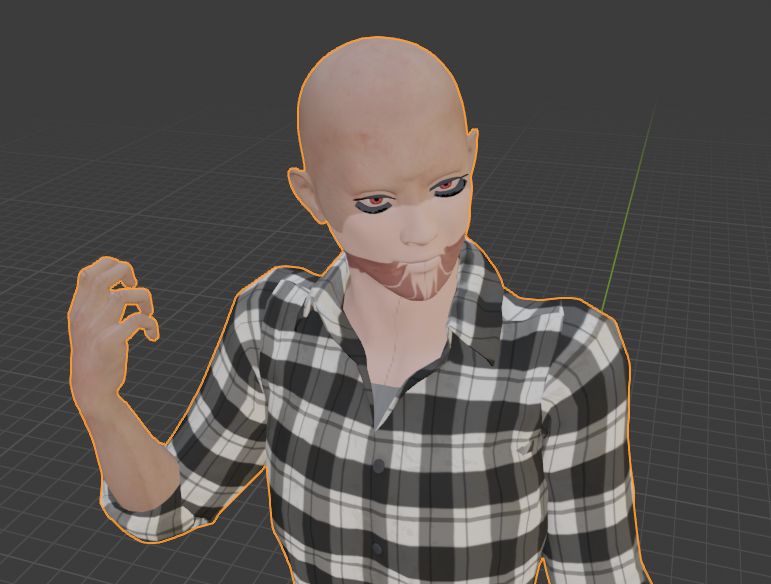
|
|
By 4u2ges - 6 Years Ago
|
That looks scary :(
Feel free to add your comment and screenshots here: https://www.reallusion.com/FeedBackTracker/Issue/Texture-mismatch-when-exporting-to-OBJ-or-FBX
|
|
By mary3233 - 6 Years Ago
|
@ path.to.the.future
I noticed the problem with the purple named morph sliders too! All morph sliders in my CC Template folder "Essential Body Morphs" are purple named and not useable without a watermark Did you find any solution for make these sliders work?
|
|
By Peter (RL) - 6 Years Ago
|
|
path.to.the.future (8/17/2020)
4. What is the big idea to put a big opaque watermark in middle of the screen when using those purple named ultimate morph sliders?! That is very very annoying when trying to make characters. I paid for the package, don't give me such free tier treatment please.
You shouldn't be getting any watermarks onscreen if you have purchased the Ultimate Morphs. Do check you are online when using the morphs, and if the problem continues please try going to Help > Activate Entire Library in CC3 to make sure all your purchased content has been correctly activated.
For the other issues, please make use of the Feedback Tracker and the CC team will investigate the problems and give you further feedback there. Just posting on the forum may lead to issues being missed.
Thanks.
|
|
By path.to.the.future - 6 Years Ago
|
My purchase is complete with invoice and I'm online. I tried all the activate options in Help menu and it didn't help at all. I opened ticket and got no response so far.
|
|
By mary3233 - 6 Years Ago
|
|
@ path.to.the.future 4. What is the big idea to put a big opaque watermark in middle of the screen when using those purple named ultimate morph sliders?! That is very very annoying when trying to make characters. I paid for the package, don't give me such free tier treatment please. ......like mentioned above, I had the same problem. Got response from CC Team, there was a problem with the package. Open CC, go to smart gallery, select "ultimate morph" and uninstal (right mouse click). Then reinstal (again right mouse click), so the adjusted package ist redownloaded and all sliders work
|
|
By sean_UK3D - 6 Years Ago
|
Mary 3233,
Thank you for posting this fix. After trying all the obvious things I was waiting patiently for support to get back to me. So glad I checked the forum as your solution worked. No more purple sliders and no annoying watermarks. Uninstall and reinstall I did think of that but being a newbie was affraid I might make matters worse.
Happy days. :-)
|
|
By path.to.the.future - 6 Years Ago
|
Thanks, I got the RL reply too and this issue is fixed. Now I just need them to fix the male character's export texture mismatch. I just retested, the 3.3+ male base seems fine. It's the 3.2 males bases that go all silvery.
|