|
By Peter (RL) - 6 Years Ago
|
Dear iClone Users,
We have now released the 7.8 update for iClone which as added some exciting new features plus the usual bug fixes. However, as always we still need your assistance to help us track down any bugs, glitches or other annoying issues that may still remain.
Important: If you do find any bugs, issues or glitches in iClone 7.8, please can you report them first in the Feedback Tracker. Then feel free to discuss the issues in this thread but do try to include a link back to the original Feedback Tracker report or your tracker number.
As always it will help us greatly if we can keep all technical issue discussion in the one place (this thread). This will help the development team keep track of any problems.
Please do try to provide your full system specifications and a detailed description of the problem when reporting issues. If you can provide steps so we can try and reproduce the problem that will be even better.
Many thanks and have fun with iClone 7.8. :)
|
|
By 4u2ges - 6 Years Ago
|
I see that Zane was replaced with Galeb and Jade with Katherine. But what happened with Default Male and Female. They are gone for good.
Though the male is still on the Characters Pack icon. Luckily, I had a backup and restored them.
Just wonder what else might be missing.
|
|
By edithmcneill - 6 Years Ago
|
Hello
I tried to update everything today, Windows 10 system, and it wouldn't install. I removed everything except Iclone 7 and it didn't install updates. Has anyone else experienced this? If so, how did you solve the problem?
Thanks
|
|
By 4u2ges - 6 Years Ago
|
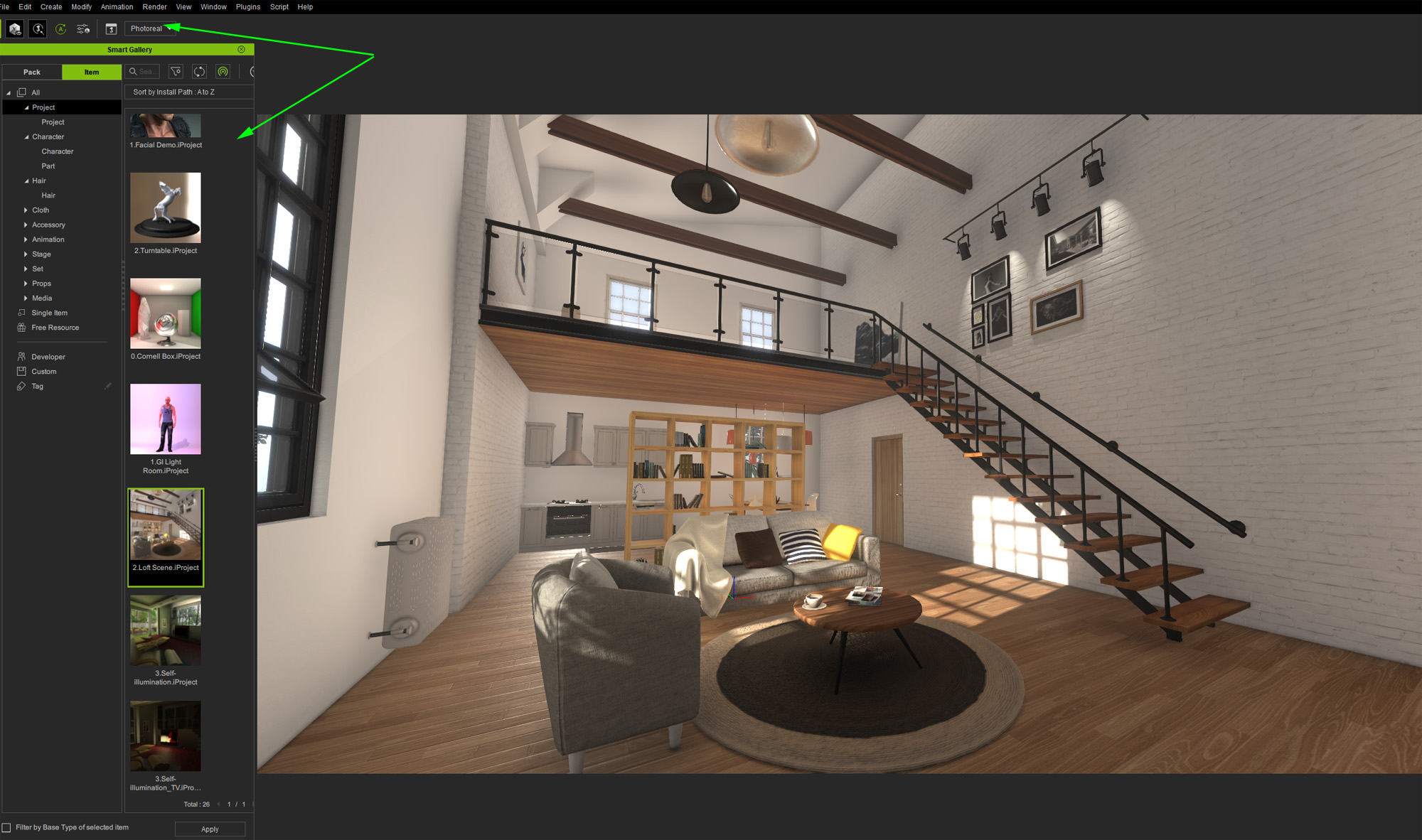
I am not sure at this point if FT5532 was ever fixed (I think it was), but the Iray Toolbar is back at full screen (CTRL+7 and for Full Sreeen Render).
In addition Smart Gallery never gets hidden either:
|
|
By Edward (RL) - 6 Years Ago
|
4u2ges (7/24/2020)
I am not sure at this point if FT5532 was ever fixed (I think it was), but the Iray Toolbar is back at full screen (CTRL+7 and for Full Sreeen Render). In addition Smart Gallery never gets hidden either:
Hello,
Please try this
1. Switch to Full Screen
2. Close Smart Gallery Panel
3. Click "Reset Layout"

|
|
By 4u2ges - 6 Years Ago
|
Thank you Edward.
That worked out well for Smart Gallery.
After Reset and iClone Restart, I had to restore my Layout and Save it. Once done, Smart Gallery no longer appears in Full Screen.
However, I had to hide Iray Toolbar. If I leave it on, then it is not hidden in Full Screen mode.
|
|
By HooDooPhonix - 6 Years Ago
|
I am having issues with props, I was made to understand, that props and their animations, would now Carry over into unreal. This does not seem to be happening, I have updated all my plugins and software (at least I believe that I have).
Please Advise
Thanks
|
|
By Anonymous - 6 Years Ago
|
|
edithmcneill (7/23/2020)
Hello
I tried to update everything today, Windows 10 system, and it wouldn't install. I removed everything except Iclone 7 and it didn't install updates. Has anyone else experienced this? If so, how did you solve the problem?
Thanks
I experienced this issue as well today on Win10. iClone7 upgrade to 7.8 and also CC3 with Pipeline upgrade along with their associated plug-ins. They all failed the install when performing the upgrade. I finally ended up having to uninstall all of them completely and then reinstalling/upgrading from scratch.
All of my Win10 OS updates are current too.
|
|
By direx1974 - 6 Years Ago
|
Hi folks,
I updated today. iClone 7.8 starts and loads my projects. So far so good. But I have seen a bug with GI. The lighting just disappear when I turn the camera into a certain position.
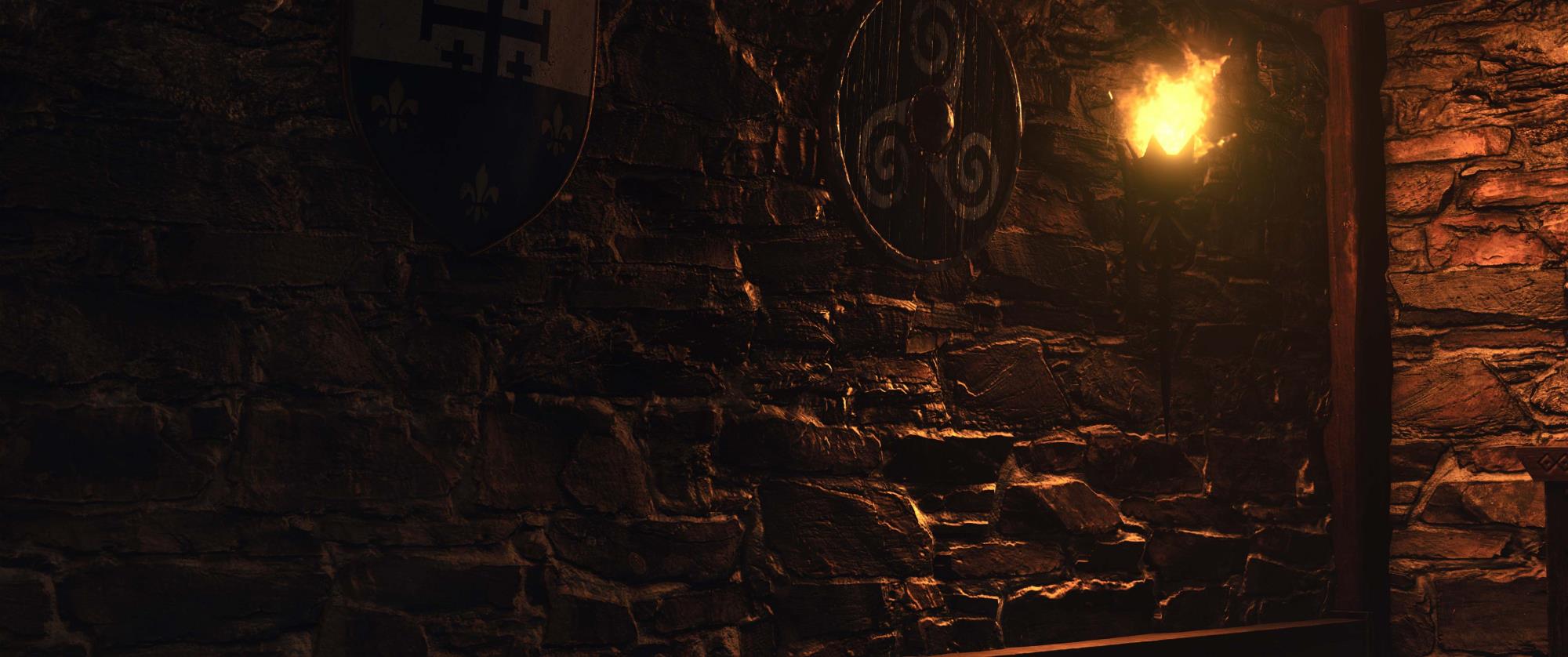
GI is working as intended ...
When I turn the camera a bit, this happens ...

No Global Illumination for the torch. Can anyone confirm this? The torch is made from the fire effect of the Popcorn FX package ...
Greetings, Direx
|
|
By Warped Reality VFX - 6 Years Ago
|
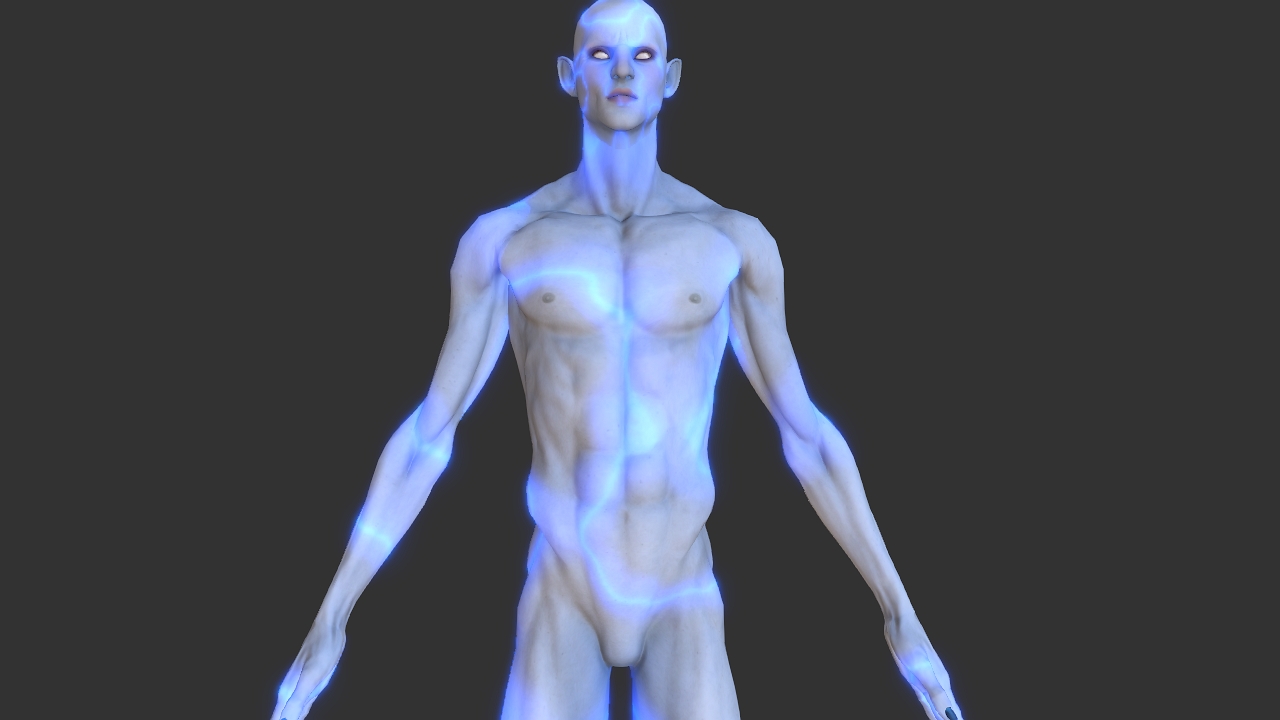
Hello, I have been working on shader type effects for iClone, for the last six months for the marketplace, and after updating to 7.8, the $time variable no longer works for substances in iClone.
Here is an example of one of the effects and how it should work.
Here is another effect that doesn't work anymore this plasma effect no longer animates.
Best Regards.
Kevin L.
|
|
By 4u2ges - 6 Years Ago
|
Taking high heels from some characters does not restore feet pose.
One of the affected characters is a Base female. So far I have encountered that on 2 characters
This is happening in both CC and iClone

|
|
By Galfridus - 6 Years Ago
|
Kevin L (7/25/2020)
Hello, I have been working on shader type effects for iClone, for the last six months for the marketplace, and after updating to 7.8, the $time variable no longer works for substances in iClone. Here is an example of one of the effects and how it should work.
Here is another effect that doesn't work anymore this plasma effect no longer animates.
Best Regards. Kevin L.
Many Thanks for posting this Kevin. You have saved me a lot of time today.
After a long day of updates , new content downloads etc. I discovered that the animated substance materials in the RL Substance Power 200 pack no longer work correctly. E.G. Waves and water droplets amongst others.
It was too late yesterday to investigate any futher and then I read your posting this morning.
All I`ve done is checked that they still animate in my substance player, which they do. Unfortunately no longer in the new IC7.8 as you stated.
Lets hope RL will be able to swiftly restore this functionality to good order.
The sample material you posted looks excellent.
kind regards
Geoff.
|
|
By dltanner99 - 6 Years Ago
|
I have tried 3 times now to install iClone 7.8, and it has failed each time. I have manually uninstalled 7.7, cleared any remaining registry entries and tried again twice. I always get the same popup error message:

I have an AM3+ Motherboard with 16 Gigs of Ram, an AMD Radeon R7 graphic card and I am running on Windows 7 64-bit. It also refused to be installed using Hub, although it did uninstall 7.7.
|
|
By Peter (RL) - 6 Years Ago
|
Thank you all for the feedback. We are sorry to hear that some of you are experiencing issues since the update.
The iClone team is monitoring this thread but please remember for critical issues which are seriously affecting your use of iClone 7.8 you can contact Technical Support for assistance. And for non-critical issues, please report them in the Feedback Tracker. They will then get checked and any relevant feedback will be given there.
Thank you.
|
|
By Peter (RL) - 6 Years Ago
|
dltanner99 (7/26/2020)
I have tried 3 times now to install iClone 7.8, and it has failed each time. I have manually uninstalled 7.7, cleared any remaining registry entries and tried again twice. I always get the same popup error message: I have an AM3+ Motherboard with 16 Gigs of Ram, an AMD Radeon R7 graphic card and I am running on Windows 7 64-bit. It also refused to be installed using Hub, although it did uninstall 7.7.
Although Windows 7 is still on our list of supported operating systems, it is strongly recommended that you upgrade to Windows 10 for best performance and stability. Sadly as Windows 7 is now no longer supported by Microsoft it really is time to consider an upgrade as future versions of our software may not support Windows 7 at all.
For now I would advise checking that you have installed the Platform update below. This is very important. Also do update your graphics drivers to the latest available as outdated drivers are known to cause issues, especially as the error message you show refers to a graphics issue.
https://www.microsoft.com/en-US/download/details.aspx?id=36805
|
|
By rcruzmar - 6 Years Ago
|
** ISSUE SOLVED!! **
Through interaction with Reallusion support I realized I needed to test Live Link on a new, empty Unreal Engine 4.25 project. Transfer and animation of character worked! I then decided to create a new project and migrate my old project to the new one. I was able to successfully transfer the character and animate through Live Link. Problem solved!
My assumption is that something within the original UE 4.24 project was interfering with Live Link transfer and animation functionality. My project started as a 4.22, then updated to 4.23 then 4.24. Something may have caused a problem for Live Link. I'm just glad it was not a more serious issue.
I am leaving the original message, below, for reference.
--------------------------------------------------------------------
Good day!
The only situation I have faced with iClone 7.8 is when using Live Link. I can get my character to transfer from iClone to Unreal 4.24.3 however I believe there is a problem with the bones. Animation makes the character look like the alien from the end of "Close Encounters of the Third Kind". Like when after all "little" aliens come out of mother ship there is one, very tall alien with long arms and long fingers... then is what my character looks like.
I've made sure I have the proper version for CC_Shaders and Plug-in installed (Auto Setup 1.1 for 4.24). Upon inspecting the skeleton of the newly imported character it seems to have the bones in a different order but the names seem to be the same. Not sure if that is causing the problem I am experiencing with the animation being brought over by iClone.
I appreciate any suggestions anyone may have regarding this topic. I've checked all the most recent YT tutorials and I believe I do have this setup correctly.
|
|
By kent_310387 - 6 Years Ago
|
|
Took standard CC3+ character from iclone to unreal engine with Live Link transfer. Tried packaging Unreal for IOS. When building the shaders it failed to compile the STD_SKIN_HEAD_PBR_HQ_INST material for SF_METAL. Now all characters just have grey faces. Anything I can do so that this material can be compiled for SF_METAL?
|
|
By animagic - 6 Years Ago
|
I have noticed a strange saving behavior in 7.8.
I save a project and star after the filename disappears to indicate that the file is saved. Then, iClone does something (title bar says "Not responding') and after that the star reappears after the filename.
The file has been saved properly the first time, and I didn't change anything to it, so what is iClone doing?
|
|
By Peter (RL) - 6 Years Ago
|
|
kent_310387 (8/2/2020)
Took standard CC3+ character from iclone to unreal engine with Live Link transfer. Tried packaging Unreal for IOS. When building the shaders it failed to compile the STD_SKIN_HEAD_PBR_HQ_INST material for SF_METAL. Now all characters just have grey faces. Anything I can do so that this material can be compiled for SF_METAL?
Thanks for the feedback. Please do remember to post issues in the Feedback Tracker if you believe this to be a defect or bug. The team will then investigate. Thanks.
https://www.reallusion.com/FeedBackTracker/
|
|
By Peter (RL) - 6 Years Ago
|
Hi everyone,
Thanks for your feedback. Smart Gallery v1.11 just released to fix some critical issues listed below.
Please update the plug-in from Reallusion Hub.
- Fixed: The Smart Gallery causes iClone/CC to freeze for 20 seconds after pressing the Close button on the welcome screen in some environments.
- Fixed: When switching to Offline Mode, the Smart Gallery still tries to connect to the server and shows an error. (Feedback Tracker #7086, reported by blindman)
- Fixed: The Smart Gallery panel does not remember the open/close status and location on the workspace.(Reported by wires and Data Juggler)
- Fixed: The second Search in the Smart Gallery does not reset search filter causing a fail. (Reported by animagic)
- Fixed: Quickly docking and undocking the Smart Gallery panel will cause a program crash in some environments.
- Fixed: Cannot initial iClone/CC in some environments, but it will work when removing the Smart Gallery Plug-in.
|
|
By Peter (RL) - 6 Years Ago
|
4u2ges (7/25/2020)
Taking high heels from some characters does not restore feet pose. One of the affected characters is a Base female. So far I have encountered that on 2 characters This is happening in both CC and iClone
UPDATE: This issue has been confirmed and will be fixed as soon as possible.
|
|
By Peter (RL) - 6 Years Ago
|
Kevin L (7/25/2020)
Hello, I have been working on shader type effects for iClone, for the last six months for the marketplace, and after updating to 7.8, the $time variable no longer works for substances in iClone. Here is an example of one of the effects and how it should work.
Here is another effect that doesn't work anymore this plasma effect no longer animates.
Best Regards. Kevin L.
UPDATE: This issue should be fixed in the next update (7.81). Thank you for the notification.
|
|
By Peter (RL) - 6 Years Ago
|
|
Galfridus (7/25/2020)
After a long day of updates , new content downloads etc. I discovered that the animated substance materials in the RL Substance Power 200 pack no longer work correctly. E.G. Waves and water droplets amongst others.
It was too late yesterday to investigate any futher and then I read your posting this morning.
All I`ve done is checked that they still animate in my substance player, which they do. Unfortunately no longer in the new IC7.8 as you stated.
Lets hope RL will be able to swiftly restore this functionality to good order.
The sample material you posted looks excellent.
kind regards
Geoff.
UPDATE: These issues with the Substance Power 200 should be fixed in the upcoming 7.81 update. This is due mid to late August.
|
|
By mr brush - 6 Years Ago
|
Every time i try to drag or double click physics props it doesn't do anything except jump to the smart gallery and start re-downloading the packs. Iv'e restarted the pc and still the same. I'm stuck atm.

|
|
By Peter (RL) - 6 Years Ago
|
|
animagic (8/3/2020)
I have noticed a strange saving behavior in 7.8.
I save a project and star after the filename disappears to indicate that the file is saved. Then, iClone does something (title bar says "Not responding') and after that the star reappears after the filename.
The file has been saved properly the first time, and I didn't change anything to it, so what is iClone doing?
Hi Animagic... To help the team understand this issue better, could you perhaps post a video showing exactly what happens. Thanks.
|
|
By Edward (RL) - 6 Years Ago
|
|
mrbrush (8/22/2020)
Every time i try to drag or double click physics props it doesn't do anything except jump to the smart gallery and start re-downloading the packs. Iv'e restarted the pc and still the same. I'm stuck atm.
Hi,
Please ref the post: https://forum.reallusion.com/FindPost455950.aspx
:laugh:
Edward
|
|
By animagic - 6 Years Ago
|
Peter (RL) (8/24/2020)
animagic (8/3/2020)
I have noticed a strange saving behavior in 7.8.
I save a project and star after the filename disappears to indicate that the file is saved. Then, iClone does something (title bar says "Not responding') and after that the star reappears after the filename.
The file has been saved properly the first time, and I didn't change anything to it, so what is iClone doing?Hi Animagic... To help the team understand this issue better, could you perhaps post a video showing exactly what happens. Thanks.
Hi, Peter, here is a video showing the issue:
|
|
By simon_20140205222146880 - 6 Years Ago
|
|
I still get a lot of very long pauses and frequent crashes with project of 10 minutes length or more. I'd love to be able to create scenes of up to an hour or so actually, but even at 10 minutes I feel something going to break at anytime (which it often does).
|
|
By animagic - 6 Years Ago
|
|
simon_20140205222146880 (8/28/2020)
I still get a lot of very long pauses and frequent crashes with project of 10 minutes length or more. I'd love to be able to create scenes of up to an hour or so actually, but even at 10 minutes I feel something going to break at anytime (which it often does).
Unless you have continuous movement without lapses in time, it really makes more sense to break up your projects in smaller chunks and assemble things in a video editor.
I usually have projects run no longer than one minute. Render it and go on to the next one. Advantage is also that if there is a hiccup in one scene you don't have to rerender everything.
|
|
By TopOneTone - 6 Years Ago
|
Ever since the latest update I have been experiencing major problems with both IC7 and CC3. My drivers are current and I have reset the nvidia control back to default settings, uninstalled and reinstalled the software, but the problems persist. I cannot open a project in CC3 at all, while IC7 is slow to process changes and will not complete a render. While rendering the animation freezes, though the sound keeps going. Once the render process has completed the display panel turns white, the program freezes and then closes. FYI I am running 1080Ti on windows 10 and all was working fine before the latest IC7 and CC3 updates. I hope the promised new update arrives shortly as at present both programs are unusable for me. Any other suggestions most welcome.
Tony
|
|
By Hookflash - 6 Years Ago
|
Is anyone else having issues with "Look At" in 7.8?
1. "Look Weight" doesn't seem to be working. Adjusting its value has no effect, and deselecting then reselecting the object causes Look Weight to be reset to 100.
2. When the pivot of the Look At target is changed, Look At continues to look at the old pivot as opposed to the new one.
|
|
By Zkeko - 6 Years Ago
|
|
Nvidia drivers, I guess
|
|
By Zkeko - 6 Years Ago
|
Ok, so there is no way I can start Iclone 7 and CC3. Win 10 is updated to the latest 1909 (2004 is not recommended by win updater), other NVIDIA drivers (tried every possible) is impossible to update/install, windows saying that my NVIDIA driver is latest and best. So, I did everything I could with Windows and NVIDIA.
Tried with Iclone reinstalled, nothing. All Reallusion HUB updated and installed. 3dxchange working but Iclone and CC3 wont start.
Any suggestions out of already mentioned attempts ?
Board: Gigabyte X299 AORUS Gaming 3 Pro-CF Intel Core i9-7920X 2.90 gigahertz Kraken X62 liquid cooler Samsung SSD 970 EVO 500GB Intel Optane+1.8TBSSD 128 GB RAM NVIDIA GeForce GTX 1080 Ti 11GB Windows 10 Home (x64), Iclone 7 v.7.8, 3DXchange pipeline 7 v.7.7, CC3 v 3.3, Motion Live plug-in
|
|
By TopOneTone - 6 Years Ago
|
Finally think I have solved the issues I was having with iclone and CC3. Having checked the nvidia and windows drivers were current, reinstalled all the software, reset the nvidia controller to default settings and still I could not open a project in CC3 and iclone would not render. I then decided to ignore some earlier advice, that was saying that in the nvidia control panel 3D settings ensure iclone and CC3 were set to "Application Controlled". I restored the Global Setting to default and then changed all the program settings for iclone and CC3 to "Use Global Setting (Off)" which instantly rectified my problems in both products.
Might not be the cure for all the current issues, but its certainly a very simple option to test and I wish I had tried it a week ago before I tried everything else.
Cheers,
Tony
|
|
By Zkeko - 6 Years Ago
|
Lucky You, imagine you cant even launch Iclone and CC3 at all, not even after following instructions from here https://kb.reallusion.com/Product/52848/-IMPORTANT-Nvidia-Graphics-Driver-43602-Issues
Windows are imposing updates, and whatever you do to postpone them (because everything worked just fine on your PC), finally one night they catch you off guard and they win!
Next day you find yourself with the 10 000 $ worth PC that cant launch your software, cant update any Nvidia driver, old or latest, cant update win 10 to newest 2004, cant rollback anything at all, and you end up in this forum complaining )))
|
|
By Peter (RL) - 6 Years Ago
|
animagic (8/27/2020)
Peter (RL) (8/24/2020)
animagic (8/3/2020)
I have noticed a strange saving behavior in 7.8.
I save a project and star after the filename disappears to indicate that the file is saved. Then, iClone does something (title bar says "Not responding') and after that the star reappears after the filename.
The file has been saved properly the first time, and I didn't change anything to it, so what is iClone doing?Hi Animagic... To help the team understand this issue better, could you perhaps post a video showing exactly what happens. Thanks. Hi, Peter, here is a video showing the issue:
Thanks for the video. Much appreciated. :)
|
|
By Peter (RL) - 6 Years Ago
|
Zkeko (8/31/2020)
Ok, so there is no way I can start Iclone 7 and CC3. Win 10 is updated to the latest 1909 (2004 is not recommended by win updater), other NVIDIA drivers (tried every possible) is impossible to update/install, windows saying that my NVIDIA driver is latest and best. So, I did everything I could with Windows and NVIDIA. Tried with Iclone reinstalled, nothing. All Reallusion HUB updated and installed. 3dxchange working but Iclone and CC3 wont start. Any suggestions out of already mentioned attempts ? Board: Gigabyte X299 AORUS Gaming 3 Pro-CF Intel Core i9-7920X 2.90 gigahertz Kraken X62 liquid cooler Samsung SSD 970 EVO 500GB Intel Optane+1.8TBSSD 128 GB RAM NVIDIA GeForce GTX 1080 Ti 11GB Windows 10 Home (x64), Iclone 7 v.7.8, 3DXchange pipeline 7 v.7.7, CC3 v 3.3, Motion Live plug-in
Hi...
Sorry to hear you are having all these problems.
I was running Windows 10 version 1909 (and now 2004) and didn't have any problems running iClone or Character Creator so something else is at play here.
Have you been in contact with Technical Support about the problem? It may be worth sending them your system information (dxdiag.txt) so they can check for any system problems.
https://www.reallusion.com/CustomerSupport/UserEx/QForm.html
EDIT: One thing to check is that the 3D Settings for iClone and CC in your Nvidia Control Panel are set to the default "Application Controlled". If you have customised the 3D Settings this may be causing the issue.
|
|
By Zkeko - 6 Years Ago
|
Iclone 7 / CC3 launch problem SOLVED!
Present NVIDIA driver was impossible to uninstall until I found DDU v18.0.2.8, small driver uninstaller, from safe mode in win 10 1909, then back to normal mode successful installation of newest NVIDIA driver for GeForce 10 series
Both Iclone 7 and CC3 now working.
Thanks
|
|
By Peter (RL) - 6 Years Ago
|
Hi Everyone
Today we released iClone 7.81 to fix a number of issues that were reported. If you reported any issues, please check to see if 7.81 has fixed the problem and if not please let us know. Do also remember to report outstanding issues on the Feedback Tracker as well. Thanks.
|
|
By Postfrosch - 6 Years Ago
|
Hi RL:
If you export a CC 3.3+ avatar in CC 3.3 with the export function as an iAvatar reduced with LOD function,
this avatar will be exported to Iclone 7.81, but if you try to open this iAvatar in Iclone 7.81, Iclone crashes
Addendum:
IC 7.81 when loading all my avatars that have been polyreduced with the LOD function - regardless of the CC 3 version I created them with.
I reported this bug in the feedback tracker: Issue 7223
https://www.reallusion.com/FeedBackTracker/Issue/IClone-7-81-crashes-when-trying-to-open-a-CC-3-3-avatar-that-was-remesht-with-the-LOD-function
Greets from Germany
Postfrosch
|
|
By Peter (RL) - 6 Years Ago
|
|
Hookflash (8/29/2020)
Is anyone else having issues with "Look At" in 7.8?
1. "Look Weight" doesn't seem to be working. Adjusting its value has no effect, and deselecting then reselecting the object causes Look Weight to be reset to 100.
2. When the pivot of the Look At target is changed, Look At continues to look at the old pivot as opposed to the new one.
Thank you for the feedback.
We have conformed there is an issue and plan to fix it in the 7.9 update.
We do apologise for the inconvenience caused.
|
|
By alex_688011 - 6 Years Ago
|
Is anyone else having crashes with 7.81? I updated my iclone version and now a certain .iavatar I exported from CC3 will crash 100% of the time, and has effectively stopped a ton of .iprojects loading at all!
https://www.reallusion.com/FeedBackTracker/Issue/Iclone-now-crashes-when-opening-up-files-due-to-a-particular-IAVATAR-asset
I 100% imagine it's something to do with all the material fixes that went in to 7.81. Is there any way I can locally rollback to 7.8 rather than be on this version? Everything worked as expected for me in 7.8
|
|
By RonnMoto - 6 Years Ago
|
Is anyone else having issues with the edit motion layer tool? It will not open, only toggles the link button on and off. and I'm getting a message stating that this object contain spring effects ( add an "off" key) even when spring effects are turned off. I can't customize any motions. stuck using default/bland motions. Am I missing something?
|
|
By Peter (RL) - 6 Years Ago
|
|
garris540_17 (9/9/2020)
Is anyone else having issues with the edit motion layer tool? It will not open, only toggles the link button on and off. and I'm getting a message stating that this object contain spring effects ( add an "off" key) even when spring effects are turned off. I can't customize any motions. stuck using default/bland motions. Am I missing something?
Hi... Edit Motion Layer is working fine for me in 7.81. Have you recently used a multiple screen setup with iClone and moved panels onto other screens? If so this will be the problem. Try moving the panels back to main screen and this should resolve the problem for you.
|
|
By RonnMoto - 6 Years Ago
|
|
I do have a multi monitor system however, I've reset my workflow, to no avail. I've inserted different motions but nothing seems to work. All other panels appear when needed. I'm completely baffled.
|
|
By Peter (RL) - 6 Years Ago
|
|
If you are familiar with registry editing please try the following.
WARNING: Editing Windows Registry is NOT recommended for those who are unfamiliar with registry editing. Be sure to backup all the registries prior to making any changes.
1) Search for Regedit on the Taskbar. 2. Select the Registry Editor App from the displayed list. 3) Once Regedit is open, navigate to the location below.
HKEY_CURRENT_USER\SOFTWARE\Reallusion\iClone\7.0
4) Right-click and Delete the 7.0 registry key as shown in the image below.
5) Open iClone again and check to see if the Edit Motion Layer panel is restored.  |
|
By Peter (RL) - 6 Years Ago
|
If you ae continuing to have these issues, please contact Technical Support and let them have the project/character that causes the crash in iClone. They will then be able to check to see what the issue is.
|
|
By alex_688011 - 6 Years Ago
|
Will do thanks. I attached the project and avatar asset to the issue I opened but they are private replies so I dont know who can see them and who can't
Thanks!
|
|
By RonnMoto - 6 Years Ago
|
Ok, I've finally got everything working. Thanks for your help!
|
|
By wsessoms - 6 Years Ago
|
|
No Sound After iClone 7.82 Update
The sound doesn't play for voice or background sound since I updated to iClone 7.82. If I record a video file from within iClone 7.82 and play the video file I can hear the voice and sound that is export with the video but I can't hear the sound when played in the Timeline. This was working before I update to iClone 7.82.4515.1
Has anyone else experienced this.
|
|
By wsessoms - 6 Years Ago
|
No Sound After iClone 7.82 Update
The sound doesn't play for voice or background sound since I updated to iClone 7.82. If I record a video file from within iClone 7.82 and play the video file I can hear the voice and sound that is export with the video but I can't hear the sound when played in the Timeline. This was working before I update to iClone 7.82.4515.1
Has anyone else experienced this.
|
|
By JoeGideon - 5 Years Ago
|
There is a major bug in iClone 7.83.
If you animate a character and use the "look at camera" or "pick target" (and have the character look at an object), the animation is fine in iClone, HOWEVER, if you export the animation to FBX (using the correct settings and, yes, the bake constraint key), the exported character's eyes badly malfunction. They shudder and shake and look in wrong directions. In addition, this same problem happens if you try to save the animation to a Motion Plus.
I have reported this bug to technical support, to the Feedback tracker, and elsewhere in the Forum. I am still waiting for someone from Reallusion to address this issue. Reallusion needs to fix this bug ASAP.
Here is a link to my YouTube video demonstrating this bug:
https://www.youtube.com/watch?v=qb7qSiVD_Ek

|
|
By Peter (RL) - 5 Years Ago
|
|
JoeGideon (1/5/2021)
I have reported this bug to technical support, to the Feedback tracker, and elsewhere in the Forum. I am still waiting for someone from Reallusion to address this issue. Reallusion needs to fix this bug ASAP.
Hi...
Thank you for the feedback. If you have reported the issue in the Feedback Tracker it will be looked at by the iClone team. You will then get a status update once the issue has been fully investigated.
|
|
By kmitchell.12catblackstudios - 5 Years Ago
|
So I made the mistake of hitting the save animation button in the content browser while the animation popup was open and the appliction just hung.
I killed it and until i restarted I could not open my custom animation folder.
Now when ever I go to save an animation the editor just freezes...
|
|
By bmacdonald1986 - 5 Years Ago
|
I cannot bake Accessory LookAt information to MotionPlus.
I have a lookat constraint on my characters accessory, its a two handed prop. One hand is parenting the accessory and then the accessory is looking at the other hand:

I am following the guide and checking off the correct boxes in the MotionPlus collect clip dialog:

According to the 6.0 guide this feature was available. Was it removed from 7.0+?

|
|
By lianchiu - 5 Years Ago
|
bmacdonald1986 (1/30/2021)
I cannot bake Accessory LookAt information to MotionPlus. I have a lookat constraint on my characters accessory, its a two handed prop. One hand is parenting the accessory and then the accessory is looking at the other hand: I am following the guide and checking off the correct boxes in the MotionPlus collect clip dialog: According to the 6.0 guide this feature was available. Was it removed from 7.0+?
Could you record your workflow?
|
|
By Peter (RL) - 5 Years Ago
|
JoeGideon (1/5/2021)
There is a major bug in iClone 7.83. If you animate a character and use the "look at camera" or "pick target" (and have the character look at an object), the animation is fine in iClone, HOWEVER, if you export the animation to FBX (using the correct settings and, yes, the bake constraint key), the exported character's eyes badly malfunction. They shudder and shake and look in wrong directions. In addition, this same problem happens if you try to save the animation to a Motion Plus. I have reported this bug to technical support, to the Feedback tracker, and elsewhere in the Forum. I am still waiting for someone from Reallusion to address this issue. Reallusion needs to fix this bug ASAP. Here is a link to my YouTube video demonstrating this bug: https://www.youtube.com/watch?v=qb7qSiVD_Ek
This issue should be fixed in the upcoming version 7.9. Apologies for the inconvenience this bug has caused.
|
|
By SagaStudios - 5 Years Ago
|
My issue is this:
I am trying to just load a Dragon from the Dragon Pack it starts to add it and gets hung at 70% every time. It happens on The Imp Pack and the The Wheeper. Haven't tested any others. I have done clean install, which by the way it would help if your installer removed everything including the Reallusion Hub service because with it staying on it doesn't allow the system to delete other folders associated. This includes AppData as well. I have done an install without plugins and with plugins same result.
I left it on for two hours. I tried to upload the dmp file but your system says it is too large.
I have attached a screen shot as well.
I am running a MSI GE75 Raider with 32GB RAM two 1 TB SSD and has a RTX 2080 Super so should be enough to handle this.
|
|
By lianchiu - 5 Years Ago
|
SagaStudios (2/17/2021)
My issue is this: I am trying to just load a Dragon from the Dragon Pack it starts to add it and gets hung at 70% every time. It happens on The Imp Pack and the The Wheeper. Haven't tested any others. I have done clean install, which by the way it would help if your installer removed everything including the Reallusion Hub service because with it staying on it doesn't allow the system to delete other folders associated. This includes AppData as well. I have done an install without plugins and with plugins same result. I left it on for two hours. I tried to upload the dmp file but your system says it is too large. I have attached a screen shot as well. I am running a MSI GE75 Raider with 32GB RAM two 1 TB SSD and has a RTX 2080 Super so should be enough to handle this.

try this
|
|
By francois_850163 - 5 Years Ago
|
|
Issue 7648 Hair & Cloth Physics Freak out & iClone CRASH
Hello
I am brand new to Reallusion software and must still learn everything about everything.
There is so much potential but the learning curve is extremely overwhelming!
I am running into some freaky physics results and not sure whether it is a bug or whether it is my system?
I have a character with hair and dress I sent from CC3 to iClone 7 - Please see image #1.
(I also imported iAvatars I exported from CC3, but the same thing happens)

I have not changed any settings in the physics, except for making the cloth weight map less bright.
I have added a motion to the character, and have enabled character hand and foot collisions.
When I play the sequence, the cloth and hair physics have extreme results - please see image #2
(I have a screen recording .ZIP video file which I can also share?)

Also, my iClone has been crashing multiple times since I started this project - see image #3:

What is happening? Why? And why is my software crashing constantly?
Your assistance is very much appreciated!
Regards
|
|
By SagaStudios - 5 Years Ago
|
|
I tried that as well. I even deleted the content folders when I Uninstaller the program.
|
|
By mark - 5 Years Ago
|
Francois...might be good to have your computer's system specs as well.;)
|