|
By mrtobycook - 6 Years Ago
|
I can't install any product. It worked fine, then I had to uninstall everything (when my hard drive started dying and I had to replace it), then I cloned the main system drive in my machine. (Windows 10)
I can install anything that isn't Reallusion - but all installers for iclone seem to be working fine then just disappear half way through installing. If I try to install via the hub, I get the generic (and incredibly frustrating) "Couldn't install iclone 7!". Doesn't even give an error code. (!!!!!)
- I have tried uninstalling the hub then downloading the latest version and installing that. Same problem persists. - I have tried running the iclone installer as administrator - I have emptied the Temp folder as much as I could (c:/windows/temp), although some files were in use
- I have tried removing anything called iclone or reallusion from program files
Anyone know how to fix this? :-((((
Toby
|
|
By wires - 6 Years Ago
|
|
You really should contact Reallusion Customer Support directly to get assistance in solving this issue.
|
|
By mrtobycook - 6 Years Ago
|
|
I have, but unfortunately (especially as the bulk of Iclone users are hobbyists) support isn’t open on weekends.
|
|
By Kevin.S - 6 Years Ago
|
|
mrtobycook (2/2/2020)
I have, but unfortunately (especially as the bulk of Iclone users are hobbyists) support isn’t open on weekends.
Iclone is locked to your system Hardware ID, you may need to deactivate your software in your account. Then reactivate it if you changed hard drives
especially C drive / system drive..No hard drive has the same hardware ID numbers, Even if you clone a drive, the hardware is different. This could be
the issue as to why you cant install reallusion products.The hardware does not match up to Reallusions verification system.
|
|
By mrtobycook - 6 Years Ago
|
This is so helpful, thanks so much! I just went in and deactivated the software, then restarted, and tried to install once again.
But yeah exactly the same thing happened. It's weird cause with Iclone installer it gets past the "verifying serial number" part fine - it's just when it gets to "configuring product information" ("Setting up product information, please wait...") it then crashes out (well, it entirely disappears).
Same thing happens with Character Creator 3 installer...
|
|
By Kevin.S - 6 Years Ago
|
|
mrtobycook (2/2/2020)
This is so helpful, thanks so much! I just went in and deactivated the software, then restarted, and tried to install once again.
But yeah exactly the same thing happened. It's weird cause with Iclone installer it gets past the "verifying serial number" part fine - it's just when it gets to "configuring product information" ("Setting up product information, please wait...") it then crashes out (well, it entirely disappears).
Same thing happens with Character Creator 3 installer...
Back up any project files you have before doing anything.
Do you have any virus software loaded like Nortons or macafee...make sure that is disabled.
Im starting to think it could be system related make sure windows it up to date,
also make sure the system clock and date are set correctly. Do this step...
Its a pain but you have to make sure everything is gone for a clean install.
manual cleaning hunt all the files ...
ok try this go to
C drive ...users/ public/ public documents/ see if there is a reallusion folder there delete it
go to C drive / program folders/ get rid of any reallusion folders....
go to C drive / program files (x86) get rid of any reallusion folders.
C drive : temp folder check if any reallusion related items.
Check This PC: documents folder/ for any RL. documents or files delete it
go to control panel make sure no reallusion anything shows up in the uninstall list.
if you are good with windows you can go to windows search and type, "event viewer" and take a look at your logged errors.
this can tell you lots of information .
make sure virus software is off..
once you have everything deleted try installing again in administrator mode.
if none of that works ....
There could be some windows or hard drive directory errors you are having. I have used system mechanic for years
do you have anything like system mechanic ? you can do a free scan but you have to own it to fix stuff but
it can tell you what might be going on or any listed errors. Other then that contact tech support.
Free scan
|
|
By Peter (RL) - 6 Years Ago
|
|
While you wait for Support to get back to you, please can you try the following to see if it helps for iClone 7:
a) Download and unzip the attached file.
b) Run "CleanReg.exe"
c) Then Go to "C:\Program Files\Reallusion\" and delete the iClone 7 folder
Note: When you run CleanReg you may get an "Access Denied" error message. If this happens, please right click the Cleanreg.exe and select "Run As Administrator".
Please also go to the location below and delete any installers that may be present in case of corruption.
C:\Users\<Username>\AppData\Local\Reallusion\RLDownloads
Then try to install iClone 7 again using the Reallusion Hub.
|
|
By mrtobycook - 6 Years Ago
|
Thanks for your help, Peter!
Unfortunately those steps didn't amount to much.
- The iclone 7 registry cleaner couldn't find anything
- I removed all those downloaded files, and then when I tried to install it crapped out even sooner LOL. :-))) It wouldn't even open up the installer! It just had the error as attached.
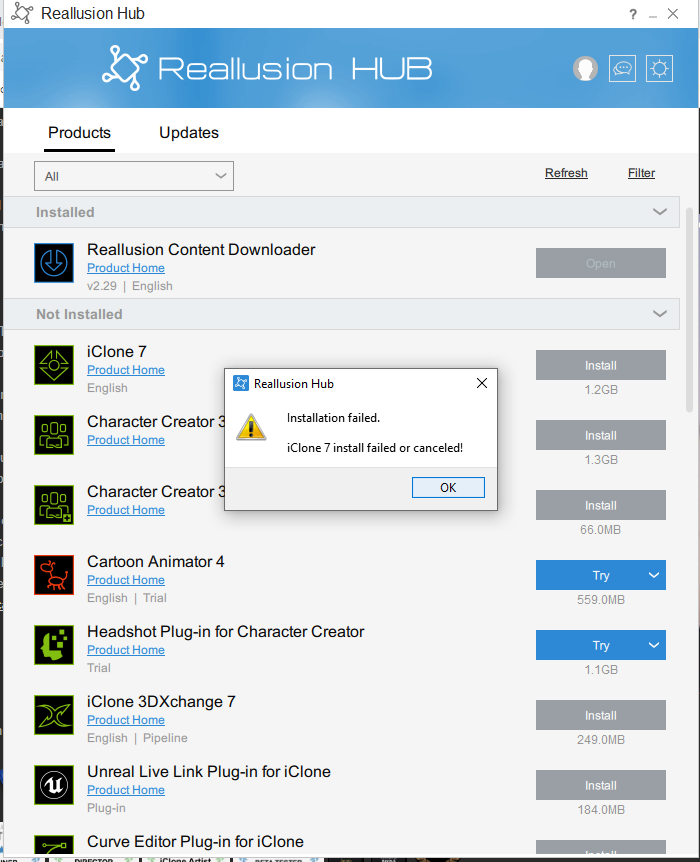
When I searched the registry myself (regedit), there are definitely random iclone things in there - but nothing that seemed particularly problematic, at least for me.
It's very unusual, though, that iClone doesn't remove all the registry values itself when its properly uninstalled!
Any other ideas Peter? I'm all ears!!! :-))))
|
|
By mrtobycook - 6 Years Ago
|
BTW Kevin, thanks for the suggestion about System Mechanic!
I'm using this stuff for business so I was happy to purchase System Mechanic, even if in this case it didn't help (might come in useful later!).
But unfortunately the exact same error occurs even after running System Mechanic and cleaning up my registry and Windows Temp files :)
|
|
By mrtobycook - 6 Years Ago
|
For anyone who finds this thread later, the issue preventing installation for me isn’t fixable.
(A) Reallusion’s uninstall process (at least in Windows 10) unfortunately doesn’t fully remove various things on your hard drives and in the registry, which can create problems when you try to reinstall.
(B) Reallusion has two “registry cleaner” tools but they only check for serial numbers in your system, rather than fully clean your registry of all things that could be problematic.
(C) 3rd party registry cleaner products may be suggested by support, and may indeed be the answer. But use at your own risk, as they remove vital system files. I used JetClean and it bricked my machine. (Luckily I had a full clone backup.) I have subsequently tried System Mechanic, which found various registry issues apparently, and said it fixed them. But it didn’t fix this issue.
(D) There is unfortunately no Reallusion “cleanup” tool that checks for leftover folders on your hard drive (and temp files) in a thorough way - the uninstaller is the only thing that does this, and isn’t fully effective. This is why you will find so many posts from Peter on this forum (and also responses from support) listing folders (on your hard drive) to double check are deleted.
The only remedy in my case is to do a full fresh reinstall of Windows 10. Which, in terms of time lost in a business setting, is a very very expensive proposition for me!
I hope Reallusion works on a proper custom “registry and hard drive cleaner” for this sort of issue, as a quick Google search or search of this forum will show it’s not rare. No other paid application I’ve ever used has wanted me to reinstall Windows to fix it... :-(
Toby
|
|
By FeatherDrop - 6 Years Ago
|
I've just hit the same issue - similar circumstances too.
Raised a support ticket but Reallusion should provide setup files as executables in these situations so that a full manual install of, say, iClone 7.00 be carried out with the Hub then able to apply patch up to 7.71
Will post with feedback from support
|
|
By animagic - 6 Years Ago
|
|
The one thing not mentioned here is folder permissions. I had an issue once where I couldn't uninstall properly or reinstall. It turned out that some folder permissions were incorrect. Unfortunately, it's too long ago for me to remember how I resolved it eventually. Reinstalling Windows would fix it, but that's quite drastic.
|
|
By Peter (RL) - 6 Years Ago
|
mrtobycook (2/3/2020)
Thanks for your help, Peter! Unfortunately those steps didn't amount to much. - The iclone 7 registry cleaner couldn't find anything - I removed all those downloaded files, and then when I tried to install it crapped out even sooner LOL. :-))) It wouldn't even open up the installer! It just had the error as attached. When I searched the registry myself (regedit), there are definitely random iclone things in there - but nothing that seemed particularly problematic, at least for me. It's very unusual, though, that iClone doesn't remove all the registry values itself when its properly uninstalled! Any other ideas Peter? I'm all ears!!! :-))))
Thanks for updating us. Sorry to hear the problem continues.
Have you tried to install to a different drive (if you have one). If you have an external drive for example it would be worth trying to install there to see if this works or if you get the same issue.
|
|
By Peter (RL) - 6 Years Ago
|
|
mrtobycook (2/4/2020)
I hope Reallusion works on a proper custom “registry and hard drive cleaner” for this sort of issue, as a quick Google search or search of this forum will show it’s not rare. No other paid application I’ve ever used has wanted me to reinstall Windows to fix it... :-(
Installation problems do occur but the vast majority of issues reported never require a reinstall of Windows. There is almost always a less extreme solution but sadly it can take a lot of troubleshooting to find it.
One thing I would say for anyone considering changing hard drives is to uninstall your Reallusion software first. Although often not necessary it is better to be cautious and it may save you time in the long run.
|
|
By Peter (RL) - 6 Years Ago
|
|
FeatherDrop (2/4/2020)
I've just hit the same issue - similar circumstances too.
Raised a support ticket but Reallusion should provide setup files as executables in these situations so that a full manual install of, say, iClone 7.00 be carried out with the Hub then able to apply patch up to 7.71
Will post with feedback from support
We already supply executables for iClone and Character Creator that can be installed without the Hub. You can download them from your Reallusion Account > Registration page.
|
|
By Kevin.S - 6 Years Ago
|
|
mrtobycook (2/3/2020)
BTW Kevin, thanks for the suggestion about System Mechanic!
I'm using this stuff for business so I was happy to purchase System Mechanic, even if in this case it didn't help (might come in useful later!).
But unfortunately the exact same error occurs even after running System Mechanic and cleaning up my registry and Windows Temp files :)
Try to install a trial version of any of there software directly from the reallusion website. It might be worth a try before you try to reinstall windows.
As peter said can you install to another drive and see if it installs ?
The only other thing I know is sometimes when you clone a drive, sometimes you have to make a new
user account, as some of the registry's are locked to the hardware ID's and the user account. Sometimes making
a new master user account can fix this issue and reset all permissions to the hardware ID's. registry's.
If you try this just make sure to restart windows once you have done so. And of course remember the new name and password
or write it down.:D

Dont use the hub go straight to the reallusion website and download the trials.
iclone
Trial version
|
|
By FeatherDrop - 6 Years Ago
|
Just downloaded all the installers from my account (except Crazytalk 8!) and successfully installed iClone 7 (latest version).
When you enter the serial during the install, the installer program connects with the Reallusion site and updates the information in your account with the other details (PC Name and Company Name).
If you're reinstalling on a PC that previously had Reallusion software then you may already have installers downloaded by the Hub - click on Settings in top-right and you will see a hyperlink to the download location. I've used it to find the installer previously downloaded for Crazytalk 8.
The Reallusion Hub is there as an assistant but does not prevent you from doing the work manually. I would hope that the boffins in the background will be working on an update to the Hub package to allow the reinstall on a previously used machine!
|
|
By mrtobycook - 6 Years Ago
|
Hi all! Thanks again for all the help and advice.
- Drive: have tried installing to other drives and same thing happens unfortunately. (Ironically, this whole thing started because Iclone was getting confused as to where my files were supposed to be - even though the registry had the correct folder paths - on a separate drive. I then upgraded my system drive to try to fix that issue, which of course has led to this nightmare lol)
Kevin, I’ve tried installing trials but it won’t let me as I have the full versions. Do you mean create a new “pretend” user account (with a different email) and then install the trials using that? I guess that’s something I definitely haven’t tried. Will give it a go.
|
|
By FeatherDrop - 6 Years Ago
|
Logon to your account and download the latest version of the installer (except Crazytalk 8!) - use these to install.
I've just done it successfully and updated information on account for all products - Hub even detected installs and allowed download/install of resource packs.
Hope that helps...
|
|
By Kevin.S - 6 Years Ago
|
|
mrtobycook (2/4/2020)
Hi all! Thanks again for all the help and advice.
- Drive: have tried installing to other drives and same thing happens unfortunately. (Ironically, this whole thing started because Iclone was getting confused as to where my files were supposed to be - even though the registry had the correct folder paths - on a separate drive. I then upgraded my system drive to try to fix that issue, which of course has led to this nightmare lol)
Kevin, I’ve tried installing trials but it won’t let me as I have the full versions. Do you mean create a new “pretend” user account (with a different email) and then install the trials using that? I guess that’s something I definitely haven’t tried. Will give it a go.
I mean your windows account ... when you start your computer do you have a name that pops up with a password that you enter to log into windows?
|
|
By ant_127217 - 6 Years Ago
|
hi there.
have same problem. can't create user account on realusion site and can't install abny programs as from Hub or standalone
video install process https://www.youtube.com/watch?v=b8Ot5B55FT0
Event viewer log
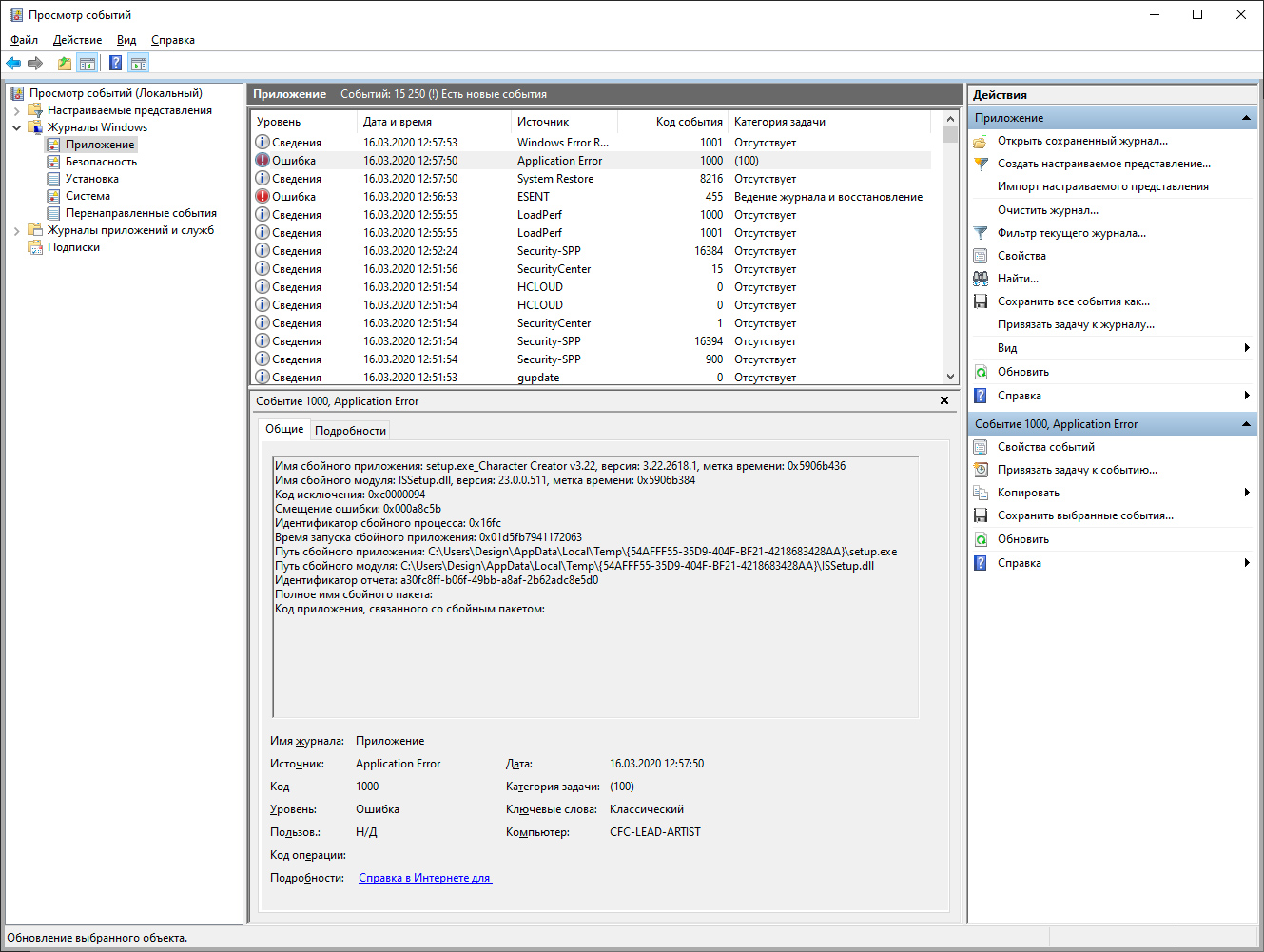
Clean all by hand and regcleaners. no trace of realusion products. run as admin.
Please help. Thanks a lot.
|
|
By mrtobycook - 6 Years Ago
|
Hi there!
So sorry to hear you are having troubles. Peter (the main moderator) will get back to you I'm sure at some point - but have you contacted support? Support will help you sooner and better than the forum in most situations.
I never had the issue of not being able to register - this might be that their registration system is just down at the moment. Definitely contact support and ask them what the story is!
If you still have problems after contacting support, please reply again on here with full details of exactly what is happening and what you have tried, in an much detail as possible. Are you a paid user or a demo user? Has it worked before? Is this a new install of Windows? What version of Windows is this? etc etc
Toby
|
|
By Peter (RL) - 6 Years Ago
|
Hi...
If you are signed into the forum then you already have a Reallusion Account. Just sign into the Hub with the same details.
Do also ensure you are logged into your computer as an Administrator. To check in Windows 10 go to Start > Settings > Accounts.
You should also try installing to a different drive if possible to see if that works. Just go into the Hub Settings and take the check out of "Use the default install path while installing".
|
|
By ant_127217 - 6 Years Ago
|
hi, Peter.
If you are signed into the forum then you already have a Reallusion Account
it's my collegue account. i cant do anything on my workstation. ^(
Login as Admin. Run as admin. Try to install on 3 (three) different harddrives. NO result. ^(
4 comps in my office works fine with try versions and no problems with soft. ^( We want by your pipeline, but i as a graphis and modeller has troubles with install and this make impossible usage Realusion in our project. ^(
Any thougths, whats may be wrong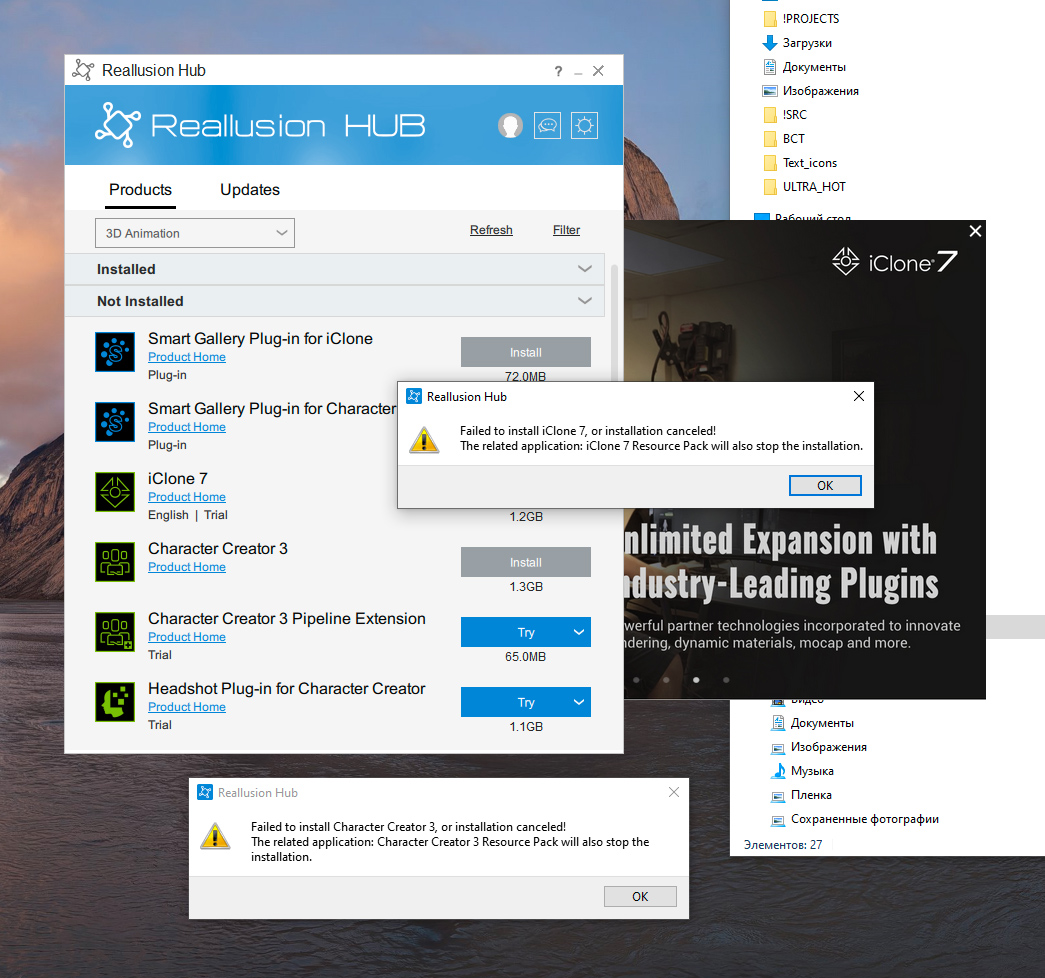 ? Thanks advance. ? Thanks advance.
|
|
By Peter (RL) - 6 Years Ago
|
|
Thanks for explaining more. It sounds as though your Workstation may have settings that prevent it from connecting through to our servers.
1) Please try the following steps:
a) Go to "Start" > "Settings" > "Network and Internet" > "Proxy".
b) Now check the "Manual Proxy Setup" settings to see if you are using a Proxy Server. If you are, please turn off this option if it is currently selected and try to create your account and install your software. 2) If you are able, please temporarily disable any security programs - such as software firewall, hardware (router) firewall, antivirus - that may interfere with the installation process. Once complete, please don't forget to turn back on. 3) If you still have problems after that, please contact our Technical Support department for further assistance. They will be able to advise you further. |
|
By ant_127217 - 6 Years Ago
|
Thanks for participating, Peter.
but nothing helps. Send Ticket to support. ^/ and wil wait
Anton
|
|
By joejvg - 6 Years Ago
|
Hi,
I am having an issue related to the first thread in this post. Win 10 and it was easy to find the problem by using a tool called Process Explorer by Sysinternal. For the path: [Access is denied.] and other scans by the product have similar messages such as file could not be opened. I am troubleshooting and resolving this issue. By the way, I changed my anti-virus and also Windows Defender to allow inbound and outbound for the three executables involved and also changed all permissions for users running the job (running as Administrator did not matter). This is the root of my issue and maybe other individuals. Use utility as it beats Task Manager by a mile and the properties tab alone tells you all you need really.if I need to and will report the issue or get them involved if I start spinning my wheels.
Once I get this resolved I'll post how I did it. I'll notify support also.
Joe
|
|
By dco_861480 - 6 Years Ago
|
The same problem - I can not install any reallusion trial on Windows 10. Have tried two different computers. Neither one had any reallusion products before.
The installer just shows an icon in task bar and disappears soon. And nothing else happens.
|
|
By Peter (RL) - 6 Years Ago
|
|
dco_861480 (8/10/2020)
The same problem - I can not install any reallusion trial on Windows 10. Have tried two different computers. Neither one had any reallusion products before.
The installer just shows an icon in task bar and disappears soon. And nothing else happens.
Is the problem installing the software through the Reallusion Hub or launching it after install?
If the problem is installing, try going to the install folder in Hub settings as shown below, and then try right clicking the installer (.exe file) and choose "Run As Administrator". Does this allow you to install correctly?

|
|
By joejvg - 6 Years Ago
|
Hi,
Reallusion installed without any issues on my machine. When I launch it from the desktop, it prompts for the login, goes into a wait state, and eventually werfault.exe is launched and the window closes with no error message. I have seen this behavior described elsewhere. I made sure that Windows Defender allowed the Reallusion Hub and QtWebEngineProcess for Public and Private access. I added the exceptions to the real-time virus scanning for them also:

I had disabled both Windows Defender and my virus scanner but the same issue remained. But I did the right thing and configured both. Still, the same problem persisted and I soon discovered why. I used a utility called Process Explorer instead of Task Manager as it provides more information:
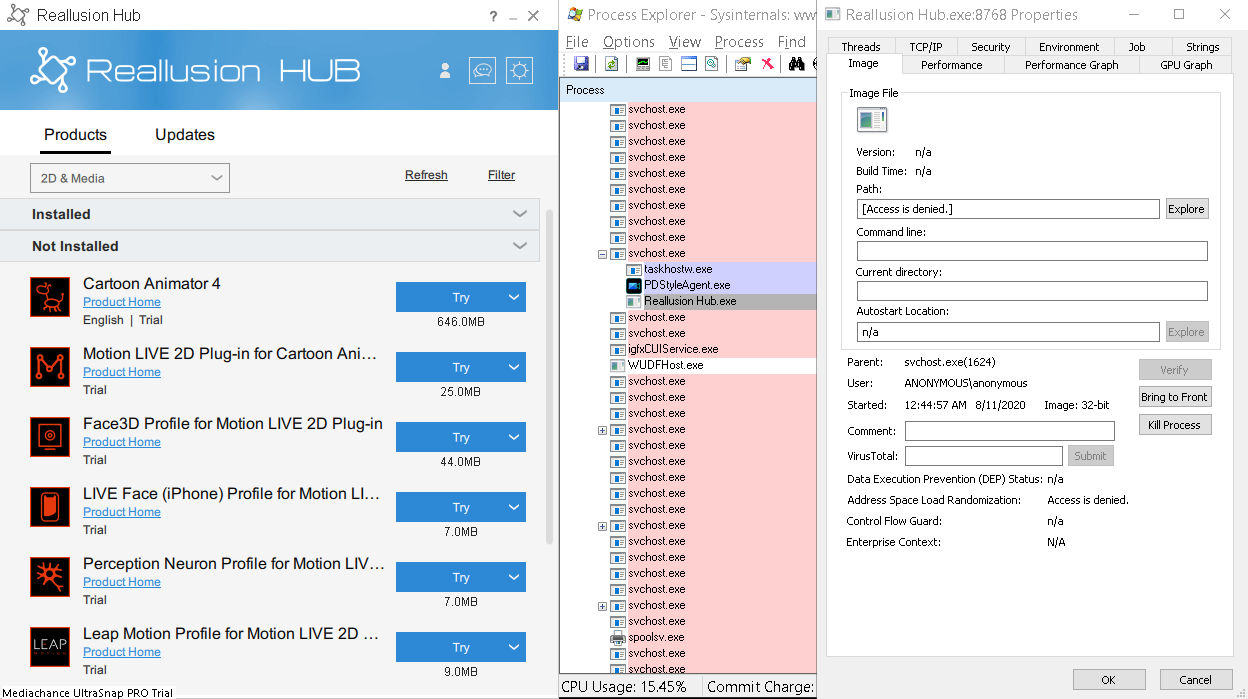
As you can see, it is a permissions problem on my machine. It is not asking for the login yet and this executable is in a wait state:
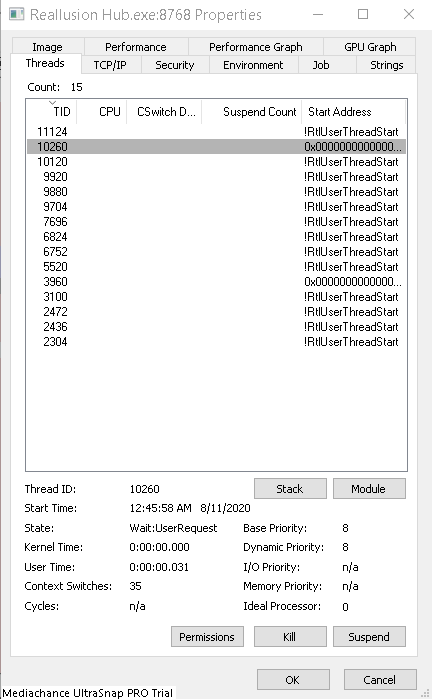
So I changed all the permissions to allow full control:

I also ensured all files inherited these access levels.

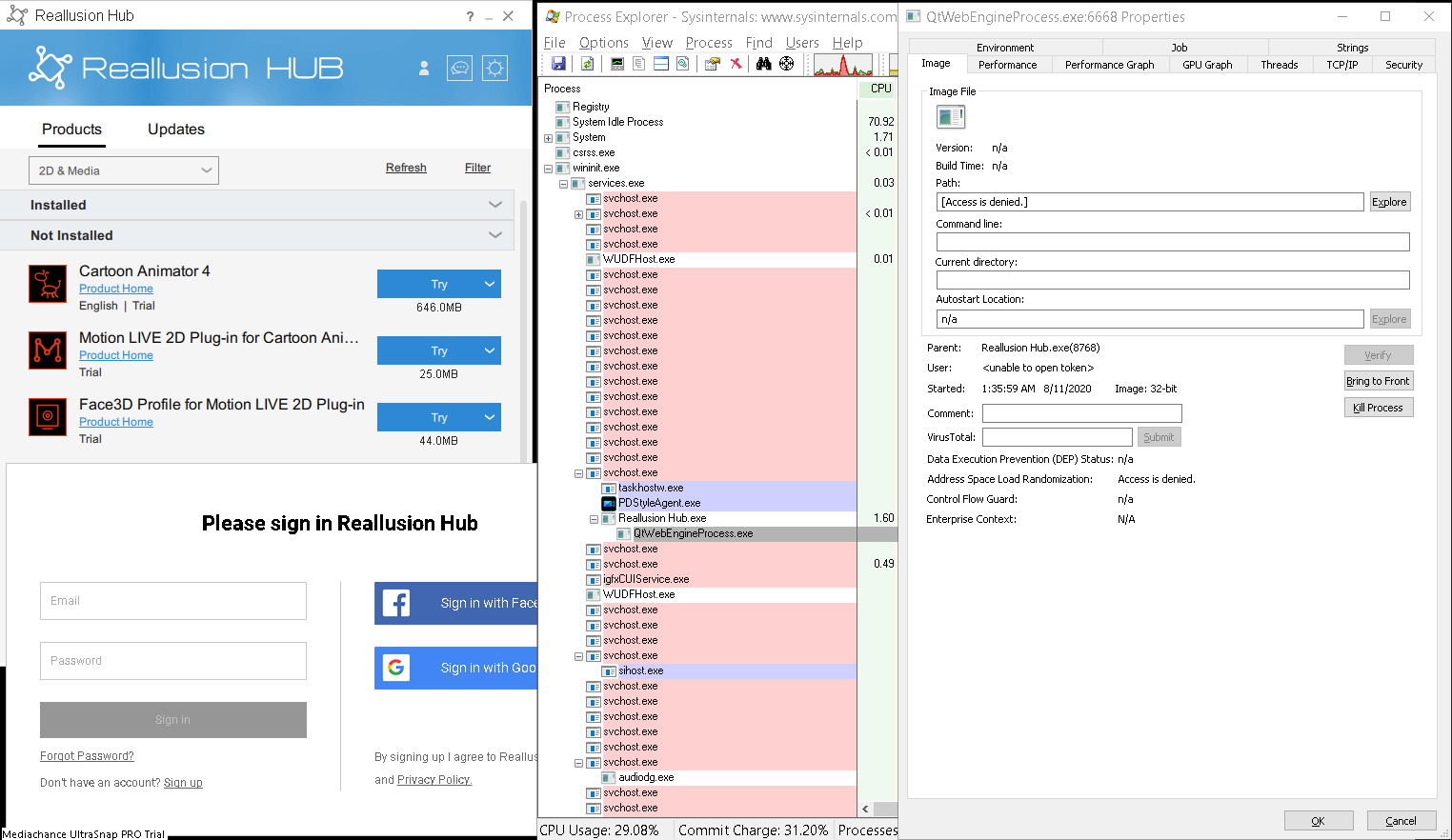
I log in and look at the processes again:

Same thing. Access denied locally so nothing to do with not being able to log in from what I am seeing her so far anyway. Until these authorization issues are gone it will do this every time.
As you can see I did a lot of work troubleshooting for support and following recommendations to the letter (far more than I have ever done for any application). I submitted a shorter version of this post and was told to read the posts. Not a very good answer after showing the issue was local permissions and I had already done what I describe in this post. A developer should be able to figure this out after seeing if they can reproduce my issue. If I had the source I would do it and fix this as I have been a developer for a long time and know Windows and .NET really well.
I do realize everyone's PC environment has differences and since I am a developer my machine has a lot of software running on it. I will go the extra mile as I like the product so much and do this on a machine with nothing but Windows 10 installed on it and see if all I have running on it maybe is causing this. But I must say I have been installing software on this machine since it was a fresh Win 10 Pro install. The machine has plenty of muscle so I know it is not a resource issue. No other App has given me trouble like this one but since I like it so much I am willing to see if that is the issue. So hold off on notifying support. I did already and got a reply to read the post, etc. with a link included - believe me I did. Until I do the fresh install of Win 10 with only this App installed.
I will post the results in a day or so after I get this test run.
Joe
|
|
By 5cats - 6 Years Ago
|
|
joejvg (8/11/2020)
I used a utility called Process Explorer instead of Task Manager as it provides more information:
As far as I know Reallusion Hub is running with Administrator privileges. This is why "Access Denied" is displayed in the path field. You should right click on procexp.exe and choose "Run as administrator" to see the process details of Reallusion Hub.
|
|
By joejvg - 6 Years Ago
|
I am confused. Administrator has ACL to run anything. So does my username. Anyone with lower privileges should get the message. Not an administrator.
|
|
By joejvg - 6 Years Ago
|
|
By the way, this has nothing to do with this issue. See my detailed analysis of the DLL and the memory access restriction exception it is raising.
|
|
By matthewsomeday127 - 5 Years Ago
|
|
Hey Toby, I'm going through that now. Everything says it installs but the Smart Gallery never shows up in either platform, nor do I have Acculips, which was supposed to be a big selling point. 500 bucks, and a hundred hours later, I'm ready to give up and apply for a refund. Look, there are plenty of other good programs out there, and Reallusion at least owed me a phone call, a share screen, SOMETHING to make sure we get our products. That's just too much trouble for them. I've found other people having the same trouble with Reallusion. They've got to clean up their irresponsible act.
|
|
By Kelleytoons - 5 Years Ago
|
Again, no apologist for RL, you have to trust me (I hold their feet to the fire anytime I feel necessary). But, to be fair, there are a TON of computer configurations out there and the RL stuff works on well over 90% of them with no issues.
So go through the normal troubleshooting. First, uninstall (through the Hub) everything it lets you uninstall (assuming it installed anything). Then, through Windows, remove the Hub. Make sure your Windows is up to date (check for any updates) and do the same for your display drivers. With everything clean and ready, download the Hub and start again. Start with ONLY iClone and see what happens (don't install any other plugins for it). At that point in time IF it installs properly (you get no other errors) try running it. If it doesn't install, try turning off your AV and any firewalls and try again.
At that point, file a trouble ticket with RL. While there is no phone support they are (usually) very good at getting back to you right away (Monday, in this case). Not necessarily solving your issue, but at least working on it. Tell them exactly what you've done, all the steps (video if possible - that's REALLY helpful and installing freeware OBS makes it easy to create one) and let them give it a shot.
I truly believe (and, again, I'm a guy who complains about RL as much as anyone) you can get up and running if you stick to it. And the software IS worth it.
|
|
By bossdoggtdot - 5 Years Ago
|
|
your firewall is blocking access to it
|
|
By bdpbiz777 - 4 Years Ago
|
The problems you were having trying to install your product are often related to sneaky and tactful bureaucratic manipulation practices. We own three small corporations, so we're familiar with how cooperate bureaucrats use psychological manipulation tactics to control consumers. Two years later, maybe you can see how your issues could very well be related to Realluson's new 'subscription practices.' So, when bureaucrats (corporate powers) are preparing for major product shifts in their favor, they start shutting down everything that came before their 'beneficial upgrades!" In other words, when corporate bureaucrats decide to 'upgrade', they'll start phasing out previous products in an attempt to force customers to adjust. Remember the days of just buying a CD or USB with the app on it benefited us, the consumer.?
Reallusion's excuse for its new subscription system is "keeping up with technology." 3D Max charges $4k for its subscription, claiming the program has tons of new features, when in fact, very little has changed since 3D Max 2016. When Reallusion was small and unknown, they needed the small guys. Now, Reallusion is just another bureaucratic Capitalistic Communist bully!
Fortunately, we're no longer 'little guys.' All the nonsense and hassle Reallusion's new subscription plans cause trying to install and authorize iClone 7 and associated products are meant to discourage and force upgrades. We could easily upgrade to all things iCLone 8, but by years end, iClone-Reallusion-co-dependent-bureaucratic-Capitalistic-Communist-bully subscription plans will be obsolete. Yes! This post is a professional vent after months of trying to download hundreds of dollars of Reallusion iClone 7 and its associated apps through a Reallusion Hub that appears to be geared towards forcing users to upgrade to iClone8!
|
|
By animagic - 4 Years Ago
|
To refute this long, so-called "professional" post: RL does NOT have a subscription model.
I OWN all versions of iClone since 1.52 and I don't have to pay to keep them working.
|