iClone Preview camera stuck on one axis


https://forum.reallusion.com/Topic424352.aspx
Print Topic | Close Window

By linus10111 - 7 Years Ago
Hi everyone. Please help. I was busy making some scene camera adjustments when my Preview camera window just stopped working. Its behaving like a keyframed camera because when I scroll through the timeline the preview window moves between two points, but its stuck there, I cant move it manually like i always do (I hope i make sense)..
I tried restarting iclone, resetting window layout, and even creating and duplicating the project (with a different name) but  nothing seems to work. Surprisingly, when i create a new project, preview window works without any issues. This basically tells me my iclone works, there are some keyframes in my preview camera (is that even possible????????)
Im using version iClone 7.61.3304.1

Someone please help remove the keyframes (if thats what it is),. I've come a long way and I cant lose 3 weeks of work..

By wires - 7 Years Ago
The Preview Camera does not create keyframes. Open the Scene Manager and look for a Camera in the list, if there is more than one Camera then select each one in the list and make sure that the Zoom, Move and Rotate icons are all bright white and that the "Lock" icon next to the Camera name is in the Unlocked position:
https://forum.reallusion.com/uploads/images/9c7d24c7-d289-4312-8f27-8dbf.png

If a selected Camera shows the icons as grey then the Camera is locked and can not be adjusted. The "Lock" icon is closed and needs to be clicked to unlock the Camera:
https://forum.reallusion.com/uploads/images/c6ac299c-5b16-4a3e-b3a7-67dc.png

Any and all motion keyframes on a Camera are visible on the Transform track:
https://forum.reallusion.com/uploads/images/eea06f78-9965-400a-8897-ff9a.png

To remove all the Camera keyframes select the Camera in the Scene Manager then right click anywhere in the main preview window and then click on "Remove Object Animation" from the list.

Make sure that the Timeline cursor is at Frame 1 before doing this.
https://forum.reallusion.com/uploads/images/0f222f5d-3097-4e18-980b-924d.png

This should now reset your Camera. When moving around in a scene just to check items it really is important to ensure that no Camera other than the Preview Camera is selected.
https://forum.reallusion.com/uploads/images/8513ca33-eb31-4b6c-8729-3c24.png

By linus10111 - 7 Years Ago
wires (10/10/2019)
The Preview Camera is selected.
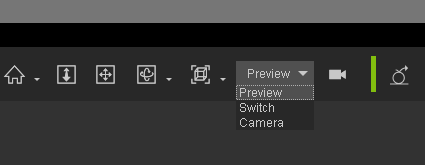
https://forum.reallusion.com/uploads/images/8513ca33-eb31-4b6c-8729-3c24.png


 Thanks for the info but its not the problem Im facing.
The issue is, I can not move within the preview window.

Let me try to explain. Lets say i have a scene with Camera1, unhidden. When i have Camera1 selected, I should be able to see through Camera1's lens, and thats what happens (no problem there). When i view through Preview camera selection, i should be able to home in or around Camera1, objects etc (basically navigate the whole scene), but this is not happening. Preview camera is just stuck. Preview camera does not have Camera1 in view and Iam failing to pan, zoom, rotate into Camera1 or any random object i try to focus the preview camera on.

At Frame0 the preview camera was at axis X0,Y0,Z0 (lets call it 'PointA'). At the current frame9356, the preview camera is at axis X-265, Y-50, Z0 (lets call it 'PointB'). When i scroll back and forth in the timeline between frame 0 and frame 9356, the preview camera moves between PointA and PointB. It refuses to allow me to to view anything else.

I hope i explained better.
By linus10111 - 7 Years Ago
I just realised Im having a similar problem as listed here: https://forum.reallusion.com/36114/Preview-camera-reset

But there was no solution to this problem. Please help.  Reallusion programmers please say something. Someone, anyone?
By mark - 7 Years Ago
Very strange for sure. I'm trying to replicate but it seems to be working on my system.
So if you click on an object in your Preview Camera's field of view and hold down the ALT key or tap the X key it doesn't allow you to rotate around the object you selected? Does holding the Left or Right Mouse button allow any movement or the Scroll Wheel allow zooming? And I sure you have re-booted your system...they used to suggest updating the Display Card drivers in a lot of strange cases like this but with the Nvidia drivers issue that is not recommended at this time for sure!!!
By linus10111 - 7 Years Ago
mark (10/11/2019)

So if you click on an object in your Preview Camera's field of view and hold down the ALT key or tap the X key it doesn't allow you to rotate around the object you selected? Does holding the Left or Right Mouse button allow any movement or the Scroll Wheel allow zooming? And I sure you have re-booted your system...

Thanks. I tried these but they do not work.
I doubt its a driver problem considering that if i open a new project, everything works well. I only experience this problem when I open the project Im working on
By linus10111 - 7 Years Ago
mark (10/11/2019)

So if you click on an object in your Preview Camera's field of view and hold down the ALT key or tap the X key it doesn't allow you to rotate around the object you selected? Does holding the Left or Right Mouse button allow any movement or the Scroll Wheel allow zooming? And I sure you have re-booted your system...

Thanks. I tried these but they do not work.
I doubt its a driver problem considering that if i open a new project, everything works well. I only experience this problem when I open the project Im working on
By linus10111 - 7 Years Ago

Notice that at Frame1, Im able to freely move the Preview camera. At Frame 8375, it moves just a bit and as i go higher up the timeline, the preview camera just plain stops moving. The other cameras are not affected. When i create new camera, it also works well.

I posted this at feedback tracker