|
By AverageJoe - 10 Years Ago
|
|
I'm curious, now that IC6 and the G6 character seems to be a Non-Standard Human, whether there'll be additional or full support for importing Mixamo characters into IC6? And by full support, I mean facial animations similiar to how Daz Genesis 2 characters now support facial animations? I've been considering getting the Fuse app on Steam, which inlcudes 2 auto-rigs a week through Mixamo, and thought this would be a great additional tool to use with iClone.
|
|
By Rampa - 10 Years Ago
|
|
Does Fuse provide morphs or facial bones for visemes?
|
|
By AverageJoe - 10 Years Ago
|
I don't really know, I haven't actually purchased it. Yet. However, I did see a video where they took a character created in Fuse, rigged in Mixamo, and imported into Unity and they were able to animate the face. Now whether or not that answers your question, I don't know.
[EDIT]
It states, as a feature on the Steam page for Fuse:
Facial Animation Blendshapes automatically generates 50 embedded facial blendshapes upon upload for rigging at Mixamo.com (FBX format only)
Facial Animation Blendshapes - When you upload your character to Mixamo to be Autorigged, you can now have 50 facial animation blendshapes generated automatically
|
|
By Rampa - 10 Years Ago
|
|
I guess that answers it! Thanks. :)
|
|
By hattori kun - 10 Years Ago
|
I'm using fuse for some non-hero characters to populate scenes.
I requested mixamo preset last month.
https://forum.reallusion.com/FindPost222192.aspx
The problem with autoriggers as usual is that the rigging is not as good as hand rigged characters. Skinning is not yet there and you really have to manually fix things.
|
|
By AverageJoe - 10 Years Ago
|
|
I noticed oin some videos about Mixamo, there's an option to convert to a bipedal 3DSMax and/or CAT character... Have you used this, or stuck with the FBX export? Would this support facial animations? Do you know of any tutoprials showing using Mixamo in an iClone pipeline?
|
|
By Rampa - 10 Years Ago
|
They may not really work that well in "realistic" iClone environments. Fuse looks very cartoonish. It doesn't look like the hair or clothing is suitable for physics at all.
It is another neat option for characters though.
|
|
By AverageJoe - 10 Years Ago
|
|
I'm not a big fan of creating super realistic characters and/or environments. Looking cartoonish allows for the hobbyist, such as myself, to take shortcuts and get something done a whole lot quicker. Which is one of the reasons I''m really interested in using Mixamo. I'm not a modeler by any means, at least not for characters and neither do I want to spend a fortune buying content. I really, really, really want to use Mixamo, but without facial animation support, it's just not really feasible. I'm not a big fan of Daz3D either, so was wishing either the Mixamo or Autodesk Character Generator would be worthwhile endeavors.
|
|
By Rampa - 10 Years Ago
|
Their auto-rigger is barfing for me sense last night. They may doing their big Mixamo 2.0 upgrade or something. I was hoping to find out if I could download those 50 blendshapes with my FBX. I'll try again later.
Autodesk Character Generator is not as versatile, but creates pretty nice characters. It does not give the characters eyelashes, so if you don't need those, it's nice. It can have facial bones or morphs. The bodies are not complete under the clothing, so it's not quite Clonecloth-ish.
Hopefully the iC6.1 upgrade will be a good solution, with more clothing bases/options. :)
|
|
By hattori kun - 10 Years Ago
|
When you download the fbx from mixamo you can have it autoconverted to characterstudio biped using a maxscipt. Takes a couple of seconds. Then you can fix the skinning and weights. Export as usual and characterize for Iclone.
The face morphs when I checked it last time came embedded in the fbx and shows up as morph modifiers in max after autoconverting. Its pretty straightforward to go from Mixamo>Max>3dx>Iclone.
But you still need to know max. The skinning is not perfect.
|
|
By AverageJoe - 10 Years Ago
|
|
I don't know Max... don't want to know Max... It really kinda sux that someone wants to create movies, but has to learn modeling and rigging. Movie making is supposed to be a hobby, not a full time job. iClone has so much potential, but it's completely misdirected to the wrong crowd, and the wrong set of tools.
|
|
By hattori kun - 10 Years Ago
|
RL is doing a good job imho.
By providing G5 characters that you can customize without knowing rigging, anyone can use them and buy in the marketplace other things they need without knowing how to model.
Knowing how to will save money.
Its no different to film makers, hobbiest or pros, needing to know film stock, lenses and other technical stuff.
If you don't mind having the skinning like this you can use it in Iclone as is.

The shoulder is off. Stomach is crushed in. The crotch root area is too high. There's some weight issues on the legs.
|
|
By mtakerkart - 10 Years Ago
|
@Wizaerd
I use Fuse and I love it for Iclone.
You can download a Character I made with it . The bone structure is Maya in 3dxchange.
Have fun.
https://www.mediafire.com/?edzd4fughcdcvvs
|
|
By prabhatM - 10 Years Ago
|
Just curious.
Isn't DAZ-ICLONE (Genesis 1 & 2) Pipeline Good enough for Characters to work with in ICLONE ?
|
|
By hattori kun - 10 Years Ago
|
Daz and Iclone characters are good enough to tell stories. No doubt about that and the quality is great for both. RL is doing a good job in providing the assets and tools necessary for storytellers either via the marketplace or separate modules. They have a good ecosystem.
Its when you have contracted paid jobs that require custom characters that will need the know how. Because most paid jobs can't rely on generic daz and iclone characters. So you will have to know the technical part to create a fully rigged bunny for a company mascot. :D
Unless you can buy that bunny and able to convince the client its the bunny he wants.
Mixamo is targetted for non hero characters.
Same issue with that file. Joint pinching, weight skinning issues, anatomy not ideal.
It gets you there 90% though.

|
|
By prabhatM - 10 Years Ago
|
|
hattori kun (3/6/2015)
Its when you have contracted paid jobs that require custom characters that will need the know how. Because most paid jobs can't rely on generic daz and iclone characters.
Makes Sense.
Since I build my own stories, I primarily depend on DAZ for all my character development. One could really customize DAZ Genesis.So far it's been adequate. Perhaps I select my stories accordingly.
A Contracted Paid Job situation could be different. Then again one has to work with MODO or something rather than MIXAMO. For the crowd scene, low res ( decimated ) DAZ characters work pretty well for me.
|
|
By AverageJoe - 10 Years Ago
|
hattori kun, the example you provided is indeed messed up, but surely they're not all like that. I've seen other examples where they look fine. Could this be an artifact of viewing it on the Mixamo site? Perhaps there's an issue there, and the character itself is ok. It seems the autorigging feature could really mess up on completely different types of characters, but since all biped models would be largely the same, I don't see why the autorigging would mess up so badly on something to ordinary and standard. I've been researching this for a while, and while lots of people complain about the price, the actual product and rigging gets high marks across the board.
prabhatM (3/6/2015)
Just curious.
Isn't DAZ-ICLONE (Genesis 1 & 2) Pipeline Good enough for Characters to work with in ICLONE ?
Good enough? Yes. Expensive? Absolutely. Even though Daz Studio is free, it's assets aren't. And to get the most from it, in terms of variety, you'll be spending a pretty penny on assets. It can also be a pain in the butt to work with sometimes. With iClone 5.5, I imported many Daz/Genesis characters, and for the most part, all of them had something terribly wrong about them. I've not tried Genesis 2 because quite frankly, I'm just not all that into Daz.
Does it support facial animations? If not, it might be fun to play with and pull into iClone and animate it, but without facial animations, it's not really good for a character.
|
|
By prabhatM - 10 Years Ago
|
|
wizaerd (3/6/2015)
With iClone 5.5, I imported many Daz/Genesis characters, and for the most part, all of them had something terribly wrong about them.
What kind of problem did you face ? Could you please elaborate ?
When I tested DAZ characters with ICLONE I hardly faced any problem.
|
|
By AverageJoe - 10 Years Ago
|
prabhatM (3/6/2015)
wizaerd (3/6/2015)
With iClone 5.5, I imported many Daz/Genesis characters, and for the most part, all of them had something terribly wrong about them.
What kind of problem did you face ? Could you please elaborate ? When I tested DAZ characters with ICLONE I hardly faced any problem.
Most of the issues I faced were pop thru. There's a Daz thing called the super suit I believe (it's been a while) and every character had some pop through in it. Hair never seemed to import correctly, clothes never seemed to really fit. Much of it may have been my own fault, pushing the limits of Genesis too much, but as I said, I'm not a modeler. Never really wanted to be, just want to create some unique characters for movies. Of course, at the time I did all this, facial animations weren't supported either (yeah, it's been a while)
So maybe I owe it to myself to re-try Daz with Genesis 2 and better iClone support. (grrrr, I just don't like Daz)...
Oh yeah, and I was never, ever able to get Decimate to work correctly, because let's face it, Daz characters are very high poly count, not really suitable for real time animation.
|
|
By prabhatM - 10 Years Ago
|
wizaerd (3/6/2015)
prabhatM (3/6/2015)
wizaerd (3/6/2015)
With iClone 5.5, I imported many Daz/Genesis characters, and for the most part, all of them had something terribly wrong about them.
What kind of problem did you face ? Could you please elaborate ? When I tested DAZ characters with ICLONE I hardly faced any problem. Most of the issues I faced were pop thru. There's a Daz thing called the super suit I believe (it's been a while) and every character had some pop through in it. Hair never seemed to import correctly, clothes never seemed to really fit. Much of it may have been my own fault, pushing the limits of Genesis too much, but as I said, I'm not a modeler. Never really wanted to be, just want to create some unique characters for movies. Of course, at the time I did all this, facial animations weren't supported either (yeah, it's been a while) So maybe I owe it to myself to re-try Daz with Genesis 2 and better iClone support. (grrrr, I just don't like Daz)... Oh yeah, and I was never, ever able to get Decimate to work correctly, because let's face it, Daz characters are very high poly count, not really suitable for real time animation.
In my opinion, DAZ is a great fit with ICLONE.
The POKE THROUGH issue that you faced is easy to resolve.
1) You can use POKE THROUGH PLUGIN in DAZ to avoid this.
2) You simple set the OPACITY of those body parts under the clothes to Zero in ICLONE.
Since you are not a modeler, DAZ is truely a great tool for you to work with. Just give another try. DAZ characters are better expressive than ICLONE native characters.
|
|
By AverageJoe - 10 Years Ago
|
|
In my opinion, DAZ is a great fit with ICLONE.
The POKE THROUGH issue that you faced is easy to resolve.
1) You can use POKE THROUGH PLUGIN in DAZ to avoid this.
2) You simple set the OPACITY of those body parts under the clothes to Zero in ICLONE.
Since you are not a modeler, DAZ is truely a great tool for you to work with. Just give another try. DAZ characters are better expressive than ICLONE native characters.
Nothing wrong with options and variety. I still wish RL would officially support Mixamo for characters, as much as they support Daz, and making it the only option for non-modelers it too restricting and limiting. I strongly dislike Daz. Very strongly.
|
|
By mtakerkart - 10 Years Ago
|
|
Does it support facial animations? If not, it might be fun to play with and pull into iClone and animate it, but without facial animations, it's not really good for a character
Yes of course! Did you try the character I uploaded?
Here is the link:
https://www.mediafire.com/?edzd4fughcdcvvs
|
|
By AverageJoe - 10 Years Ago
|
mtakerkart (3/6/2015)
Does it support facial animations? If not, it might be fun to play with and pull into iClone and animate it, but without facial animations, it's not really good for a character Yes of course! Did you try the character I uploaded? Here is the link: https://www.mediafire.com/?edzd4fughcdcvvs
I admit, I did not try it because I didn't know if it supported facial animations. If it did not, then there was no sense in my trying it. And secondly, it's been so long since I've done any of this, I do not yet have 3DXchange insatalled on this new computer, plus I also need to re-familiarize myself with how to do it all.
Seeing as you have experience using Mixamo, specifically with iClone, any chance of doing a tutorial?
[EDIT]
Ok, I tried your character. Unless I did something wrong (quite possible), or missed a step, there is no facial animation capable on this character. No lip synching, no eye movement, no mouth movement. At all. Could you tell me how you were able to import this and get facial animations?
|
|
By mtakerkart - 10 Years Ago
|
@Wizaerd
Ok.
After converted to non-standard human you have to set the eyes in the Face/extend maping.
, all the visemes in the expression editor.
Ok. I made this very old tutorial but I think what you're interesting of is at 5.05:
|
|
By AverageJoe - 10 Years Ago
|
|
mtakerkart (3/6/2015)
@Wizaerd
Ok.
After converted to non-standard human you have to set the eyes in the Face/extend maping.
, all the visemes in the expression editor.
Ok. I made this very old tutorial but I think what you're interesting of is at 5.05:
Thanks, I had never actually gone through and done this manually before. I assume this is what the Daz Genesis 2 DUF file does?
|
|
By AverageJoe - 10 Years Ago
|
|
In my opinion, DAZ is a great fit with ICLONE.
The POKE THROUGH issue that you faced is easy to resolve.
1) You can use POKE THROUGH PLUGIN in DAZ to avoid this.
2) You simple set the OPACITY of those body parts under the clothes to Zero in ICLONE.
Since you are not a modeler, DAZ is truely a great tool for you to work with. Just give another try. DAZ characters are better expressive than ICLONE native characters.
I just spent a whole lot of time re-downloading Daz, as well as some of the assets for it, and tried to use it. And now I remember why I hate it so much... Nothing is compatible. Hair only works part of the time, and none of the hair works with Genesis or Genesis 2... Half the clothes only work for specific characters, and aren't universal. I like what they tried to do with the Genesis and Genesis 2 systems, but it's still all a crapshoot on building and getting an actual character. As well as never really being sure what you're downloading via their download manager... No, I even dislike Daz much more strongly now... What a mess.
|
|
By planetstardragon - 10 Years Ago
|
|
I avoid importing daz character with hair, it rarely works ....it's better to transfer all their hair as props, without the rig attached - the hair rig actually interferes with shaping in iclone
|
|
By mtakerkart - 10 Years Ago
|
|
I assume this is what the Daz Genesis 2 DUF file does?
Yep. For Genesis 2 character.
|
|
By AverageJoe - 10 Years Ago
|
I tried to follow your video, starting at 5:05, but it's just not working for me. Upon importing, I get a message stating
"3DXchange will only support morph keys from FBX version 2011 and prior, please make sure your morph animation is exported from FBX plug-in-2011 or prior"
I first convert to Non-Standard, and I set the T-Pose to Maya, then Convert. I go into the Expression editor, and the head already tilts and turns (although not very much and I will want to change that). But when I get to the eyes, they're not selectable... I cannot rotate them as appropriate. It seems I can adjust the jaw, but I have to use the sliders on the right. I cannot seem to find the appropriate sliders for messing around with the eyes though...
|
|
By planetstardragon - 10 Years Ago
|
daz works pretty well for me, but only after I customize the Morph export rules to look like this
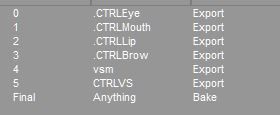
this gives me all the options i want to get really customized expressions. I went through a ton of trial and error to make that list :p
|
|
By bluemidget666 - 10 Years Ago
|
Sounds like you need the auto desk fbx converter, and convert you fbx file to a earlier version.
It's free ...
|
|
By AverageJoe - 10 Years Ago
|
|
bluemidget666 (3/6/2015)
Sounds like you need the auto desk fbx converter, and convert you fbx file to a earlier version.
It's free ...
This is one of the reasons I find it so frustrating to work with Reallusion products. All these tiny tweaks, and separate utilities you gotta run, not just for characters, but models. Different versions of FBX, DAE, etc... All these individual files you have to apply here, then there... then there's this other file... What a giant pain the you know what...
And Daz is no better... you need this file, or that plugin, etc... don't upgrade, downgrade to that... ARGH!!!!!
Maybe it's time to just get RL out of my life, perhaps use the Source Filmmaker...
|
|
By planetstardragon - 10 Years Ago
|
that's not RL's fault though, Autodesk is behind what goes on with fbx
this empasized by my recent focus on make human, I have carrara, poser, houdini daz, modo, blender, autodesk student products ....and all of them have their own unique way of freaking out on what they get from the python version of fbx lol.... it's evident that some people in the industry don't want everyone to get along perfectly for control / financial reasons...
Also, in the first beta that fbx was produced, I went and tested almost every package out there ..so I'm saying this with confidence.
RL's version of fbx is very close if not right on the safe standard of fbx....but overall , fbx can be a disaster when you use multiple programs.
|
|
By bluemidget666 - 10 Years Ago
|
I understand your frustration but as you point out with Daz this problem is universal (out side of auto desk products).
The truth is unless your using max or maya you are going to have to jump through hoops to get what you need.
That's why the FBX converter exist in the first place .
On the plus side it's free and is very easy to use..
|
|
By mtakerkart - 10 Years Ago
|
@wizaerd
I have the same message and it is ok. But I think you have to learn how to setup an fbx character in 3dxchange. I will try to find some reallusion tutorial to help you. the character I uploaded works perfect but it need to be converted as an iclonable character like any non-Iclone character.
|
|
By mtakerkart - 10 Years Ago
|
I think this one. It start at 4:20 to set the eyes.
|
|
By AverageJoe - 10 Years Ago
|
|
mtakerkart (3/6/2015)
I think this one. It start at 4:20 to set the eyes.
Thanx, I'll take a look when my frustration and anger level have decreased somewhat... I just want to make movies, with interesting and unique characters... But I guess this is just too much to ask for...
|
|
By Rampa - 10 Years Ago
|
I think your best bet right now is G5 Cloncloth. It's not perfect for physics, but is the easiest, most flexible way to create lots of iClone characters.
With a bit of practice, the face builder works quite well too.
Characters built using the internal iClone tools have the HUGE advantage of being better rigged, and already rigged. By better, I mean the rig has bones that the user does not see for better skin movement in the joints, etc. I think the G5 Clonecloth looks pretty good. I don't like the G3 stuff, but the G2 stuff was also better looking, with a G5 head!
Peter mentioned a tentative mid-April release for 6.1, so G6 characters are a ways out yet.
|
|
By planetstardragon - 10 Years Ago
|
I can certainly empathize with Wizaerd though, I only understand this much because of how far I've gone to make unique characters - I finally have a decent workflow - with no legal kittens attached to it - 2 days of research just to figure out how to get the softwares I'm using to recognize a tpose.....something that should be very simple.
|
|
By AverageJoe - 10 Years Ago
|
|
rampa (3/6/2015)
I think your best bet right now is G5 Cloncloth. It's not perfect for physics, but is the easiest, most flexible way to create lots of iClone characters.
With a bit of practice, the face builder works quite well too.
Characters built using the internal iClone tools have the HUGE advantage of being better rigged, and already rigged. By better, I mean the rig has bones that the user does not see for better skin movement in the joints, etc. I think the G5 Clonecloth looks pretty good. I don't like the G3 stuff, but the G2 stuff was also better looking, with a G5 head!
Peter mentioned a tentative mid-April release for 6.1, so G6 characters are a ways out yet.
Thanx for your input. I have CloneCloth, and it is a good product. And the facial mapping thing does work fairly well for character diversity. But with mtakerkart's patience and assistance, I think I've finally got a handle on using Fuse/Mixamo for a fully animatible character. So with all 3 of these methods, I should be able to come up with some truly unique and diverse characters.
mtakerkart (3/6/2015)
I think this one. It start at 4:20 to set the eyes.
Thank you for your time and patience. I believe I now "get it". (keeping my fingers crossed...)
|
|
By mtakerkart - 10 Years Ago
|
|
time and patience
The secret of success!! ;)
One year i'm waiting for the Neuron mocap system to make movie very fast.....
I tried Blender , UDK 4, Cry engine , Muvizu , Source Filmaker, RenderDigimania, Unigine, Unity,Daz
3d and the only one I could make very cool stuff very fast is Iclone.
|
|
By Rampa - 10 Years Ago
|
mtakerkart (3/7/2015)
time and patience The secret of success!! ;) One year i'm waiting for the Neuron mocap system to make movie very fast..... I tried Blender , UDK 4, Cry engine , Muvizu , Source Filmaker, RenderDigimania, Unigine, Unity,Daz 3d and the only one I could make very cool stuff very fast is Iclone.
The only tricky part is putting all your mocap together. I have a method I think works pretty well in iClone, even though it takes a couple steps.
What's your method for stringing together mocap clips so there are no jumps? Or do you just film each one separately?
|
|
By AverageJoe - 10 Years Ago
|
mtakerkart (3/7/2015)
time and patience The secret of success!! ;) One year i'm waiting for the Neuron mocap system to make movie very fast..... I tried Blender , UDK 4, Cry engine , Muvizu , Source Filmaker, RenderDigimania, Unigine, Unity,Daz 3d and the only one I could make very cool stuff very fast is Iclone.
One last question, if I may... Anything special I need to know or click on when downloading from the Mixamo site? If I add animations to my character via Mixamo, what do I need to do to ensure they're part of the character upon importing to iClone?
|
|
By prabhatM - 10 Years Ago
|
|
wizaerd (3/6/2015)
I just spent a whole lot of time re-downloading Daz, as well as some of the assets for it, and tried to use it. And now I remember why I hate it so much... Nothing is compatible. Hair only works part of the time, and none of the hair works with Genesis or Genesis 2... Half the clothes only work for specific characters, and aren't universal. I like what they tried to do with the Genesis and Genesis 2 systems, but it's still all a crapshoot on building and getting an actual character. As well as never really being sure what you're downloading via their download manager... No, I even dislike Daz much more strongly now... What a mess.
Since you hate DAZ so much, I am not sure if I should talk about it any further.
DAZ has a built-in tool to REFIT the hair and clothes to Genesis characters. They work perfectly well.
When you hate somthing so much with impulsive reactions, you are bound to miss the EMBEDDED SOLUTIONS.
Animation needs patience. Without patience, you can't even work with your favourite Source Film maker. Or, any other software.
|
|
By prabhatM - 10 Years Ago
|
|
rampa (3/7/2015)
[quote][b]
The only tricky part is putting all your mocap together. I have a method I think works pretty well in iClone, even though it takes a couple steps.
Could you please share those steps with us ?
|
|
By planetstardragon - 10 Years Ago
|
I can't exactly agree with the patience, i have none, my determination is greater than my patience ....if you saw how I learn new software - you'd laugh. :w00t:
Patience is = I'll try again tomorrow
Determination is = This is going to work even if I have to reprogram the kitten!! Moar Coffeee!!
Daz works fine for me now :P
|
|
By Rampa - 10 Years Ago
|
prabhatM (3/7/2015)
rampa (3/7/2015)
[quote][b]
The only tricky part is putting all your mocap together. I have a method I think works pretty well in iClone, even though it takes a couple steps.
Could you please share those steps with us ?
I'll make a tutorial with my latest method and get it posted in my corner.
It works pretty well, but does require saving and re-importing the string of motions. I did put in a request for a "mix-down" button that would just merge all the clips into one. :)
|
|
By prabhatM - 10 Years Ago
|
|
planetstardragon (3/7/2015)
I can't exactly agree with the patience, i have none, my determination is greater than my patience ....if you saw how I learn new software - you'd laugh. :w00t:
Patience is = I'll try again tomorrow
Determination is = This is going to work even if I have to reprogram the kitten!! Moar Coffeee!!
Daz works fine for me now :P
Nice that you can differentiate between Patience and Determination to your advantage.
|
|
By planetstardragon - 10 Years Ago
|
patience is someone willing to learn something new...
Determination is knowing exactly what you want, and learning whatever you have to, to get what you want.
Patience can quit - determination can't. Patient people get more rest. lol
|
|
By prabhatM - 10 Years Ago
|
|
planetstardragon (3/7/2015)
patience is someone willing to learn something new...
Determination is knowing exactly what you want, and learning whatever you have to, to get what you want.
Patience can quit - determination can't.
A Determined Person Always has Enough Patience to find a Solution to his Problems.
|
|
By planetstardragon - 10 Years Ago
|
well yeah, because you can't rest till you get what you want....you try to conserve energy ..so it looks like patience but it's more logic and wisdom, since experience shows that hammers don't fix everything all the time...how I wish they did!! :crying:
|
|
By mtakerkart - 10 Years Ago
|
|
If I add animations to my character via Mixamo, what do I need to do to ensure they're part of the character upon importing to iClone?
You can add the Mixamo animations to your character and download all of it. But if your not comfortable with the fbx format I suggest you to practice with the free mixamo mocap before ;-)
|
|
By mtakerkart - 10 Years Ago
|
|
What's your method for stringing together mocap clips so there are no jumps? Or do you just film each one separately?
I've no method to enligne Iclone mocap that's why I backed the Neuron perception to record the whole performance of the actor scene by scene , like in the real life.
|
|
By prabhatM - 10 Years Ago
|
|
planetstardragon (3/7/2015)
well yeah, because you can't rest till you get what you want....you try to conserve energy ..so it looks like patience but it's more logic and wisdom, since experience shows that hammers don't fix everything all the time...how I wish they did!! :crying:
Logic and Wisdom apply on a particular point. Patience sees them through. It's a continuum.
Without patience, the logic and wisdom can not find their success.
|
|
By planetstardragon - 10 Years Ago
|
logic and wisdom is it's own reward! Patience is not a reward, rewarding yes...but not a reward in itself, a patient person can sit and wait forever, i'll be laughing with a hammer in my hand! :w00t:/
in the world of balance, there is a time and a place for everything....be patient, you will eventually understand this. :cool:
|
|
By AverageJoe - 10 Years Ago
|
|
Since you hate DAZ so much, I am not sure if I should talk about it any further.
DAZ has a built-in tool to REFIT the hair and clothes to Genesis characters. They work perfectly well.
When you hate somthing so much with impulsive reactions, you are bound to miss the EMBEDDED SOLUTIONS.
Animation needs patience. Without patience, you can't even work with your favourite Source Film maker. Or, any other software.
I'm fine with the patience required for animation. I've made a myriad of movies, and I'm not so much looking for shortcuts in the movie making and/or animation aspects. It's the other stuff I get frustrated with. Modeling, rigging, exporting, tweaking, set building, etc... I just want to get too the actual movie making part. I've spent hours tweaking keyframes and motions, because to me, that is the fun part. All this other stuff, just to get a working character isn't the fun part for me.
|
|
By planetstardragon - 10 Years Ago
|
unfortunately thats where the whole 3D industry has their hooks on making money. They have literally made it that if you want to do anything cool...you are going to have to pay ....either in cash or in software to work around all the limitations they impose, or in endless tutorials to not learn the software, but work around the non stop bugs... - so it's easier paying than fixing.
This is not frustrating by accident.
|
|
By prabhatM - 10 Years Ago
|
|
wizaerd (3/7/2015)[hr
I've spent hours tweaking keyframes and motions, because to me, that is the fun part. All this other stuff, just to get a working character isn't the fun part for me.
:)
I understand and agree. Things are slowly getting easier.
After 30 years when I got back to doing animation myself, I decided not to do modeling any more. These days, I enjoy doing my scripts, music and the scene-wise animation. I don't even try to learn Physics ( or any other feature) if my story does not demand it. I know it's there and I will get it going when I need it. Honestly I am more into story telling rather than animation or anything.
Even UV has no place in my scheme of things so long things work for me.
( Though I faced the issue of Power of 2 in Unreal Engine when I tried to import my Toon shaded DAZ character in FBX format. More later on that issue.)
|
|
By planetstardragon - 10 Years Ago
|
welp, on a good note , after "hammering" through a bunch of bugs and limitations with blender and makehuman for the last 3 days, I just finished ironing out my workflow and have my first decent low poly basemesh to work out of, the way I wanted to work! they didn't make it easy, but i kept clicking till i got it!! Patience had nothing to do with it, I wanted to punch something every step of the way!! :w00t:
ps - discovered a bug in 3DX5 in the process - blender exports the fbx mesh fine, but once it comes into 3DX5 - when you re-export it as fbx - the fbx becomes incompatible with modo, (loads with problems ) where as modo imports the fbx without errors directly from blender and exports fine as well.. - easy to recreate - simply import an fbx of makehuman from either blender or makehuman standalone to 3DX5 - , just export without converting to standard human ....then import to any other software and compare the fbx from blender or make human vs 3DX5 - i think converting the character to non-standard might correct this ....but this should be looked into because it could affect rigged props that don't get converted to non-standard characters. ie - making a rigged prop in modo, importing as fbx to use substance, then exporting - it may not be the same thing as first fbx.
pss- i blame these issues on the fbx format - if it was consistent no one would have a problem with exchanging files to begin with. collada is more consistent. ( but even then Daz made their own version of collada...even though collada was fine! ^.^ )
psss - modo indie crashes more than ray charles driving home after a few drinks! ^.^
|
|
By animagic - 10 Years Ago
|
prabhatM (3/7/2015)
planetstardragon (3/7/2015)
well yeah, because you can't rest till you get what you want....you try to conserve energy ..so it looks like patience but it's more logic and wisdom, since experience shows that hammers don't fix everything all the time...how I wish they did!! :crying:
Logic and Wisdom apply on a particular point. Patience sees them through. It's a continuum. Without patience, the logic and wisdom can not find their success. Planet, I think you confuse patience with passiveness, which it is not.
|
|
By planetstardragon - 10 Years Ago
|
Exactly animagic - Not confusing it, applying what I learned from years of patience...
patience rewards you with logic and wisdom....the hammers that build things!
there is a time to sit and wait, and there is a time to get things done!!
we are patient with RL because they are working at full capacity in good faith - logic and wisdom tells us to support them best we can because no other company cares as much.
but we don't have to take that nonsense from other companies that try to take advantage of our patience. that said ....here's a bad kitten toy i found for 19 bucks a year!
Let's get things done!!!!!! \:crazy:/
http://voxelfarm.com/
|
|
By prabhatM - 10 Years Ago
|
planetstardragon (3/7/2015)
Exactly animagic - Not confusing it, applying what I learned from years of patience... patience rewards you with logic and wisdom....the hammers that build things! there is a time to sit and wait, and there is a time to get things done!! we are patient with RL because they are working at full capacity in good faith - logic and wisdom tells us to support them best we can because no other company cares as much. but we don't have to take that nonsense from other companies that try to take advantage of our patience. that said ....here's a bad kitten toy i found for 19 bucks a year! Let's get things done!!!!!! \:crazy:/ http://voxelfarm.com/
You will say the same thing about the other companies if you join them on a hi-tea and do a photo-op with the President.
|
|
By planetstardragon - 10 Years Ago
|
in case you haven't noticed, i actively look for companies and technologies that are on point. They don't look for me, i look for them....You just want to argue lol -hugs-
voxels are the future, polygons are near the end of their life cycle.
i'm really doing this for myself, I'm finding the fastest workflow possible...and sharing what I find because I know it can help others.
making unique characters is actually pretty easy, and can be done for free.
|
|
By mtakerkart - 10 Years Ago
|
|
there is a time to sit and wait
Interesting. Do you have childrens Planet?
I can confirm to you that programing a human to be self-ruling takes patience and it has nothing to do with the wait .... ;)
|
|
By planetstardragon - 10 Years Ago
|
Now you are mixing apples and astrophysics...Last I heard, we were talking about 3D software, the confusing issues they add, and making interesting characters :D
Have patience, eventually the difference will be clear!
ps - no it's not daz or poser :w00t:

|
|
By mtakerkart - 10 Years Ago
|
|
That's what I thought ;)
|
|
By planetstardragon - 10 Years Ago
|
uh huh....
"To kittens with circumstances; I create opportunities." - Bruce Lee
always make it a point to learn from the best.
|
|
By AverageJoe - 10 Years Ago
|
|
sw00000p (3/8/2015)
"ANY ANIMATED CHARACTER WILL PERFORM PERFECTLY INSIDE ICLONE..."
...Regardless of the software used!
IF YOU:
1. Retarget the animation
...to a simplified skeleton, i.e. "RL_Game Bone".
1. Just add "Facial Bones!
POOF! :Wow:
Keeping in mind that not everyone wants to be a 3D professional, and that many people use iClone because they like to make movies, not model, texture, and rig their own characters. SO could you elaborate a bit more on what you mean by your response?
|
|
By planetstardragon - 10 Years Ago
|
Wizaerd, what kind of characters do you want, and what kind of workflow would you like ?
I've explored just about every avenue of character creation - maybe i can offer some ideas that will help you.
I know the feeling, but being that this is important to my goal with my business, i had to learn it :pinch:
also, i'm an advocate of noobs, i have much more concern and empathy for a noob ...than I have for a pro - having been a pro on the techie side in music....our job is finding solutions...not crying ..so i tend to be a bit more dragon to them...no soup for them!! I have no patience for a pro in diapers!!
but you ...i defend and support.... if i can help ...i'd like to :)
same goes for ANYONE that approaches me like a fellow noob ♥
"How can I be useful, of what service can I be? There is something inside me, what can it be?" - Vincent Van Gogh
|
|
By AverageJoe - 10 Years Ago
|
It's ironic, or sad depending on how you look at it, but I've had every version of iClone since 1.5, and to this day, I've rarely ever done anything with it...
I really like the character design of those in Team Fortress 2, which is why I thought Fuse would be a good solution. I bought it this weekend, and I can create the characters I want there pretty easily, although I wish they had more variety in the clothing department. I'm not really looking for photo realistic characters, just some that have some character about them, and no so average or plain looking.
I've talked with a few different people who say that Fuse characters work well in iClone, it's just a matter of getting it set up right in 3DXChange. So I think I'm good for characters, at least for a while.
My issue, and it's strictly my issue, is that I get excited about creating a movie, and when I sit down to work, realize all the external & separate bits & pieces that have to be pulled together, imported, tweaked, etc... that by the time I'm ready to start movie making, I get burned out.
I have so many different content packs, but even they require all sorts of assembly. For example, I ordered and downloaded the Extreme Building Pack but when I go to it in iClone, there are no buildings, it's all pieces of buildings, needing to be assembled. Now I realize that for the greatest variety and diversity, this is the best way to package it. But I had hoped it'd have some pre-assembled buildings instead of having to dig through the hundreds of parts, and slowly put them all together to finally build a building and then do it all over again for the second building, etc...
Extreme Operating Room? No, props and pieces to build an operating room.
I know, it sounds like I'm a big whiny baby, and for the most part I guess I am. But I was super amped to create a movie and start animating things but all my time & effort is spent on the assembly part. And eventually, it just kinda loses it's appeal. I'll lose interest, and read a book or play a game. A few weeks later, I'll get an idea for a movie, get excited about it, and start the whole process all over again.
And be assured, I know it's strictly my own short comings, it really doesn't have much to do with iClone itself, well not completely at least.
|
|
By prabhatM - 10 Years Ago
|
|
wizaerd (3/8/2015)
It's ironic, or sad depending on how you look at it, but I've had every version of iClone since 1.5, and to this day, I've rarely ever done anything with it...
I really like the character design of those in Team Fortress 2, which is why I thought Fuse would be a good solution. I bought it this weekend, and I can create the characters I want there pretty easily, although I wish they had more variety in the clothing department. I'm not really looking for photo realistic characters, just some that have some character about them, and no so average or plain looking.
I've talked with a few different people who say that Fuse characters work well in iClone, it's just a matter of getting it set up right in 3DXChange. So I think I'm good for characters, at least for a while.
My issue, and it's strictly my issue, is that I get excited about creating a movie, and when I sit down to work, realize all the external & separate bits & pieces that have to be pulled together, imported, tweaked, etc... that by the time I'm ready to start movie making, I get burned out.
I have so many different content packs, but even they require all sorts of assembly. For example, I ordered and downloaded the Extreme Building Pack but when I go to it in iClone, there are no buildings, it's all pieces of buildings, needing to be assembled. Now I realize that for the greatest variety and diversity, this is the best way to package it. But I had hoped it'd have some pre-assembled buildings instead of having to dig through the hundreds of parts, and slowly put them all together to finally build a building and then do it all over again for the second building, etc...
Extreme Operating Room? No, props and pieces to build an operating room.
I know, it sounds like I'm a big whiny baby, and for the most part I guess I am. But I was super amped to create a movie and start animating things but all my time & effort is spent on the assembly part. And eventually, it just kinda loses it's appeal. I'll lose interest, and read a book or play a game. A few weeks later, I'll get an idea for a movie, get excited about it, and start the whole process all over again.
And be assured, I know it's strictly my own short comings, it really doesn't have much to do with iClone itself, well not completely at least.
You just need an enthusiastic assistant who can keep the characters and props ready for you. Then you can focus on directing/animating the movie.
|
|
By planetstardragon - 10 Years Ago
|
no you are not a whining baby, it's very overwhelming ....
I watch the eve game battles on youtube ...and want to make something like that for a music video .......stresses me out to think of all the stuff i have to do just to do a 30 second clip that some kid will dislike from a smartphone because his girlfriend dumped him lol.
when you say clothes, how much do you want to change clothes ? extreme, or just colors / textures ?
also, the trick to doing stuff fast, is finding a system that uses the same rig for all their characters - this way ...you do it once, save the profile ...and it works for any character in that system.
now ...on modding and sculpting....is that something you'd be interested in investing time into ?
instead of spending money on fuse ...have you tried the autodesk character generator ?
https://charactergenerator.autodesk.com/
I can show you how to mod those ...and they fit the paradigm of using the same rig for every character ..and it's free....( with options to pay )
.....and
here's what i've learned so far about character creation -
you are going to spend something.....either time, money ..or both.. or quality....
with money - the more you spend the more you get
time - the more you spend the more you get
both - the more you spend the more you get lol
if you want legal rights to your character you will spend time and money abundantly, then it turns into an adventure of what software does the most of what you want with the least bugs - they ALL have bugs and need workarounds. Even autowreck, but since autowreck controls fbx....they make it easier for autowreckers after bilking them for as much money as they can.
if you want a great character but don't care about legal rights to it, but want good quality to focus on your story... this avenue is more money. this is good if you want to focus on making videos for film festivals and need the best available without having to hire an art department.
if you want a great character and just want to make videos for lolz - this is more time with options to spend money....you don't have to because there are a ton of free options, it's just a matter of finding them. Then there are the stupid legal risks because some of the free sites are just rips from games - and some game or youtube can do a hand slap just because......this avenue is good when you just want to make funny clips to share with friends for laughs ...usually when there is trouble ...the video gets taken down, or an ad placed on your video or you get a slap on the wrist by the big bad pro in diapers. you give em the finger and make a new video about how they like picking on noobs and should be boycotted for not recognizing the value of the marketing fan art brings... - make a new account if necessary and move on lol.
|
|
By AverageJoe - 10 Years Ago
|
I thought about the Autodesk Character Generator, but didn't know if they'd be fully animaible, including facial animations, in iClone. I assumed they would, but have to go through the 3DXChange portion. Are they easy to deal with from that perspective?
As far as clothes are concerned, things like duster coats, which probably require all sorts of additional work to flow and collide correctly, motorcycle jackets, bandoliers, etc... And slutty clothes for the women folk... ;)
Which would you recommend more? Fuse or the Autodesk thing? In your opinion, which one allows for the most diversity in creating characters for iClone?
|
|
By planetstardragon - 10 Years Ago
|
well to me ...they both have strict copyright rules ....and mixamo makes it worse by limiting me to 2 rigs a week... so it's like asking which poison can i tolerate more lol.
fuse is more versatile than the character generator ...but since I'm into modding ...the character would change anyways ...so I'd go free without the limit of 2 rigs a week...the fuse characters look better and more diverse options than the autodesk characters.
last i used the character generator, they had a face rig in the free...you had to enable it in the export settings area .....not sure if they disabled it ....they had it in beta.
I'm thinking sculptris and the substance tools are your friends ....taking a base mesh that you can mod new features into....the new texture system in iclone adds more than just color and does shaping with displacement.....and you can take advantage of it to really make unique looks.
-
the system I'm working with now ....is a mix of make human, poser pro, modo, blender and sculptris.... I make my character in make human.....adjust it to be more compatible in blender ...export it to modo to attach clothes to it ....and use the poser cloth tools to make my own clothes. I got through the hardest part of getting most of the work arounds ...and ready to move on to learning advanced clothing techniques. ( at least till i figure out how to work around the cross-eyed rigging in make human lol - 3DX5 adapts to it, but still isn't right! Lol ) - sculptris is for once it's inside 3DX5 - i'll just export that mesh after it's converted and tweak it without changing face counts ...sculptris is good at that.
|
|
By AverageJoe - 10 Years Ago
|
|
I went ahead and created an account on the Autodesk product, and it certainly has more variety for the clothing part. Will it fully animate in iClone? What will I have to do in 3DXChange to get it to fully work in iClone?
|
|
By planetstardragon - 10 Years Ago
|
|
it has worked well for me when I used it - BUT these companies are notorious for changing things for the sake of making income ...I'll log in to and check it out ....if it still has the face rig ...I'll just rig one up in 3DX5 and share the profile so you don't have to go through that ;)
|
|
By AverageJoe - 10 Years Ago
|
Oddly enough, I created a character, but I guess since I used what they call an Artistic Setting, I cannot download it without having a subscription. I cannot see anywhere to subscribe either. I looked in the Help system, and step 1 was to go to, but there was no URL or address to go to in order to subscribe.
[EDIT]
I found it... $50 a year... Might be worth it if I use it a lot... Hmmmm, I might end up doing this, so whatever help you can offer for getting them into iClone would be greatly appreciated!
|
|
By planetstardragon - 10 Years Ago
|
ok, tested it , works great ....
this is the export settings I used -

I tested both the 3DSMax and the Generic ..... use the generic, it works with the maya profile. so skip checking the 3DSmax option and just stay with generic.
Once the mesh comes in, select the mesh and do an auto smooth to iron out the wrinkles....
The facial needs extensive programming with expressions, in both the retargetting and expressions - that's where it gets tedious, but will be same with any other system you use that doesn't have a default profile in 3DX5 like daz. - , working on that now, will share it after I finish it.
but it's a very good rig, far superior to what fuse would give you. Excellent rig to mod actually...I'm surprised actually, it got way better than beta ^.^
the facial bone rig is actually similar to the iclone standard rig...not as detailed, but they have some of the key points.
|
|
By planetstardragon - 10 Years Ago
|
also, it's showing free for me with basic characters, but i don't know if that was a perk for me being active in beta or that i'm in the student program.
too bad they dont have a mix of facial rig along with morphs .....
I have to give credit where credit is due, and autodesk fixed up the character generator nicely - not crazy about the topology....but if i wasn't so knee deep in my objective ..this would be a choice I'd like for modding.
|
|
By Rampa - 10 Years Ago
|
If you happen to be a student, you can get a free account to use all Autodesk products (non-commercial, of course).
They no longer include facial rig or morphs for free. Both work quite well. The skeleton is standard Maya HumanIK, so it's a "one-click" rigging solution. The bodies are not complete under the clothing, and there are no eyelashes. Textures are just one map.
This was originally "Evolver", which RL licensed for a bit some years ago.
|
|
By AverageJoe - 10 Years Ago
|
I really appreciate your help.
I was unable to select anything higher than Low for resolution, and couldn't choose any of the facial morph or rigs... Perhaps because my subscription hasn't been made official yet. I also didn't have any of the twirly little blue icons I see on your screen, but again perhaps because my subscription isn't active yet.
I'll try again after a while. And I really, really appreciate your help with the 3DXChange stuff. If whatever profile you send allows me to easily and quickly get characters, male and female, into the system with the least amount of hassle, I'll forever be in your debt. Well not forever perhaps... heh heh heh
|
|
By planetstardragon - 10 Years Ago
|
well then, let me share what I see in the rig i downloaded
these are the controllers you get for the face in the generic rig ....this is nice because you have options of how you want the shapes to take ...
each one of those white dots are bones that you use to shape the eyebrows / lips or tongue in the programming ...which means you can customize your characters to speak differently in the profile .....like if you say ...Hi with a happy face ....it looks different than Hi with an angry face ...so there really is no one size fits all when it comes to expression programming.
Having these options are nice since you can program your character to be in a happy, sad or angry mood ....

My pleasure in helping, I went through it...know how nerve wrecking it can be ..and that's why I help...plus i learn more when I help others so it helps me back lol , ( still going through it with all the other softwares i mentioned - the pain doesn't stop! lol )
|
|
By AverageJoe - 10 Years Ago
|
|
planetstardragon (3/8/2015)
well then, let me share what I see in the rig i downloaded
these are the controllers you get for the face in the generic rig ....this is nice because you have options of how you want the shapes to take ...
each one of those white dots are bones that you use to shape the eyebrows / lips or tongue in the programming ...which means you can customize your characters to speak differently in the profile .....like if you say ...Hi with a happy face ....it looks different than Hi with an angry face ...so there really is no one size fits all when it comes to expression programming.
Having these options are nice since you can program your character to be in a happy, sad or angry mood ....
... image snipped ...
My pleasure in helping, I went through it...know how nerve wrecking it can be ..and that's why I help...plus i learn more when I help others so it helps me back lol , ( still going through it with all the other softwares i mentioned - the pain doesn't stop! lol )
SO if I choose the Generic, and there's no one size fits all, what do I need to do in 3DX5 to get these working?
|
|
By AverageJoe - 10 Years Ago
|
|
rampa (3/8/2015)
If you happen to be a student, you can get a free account to use all Autodesk products (non-commercial, of course).
They no longer include facial rig or morphs for free. Both work quite well. The skeleton is standard Maya HumanIK, so it's a "one-click" rigging solution. The bodies are not complete under the clothing, and there are no eyelashes. Textures are just one map.
This was originally "Evolver", which RL licensed for a bit some years ago.
So if one paid to get the facila rigging, either morph or bones, using the Maya export option would allow me to pull into 3DX5, choose the Maya profile when converting to Non-Standard Human, and that's it? I'd be able to save it to iCLone and animate everything, even facial stuff?
|
|
By planetstardragon - 10 Years Ago
|
as for paying for this, i'm not crazy about their mid poly mesh, there was a crease in it that didn't look so great ...I'd fix it in a mod ....
it will be work even with a profile, because as I said, you'd want to customize your characters so they don't all look like they take the same drugs lol
BUT apparently you may be able to use one base profile to modify each character in 3DX5 providing they all use this exact rig.
I can't comment on fuse because I have no idea what their facial options are ....if they have any ....
|
|
By planetstardragon - 10 Years Ago
|
wizaerd (3/9/2015)
rampa (3/8/2015)
If you happen to be a student, you can get a free account to use all Autodesk products (non-commercial, of course).
They no longer include facial rig or morphs for free. Both work quite well. The skeleton is standard Maya HumanIK, so it's a "one-click" rigging solution. The bodies are not complete under the clothing, and there are no eyelashes. Textures are just one map.
This was originally "Evolver", which RL licensed for a bit some years ago.So if one paid to get the facila rigging, either morph or bones, using the Maya export option would allow me to pull into 3DX5, choose the Maya profile when converting to Non-Standard Human, and that's it? I'd be able to save it to iCLone and animate everything, even facial stuff?
no....I'm using the generic rig ...once in 3DX5 - I use the maya template to get the body right - but the face still needs to be done manually - it's fairly straight forward ...but none the less tedious.
NONE of the expressions are done, so I'd have to program that manually as well.
I can make a template for you, ( and you should wait till i finish one to review how it works in iclone first before buying anything ) and you can mod that template, again, providing that all their characters use this template....if for instance they change the rig in a different poly or different size character ...then 1 profile won't work...you'd have to do it from scratch ...but I'm under the impression, they use 1 base rig ...and all their meshes are attached to it - thus 1 profile would work.
|
|
By planetstardragon - 10 Years Ago
|
|
i'm doing the expressions now ....excellent rig ..it's actually making this process fun because it's so responsive!
|
|
By Rampa - 10 Years Ago
|
|
wizaerd (3/9/2015)
[quote]rampa (3/8/2015)
If you happen to be a student, you can get a free account to use all Autodesk products (non-commercial, of course).
So if one paid to get the facila rigging, either morph or bones, using the Maya export option would allow me to pull into 3DX5, choose the Maya profile when converting to Non-Standard Human, and that's it? I'd be able to save it to iCLone and animate everything, even facial stuff?
Almost. You need to download the FBX file. Medium resolution mesh is best, because you can apply smoothing in iClone if you find it needed. I always select the high resolution skeleton. It gives breast and tummy bones. The HumanIK I mentioned is the preset in 3DX.
No matter what you use, you have to do the facial gestures in the expression editor in 3DX, be it morphs or bone adjustments. The only way to have this mostly automatic is by using DAZ with the facial DUF file, or just stick with iClone G5, or earlier, characters. The head builder is ready to go as soon as you finish building the head, complete with blinking etc. You will need to specify the eye, upper eyelid, and jaw bones. The breast bones can be set to "extend", and then have spring applied. No matter what you do, it's a bit of work! ;)
That said, I usually go with the facial rig. It makes for a smaller file, and is easy to pose the bones however you want.
|
|
By planetstardragon - 10 Years Ago
|
the mesh is inferior - lots of bad faces - would have to be corrected with modding - and i am using the medium quality.
but this rig......is hot! It's the kind of Rig that swoop would approve of! but he would spit on that mesh! lol
|
|
By planetstardragon - 10 Years Ago
|
this is why I'm calling it inferior


i have no idea why autodesk would allow that on a premium product.
this is where you have to decide if that doesn't bother you, or if you are willing to fix it....the rig makes it worth fixing though imo....but like most other 3D options, it's none the less a caveat...a fly in the ointment! :pinch:
|
|
By Rampa - 10 Years Ago
|
|
planetstardragon (3/9/2015)
this is why I'm calling it inferior
i have no idea why autodesk would allow that on a premium product.
Because it's not theirs, they bought it from Evolver, and don't seem to throw much love at it. It's been stagnant for a long time now.
I'm not sure if the eyes work with the "look at" command. It's been a while sense I played with one of these models.
|
|
By planetstardragon - 10 Years Ago
|
|
but i have to admit, it's the best rig i've played with in a while, they did show love to the rig and weight mapping. the bones are moving the mesh as smooth as a morph. visemes are super easy to make because of it.
|
|
By planetstardragon - 10 Years Ago
|
I just realized that Iclone 6 no longer has the option to move individual points on the face rig :pinch:
why did that happen ?! as is, it was hard enough to get a nice smile with bones...which is why i don't like using facial bones to begin with, not because using bones are bad, but because i'm severely limited in expressions because of iclones limitations with em! they get stuck with that zombie suicidal look. :crazy:
|
|
By Rampa - 10 Years Ago
|
|
planetstardragon (3/9/2015)
I just realized that Iclone 6 no longer has the option to move individual points on the face rig :pinch:
why did that happen ?! as is, it was hard enough to get a nice smile with bones...which is why i don't like using facial bones to begin with, not because using bones are bad, but because i'm severely limited in expressions because of iclones limitations with em! they get stuck with that zombie suicidal look. :crazy:
That one is a total bummer! My guess is that it's being deprecated because the G6 facial expressions are mesh morphs rather than bone morphs.
|
|
By planetstardragon - 10 Years Ago
|
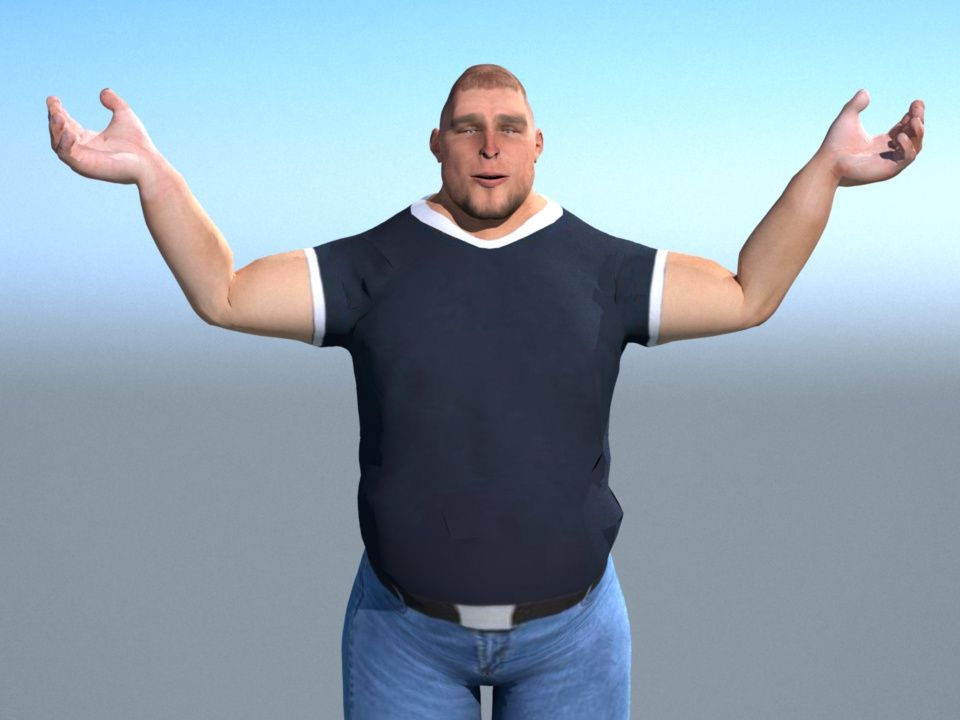
here you go, this is the base profiles I made for the Autodesk character generator attached to this post.
overal - I give it a 6 out of 10 - great rig ( which is what got it the 6 ), bad mesh, lots of customization work ...but that's also a plus since it has a good enough rig to make good custom profiles - like for smiles and other emotions..... the mesh...could be fixed in sculptris ...but as you see in this pic below ....it's a mess...look at all the triangulated areas ...even after iclone 6 smoothing and look at the way the elbow folds - horrible - but all fixable by smoothing out the mesh in sculptris.
maybe someone who uses fuse can do a similar review for you to compare. Fuse will have it's issues as well, maybe not the same ones, but perhaps in limitations, because I doubt their rig is as extensive as this one.
without custom expressions, this is the biggest smile you will get in iclone. But the rig is good enough to make it bigger. that you would have to make to your liking in the custom profiles area in 3DX5
6 out of 10 is actually a high rating for me - i've seen worse.
|
|
By AverageJoe - 10 Years Ago
|
|
Thank you, thank, thank you... I'll give it a whirl... but one last thing? :blush: How do I use the profile?
|
|
By planetstardragon - 10 Years Ago
|
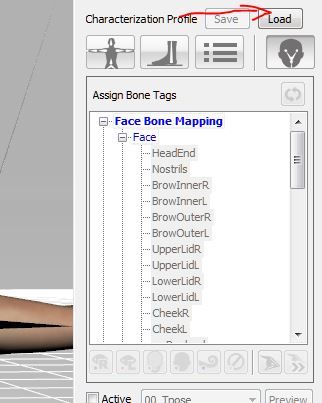
when you first go to "convert to non standard"
look for this ...it will open your directory with the profiles, just put the base rig profile there and open...should in 'theory' autorig your characters .... like i said ..it should work, providing they don't change the rig ...or the poly face count per each new character. Which these were done with mid poly - I dread to see the errors in the low poly mesh :ermm:
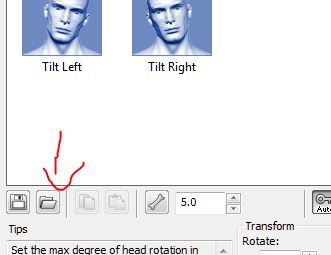
in the expressions area, look for this - and do the same - it should load the viseme settings i created for this character ..again...in theory - it depends if things change from character to character.
|
|
By AverageJoe - 10 Years Ago
|
Thank you. I really mean it, your help & assistance is greatly appreciated. I am humbled...
Perhaps to honor your kindness, I should learn how to do some of this so i could pass it on to someone else who is struggling...
|
|
By planetstardragon - 10 Years Ago
|
yeah, it's what i aim to inspire in this forum. ( and why i am the way i am when people get rude )
learning to animate without a formal instructor is hard, and you really do learn when you help others, so you really do end up winning in the end - even if the other person doesn't understand. It's like reviewing your own notes and discovering something new.
like in explaining this to you, i just rediscovered how nice a well rigged character is to work with ...even with the mesh issues.....tweaking a mesh is far easier than tweaking a rig.
|
|
By prabhatM - 10 Years Ago
|
|
wizaerd (3/9/2015)
Perhaps to honor your kindness, I should learn how to do some of this so i could pass it on to someone else who is struggling...
If you mean that seriously, you already are on your way to a different orbit.
|
|
By planetstardragon - 10 Years Ago
|
i did a quick mod to see what was under the hood of this character ....the mesh is nice for modding ...but the uv stinks - so to really mod this the right way - you'd want to redo the uvs - since moving the mesh stretches the uv out - the uv is so tight on this he can't pass gas without shifting it lol - additional facial expressions for the custom set has to be done with morphs, which is what this is...since the jaw / lip bones don't appear in the custom expressions area ....which i find strange ...another issue i found in 3DX5 - no biggie for me though since i'm more into morphs than bones. - i'd love to share this character ...but i can't due to their eula ...which is why i don't use this system to begin with...i like being able to share :)
they render fast in indigo, this was a 1 minute render.
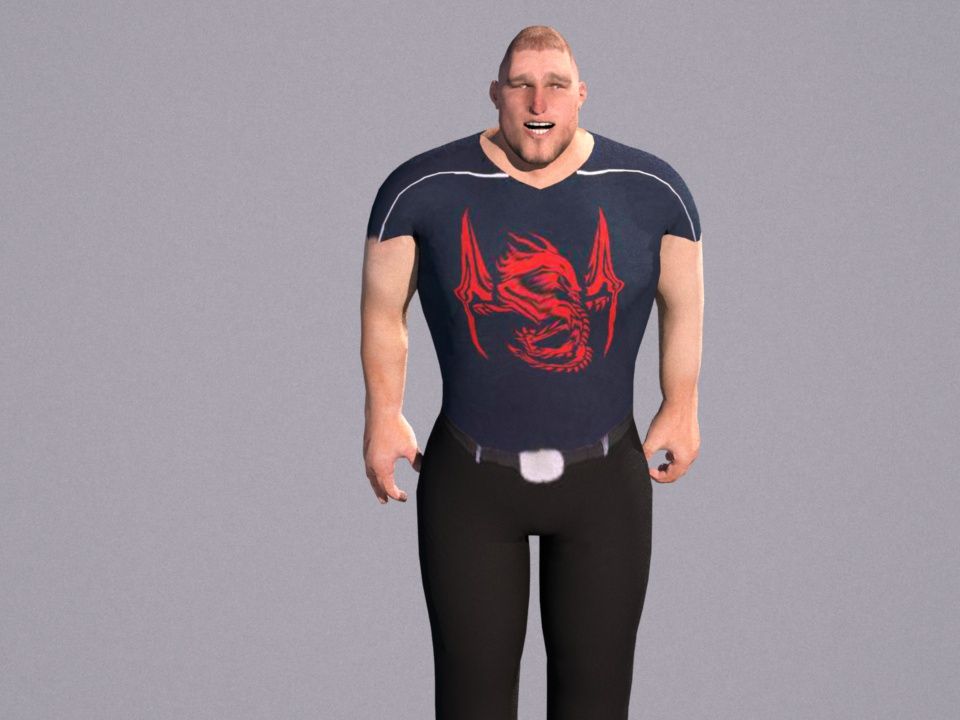
|
|
By prabhatM - 10 Years Ago
|
I still can not figure out why do we need anythingelse other than DAZ to create characters for ICLONE. It's so versatile and the characters are so believable !
It barely takes few minutes to create your own customised character ! The Pipeline to ICLONE is so well established !!
 

|
|
By planetstardragon - 10 Years Ago
|
daz is nice, but it's just one option.
do you work for daz ?
|
|
By prabhatM - 10 Years Ago
|
|
planetstardragon (3/9/2015)
daz is nice, but it's just one option.
do you work for daz ?
It helps me focus on the story and direction instead of worrying too much about how to do a character. If one character takes so much time and energy, how will you EVER focus on a storyline based movie with multiple characters ?
In a movie, there is so much more to do other than creating a character ! If it's a fantasy character, spend a lot of time on it. Use ZBrush or whatever. But if your focus is on a regular movie, one needs to get going with quick character development. And DAZ is pretty good for that.
USE ICLONE FOR YOUR ANIMATION.
|
|
By planetstardragon - 10 Years Ago
|
i agree, but daz is one of the more expensive options to have a nice collection of stuff.
being that i also want to be able to share stuff i make, it's not a best option for me - it's nice when i want to make something quick for a release though...so it has it's place in my set...as does poser.
besides, once you learn some of the tricks, it's not hard at all to make a great character...more freedom if anything. Daz has a tight copyright on their stuff.
it's a same principle i do with music too, while I haven't released any sample packs, I like the idea that i can deconstruct my releases, and sell them as sample packs too. Maximum merchandising. ;)
|
|
By prabhatM - 10 Years Ago
|
|
planetstardragon (3/9/2015)
Daz has a tight copyright on their stuff.
That comes to play if you are doing Game Development.
For movies, you can customise Genesis and create your own character. It takes barely 10 minutes to do a completely different looking character in DAZ with Genesis. And then you can get going with your movie.
|
|
By planetstardragon - 10 Years Ago
|
for example, if you make a hit series for a cartoon network, - recreating that character could be argued as a derivative work based on Daz's Eula including the 3D printing. Daz should not be used in copyrighted work. it's used for fun illustrations like magazine stuff, lolz videos, and stuff you have no plans on merchandising. A series or movie is a different animal, you want those rights.
The general concept, Laws and Eula's are created to make criminals, which in turn enables you to compensation for negligible acts. Some Eulas are vague enough to construe most actions as negligible.
|
|
By prabhatM - 10 Years Ago
|
|
planetstardragon (3/9/2015)
for example, if you make a hit series for a cartoon network, - recreating that character could be argued as a derivative work based on Daz's Eula including the 3D printing. Daz should not be used in copyrighted work. it's used for fun illustrations like magazine stuff, lolz videos, and stuff you have no plans on merchandising. A series or movie is a different animal, you want those rights.
When you become a hit, I am sure you can afford to pay a little. And DAZ would not become your stumbling block.
And if that's the case, start with a blank screen in ZBrush.
|
|
By planetstardragon - 10 Years Ago
|
when I'm a hit, it's because i funded myself through all the extra effort I'm putting in now to become a developer lol
I do freelance work with an attorney, I understand the game of frivolous lawsuits. I'm avoiding that now before someone attempts to tap me on the shoulder later. :D
By then I'll be able to address any attempts as slanderous and defamatory.
|
|
By prabhatM - 10 Years Ago
|
|
planetstardragon (3/9/2015)
when I'm a hit, it's because i funded myself through all the extra effort I'm putting in now to become a developer lol
I do freelance work with an attorney, I understand the game of frivolous lawsuits. I'm avoiding that now before someone attempts to tap me on the shoulder later. :D
RL did a wonderful job offering its users a Pipeline with DAZ. The ICLONE users must take advantage of that.
|
|
By planetstardragon - 10 Years Ago
|
|
oh, absolutely...and the daz system is great. Just understand the legal implications. I want daz to survive, but not at my expense. Their rules are a bit too strict for me. Their artists are very talented though!
|
|
By planetstardragon - 10 Years Ago
|
that is an excellent legal and moral tip from swoop! Swoop knows his stuff and understands the game very well.
I often try to encourage him to explore his creative side, so he can reap the benefits of branding and merchandising his hard work!
Fortunately, Makehuman is public domain, and a wonderful canvas to create original characters with. The perfect rig and mesh has already been calculated....it's no longer an art...it's a science ....i prove nothing by adding 1 + 1 over and over again.
Daz wants to own the canvas. Good for them!
|
|
By prabhatM - 10 Years Ago
|
|
planetstardragon (3/9/2015)
that is an excellent legal and moral tip from swoop! Swoop knows his stuff and understands the game very well.
I understand where you are coming from.
Selling a Modified character as your own is different from making movies with them.
|
|
By planetstardragon - 10 Years Ago
|
know what swoop ? i know talent when i see it, you have great potential, but you haven't fully explored your talent ....only your skill.
time to shine sir.
and yes, there is a difference, it took me many years to rediscover who i was and things i liked after being a techie. you love very cool things you can make with your eyes shut, i know you do. I know you have a preference and taste. no one gets as passionate about things as you do without that!
my focus with you, is to give you back to yourself :cool:
|
|
By AverageJoe - 10 Years Ago
|
I really hate Daz. Not the end product itself, just getting to it. They have so many incompatible items that are junked up in the studio application that just trying to build a character becomes this horrible tedious exercise. Not to mention that to really get anything useful and diverse out of Daz, you'll be spending a fortune on content. Only to find out that $150 of stuff you just bought isn't compatible.
I re-installed Daz over the weekend, and immediately in their Daz Installer, there was something like 193 individual items to install. I tried to be selective, and choose only things that were compatible with Genesis 2, but of course their descriptions in the Installer left a whole lot to be desired. So after a couple of hours of installing, I get in to build a character, and none of the things I installed were actually compatible with G2. I had no selections of hair, the clothing options were minimal at best. So my choice was to either purchase a whole crapload of stuff, or just throw Daz away.
I really hate Daz.
|
|
By AverageJoe - 10 Years Ago
|
|
SO yesterday I set up a subscription to the Autodesk Character Generator, it became active and yet I am still unable to download anything higher than Low resolution, and neither am I able to slect any of the facial stuff to export either. This is becoming even more frustrating. Maybe I'm better off with the Fuse & Mixamo stuff...
|
|
By planetstardragon - 10 Years Ago
|
prabhatM (3/9/2015)
planetstardragon (3/9/2015)
that is an excellent legal and moral tip from swoop! Swoop knows his stuff and understands the game very well.
I understand where you are coming from. Selling a Modified character as your own is different from making movies with them.
yes, and part of the entertainment business model is having rights to merchandise your original creation. If you get a hit anything, that means live performance, merchandising and licensing. All of which would be chained to daz's accounting department if you take that route.
|
|
By planetstardragon - 10 Years Ago
|
|
sw00000p (3/9/2015)
I get enough pleasure in helping. ;)
me too! :)
don't just be yourself, be yourself with a passion my dear swoop :cool:
|
|
By prabhatM - 10 Years Ago
|
|
wizaerd (3/9/2015)
I really hate Daz. Not the end product itself, just getting to it. They have so many incompatible items that are junked up in the studio application that just trying to build a character becomes this horrible tedious exercise. Not to mention that to really get anything useful and diverse out of Daz, you'll be spending a fortune on content. Only to find out that $150 of stuff you just bought isn't compatible.
I re-installed Daz over the weekend, and immediately in their Daz Installer, there was something like 193 individual items to install. I tried to be selective, and choose only things that were compatible with Genesis 2, but of course their descriptions in the Installer left a whole lot to be desired. So after a couple of hours of installing, I get in to build a character, and none of the things I installed were actually compatible with G2. I had no selections of hair, the clothing options were minimal at best. So my choice was to either purchase a whole crapload of stuff, or just throw Daz away.
I really hate Daz.
I hate Mango because I never tasted it.
If you really want to work well with DAZ characters and ICLONE, use GENESIS 1, not Genesis2.
Genesis is FREE with DAZ. Work on the basic character. Modify it with Zbrush if you want. Create costume with Zbrush or Marvellous Designer. Don't buy anything from the DAZ store.
Take a DAZ based character as FBX to 3DX, create the PROFILE and SAVE it. So that you can use the same for all DAZ based characters in ICLONE.
DAZ characters will give you BETTER EXPRESSIONS inside ICLONE than ICLONE's native characters for the same motion or Facial animation.
Trust me. Since you are impatient to do animation in ICLONE, DAZ characters are the EASIEST OPTION for you.
|
|
By planetstardragon - 10 Years Ago
|
|
wizaerd (3/9/2015)
SO yesterday I set up a subscription to the Autodesk Character Generator, it became active and yet I am still unable to download anything higher than Low resolution, and neither am I able to slect any of the facial stuff to export either. This is becoming even more frustrating. Maybe I'm better off with the Fuse & Mixamo stuff...
all of them have a certain level of frustration....the idea is to look for the one with the least frustration that meets your goal.
Maybe fuse is it, but I suggest finding someone who uses it for a review, I've seen mixed reviews ...some people very happy ...others felt limited.
there is no perfect solution, only someone willing to get paid to fix it for you lol...
and there really is nothing wrong with that when you consider how much work goes into it.
so honestly, it's about picking the poison that suits your needs best lol
|
|
By planetstardragon - 10 Years Ago
|
and you do a great job at not showing any talent and helping others appreciate the value of proper rigging! so you are right on point!
don't start lol -hugs-
see wizaerd ? i really do try to be friendly, but they wanna battle me....i must be some prize for them or something...
can't touch this! lol
|
|
By planetstardragon - 10 Years Ago
|
|
if they gave you everything free, they wouldn't be in business, keep it real.....support them. They give you a ton of great stuff free, but that is no excuse to not support them.
|
|
By MixamoJeanette - 10 Years Ago
|
Hi everyone! Jeanette from Mixamo here. Saw this thread and figured I'd hop in and answer some of the questions I saw. One thing I want to mention is that Fuse is still very much in development. We have a ton of new tools, features and content in the works and if there are things you guys want to see, feel free to post in our Fuse Ideas forum.
@all - Fuse currently generates only facial blendshapes (a full set of facial controls, but we do not have a visimes/phenomes export). We could have it generate a bone-based rig. If that's something that would be preferable, please leave your feedback in this thread for our Technical Director:
@wizaerd - The CAT and Biped scripts do support the facial animations in a limited capacity. We have plans to update them for even better facial support. For your download question, the only thing you need to do to enable facial animation is use the "Enable Blendshapes" option during auto-rigging.
@hattori kun - You can get rid of that leg skinning glitch with the auto-rigger by using the Customize slider within Fuse to spread the characters legs a little bit. With bulkier clothing, if the clothes touch sometimes a vertex or two will 'stick'. Using the slider to change the leg stance will fix this (the customize area can be founnd on the side of the calf).
@planetstardragon - Fuse purchased from UAS/Steam comes with 2 auto-rigs per week but you can get more. If you need a whole heap of characters all of our plans included unlimited auto-rigging for Fuse characters and are no contract, no commitment. If you're interested, I'd check into the pricing here: https://www.mixamo.com/pricing
|
|
By AverageJoe - 10 Years Ago
|
|
prabhatM (3/9/2015)
I hate Mango because I never tasted it.
Your analogy is inaccurate. I have tried Daz, I have tried it off and on throughout the last several years. I have tried to like it, but find it one big giant mess of incompatible crap.
If you really want to work well with DAZ characters and ICLONE, use GENESIS 1, not Genesis2.
Genesis is FREE with DAZ. Work on the basic character. Modify it with Zbrush if you want. Create costume with Zbrush or Marvellous Designer. Don't buy anything from the DAZ store.
Take a DAZ based character as FBX to 3DX, create the PROFILE and SAVE it. So that you can use the same for all DAZ based characters in ICLONE.
DAZ characters will give you BETTER EXPRESSIONS inside ICLONE than ICLONE's native characters for the same motion or Facial animation.
Trust me. Since you are impatient to do animation in ICLONE, DAZ characters are the EASIEST OPTION for you.
All I see here is use Daz, and pull it into a modeler to get what you really want. I have stated over and over I am not a modeler, I do not wish to be a modeler. What good is Daz if I have to modify everything in some other 3D app, and of course the one you recommend is an expensive one at that. If I wanted to be a modeler, why use Daz at all?
I wouldn't mind Daz so much if it kept it's crap separated and organized. But again, upon re-installing, I'm presented with a monster list of stuff, with no clue as to what works with what. Upon getting into the program, and trying to create a character, nothing works with anything else. Choices are so severely limited.
Gensis 1 itself may be free, but stuff to use with it, such as additional morphs and clothing options are not free.
No, Daz, for me is a giant headache I'd much rather avoid altogether.
|
|
By planetstardragon - 10 Years Ago
|
|
@MixamoJeanette - That's awesome, your presence is so appreciated. Thank You!! :D
|
|
By planetstardragon - 10 Years Ago
|
|
starving artist here, :D/ i have to learn to keyframe. nothing personal to anyone. when i make more, i buy more.
|
|
By AverageJoe - 10 Years Ago
|
|
I have no real idea what you mean when you keep saying retarget the animations, or even retargeting the bones themselves. We're here (or at least I am) because I want t make movies, not learn how to rig characters or re-rig them as the case may be.
|
|
By AverageJoe - 10 Years Ago
|
sw00000p (3/9/2015)
wizaerd (3/9/2015)
I have no real idea what you mean when you keep saying retarget the animations, or even retargeting the bones themselves. We're here (or at least I am) because I want t make movies, not learn how to rig characters or re-rig them as the case may be.For those who are interested in learning "New to YOU Things" in CGI.... 1. This "Often" will require you tostep (Outside) of iClone and merely Read and Practice! Retargeting animation sounds scary, but it's really simple. Example: You select Maximo's (Hip Bone) then select (Daz's Hip Bone)... ...SAVE! 1. Match bone for bone... save the mapping! POOF! The animations transfers flawlessly! :D You CAN do this in Blender... for FREE! :w00t:
Your advice is always so vague sw00000p. Select Mixamo's Hip Bone then Select Daz Hip Bone... where? How? What are you even talking about? Then your last bit of advice is the worst advice ever, for someone who really isn't interested in modeling. Blender? No way am I going to try that app again. It's the least intuitive 3D app, and the most confusing of interfaces. But again, I've done 3D, and found it just really wasn't mu thing, so I avoid modeling, I avoid rigging because it's just not what I find fun.
|
|
By AverageJoe - 10 Years Ago
|
sw00000p (3/9/2015)
wizaerd (3/9/2015)
I have no real idea what you mean when you keep saying retarget the animations, or even retargeting the bones themselves. We're here (or at least I am) because I want t make movies, not learn how to rig characters or re-rig them as the case may be.Perhaps this will suffice. :) When you map a characters bones in 3dxchange, you are telling iClone... 1. Here is my hip, leg, toes, etc. 2. iClone animations are sent to that (precise bone). Now you need a software to say, (Here is Maximo's or ANY softwares bone) ...now send THAT animation to me! :) NOW!!! :crazy: :hehe: :P
Get It? :ermm:
Nope, because I have never mapped a bone in 3DX5. I've imported characters, converted to non-standard, chose a T-Pose profile, and was done. Now I've learned how to do the eyes for Fuse characters thanks to a user here in the forums, and know I have to setup the facial stuff, which I think I know how but haven't actually done. I'm trying to do the same for the Autodesk characters, but haven't actually been able to do one yet. This is as far as I really want to go; the longer I spend doing all this other stuff (which is of little to no interest to me), the amount of time I get to do any real movie making is drastically reduced. The more I have to do all this other non-fun stuff, my interest in the overall project starts to seriously wane.
|
|
By AverageJoe - 10 Years Ago
|
|
sw00000p (3/9/2015)
"The more I have to do all this other non-fun stuff, my interest in the overall project starts to seriously wane"
1. Then Today"Retargeting Animation" is NOT for you. :crying:
TUTOR!:ermm:
____________________________________________________________
You progressing, though.
Keep Reading and Practicing.
Then stop jumping in this thread and telling everyone it's the only solution. Let me reiterate, maybe you'll actually get it this time. iClone is not just a 3D application, it is a movie making application. Some people using it will do it for content creation (not my thing), others will use it to make movies. Not everyone is interested in modeling, rigging, texturing, etc... If they were, they'd probably be using a dedicated 3D application.
Just because movie makers want more diverse characters doesn't mean they want to actually model them or rig them. That's why there are other great applications such as Mixamo, Autodesk Character Generator, etc... And the movie maker wants a process to use those characters in as little effort as is possible so they can get to doing what they want to do, which is movie making. Hence the purpose of this thread.
Scoffing at the title of Tutor means nothing, because it's a title given by the forum for someone who has been on the forum for a certain length of time. I have been with RL products since iClone version 1.5, I have used CrazyTalk and CrazyTalk Animator as well. If RL wants to call me a tutor, it's up to them. Although in reality, I do know quite a bit about the movie making process and how they work in these applications, because I'm very interested in making movies.
You can scoff and roll your eyes all you want, but different people have different interests. I'm glad you want to get into every low level nitty gritty thing having to do with 3D, yay for you. But me? I don't much care, I just want some diverse characters to use in making movies.
|
|
By AverageJoe - 10 Years Ago
|
sw00000p (3/9/2015)
wizaerd (3/9/2015)
Then stop jumping in this thread and telling everyone it's the only solution.This will NOT work this time, Sir! "I NEVER SAID IT'S THE ONLY SOLUTION!"
This thread is about Maximo support..
...NOT Noobie training! :P
Nice Try....
Tutor :blink:
First of all it's Mixamo, not Maximo. And secondly I'm not a noob at using iClone. So move along...
|
|
By prabhatM - 10 Years Ago
|
|
wizaerd (3/9/2015)
[quote]
All I see here is use Daz, and pull it into a modeler to get what you really want. I have stated over and over I am not a modeler, I do not wish to be a modeler. What good is Daz if I have to modify everything in some other 3D app, and of course the one you recommend is an expensive one at that. If I wanted to be a modeler, why use Daz at all?
Allow me to post the last one on the topic.
I modify Genesis and create all my characters with unique looks within DAZ. I don't use any other software. I thought that was obvious in my posts. You could also use DAZ models in ZBRUSH and other softwares to modify them for more unique look.
I am not insisting you to use DAZ. Looking at your replies, it is obvious that you are not really familiar with DAZ and its benefits when you use that alongwith ICLONE.
I just wanted to tell you that I do episodic animations and the episodes are almost 45 minutes long with multiple characters. For character developments, I did not have to go beyond DAZ.
I did not try any more softwares, because I wanted to get on with my movies quickly.
I am sure you will find your ways with or without DAZ. All the best.
|
|
By mtakerkart - 10 Years Ago
|
@MixamoJeanette
Thank you very much for your input !! I like your Fuse and I look forward for the next update.
@wizaerd
The character from Autodesk generator have a problem with the "Look at" fonction in Iclone ,
The eyes are going in another world and like you , I don't want to learn how to fix it. So I'm not using it because I use lot of "look at".
My pipeline is to animate first the characters in an empty scene or very very few props. When I'm ok , I build the set just enough for the camera view, this allows me not to be "burned".
(by the way that was me telling how to set eyes ;)
I thing Iclone was build first to make movie but now with all the new features the line has become "blurred" .
|
|
By prabhatM - 10 Years Ago
|
|
wizaerd (3/9/2015)
[quote]
Scoffing at the title of Tutor means nothing, because it's a title given by the forum for someone who has been on the forum for a certain length of time. I have been with RL products since iClone version 1.5, I have used CrazyTalk and CrazyTalk Animator as well. If RL wants to call me a tutor, it's up to them.
Ha...ha....ha....actually some people think they got this TUTOR label because of certain special talent forgetting the fact that this is just an automated process on this forum. The label changes based on ( perhaps) few factors e.g. duration of time, visits, number of posts and replies given to others.
If Steven Speilberg joins this forum today, he will be known as a JUNIOR MEMBER. If he gets busy with his film and does not visit this forum often, then he will stay as a Junior member. And the Tutors will try to teach him about film making.
|
|
By AverageJoe - 10 Years Ago
|
With the new G6 bodies, maybe RL will start looking into an addon product for character creation, using a system similar to what these 3rd party character generators use (or better support the 3rd party ones out of the box). Since iClones underlying technology is a game engine, perhaps they could build an extensive, yet easy to use, character generation system similar to what is found in my games today. So those who want to to fiddle around with creating their own from scratch can still do so, but those who just want to create and use characters without all the fiddling and tweaking could do so as well.
There are lots of ways to modify a built in RL character, but they still all look similiar or aren't as clean and good looking as they could be. But they're getting closer...
|
|
By prabhatM - 10 Years Ago
|
|
mtakerkart (3/9/2015)
I thing Iclone was build first to make movie but now with all the new features the line has become "blurred" .
ICLONE6 reminds me of a great product called DELPHI from Borland. When Delphi ver 1.0 was released, it was a huge success. It was considered to overtake Visual Basic. The best part of Delphi 1.0 was its simple UI and Powerful features.
Succees brings in new people to the company. But the new people usually do not have the perspective of the old product. Sometimes they bring in few things forgetting the very reason of success. For some reason the "REVAMPED" DEVELOPMENT TEAM at Borland thought it was time to bring in certain COMPLEXITY to the software so that they could flaunt it as a better product. This desire to make the product COMPLEX became the undoing of this great product. Everyone including me hated Delphi 2.0. People started moving away from the product. And this product could never live upto its potential.
Unforunately, I see some flavour of that here. ICLONE6 is designed to be more MARKET SAVVY. The FEEL GOOD FACTORS are gathered to lift it up.
Certainly, somebody somewhere ticked a few wrong priorities. The CORE has not got the midas touch. It just the peripherals that got some boost.
|
|
By AverageJoe - 10 Years Ago
|
|
prabhatM (3/9/2015)
Allow me to post the last one on the topic.
I modify Genesis and create all my characters with unique looks within DAZ. I don't use any other software. I thought that was obvious in my posts. You could also use DAZ models in ZBRUSH and other softwares to modify them for more unique look.
I am not insisting you to use DAZ. Looking at your replies, it is obvious that you are not really familiar with DAZ and its benefits when you use that alongwith ICLONE.
I just wanted to tell you that I do episodic animations and each episodes are almost 45 minutes long with multiple characters. For character developments, I did not have to go beyond DAZ.
I did not try any more softwares, because I wanted to get on with my movies quickly.
I am sure you will find your ways with or without DAZ. All the best.
I'll be honest, if the content was organized a bit better, and bits & pieces were more compatible with other bits & pieces, I'd probably think differently about it. Oh, and if the bits & pieces were priced a bit better too, because to get a vast collection of stuff is really rather expensive. I don't dislike the concept of Daz, I just really do not like their implementation. I have tried to build characters, but get frustrated because this hair won't work, or that body part won't form how I want it, or those boots don't fit correctly... Daz's failing, to me, is the poor organization and providing a better system to know what content works with what base, etc... They're a lot like RL that way, just throw a whole bunch of stuff together, and leave it to the user to figure out what's what...
|
|
By AverageJoe - 10 Years Ago
|
prabhatM (3/9/2015)
mtakerkart (3/9/2015)
I thing Iclone was build first to make movie but now with all the new features the line has become "blurred" .ICLONE6 reminds me of a great product called DELPHI from Borland. When Delphi ver 1.0 was released, it was a huge success. It was considered to overtake Visual Basic. The best part of Delphi 1.0 was its simple UI and Powerful features. For some reason the REVAMPED DEVELOPMENT TEAM at Borland thought it was time to bring in certain COMPLEXITY to the software so that they could flaunt it as a better product. This desire to make the product COMPLEX became the undoing of this great product. Everyone including me hated Delphi 2.0. People started moving away from the product. And this product could never live upto its potential. Unforunately, I see some flavour of that here. ICLONE6 is designed to be more MARKET SAVVY. The FEEL GOOD FACTORS are gathered to lift it up. Certainly, somebody somewhere ticked a few wrong priorities. The CORE has not got the midas touch. It just the peripherals that got some boost.
I loved Delphi, developed many products using it before switching finally to C#. The final nail in the coffin for Delphi for me, was their horrible attempt at Delphi.Net. But I still have services and other Delphi apps running at customer sites.
|
|
By prabhatM - 10 Years Ago
|
|
wizaerd (3/9/2015)
[quote][b] Select Mixamo's Hip Bone then Select Daz Hip Bone...
The Process is called "Fuse" !:D:w00t:
|
|
By planetstardragon - 10 Years Ago
|
O boy, I went to take a nap and what did i miss ?! haha!
Bottom line, there are many solutions....each one can be helpful for whatever path you choose. Each one has their own caveats depending on what path you choose. I've tested most of them.
It's really nothing to debate about which is best, the best one is the one that helps you get your job done......
But debating can be fun, so carry on!

|
|
By planetstardragon - 10 Years Ago
|
|
@wizaerd, whatever path you choose, I'd be happy to help make a 3DX5 profile for you to get you started. Unfortunately I do not own Fuse, the quality of their characters is very nice but the path I chose is to own characters I use extensively so I have rights of distribution. ie - I would eventually like to put together animated bands - I want the rights to my band characters, to be able to sell my branded characters, to be able to do 3D printing and to be able to trademark it without having to answer to anyone. Its a more difficult path than the rest.
|
|
By planetstardragon - 10 Years Ago
|
again with the wars.......RL has me...there is no war. There is simply more diversity.
I think it's nice you are offering to help Mixamo, I think it is great that they came and represented ..and I can also say swoop knows his character development very well and he would be a wonderful help to Mixamo for making characters more compatible to iclone....
But a war ? lol ....no....just no. haha
PS - while Swoop is a technical wizard, be careful about making him a rep...I pretty much avoid Autodesk products because of him, this is with me acknowledging they make great products. A products community is just as important as the product itself....and if their community talks like swoop....it's something to avoid. Swoop disses iclone constantly, so we are safe :w00t:
|
|
By planetstardragon - 10 Years Ago
|
i'm more about unity and helping people be their best doing what they love.
What you FAIL to see, is that people like art and creativity......not meshes.
the perfect mesh and rig is a science, not an art.
so back of the bus for you.
|
|
By planetstardragon - 10 Years Ago
|
|
The new world order is not based on gaming swoop..sorry lol -smh-
|
|
By AverageJoe - 10 Years Ago
|
|
sw00000p (3/9/2015)
Sounds wonderful, but HOW do you accomplish this, if you can't model or rig??? :ermm:
baloney, baloney, baloney... But before I give my rebuttal, why are you're posts formatted always so badly? Do you have problems forming complete sentences, that make actual sense? Just wondering...
• If you CAN'T Model... You CAN'T create.
BS... I create movies all the time, I create characters too... I create artwork in illustration programs and paint programs. Modeling is not the end all be all of creation. Get over yourself...
• If you CAN'T script... you CAN'T create a game, (in Unity).
Can't really argue with this one, it's a valid point, but Unity isn't the only game engine available, and I don't quite think he was talking about Unity the game engine, but creating Unity amongst program users, specifically iClone users..
So, how in the world could you possibly, "Help Others Be Creative?"
IMPOSSIBLE!:P
Not impossible, he helped me tremendously.
What you FAIL to see, is that people like art and creativity......not meshes.
the perfect mesh and rig is a science, not an art.
so back of the bus for you. If you can't Breathe-Life into ANY Creation... "You're Spinning your wheels, going NOWHERE fast! :P ...Read and Practice.
Get off your high horse... planetstardragon has helped me far more than any of your inane rantings. Why do you have to be such an *** about everything. And now you're spouting off to the representative from Mixamo as if you're some official spokesperson for the average iClone user. No sw00000p, it's truly you who have no clue. No clue as to who the users are, or want they actually want. Why don't you go pester some actual 3D forum with your nonsense advice and snarky witticisms...
|
|
By planetstardragon - 10 Years Ago
|
I think he's just upset that polygons are nearing the end of their life ....moore's law is hot on his tail and he's trying to save his icebox business...
it's like spending your life learning to make a perfect 8track tape...only to be replaced by an mp3
Voxels can easily do things that would otherwise be difficult for polygonal models. Voxels are more malleable – for example, it’s surprisingly difficult to model holes with a triangular mesh, but very easy with voxels. Likewise, voxels enable models to take on very fine details such as bumps and imperfections without resorting to graphical “hacks” such as bump mapping, which merely simulate bumps by playing with how light interacts with the surfaces of objects. Voxels turn out to be a much more natural way to digitally represent the real world.
http://fullscream.com/are-voxels-the-future/
|
|
By planetstardragon - 10 Years Ago
|
and if you need help making a profile for 3DX5 we'd be more than happy to help :D
Don't be a stranger, we enjoy when companies help us noobs, it means a lot to us....its a big reason we love and support reallusion so much. Even swoop can't resist hanging with us iclone noobies... and he's as autodesk fanboi as one can get!!
but as an artist, he's a scrub, and that's where I have him by the tail!! muahahahah!
and don't be mislead, we love swoop very much...it's easy enough to just ignore someone, and we just can't ingore him! he's our bro :pinch: ♥
|
|
By planetstardragon - 10 Years Ago
|
|
what I need is a hit idea that won't take me 15 years to film because i listened to you insisting i needed to make high poly toe nails! so shush!
|
|
By planetstardragon - 10 Years Ago
|
swoop once lectured us for a month on the importance of good uv's and edgeloops...
I felt so overwhelmed, I dressed all my characters black in protest.
My Animation band, Nanee!! ( they actually made a little noise in europe with a single i did for em! lol )

|
|
By AverageJoe - 10 Years Ago
|
sw00000p (3/10/2015)
planetstardragon (3/10/2015)
what I need...What you need to do is: Read and Practice! Reallusion providesthe tutorials and samples. Complete the FREE tutorials and.... You WON'T be a noob, any longer! :)
What you need to do is stop pestering people, stop being a rude arrogant PITA. Just stop. Really. You're not amusing anyone, you're not helping anyone, you're just being an ***.
|
|
By prabhatM - 10 Years Ago
|
@wizaerd
I hope this helps you. Mark the last sentence : "Get animated!"
|
|
By MixamoJeanette - 10 Years Ago
|
Well, I think sw00p makes valid points. :) Mixamo never wants to encourage people to be ignorant. It's important to understand all of the tools made available to you. That said, others bring up the very valid point that if you want to make movies you should be able to do that without all the hassle of learning the finer details of character modeling. That's what Mixamo tries to alleviate. Let's find a balance between education and ease of use!
One thing that Mixamo is very good at is automating a lot of the tedious work for you guys. What I need to know is more specifically what your workflow is to get a current Fuse character into iClone. What tools do you use (Obviously 3DX5 has been mentioned many times) but is there a reason why that tool? What steps do you take there? What is blocking you from taking the Fuse character directly to iClone?
If you guys can give me a list of 'things' that would make your characters work in iClone easier such as:
- Add a full bone-based facial rig AND blendshapes and allow us to export both together
- Add this specific naming convention that iClone uses
- Add this additional bone that iClone requires.
That sort of thing. Then what we can do is automate a download that provides these options - even talk to Reallusion about further support for it. There's not a huge iClone community on Mixamo but if you guys want it, we will look into it. :)
|
|
By hattori kun - 10 Years Ago
|
Thanks for taking the time Jeanette. Mixamo has great support from what I can see.
Much much better than Indigo devs that have almost non-existent activity.:D
Don't know how the autorigging process is calculated but I think it might be pointcloud autoweights?
The legs in particular are problematic. Some character with thicker legs+clothes can't be weighted properly even after splitting the legs apart even more.
The joints also need some hold bones or better weightmapping. The chest and stomach area also need some more hold bones because they collapse in some motions.
For Iclone compatibility I think its already there with the fbx human ik format. 3dxchange has a preset for that.
The only major thing missing are the viseme on fuse characters. The facial expressions are named differently but its easy to create a preset in 3dxchange rather than changing all of them on your end.
Maybe you can ask Reallusion for this as reference material for all facial features and naming.
http://www.reallusion.com/ContentStore/promo/2013_Facial-Pipeline-Character-Pack/
|
|
By planetstardragon - 10 Years Ago
|
we'd really like that ...we always look for ways to look good and do things easier, we have a great mix of pros and new animator / hobbyists / machinima people .... there's a place for everyone with iclone, which is what makes it very special to me :)
we'd also like you to visit and chat with us from time to time....we love contests ...the prizes aren't really important...it's just a big party we love showing our art like a community.
We want to have fun!
|
|
By mtakerkart - 10 Years Ago
|
@Jeannette
Thank you very much Jannette for your support!
We're talking a lot about 3Dxchange because Iclone accepts only "Iclone format".
Importing .obj , fbx, .skp , etc.... need a "hub" called 3Dxchange. this tools allow you to "convert" an .fbx character to a fully animable character with the "inside" easy animation tool.
(puppetering)
What I notice with the Fuse character generator is that each Head character had a specifique
Blendshape assignment. I explain: If I made a 3dxchange preset for a Female ElfA , this preset doesn't work for a Male Dev C.P. I have to rebuild one.
May be Mixamo can give the possibility to Reallusion to make a "ready viseme blendshape" preset for fuse character we can buy like they do for Daz character.
May this video make what I said clearer:
Thank you
|
|
By AverageJoe - 10 Years Ago
|
|
Except imported character do not necessarily need facial bones if blendshapes and visemes are provided.
|
|
By mtakerkart - 10 Years Ago
|
|
Hope Mixamo generates iClone compatible characters, soon
It does Swooop for the body. The autorig Mixamo character is Maya IK preset in 3dxchange.
Have a try with This:
https://www.mediafire.com/?edzd4fughcdcvvs
|
|
By mtakerkart - 10 Years Ago
|
Thank you Swooop.
But I don't have problem with the fuse characters, they work like a charm in Iclone.
The only problem I have is How to mix a bone-face fbx animation data from a mocap with a body fbx motion data from a mocap too to the same character in the same time.
I can import one at a time but not mix the both.
Exemple: I do a facial mocap performance .
I do a body mocap performance.
But can't put the 2 mocaps at the same time.
Seriously it is because Unity is really really not movie oriented and very odd to dive in I don't want to switch but today with the free release and the Mixamo Faceplus implemented in Unity
It could be a very nice opportunity. But this is an another debat.
Fuse characters are ok for me :)
|
|
By MixamoJeanette - 10 Years Ago
|
@hattori kun - thank you for the extra information! I think we will get in touch with Reallusion directly but it seems like the link you gave me has a full list of the visemes and emotion blendshapes.
@mtakerkart - I'm very curious to learn that your 3DX5 preset made for "Female ElfA" won't work on "Male Dev C.P.". In fact, all of the blendshapes should be identical, so that's very curious. I'll check into it on my end!
@sw00p - We use Maya Human IK format but we don't use the bone name, we have a custom "mixamorig:" namespace. From what others have said, it seems that the rig is still identified as HumanIK though. Thanks for the example of how you set up your character rigging!
I can see the benefit of both providing the full bone rig (so you can create custom morphs for your character easier) and providing the preset blendshapes for visemes and emotions (so you can just plug and play).
|
|
By hattori kun - 10 Years Ago
|
|
MixamoJeanette (3/11/2015)
@hattori kun - thank you for the extra information! I think we will get in touch with Reallusion directly but it seems like the link you gave me has a full list of the visemes and emotion blendshapes.
@mtakerkart - I'm very curious to learn that your 3DX5 preset made for "Female ElfA" won't work on "Male Dev C.P.". In fact, all of the blendshapes should be identical, so that's very curious. I'll check into it on my end!
@sw00p - We use Maya Human IK format but we don't use the bone name, we have a custom "mixamorig:" namespace. From what others have said, it seems that the rig is still identified as HumanIK though. Thanks for the example of how you set up your character rigging!
I can see the benefit of both providing the full bone rig (so you can create custom morphs for your character easier) and providing the preset blendshapes for visemes and emotions (so you can just plug and play).
The link I posted has all the viseme and expressions needed by 3dxchange to map the character properly and prepare it for use in Iclone. Its not free though.
The reason a given preset will not work for all Fuse characters is because each preset is unique to a characters polycount and pointorder. That's an important point.
"Female ElfA" won't work on "Male Dev C.P" its because they probably have different polycount and pointorder I'm sure.;)
It shouldn't be called a preset in 3dxchange anyway since its a one shot deal. Any changes you make to the mesh invalidates the preset :D
You have to remap from scratch if you change a single poly in the mesh. It would have been better if they made a preset system based on naming conventions.
The only way to make a preset a "universally working preset" is to contact Reallusion to include Fuse content and have it coded to the system that Daz uses. You will find out how it works by contacting Reallusion directly.
Daz uses what's called a duf file to distribute the different morphs into an animation timeline. Once exported to fbx, that morph animation is "interpreted" by 3dxchange to automate all the mapping for the viseme and expressions of a daz mesh regardless of polycount and polyorder.
It seems to be hardcoded by RL for Daz content in 3dxchange since I can't personally create an automapping preset even if I know all the morphs needed and the .ini files involved.
Afaik if you add a bonebased face rig to fuse its less hassle for Iclone users since that's not relying on any polycount and point order so morphs are not needed hence 3dxchange presets are actually reusable for different meshes. That one I have yet to test personally on Fuse characters since Fuse is morph based afterall.
|
|
By mtakerkart - 10 Years Ago
|
@MixamoJeanette
I'm very curious to learn that your 3DX5 preset made for "Female ElfA" won't work on "Male Dev C.P.". In fact, all of the blendshapes should be identical, so that's very curious. I'll check into it on my end!
Very simple Jeannette. Because in the process of building/autorig mixamo process the number of the body polygons (wich i'm thinking is used for blendshape) is different. see image below.


So an expression preset done with 3dxchange couldn't be apply to other one.
The Daz character have the same polycount depending of the genesis generation.
That's why Reallusion made a Genesis 1 and genesis 2 presets.
|
|
By mtakerkart - 10 Years Ago
|
As you can see below Jeannette , I made 2 differente face shape with the same character type inside Fuse.
The number of the mesh is the same , so the 3dxchange expression preset can work with the two. (sorry for my very bad english...:blush:
I think it will be very difficult to make a "generic" preset because there's 40 heads , 34 bodys,34 arms, 34 legs and the mix of them give everytime a different body polygon number.
For me Fuse is perfect. I think the next update of Iclone will integrate a morph system like they did
in the previous version.
BUT!!!!! May you can contact Reallusion to propose a sort of Faceplus plugin like you made for Unity. ;)


|
|
By MixamoJeanette - 10 Years Ago
|
Ah, I see. I didn't realize it was based on the point order and polycount. :\ That does present a problem. Our base characters actually all use identical geometry, so even if you mix and match different body types it should have the same polycount, but the point order may vary and the clothing will absolutely vary.
I want to thank you all for the information, you've given me a lot to look over. I'll take a closer look into things and see what we can do on our end. :)
|
|
By planetstardragon - 10 Years Ago
|
now, about the pricing! :w00t:
we have a ton of motions, the motion panel in iclone ( motion generator ), the cmu files, we scoured the net for anything that moves, we have the kinect, getting the next gen mocap system soon, I like to keyframe, swoop has a cat in his max and motion builder...........we really like your motions ..but your prices are like hollywood...... we are more like machinima - how about you give us an iclone exclusive price, and for any exports they have to buy a license from you direct so you have control on it's distribution ? I like the fuse idea because apparently i can import my own meshes and use the set up like a modeler...so it does seem like an option, especially with your support! :D
this is the track i made for Nanee! ♪ ♫ ♬ ♥
|