|
By Space 3D - 10 Years Ago
|
Hai friends....
Please info how to be best render with water effect.
When use water effect large scale .......?
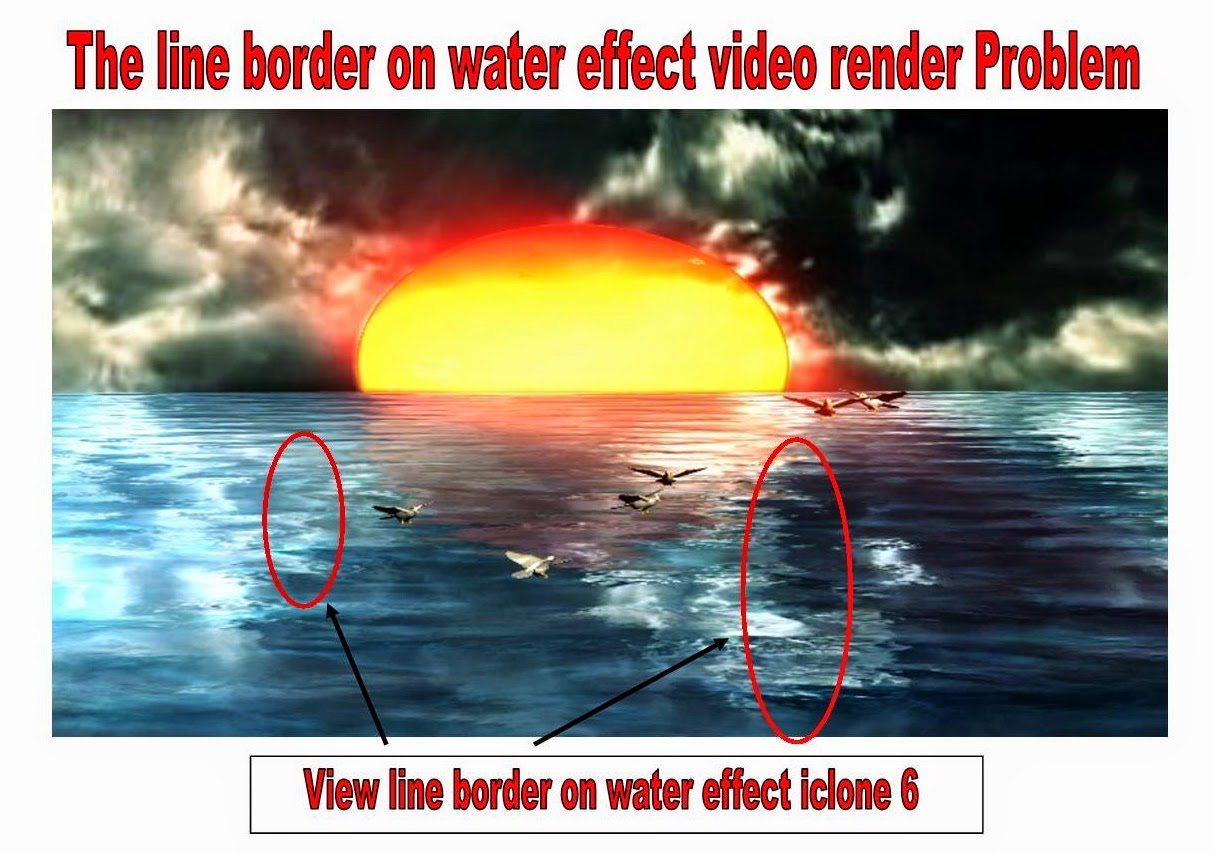
----> the problem is .. View Line Border on water effect.
Please how to for this Line Border disappears on render output.
Thanks
Space 3D
Note :
- Sample picture water ( View Line Border)
- On video the line border very clear (1920x1080 ) HD
Cumputer :
Windows 8.1 64 bit
Nvidia GTX 650
Ram memori 8 giga
Hardisk 1 T
Intel core i3 325 Mhz
|
|
By planetstardragon - 10 Years Ago
|
Hi Space 3D,
the only thing that comes to mind is that it's in the texture ?
I don't want to call this a bug yet because a texture can cause this, I'd suggest trying with a few other water presets and see if it happens the same ....if it happens the same with all textures, then check your video card driver is my next technical suggestion.
I hope this helps :)
|
|
By Space 3D - 10 Years Ago
|
i change another texture ......, the result like this picture .
i see this line on water effect since iClone 5 .
by the way , iclone water effect on youtube the result like this .
This link on youtube made by iclone with use water effect. ( see line border)
https://www.youtube.com/watch?v=I2Bs-ixTd-g

|
|
By planetstardragon - 10 Years Ago
|
oh wait, now that look looks like the edge / end of the uv .....
the quickest fix I'd do for this is move the whole set over ...
I'd definitely post that pic on the bugs report thread to see if they can remap that water UV to not cut there - post specifically that last one you just showed though, it makes it very clear. - the prior one , the water was too dark to see it.
unless you can get that obvious a shot from ic6 with that same light colored water and the clip on the shine.
|
|
By prabhatM - 10 Years Ago
|
|
You see a lot more undesired lines in Toon render. I reported long time back if they could avoid this.
|
|
By planetstardragon - 10 Years Ago
|
@ space and Prabbat
just curious , did you guys by chance change the sizes of the default water ?
Just wondering if that is causing a shift in the UV ?
I can't imagine RL making a uv cut dead center of a scene, but I can imagine the uv shifting for some reason by changing the default size ?
|
|
By prabhatM - 10 Years Ago
|
|
I can't recall now. But I don't think I did anything unusual.
|
|
By planetstardragon - 10 Years Ago
|
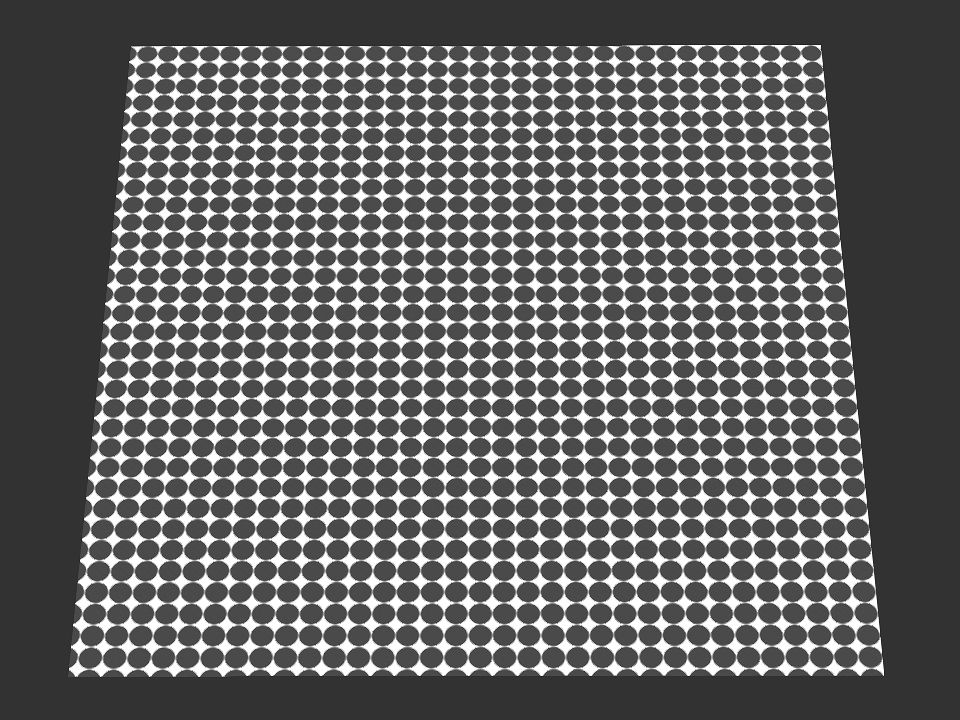
ok, here's a test I performed to test the default uv on my water -
I used this image as a texture on my water, to see if this pattern would be broken by the uv, I figured somewhere I'd see a half circle or a shifted circle
http://alloutput.com/wp-content/uploads/2013/11/black-circle-mask-to-fill-compass-outline.png
and got this - so on my computer the uv looks fine ....i'd be curious to see what the results on your computers would be in comparison
|
|
By planetstardragon - 10 Years Ago
|
interesting discovering playing with this, if you change the wave size, it extremely changes the texture
now it makes me wonder if the bump map is seamless. if you change the wave size, and somehow the bump map gets shifted as I just observed, yet is not seamless, you can make a real mess lol!
|
|
By planetstardragon - 10 Years Ago
|
the more i think of this, the more the video bump map is the culprit ...consider that the video bump maps can't be seamless ...they can loop seamless, but they wont be seamless for every frame as a single texture. Now when you change the wave size, it's going to cause sharp lines from the lack of the seamless edge
hence, the most logical fix is adjust your wave size so the shine doesn't reflect on the non seamless portion of the video bump maps effect. if that makes any sense....it's that shine being cut off that's giving it away.
the fastest way to test this theory, is just delete the video bump map from the water and see if that edge goes away.
|
|
By colour - 10 Years Ago
|
|
If Sky is a Prop, uncheck Shadow.
|
|
By Space 3D - 10 Years Ago
|
hai friends ,
i use your texture for water effect .
and reduce texture with blur effect to be mat texure .
sea view is very natural flow and good wave . ( nice texture for that )
the problem is not on texture ..... ?
remember ... this on Large Scale
this video made for footage " sea on the sunshine " afternoon . ( view large sea needed)
The question ...? How to be best render and " Dissappears Line Border on water Effect "
Please info us your reference.
Thanks
|
|
By wires - 10 Years Ago
|
|
It's difficult to assist you without knowing some facts/settings. 1. Which water type are you using? 2. What are your settings? See here: 
3. What are your camera settings? See here: 
With the above information maybe one of us can recreate the scene for testing.
|
|
By Space 3D - 10 Years Ago
|
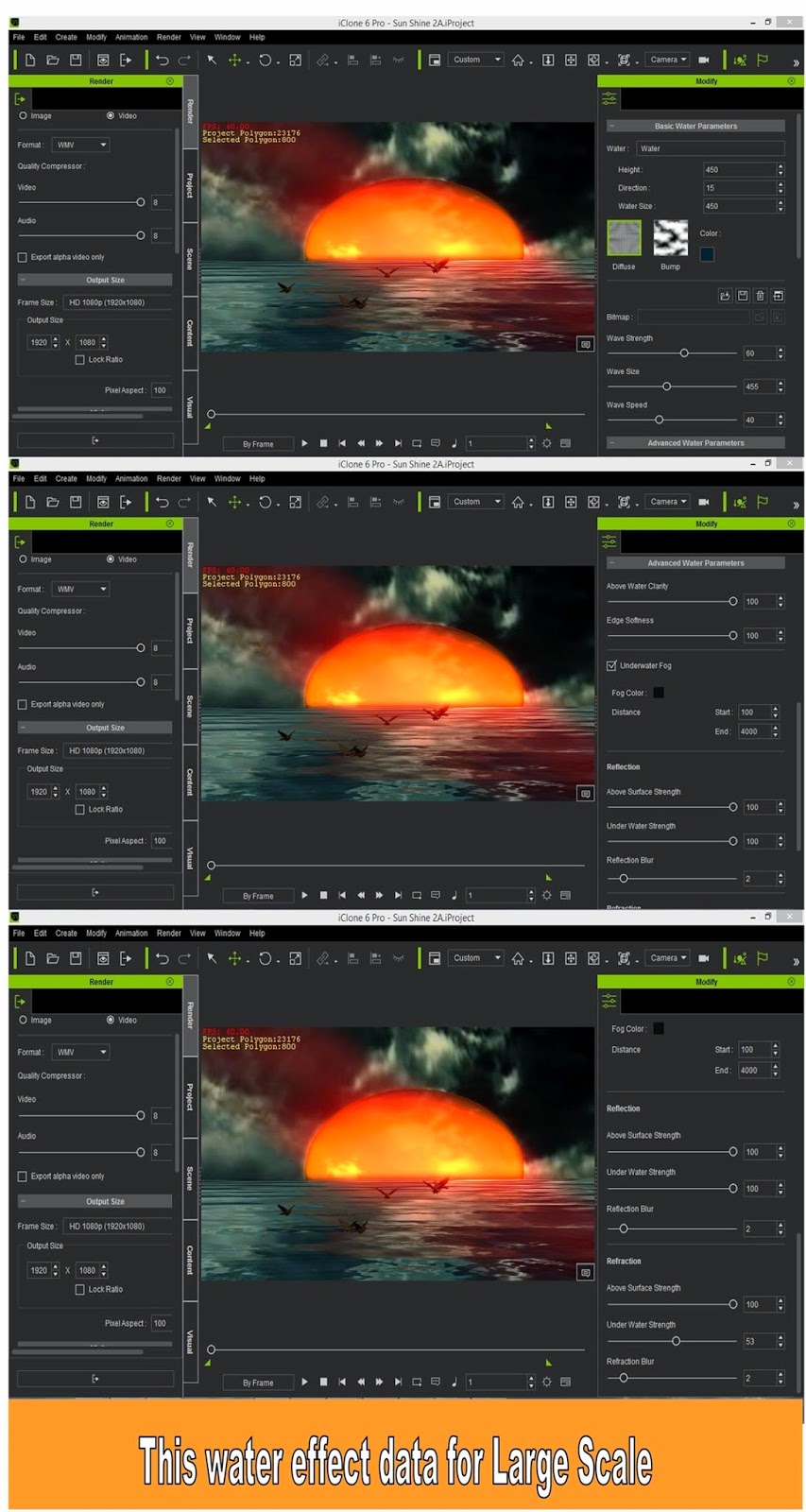
This my data for reference and evaluated. ( camera and water effect iClone 6 )
please give me reference to be best render and " Line Border Dissappears "
thanks

|
|
By wires - 10 Years Ago
|
|
I think that I have found out what is causing you problem. :) This is a screen shot from a rendered WMV clip: 
This results when 3D Stereo Vision Output is enabled in side by side mode: 
Make sure that this mode is not checked when exporting your video. Please post here to let us know if this helped. :)
|
|
By planetstardragon - 10 Years Ago
|
|
wow, nice catch Gerry! I would have never guessed that one!! lol
|
|
By Postfrosch - 10 Years Ago
|
Hello Friends,
This error has been reported as early as 2011 with IC 5 in the German forum.
When users make clips he was deutlcih only be seen very weakly or not at others. Was able to reproduce this error no one really. A message to our support returned no results.
Here is the link to the then Tread with some clips on the topic (unfortunately all in German) (unfortunately all in German)
forum.reallusion.com/Post.aspx?SessionID=nxtepta1ch1u2j311tjb4quo
It seemingly as if the age-old error would reappear
Greetings from Germany
Postfrosch (Werner)
@Gerry: It's not stereoscope
|
|
By Space 3D - 10 Years Ago
|
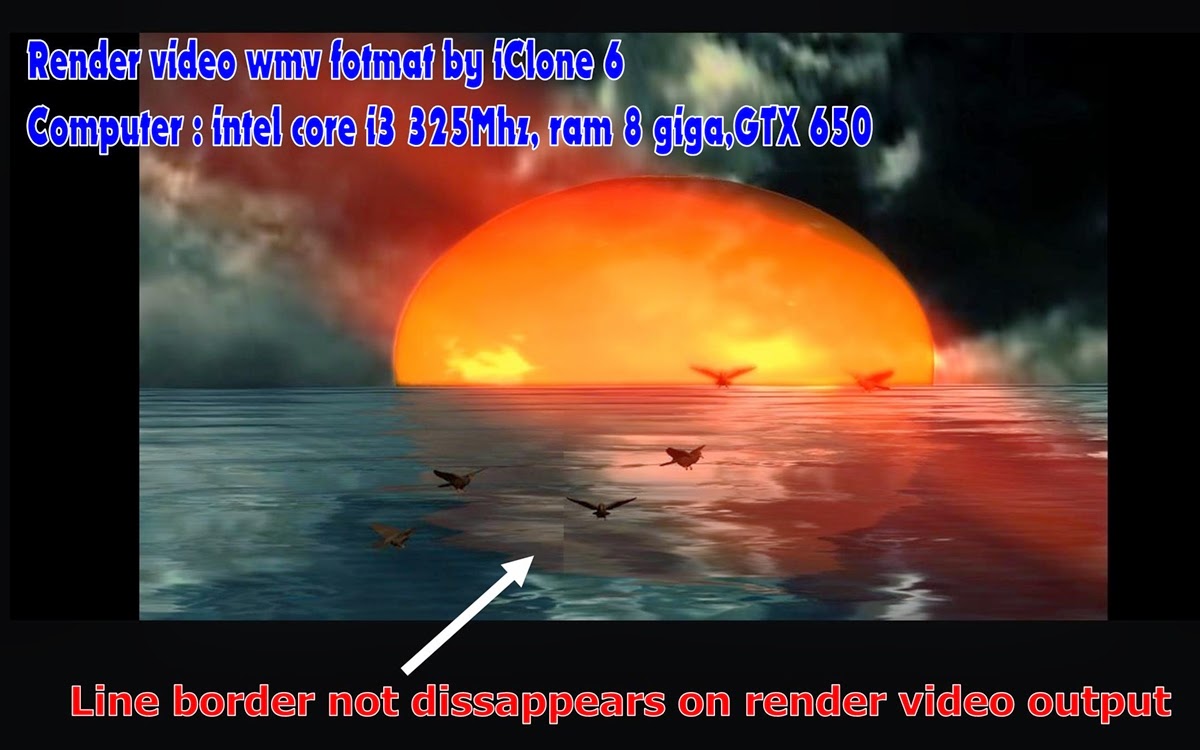
Hai friends .... i use your reference about setting render on video output.
this my result ( not use strereo output )
Line border not dissappear ..... Stil on the line .... .
Please another reference friends .
Water effect iclone 6 .... on Large Scale "Statis Camera" (Large sea needed )
Thanks

|
|
By planetstardragon - 10 Years Ago
|
|
can you please adjust the wave size, and let me know if those lines move ?
|
|
By planetstardragon - 10 Years Ago
|
never mind, just figured this out, it's related directly to your video card ...
if you zoom in to your picture, you will see that there are even more vertical lines than that ...look specifically at the line on the left ...and follow it up......you will see several bars of lines like that .....right next to each other , as if the image is sliced up.
|
|
By planetstardragon - 10 Years Ago
|
this is what i mean, i took a section of your water where I spotted it, and zoomed in...
maybe you may want to check your nvidia control panel settings ?

|
|
By Space 3D - 10 Years Ago
|
This correct. The moving line on sceene
Sometimes there and did not see it
On one render proses Frame 0 -------------> 1800
|
|
By planetstardragon - 10 Years Ago
|
yeah, that definitely sounds more like a video card thing ....it happens with games too...
you may want to review one of your settings on your video card to see if something that is incompatible with iclone is enabled....
|
|
By Space 3D - 10 Years Ago
|
|
by the way , please info us " Best Setting Nvidia Card " for iclone 6
|
|
By planetstardragon - 10 Years Ago
|
|
your card might be fine, but it may have access to advanced features with textures and anti-aliasing that are not compatible with iclone - iclone is still new to dx11, but dx11 has been doing tons of stuff with anti-aliasing and v-synch for games that might not work with iclone. If that is the case, it's an easy fix, you don't have to change your card for your whole system, you can make a custom profile for iclone.
|
|
By Space 3D - 10 Years Ago
|
Hai friends , water effect alternatife .... for Large Scale
i use another software After effect with red giant tsunami its nice for that , but needed more time for render.
AE red giant tsunami needed 1,30 hour , result good no see line border.
iClone 6 water is good , result good but " see line border on the water "
i think need evaluated for water effect. ( system iclone 6 )
|
|
By Britlish - 10 Years Ago
|
I have the same problem. I'm using an AMD R9 270X 4GB card, and have tried to adjust every possible variable to no effect. The size of the water, the angle, the lighting, the video card settings, don't change the fact that there is a noticeable vertical line down the centre of water in the renders.

|
|
By animagic - 10 Years Ago
|
|
Because it is always a vertical band which only covers the water, it looks like a rendering problem. Water is a different kind of item from other surfaces and for some reason it is not handled correctly. It is also telling that apparently it occurs with NVidia as well as AMD cards. I would suggest entering a bug report in the 6.02 bug thread here: https://forum.reallusion.com/Topic224537-385-1.aspx, including a few of your render samples. You may be requested to provide a project that shows the issue.
|
|
By Peter (RL) - 10 Years Ago
|
|
Hi Space 3D, Could you please send us the project as I requested in my reply to you via Support. This will help us track down the cause of the problem. Many thanks.
|
|
By Space 3D - 10 Years Ago
|
Hai Peter ,
Thanks for suport us .
Note :
- i have send my project " water effect iclone 6 " on my ticket
|
|
By mark - 10 Years Ago
|
|
Like others have said...I'm pretty sure it's the edge of the Wave "Bump-Map" showing. I was able to mitigate it by rotating the water a few degrees around what iClone calls the "Z" axis...it might help :)
|
|
By Britlish - 10 Years Ago
|
I have been in touch with support and they have replied thus:
Per our developer feedback, this is known issue since iClone 5. We'll try our best to improve it in v6.1 patch, but sorry we can't give any assurance at the moment.
The root cause is iClone's 3D View has large variance from the export size.
Our suggestion to avoid the issue you seen is close/undock all the windows panels like Content Manager & so forth in order to have large 3D View before the render.
You also can adjust the screen resolution to be nearest to the render format to see whether it helps.
I'll see if this works next time I use water.
|