|
Author
|
Message
|
|
paulg625
|
paulg625
Posted 9 Years Ago
|
|
Group: Forum Members
Last Active: 4 Years Ago
Posts: 388,
Visits: 1.4K
|
Thanks for all the hard work guys it will prove invaluable when I start working with Faceware...
|
|
|
|
|
Skuzzlebutt
|
Skuzzlebutt
Posted 9 Years Ago
|
|
Group: Forum Members
Last Active: 3 Years Ago
Posts: 582,
Visits: 8.6K
|
Rampa (9/25/2017)
A phone is a great capture device. If you have a phone with a bit of oomph, you can record 60 FPS. I have a no-name phone that is reasonably powerful that I use just as a small tablet, because it is obsolete 3G. But it is a perfect carry-with-you facial capture device. Just load the video to your computer and use Manycam to send it through Faceware. Use this awesome app. It is open-source, and so add-free. It can record up to 120 FPS, so it'll do the trick. https://play.google.com/store/apps/details?id=net.sourceforge.opencamera&hl=en a little more on this: even a old phone without service will work, (we have a drawer full here) but you can buy a pretty nice android smartphone from a dollar store for 25.00 last night we built 2 head rigs using "selfie-sticks" so all this is mobile and no distraction with monitors, so the user(s) can focus on performance
.
|
|
|
|
|
Kelleytoons
|
Kelleytoons
Posted 9 Years Ago
|
|
Group: Forum Members
Last Active: 2 Years Ago
Posts: 9.2K,
Visits: 22.1K
|
chewi (9/25/2017)
Why though?
Why have cheap capture devices? Why not?
Alienware Aurora R16, Win 11, i9-149000KF, 3.20GHz CPU, 64GB RAM, RTX 4090 (24GB), Samsung 870 Pro 8TB, Gen3 MVNe M-2 SSD, 4TBx2, 39" Alienware Widescreen Monitor
Mike "ex-genius" Kelley
|
|
|
|
|
SeanMac
|
SeanMac
Posted 9 Years Ago
|
|
Group: Forum Members
Last Active: 3 Years Ago
Posts: 416,
Visits: 3.4K
|
That discovery of the Open Camera App on Google Play Store is excellent. @budbundy: kudos!
3Dtest says 640X480 resolution is fine for Faceware. This App allows Frame Rate settings up to 120 fps.
3Dtest in his Faceware tutorials says the crucial control for Faceware is fps and that a high Frame Rate is more important than the resolution.
Home Built in Coolermaster ATX case with GigabyteGA-Z170X-GAMING 7 MoBo, i7-6700 @ 3.4 Ghz, Asus GeForce GTX 970 Graphics Card, 32GbDDR4 RAM, 4K & HD monitors, Huion H610 Pro Graphics Tablet, Kinect v2, Logitech920 Webcam, Win 10 64 Bit OS
|
|
|
|
|
Kelleytoons
|
Kelleytoons
Posted 9 Years Ago
|
|
Group: Forum Members
Last Active: 2 Years Ago
Posts: 9.2K,
Visits: 22.1K
|
Yeah, I've found that 640x320 works just fine in tracking.
Alienware Aurora R16, Win 11, i9-149000KF, 3.20GHz CPU, 64GB RAM, RTX 4090 (24GB), Samsung 870 Pro 8TB, Gen3 MVNe M-2 SSD, 4TBx2, 39" Alienware Widescreen Monitor
Mike "ex-genius" Kelley
|
|
|
|
|
TheOldBuffer
|
TheOldBuffer
Posted 9 Years Ago
|
|
Group: Forum Members
Last Active: 2 Years Ago
Posts: 429,
Visits: 6.4K
|
@Kelleytoons
Is faceware living up to expectations ?
Homebuilt computer - Windoze 10, INTEL i9 9900 k @ 5.1 GHz, EVGA RTX 2080 TI XC ULTRA, 16GB 3100 MHz RAM, Asus Maximus Hero XI motherboard, Sound blaster Z series. iClone6 & 7 Pipeline, Crazytalk 8, Crazytalk Animator 2, Facefilter, Pop video 3, Hitfilm 4Pro, Cubase 8.5 Pro,
|
|
|
|
|
Kelleytoons
|
Kelleytoons
Posted 9 Years Ago
|
|
Group: Forum Members
Last Active: 2 Years Ago
Posts: 9.2K,
Visits: 22.1K
|
I wish I could tell you for sure -- just haven't had enough time to really play with it (hopefully in the next two days I will be able to experiment a lot more -- no tennis and no major chores, although I still need to clean the pool a bit after Irma). I have something in mind to test it out, though, so perhaps after I try that I can give a better report. My initial impressions are it's about what I expected.
Alienware Aurora R16, Win 11, i9-149000KF, 3.20GHz CPU, 64GB RAM, RTX 4090 (24GB), Samsung 870 Pro 8TB, Gen3 MVNe M-2 SSD, 4TBx2, 39" Alienware Widescreen Monitor
Mike "ex-genius" Kelley
|
|
|
|
|
TheOldBuffer
|
TheOldBuffer
Posted 9 Years Ago
|
|
Group: Forum Members
Last Active: 2 Years Ago
Posts: 429,
Visits: 6.4K
|
Kelleytoons (9/26/2017)
I wish I could tell you for sure -- just haven't had enough time to really play with it (hopefully in the next two days I will be able to experiment a lot more -- no tennis and no major chores, although I still need to clean the pool a bit after Irma).
I have something in mind to test it out, though, so perhaps after I try that I can give a better report. My initial impressions are it's about what I expected.Thanks. I'll keep an eye out for your report.
Homebuilt computer - Windoze 10, INTEL i9 9900 k @ 5.1 GHz, EVGA RTX 2080 TI XC ULTRA, 16GB 3100 MHz RAM, Asus Maximus Hero XI motherboard, Sound blaster Z series. iClone6 & 7 Pipeline, Crazytalk 8, Crazytalk Animator 2, Facefilter, Pop video 3, Hitfilm 4Pro, Cubase 8.5 Pro,
|
|
|
|
|
theschemer
|
theschemer
Posted 9 Years Ago
|
|
Group: Forum Members
Last Active: 3 Years Ago
Posts: 1.4K,
Visits: 2.9K
|
budbundy (9/25/2017)
Rampa (9/25/2017)
A phone is a great capture device. If you have a phone with a bit of oomph, you can record 60 FPS. I have a no-name phone that is reasonably powerful that I use just as a small tablet, because it is obsolete 3G. But it is a perfect carry-with-you facial capture device. Just load the video to your computer and use Manycam to send it through Faceware. Use this awesome app. It is open-source, and so add-free. It can record up to 120 FPS, so it'll do the trick. https://play.google.com/store/apps/details?id=net.sourceforge.opencamera&hl=en a little more on this: even a old phone without service will work, (we have a drawer full here) but you can buy a pretty nice android smartphone from a dollar store for 25.00 last night we built 2 head rigs using "selfie-sticks" so all this is mobile and no distraction with monitors, so the user(s) can focus on performance Dumb question but here goes...I am really liking the option of using Manycam and dropping a video and having it track that. It works great. But I have never made a video of myself before and need some tips. I did download the Open Camera app onto my cell phone and also my Asus tablet but am having a hard time holding the tablet/phone steady and my eyes seem to not know where to look so the video doesn't turn out. Do you buy/make a holder to hold the device and what angle is best? Straight at it or tilted left/right? Never did any video of myself so I am a noob at the moment. :unsure:
|
|
|
|
|
Skuzzlebutt
|
Skuzzlebutt
Posted 9 Years Ago
|
|
Group: Forum Members
Last Active: 3 Years Ago
Posts: 582,
Visits: 8.6K
|
we built something along these lines, but stuff like this can be bought for under 20.00 head mountwe face the screens away from the actors and slightly tilt down so they can act and not be distracted too much. trying to do this while sitting in front of a computer staring at yourself isnt going yield very good results 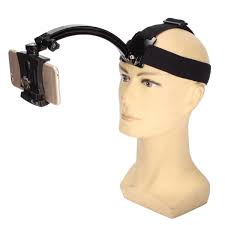 .
.
|
|
|
|