|
By alanchen - 15 Years Ago
|
Uploader v1.51
Fixing re-purposed times limitation
==========================
Uploader v1.5
Supporting ccslider upload
==========================
Uploader v1.4
Supporting retrieving IC6 content thumbnail; fixing IC6 content derivative content display issue
==========================
Uploader v1.3
Assigning category (and installed sub-folder, optional) from the uploader
==========================
Uploader v1.21
Supporting iprops with iscript attached (e.g. physic toolbox) uploaded
==========================
Uploader v1.2
Assign Export license price for selected categories from the uploader directly
==========================
Uploader v1.11
In the near future, developers who want to submit contents to Reallusion content store can "select from existing marketplace content" without re-uploading the contents in a zip file, and content packs created from marketplace content can be DRM protected if the "embed watermark" is selected before uploading. v1.11 is targeted to the required updates in response to the change, no feature was added.
==========================
Uploader v1.1 new features:
1) CrazyTalk Animator content supported.
2) Upload and Hide. Now you can publish and hide content from your store at the same time.
3) Upload and Publish. You can publish content to theme stores while uploading.
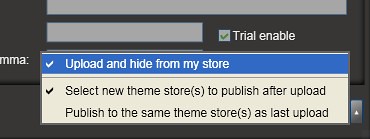
2 & 3 should be very useful when you only sell content in theme stores (you can check "Upload and Hide from my store" and "Select new theme stores to publish", then everything will be done at once). If you don't want to select theme stores every time, select "Publish to the same theme store(s) as last upload" will publish content to the same store every time.
4) Account sitter. From your city management page > Settings (in the left nav), you can assign an account sitter who can upload content on behalf of you; If you are an account sitter of someone, you will see the switch in the uploader, as well as your content editing and publishing page.
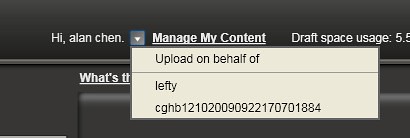

Please download the latest version here and feel free to let us know if there is any problem.
Regards,
Alan
|
|
By vidi - 15 Years Ago
|
|
Thank you Alan ! it work now proper for CTA :)
|
|
By vidi - 15 Years Ago
|
... but once again, I can't really understand why your own pop- or iwidget formats not as download supported for iClone and CTA ? You know? for CTA you can import media file as prop etc.. , and because popvideo with transparency backgrounds it's so nice to use as aniamted background image Layer or Props (e.g Windmill ). Why You don't supported and promoted your own format for development and for all your programs. Only iwidget is possible , but is only to downloadable via widgetcast :hehe:
Or it is possible to save a popVideo as prop or image Layer for to share ? I have try it but without the mediafile is the prop empty.
Sorry for my poor english :D and I hope you understand what I mean
|
|
By alanchen - 15 Years Ago
|
Hi vidi,
It's more a policy issue than technical limitations (though there are some). I'd encourage you to submit PopVideos through content store. As long as there are some high quality PopVideos from developers and generates sales, it can be a proof that opening the format can bring more benefits than risks.
Regards,
Alan
|
|
By vidi - 15 Years Ago
|
|
I'd encourage you to submit PopVideos through content store.
I gave a look in the contenstore and the popvideo catogory :hehe: That is not the right place for me. Not all User know that popvideo can be use as a prop in CTA. CTA User don't search this in the contenstore .
Your policy is for me not understanding and I see not more risk as by iwidget(aka popvideo :D) or another 3D objects. But no problem, I made now a decision and will open my own shop. Thank you !
|
|
By Alley - 15 Years Ago
|
|
Has anyone switched to this new uploader? If so, is it working with no issues?
|
|
By gizmo - 15 Years Ago
|
|
Hi Alley. Just about to post about an issue with the new Uploader and spotted your post. I defiantly cannot upload anything. Says some files cannot be uploaded although I've checked them out many times. I note no new content has appeared for the last couple of days. I am in contact with support, as I guess you are. 
Note: I'm also often getting this message although I know I have no invalid characters in my filenames .
|
|
By Alley - 15 Years Ago
|
|
I defiantly cannot upload anything. I'd be defiant too, if I couldn't upload anything.:P Hi gizmo - I actually hadn't tried it. I have learned to wait and see on these things for this very reason - thanks for the info and I shall hold off before proceeding. Thanks also for responding about the hand motions. If noone responds, I will download the pack again for interest sake.
|
|
By vidi - 15 Years Ago
|
Hi Alan ,
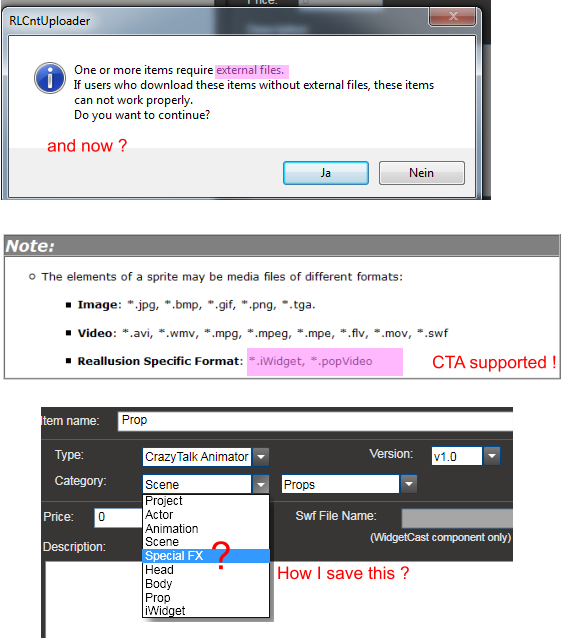
Please tell me, how can we make a special pre animate prop, for the market place when you external media not allowed.:hehe:
... and how it is possible to save a "special fx" in the fx Libary . I found no way. Peter Edwards says All the Special FX included with CrazyTalk Animator are looping .flv files. With this mind, if you have the right flash creation software you can create your own SFX and bring them into CTA.
I have created looping. flv but the save button stay greyed. I tryed SWF Animations, too, but it get a lot amount of data increase after importing . It's unsuitable for the performance.
Popvideo is for me not only a greenscreen thing. Actually I have this bought, for my own drawing png sequenzen for to make media files with alpha chanel .
Sorry ! I want no beg here, only I wondering how it get conform with RL policy, CTA program content support and the uploader? :hehe:
|
|
By alanchen - 15 Years Ago
|
Hi gizmo,
I've tried the ctprop you sent to support team without problem. I noticed that you can drag-drop CTA content into the uploader but got some other error messages before uploading. I will have the RD team take a look at the message and see what the problem might be.
Hi Vidi,
Here is the supported list of CrazyTalk Animator files. White paper for developers will be released later to help you create CrazyTalk Animator contents.
|
|
By vidi - 15 Years Ago
|
Hello Alan, Sorry for my poor englisch but
actually, my question was not, which file name have the content after saving :D, rather more a technical issue .
With another words : how is it possible to download a i.widget from marketplace without Widgetcast ?
How is it possible to include media file sprite into props for to share on the marketplace ?
I think it is not possible , therefore I try here to explain. I know how I make content for Animator, already, but not all is uploadable for the marketplace or downloadable for all User.
Thank you !
I'm looking forward to white paper.
|
|
By vidi - 15 Years Ago
|
OK Alan , SORRY all its fine !:)
I found the downloadbutton direct on the marketplace now :hehe:
I see now i.widget is supportes in a extra CTA category and the files will automatic download in die CTA share i.widgetfolder . That is what I search for all the time.:hehe::D
|
|
By gizmo - 15 Years Ago
|
|
Thanks Eunice, Alan and everyone else involved at Reallusion. My Uploader now works perfectly. The problem it appears was my pop-up-blocker in IE7/IE8. I appreciate the fact that the RL team stuck with me on a near daily basis to sort things out. I had almost decided to leave it. They did not. Cheers.
|
|
By marwansalem91 - 15 Years Ago
|
good
|
|
By GrannyJ - 13 Years Ago
|
I am having a tremendous amount of difficulty with the uploader.
My props have sound files (.wav format) plus video bump texture files (.avi format)....
When I add the iProp file, I receive this warning regarding the external files:

So then I go to grab those files, and you can see the filename in this screen shot:

Even though my filename meets the naming convention requirements, I am getting this error:

Please advise how to get the external files uploaded - do I need to place them in a zip file?
Your assistance is deeply appreciated.
|
|
By toonsunlimited - 11 Years Ago
|
|
Where is the mac version of the uploader?
|