|
By AverageJoe - 15 Years Ago
|
|
I really really really want to be able to import the necessary pieces and assemble my own sprite based characters. The full body photo fitting is a neat gimmick, but in creating a true 2d cartoon, it's of limited value. I have a slew of vector characters I've created, but cannot use them in CTA. I do not want to go through the full body photo fitting process for these characters because the results will not be nearly as good as the sprite characters. I certainly need more versatility than the few body templates (again, for sprite characters) that came with CTA. Characters created using the full body photo fitting look exactly like a photograph that's been cut up and manipulated. A true vector sprite character, with the proper layering will not appear as a cut up character. I really really really want and need the ability to create my own sprite based characters. And I really cannot believe that nobody else doesn't desire this as well...
|
|
By dh216832 - 15 Years Ago
|
|
Agreed.
|
|
By gizmo - 15 Years Ago
|
|
Me too . . . I've not played with CTA too much yet, but I was also hoping we could directly import Illustrator files. It would ensure limitless possibilities.
|
|
By rollynumber1 - 15 Years Ago
|
|
i agree too that's what 2D is all about it will be a big plus.it's better to offer it than wait and let competitor take advantage of it.always stay ahead of competitors
|
|
By vidi - 15 Years Ago
|
I'don' really understand the wish here because englisch is not my language .
I really really really want to be able to import the necessary pieces and assemble my own sprite based characters.
but I think that is possible alrady, or what mean you ?
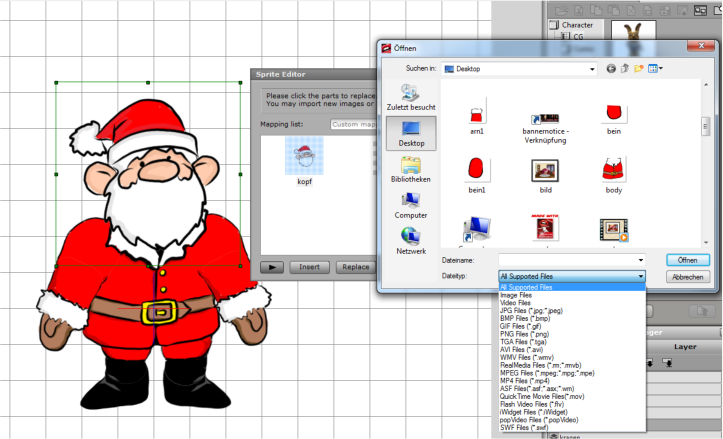
I have drawing and make a cut out in my drawing programm and brought my pieces together in the composer editor. This supported many many formats too. So I can make my own sprite charackter.
Sorry if I misunderstood :)
|
|
By AverageJoe - 15 Years Ago
|
|
Did you import this character and go through the full body photo fitting? If you imported this as a sprite based character, how exactly did you do so? The only way I've found to import a custom sprite based character is by replacing individual pieces of a premade sprite based character.
|
|
By gizmo - 15 Years Ago
|
|
vidi . . . thank you. I feel like such an idiot. Could not understand where you got your import options from on your png till I read your post properly. (At least the third reading). wizaerd. Go to Character Composer and click on Sprite Editor from there. Thanks again vidi.
|
|
By AverageJoe - 15 Years Ago
|
|
gizmo (12/1/2010)
wizaerd. Go to Character Composer and click on Sprite Editor from there.Unfortunately, I don't have the software in front of me, so I cannot say for sure, but isn't the Character Composer in-active unless you have a character on screen? Whereas you're not actually creating a new character, but modifying the individual pieces of a premade character?
|
|
By gizmo - 15 Years Ago
|
|
Yes your correct, but its 100% more than I previously thought was possible . . . (Note: I must read the online manual) In effect the 'bones' remain but the 'flesh' is easily changable.
|
|
By gizmo - 15 Years Ago
|
|
However . . . at this moment, I cannot get the facial features such as eye's, mouth, to change. I can import easily enough and exchange onto the character . . . then I try the Motion Calibration and my new mouth disappears and reverts to the old mouth whilst it is calibrating. Then it returns but when going back to Stage its gone although your asked to confirm an update. Plus the manual rotation option can be greyed out on both face and body parts in Sprite Editor, depending on what mood its in. I'm leaving it now. Let me know how you get on.
|
|
By vidi - 15 Years Ago
|
I hope google translate is propper Sorry I'm not english but i try to answer:hehe:
The only way I've found to import a custom sprite based character is by replacing individual pieces of a premade sprite based character.
Yes thats right , I used the black Dummy for that . That part of changing makes sense, then so you have the right rigging for you biped without lost the automatic CTA Puppeteer functions.
Actually, CTA had the same "cut out" animation principals as when you use FLASH, ToonBoom or after effects for 2D Animation , but it has a own concept to do some things automatic easy and faster.
I cannot get the facial features such as eye's, mouth, to change. I can import easily enough and exchange onto the character .
For lipsync or expression for your own sprite Character, you have to change all shape in the Libarys with your own varied Lipsshape, Eyes, Hands etc. This is important for the switching and Lipsync function in CTA.
That is not the same thing how work the morph based Head Function!.
For everyone, they more want learn about 2D "cut out" animation principles, prepare own sprites character and created motion , can I suggest the lynda kurs from skilled Animator George Maestri
He teach for flash and after effects, but all main principals what you learn can you apply in CTA .:) *it is not free but value
http://www.lynda.com/home/DisplayCourse.aspx?lpk2=734
Here a screen how do you change the Mouth shapes in the mouth switching Libarys .
e.g. the Lip mapping Libary is for the automatic Lypsinc in CTA . you need for every phoneme a own created Lipshape . When you now add a voice to your charackter it will only use all shape from this Lip mapping Libary ... for expression, it used only the shapes from the other default mapping Libary etc.
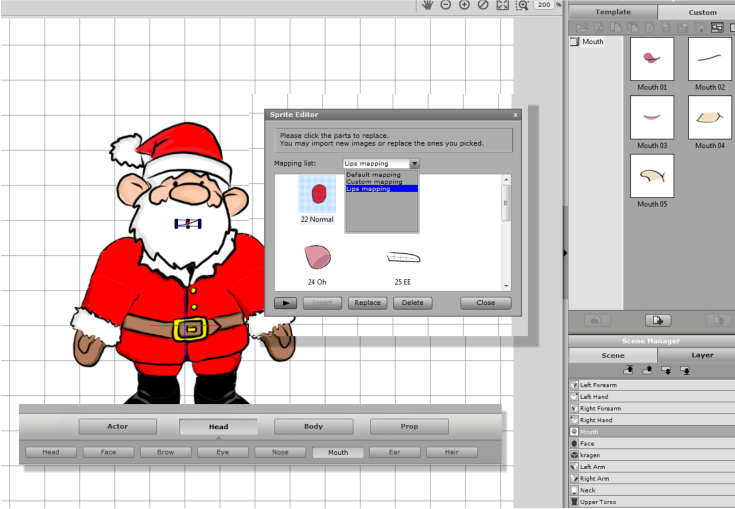
|
|
By BrettRobson - 15 Years Ago
|
vidi (12/1/2010)
For everyone, they more want learn about 2D "cut out" animation principles, prepare own sprites character and created motion , can I suggest the lynda kurs from skilled Animator George Maestri He teach for flash and after effects, but all main principals what you learn can you apply in CTA .:) *it is not free but value http://www.lynda.com/home/DisplayCourse.aspx?lpk2=734
Thanks that is excellent. I'm watching the first chapter which is free and learning a lot already.
Brett
|
|
By AverageJoe - 15 Years Ago
|
|
Hey vidi, after creating your new character (modifying the "black dummy" for example), how do you get the nam eof the actor to change? I've gone through this whole process to create a new character, saved him as a character with a name, but everytime I pull them onto the stage, the scene manager shows "black dummy" as the character's name?
|
|
By vidi - 15 Years Ago
|
|
I pull them onto the stage, the scene manager shows "black dummy" as the character's name?
Hello :)
double Click on the name "black dummy" in the szene manage and rename it
|
|
By AverageJoe - 15 Years Ago
|
vidi (12/6/2010)
I pull them onto the stage, the scene manager shows "black dummy" as the character's name? Hello :) double Click on the name "black dummy" in the szene manage and rename it d'uh... Guess I shoulda known that... Thanx
|