|
By Ascensi - Last Year
|
Hi everyone, I have an issue with a non native character. It seems like only less than 100% of the mesh can be extracted, if I have the entire mesh selected which is separate from the body, I can't extract the mesh. In this case the mesh to be extracted is a cloak. I'm aiming to have it separated for various reasons (intact) but mesh extraction option becomes unavailable using face mode when max is selected or via element mode.. vertex selection allows nothing to be selected.
Here is a tutorial showing mesh whole extraction via element (whole piece is automatically selected and the extract button is visible) https://youtu.be/iuKaploaMPE?t=2459
Is there a work around for this? thanks.
|
|
By K_Digital - Last Year
|
In such a case i deselect a small vertice of the mesh to be extracted , somewhere where you cant see it, then extract the 99,999 percent mesh.
You may use weld vertices or manually disguise the little gap afterwards if its visible.
|
|
By 4u2ges - Last Year
|
But what is the ultimate goal?
Extract is intended for splitting the mesh into parts (2 or more separate meshes).
If you need to separate a certain mesh from the character, use "Convert to Accessory" function.
|
|
By Ascensi - Last Year
|
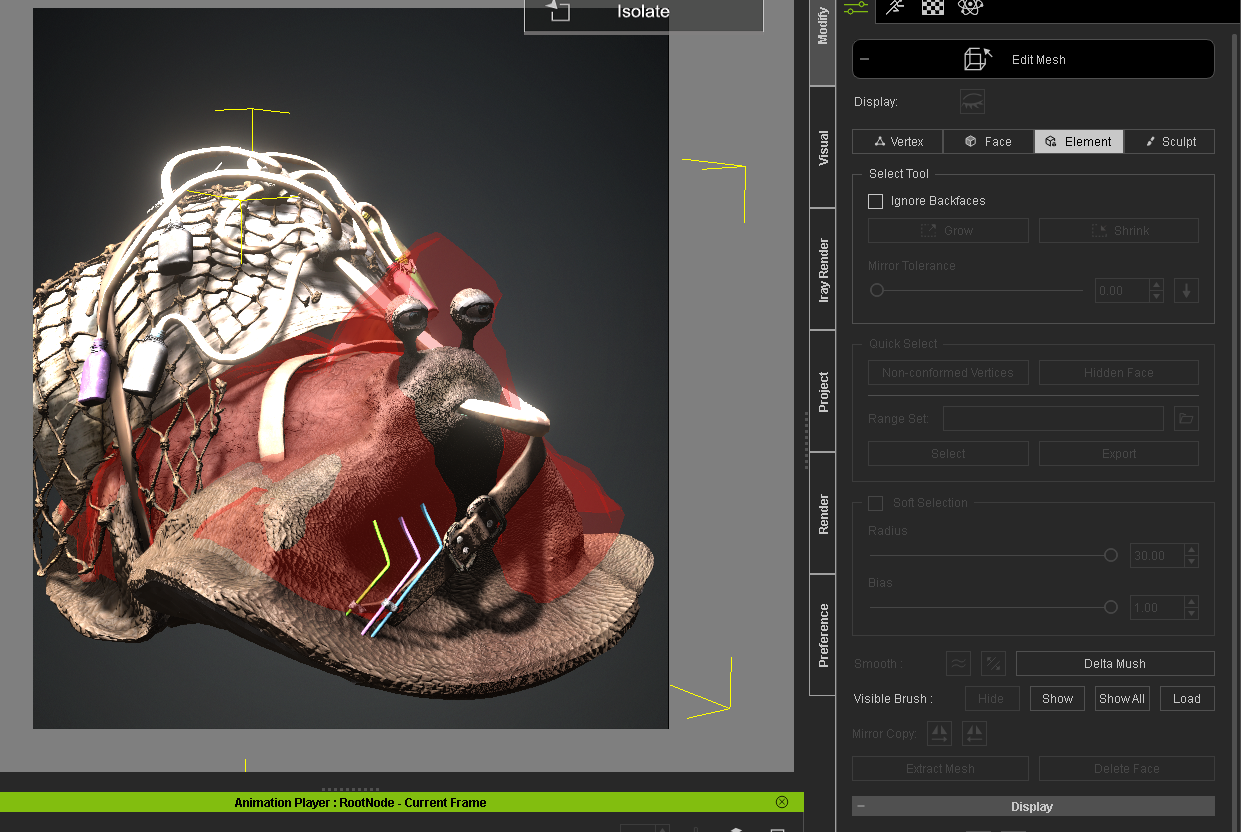
Can't select any object/mesh to convert to accessory, it seems to have merged the part/cloak with the body. I wish parts to be extracted could simple be converted to clothing or accessory. I've seen Kai Extract whole parts from a vehicle, this I think should be a non issue. Selecting the whole part is a normal operation for mesh extraction as seen in the tutorial https://youtu.be/iuKaploaMPE?t=2459 The cloak is merged with the body but thankfully not the verts.

|
|
By Ascensi - Last Year
|
|
Thanks, I may have to give that a try. As I was sharing with 4u2ges, Kai had demonstrated full part extraction of vehicle parts so I don't know why I can't extract a full part not attached to the main character via verts.
|
|
By 4u2ges - Last Year
|
The only other reason, is that the mesh has some errors.
But what mesh that cloak is part of?
Hide those meshes one by one to find out what part it belongs to.
Then select that mesh only and try edit and Extract.
If one of them only hides the cloak, then there is nothing to extract.
Keep that selected and use Convert to Accessory to separate.
But there is no going back converting to cloth though for Humanoids/Creatures
|
|
By Ascensi - Last Year
|
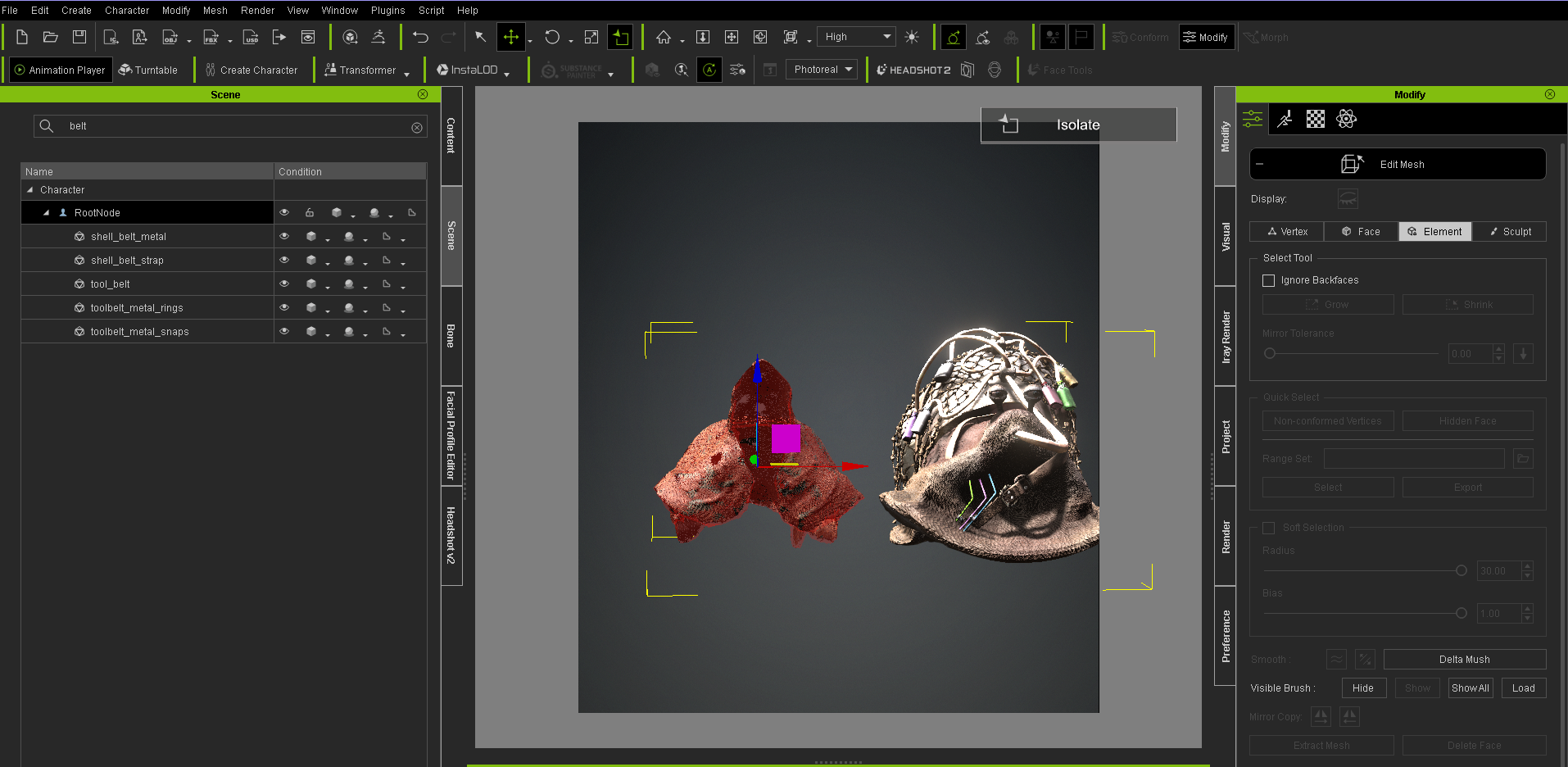
You can't convert it to an accessory if it's not in the scene list in your character to select and convert. If I choose element in the mesh editor, it selects the entire cloak mesh, nothing else.
About no going back, I could at least enable physics to keep it cloth-like even if it won't allow me to making it skinned as clothing. There isn't much reason to assign it as a cloth if someone enables physics on it, the pinning can be done with black as you know and the clothing piece just be attached to the hip.
|
|
By 4u2ges - Last Year
|
Out of curiosity...
What happens if you hide all meshes one by one, but leave the RootNode visible.
Do you see anything in the view-port?
If you do, then that part of the mesh for whatever reason is not bound as a mesh (CC could not read that mesh as a node on import).
Then the only way is to do it outside of CC (Blender?)
|
|
By Rampa - Last Year
|
|
I have seen this before as well. Try exporting your character as an OBJ, reimport as a prop, and then extract the cape mesh from the prop.
|
|
By Ascensi - Last Year
|
The cloak becomes hidden, so does the body and eyes. Originally I wanted the cloak to be a sub meshes that I could enable/disable at any time, eyes and shell too but it didn't take.
It may have been the organization that the meshes were in with bones before import. Some like to parent meshes to bones, others say meshes have to be at the root of the bone hierarchy otherwise you can get double the animation instruction to a single mesh. I didn't do that either but even so, there is nothing wrong with the mesh itself unless it max out on how many verts it can extract at one time.
|
|
By Ascensi - Last Year
|
Hi Rampa, thanks for the tip! unfortunately it still wont let me extract through editing but when i went to send the imported obj prop over to Zbrush, it showed me all the parts!! but I will extract the cloak at least and send it back.  I really hope Reallusion updates it to at least make parts a selectable I really hope Reallusion updates it to at least make parts a selectable  sub-mesh via mesh extraction or internally or make it a HIK Clothing piece only compatible with itself via vert count. sub-mesh via mesh extraction or internally or make it a HIK Clothing piece only compatible with itself via vert count.
|
|
By Ascensi - Last Year
|
So I finally found out the issue, apparently in the scene search, somehow it remembered a search from before and hid everything within the character itself!! I thought it would only hide contents in the list as a whole. it was confusing because I can see root node, the belts, metal parts etc (they are unique words that weren't the same as the search) Is it normal for a project to remember a word and keep it in the search? either that maybe my hand slipped at some point and I hit a key. Regardless, I had only expected isolation mode to maybe pin point and isolate actual models.
The only reason why I needed to extract the cloak was because I was unable to select it to fix some weights.
*********Maybe a word in the scene search different than the model name you want to edit prevents it from being able to be extracted all at once if not shown in the scene view. I'll have to test that some time.**********
|