|
By chris_045215 - 2 Years Ago
|
I have a scene with three characters, camera moves, switching.
is it possible to edit the scene? I need to extend a shot, shifting all the elements, animation, camera moves, lighting, switching, sound, downstream by X frames. I can do this with a single character but can’t seem to lock, or even move the camera and switching.
this is basic functionality in any editing system, please tell me how to do it. (Also need to tighten some of the editing)
Thanks
Chris. Melbourne.
|
|
By Data Juggler - 2 Years Ago
|
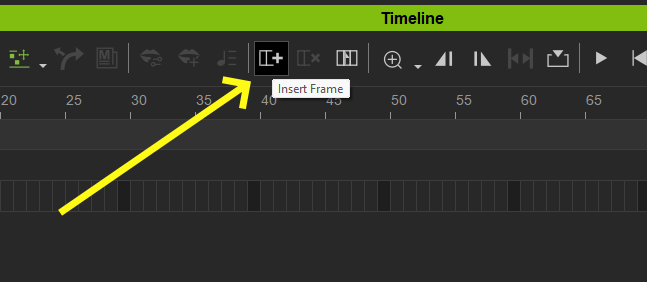
Is Insert Frames what you are looking for?
|
|
By sunlikevoid - 2 Years Ago
|
|
Sorry, It's not clear what you're asking...
|
|
By Nirwana - 2 Years Ago
|
Chris,
A 3D software is not like a non-linear video editor. I'm not aware of iClone having a function to easily move "everything" on the timeline to the left (tightening) or right (extending); I'm not talking about changing the animation speed but rather about inserting or deleting animation, camera, etc. data (which is what you want from what I understand).
I think you have two alternatives:
a) try to shift everything manually, depending on your scene that could be a major PITA.
b) do the editing in an NLE in post
If you want to do your editing "in camera" (i.e. in iClone) then you need to plan and block your scenes very carefully so that you render only exactly what you need.
|
|
By AutoDidact - 2 Years Ago
|
A 3D software is not like a non-linear video editor ………………………………………………..……………………………………………….. I'm not taking about changing the animation speed but rather about inserting or deleting animation, camera, etc. data (which is what you want from what I understand).I'm not taking about changing the animation speed but rather about inserting or deleting animation, camera, etc. data (which is what you want from what I understand). Actually a proper nondestructive animation layer system…. functions exactly like a nonlinear video editor as long as any animation on any scene object (including light & cameras) is recorded or baked into its own separate track or container as we can do Blender or Autodesk Maya.
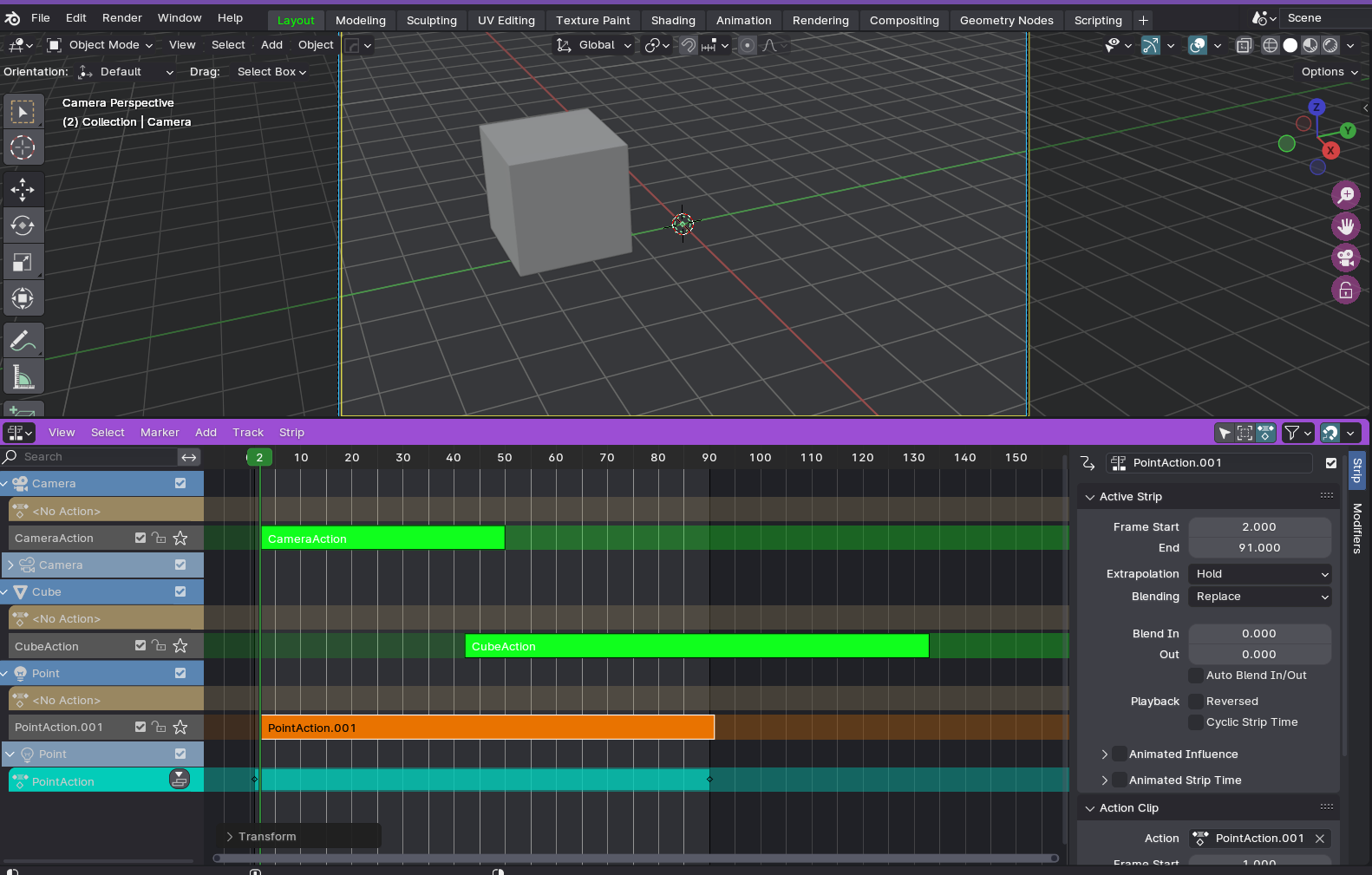
from there you can retime, apply oscillation filters etc change order in which things occur remove the animation from a specific scene elements such as a characters facial track etc.
essentially make everything &anything happen over a different linear time range.
I believe alot of this is possible to do in iclone as well. Perhaps not down the uber granular level we have in Blender or Maya but you can drill down into the motion layer for each scene element that has been animated in iclone and select and move those keys around much like a traditional Dope sheet.
I would advise becoming familiar with all of the features of the Iclone timeline as they are powerful. Sadly most people do not bother but instead just string together canned motion clips in a very linear fashion which is why it is so easy to spot a typical iclone animation from a kilometer away.
|
|
By chris_045215 - 2 Years Ago
|
Thank you all for your comments. I do edit the scene in a non linear editor then bring into iClone.then motion capture facial etc. However, when all the elements, camera moves, additional sound etc is added, then the timing needs to be adjusted, as in non linear editing.
sometimes just a few frames or seconds for a reaction, whatever.
this is essential if producing a high level animation.
i don’t want to bake the camera moves, for example, because they need to be endlessly trimmed, until the deadline or money intervenes
a fall back position is to individuallly adjust each element. But I can’t work out how to shift the camera keyframes as a block, for example . Thank you for the link to training video, I had seen it already. Perhaps there is a video I haven’t seen?
|
|
By chris_045215 - 2 Years Ago
|
|
I should add that I find the interface is very good otherwise, I am not a experienced animator, I come from an editing & VFX Background, and find the workflow is intuitive and with the ability to interface with blender unreal, et al very good. Hopefully I can source people with deeper expertise when I go into production.
|
|
By chris_045215 - 2 Years Ago
|
|
One solution would be. The ‘break’ function to be able to select all the tracks in the timeline, then move everything past the break, down or up. I realize this might create issues within individual tracks, but these can be repaired.
|
|
By Nirwana - 2 Years Ago
|
The OP's question was not, as I understood it, whether it is possible to tweak the timing, etc. on the level of an individual animation layer, but how to easily (!) move around a ton of animation layers for character animation, camera motion, dialogue/audio, facial animation, lighting, etc. all at once by, say 120 frames, to the right from the current play-head position. Is that something iClone can easily do (without having to flatten animation clips/tracks, breaking up individual layers/motion clips, and so on)?
[Quite a number of moments later...]
After some testing I can answer my own question: yes, it seems possible, but IMO not all that easily and it also seems to require prep work (such as flattening animations into clips, which the OP does not want to do):
I set up a small test scene with a a female dancer, an animated Hulk character and a simple box moving around a little (that animation needed to be flattened). I also gave the Hulk a few words to say via TTS. Then I selected everything animated, cut up all layers with with just one "break" command (i.e. one mouse click) and moved everything some frames to the right (see screenshot). NB: I did not test this with camera moves, lighting changes, the camera switcher, etc. because I'm not familiar with these things in iClone since I do all that in C4D.
iClone even cut up and moved the audio file and viseme track. To be frank, I had not expected that; iClone surprised me, so kudos to Reallusion.
@AutoDidact
Seems like I was at least partially wrong with my earlier statement.
NB: the screenshot is an attachment because of the resolution.
|
|
By AutoDidact - 2 Years Ago
|
|
I am still on Iclone 7 But it sure seems that Reallusion has improved the timeline quite a bit in version 8.
But yes, as a practical matter, the OP you should be engaging some thoughtful (fairly Linear) planning and not just haphazardly animate scene objects in any order with the hopes of re-arranging things later.
But that is a good work habit every animator should be practicing no matter what application they are using.
|
|
By chris_045215 - 2 Years Ago
|
Thank you Nirwana for your test. Not sure why you had to bake the box or hulk, as charlotte works without baking. I am away from my studio, but will test later. I don’t want to light or switch in another program, as it seems to defeat the benefit of iClone.
it would seem a small step for reallusion to break the overall project. Or maybe we are missing the solution.
thank you AutoDidact for your comments.
my background is directing and editing drama and comedy. It is necessary creatively to be able to continually edit, as elements such as camera moves, sound and music, revised reactions, will influence the Final Cut.
the ability in iClone to have control of EVERYTHING, is amazing, and will inevitably require changing the timing.
|
|
By Nirwana - 2 Years Ago
|
With regard to the baking:
In the case of Hulk that was not necessary (that character also just had a motion clip applied). I tried all kinds of things to make this "editing" work and one of them was baking/flattening the animation layers, so I guess one of those "bakes" on Hulk is just a left-over from previous testing.
The box originally did not have an animation clip, just three key frames for different positions. Whether or not that needs to be baked depends on what you want. I wanted the animation to stop during the frames that I "inserted" (just as with the two characters); if you just move the key frames (without baking) then the interpolation between the key frames changes and the box would, in this case, move more slowly but continuously during those inserted frames.
it would seem a small step for reallusion to break the overall project.
Experience has shown that with software things which are supposed to be easy or a small step often are neither. When I did "break" my testing scene, iClone took a moment to process the "break" so it was doing something in the background that took a short but noticeable period of time.
It is necessary creatively to be able to continually edit, as elements such as camera moves, sound and music, revised reactions, will influence the Final Cut.
Well, if you've been working so far with footage shoot on video or film, then you probably have had to work in the editing process with what you have (I understand re-shoots are expensive and not always possible, and, if no suitable coverage is available, then compromises have to be made). In 3D, you have more flexibility and "re-shoots" may be less expensive, but a tool like iClone may not be ideal for editing a complicated scene "in camera". Before you commit to such a workflow, I would suggest to also explore alternatives, you could, for example use a copy of the scene for a changed reaction shot and just change and re-render those frame that you need and edit them in during post (i.e. in the video NLE), instead of changing the entire scene file and re-rendering it as a whole.
Also, I think frame-exact "editing" in iClone is a lot more cumbersome then doing the same thing in an NLE. With just those few things in my test scene, I already found it difficult to mark everything and get it to "move"; if you have 20 or so individual tracks, it's probably going to be harder still. In fact, I was somewhat surprised to get it to work at all. With that said, it is not something I'd look forward to doing on a regular basis or with more complex scenes.
Finally, a complex scene in iClone may no longer play back in the viewport in real time (thus possibly require rendering the scene out first) and therefore make judging the timing more difficult if you want or need to be that precise.
|
|
By chris_045215 - 2 Years Ago
|
Thank you again for your insights. Valid work around points. However I believe that the ability to break in a scene, is such a tantalizing prospect, that it is worth pursuing. I have had experience working with software engineers, so I don’t think the concept is out of reach. Ultimately it would probably be preferable to workaround the problem of camera tracks switching etc, in order to keep the flexibility. I will continue testing.
|
|
By animagic - 2 Years Ago
|
I'm just a sole animator,, so changes are not too difficult.but I believe that in professional animation projects everything is carefully planned in advance because changes afterwards are difficult.
I know that one of our forum members renders each camera separately for the complete scene and does any composing of the scene in the video editor.
|
|
By AutoDidact - 2 Years Ago
|
|
animagic (5/26/2024)
I'm just a sole animator,, so changes are not too difficult.but I believe that in professional animation projects everything is carefully planned in advance because changes afterwards are difficult.
I know that one of our forum members renders each camera separately for the complete scene and does any composing of the scene in the video editor.
If you are working on an animated film project there should be a master continuity to your story progression based on a general story outline, script or storyboard.
I treat each scene as its its own separate story within that overall continuity. Each major “shot” is saved in it’s own Iclone scene file.
My last full Iclone film “Ghost origins” has nearly 300 separate iclone scene files and in each scene the camera timings etc. are all locked down and “approved” before final render (because of Iclone’s Realtime viewport playback for review)
By the time I get over to my Video NLE I can start import clips (PNG sequence files) into the Davinci resolve timeline in the linear order they they were rendered from Iclone.
I fact fact I populate my Davinci timeline as the PNG sequences become available as the Iclone or Blender animation is being rendered.
|
|
By chris_045215 - 2 Years Ago
|
|
I am very familiar with the various workflow processes, having worked in post and VFX for many many years. I often hear, ‘why do you want to do that?’. Translated, this is, ‘this works, do it this way’. Eventually, it has to be locked, as deadlines or budget intervenes, but up to that time the ability to improve the story is paramount. Editors recut, trim, revise until the last moment. The ability to look at a scene in its entirety, and the whole film, in its entirety, and then make changes, is the ideal. Sure, it’s necessary to have a script, plan, maybe storyboard (although they are sometimes of dubious use), but in the end when it all comes together, all the elements interact in ways that can’t be fully anticipated. Don’t lock until you have to.
|
|