|
By microblastgames - 3 Years Ago
|
|
|
By 4u2ges - 3 Years Ago
|
I bet this pops up for everyone randomly on occasion. It does for me. So I just close CC and reopen it and it goes away.
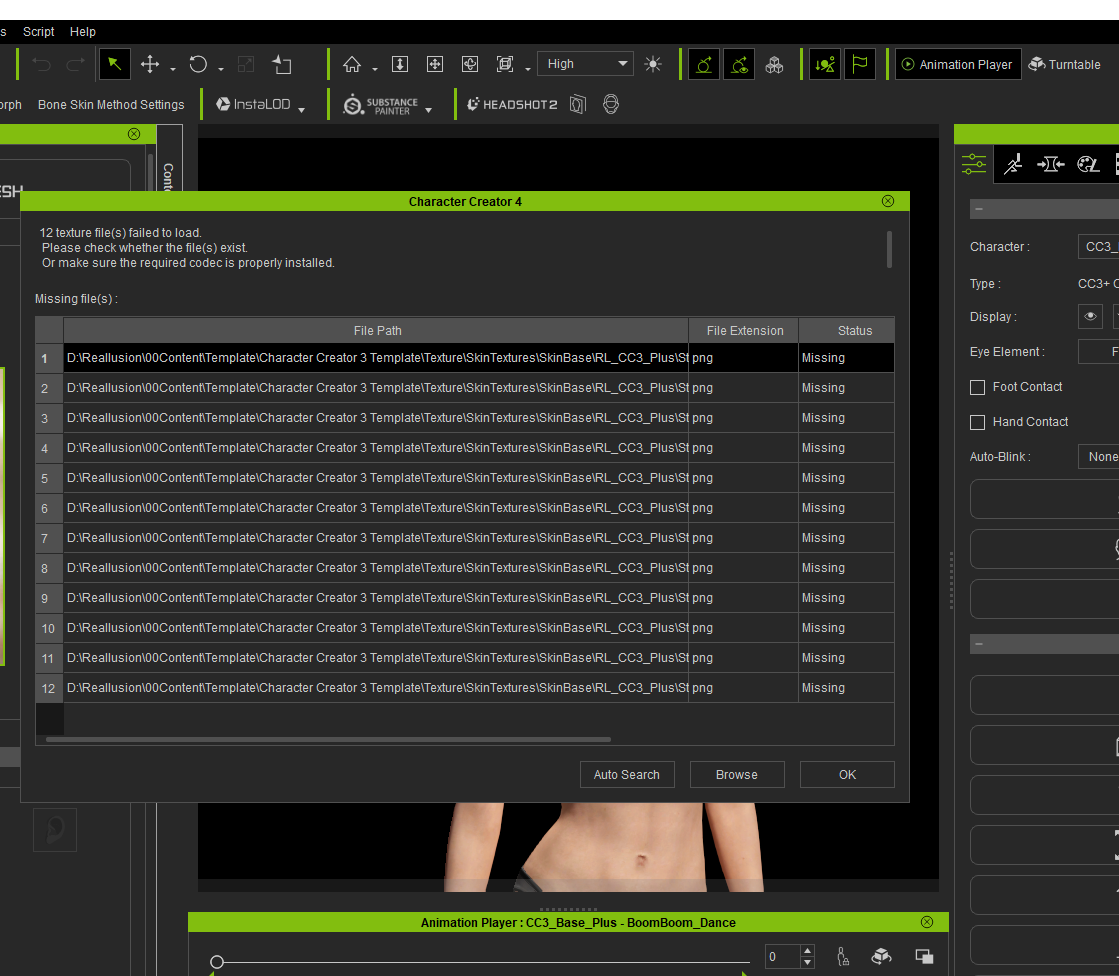
Nobody has "D:\Reallision\00Content..." folder. It's a shame this bug is still floating around after all this time.
|
|
By microblastgames - 3 Years Ago
|
Re-opening doesn't work...
Thanks anyway.
|
|
By animagic - 3 Years Ago
|
In CC4, the path to the same files is: ...\Reallusion\Reallusion Templates\Others\Skin Textures\SkinBase\RL_CC3_Plus.
Check, if they are there.
|
|
By davidmaximo - 3 Years Ago
|
|
I have this exact same problem ever since i updated. Still no answer on the feedback tracker, though it is the holidays undersandably :(
|
|
By animatedbeing - 3 Years Ago
|
This is most likely a Reallusion bug. The machine that was used to package the content files (or build the latest version of iClone) had content in a D drive with a D:\Reallusion\00Content directory.
Try auto search in -
C:\Users\Public\Documents\Reallusion\Reallusion Templates\Others\Skin Textures\SkinBase\RL_CC3_Plus
If you used the standard iClone install
|