|
By joel.lovell - 3 Years Ago
|
Well, well, WELL.  Updated Parallels today; on MacBook Pro with Sonoma 14.1.1...Windows 11 wanted an update, updated it. I decided to try installing iClone again, expected to get an error...and it installed... Updated Parallels today; on MacBook Pro with Sonoma 14.1.1...Windows 11 wanted an update, updated it. I decided to try installing iClone again, expected to get an error...and it installed...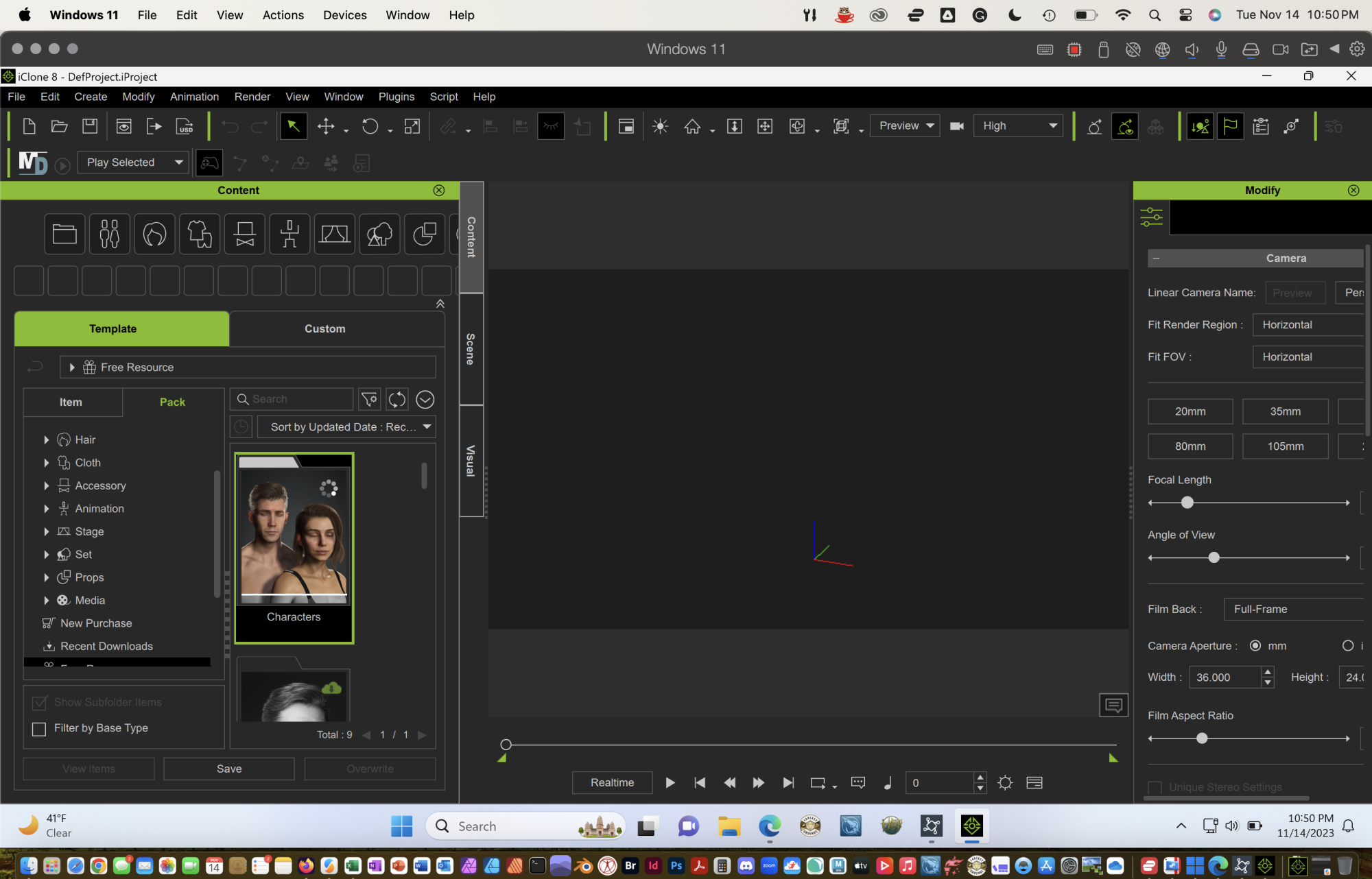
|
|
By Jean-Sé - 3 Years Ago
|
Nice 👍 thanks for sharing .
Do you have the 30 or the 40 cores GPU?
is it usable ? Or too slow?
|
|
By joel.lovell - 3 Years Ago
|
I have the 40 core GPU, and 64 GB OF RAM (could not afford the 128GB Ram upgrade unfortunately ) but so far not seeing that would be an issue.
I have installed cc4 too, and it is taking a while to get all of my content installed, but so far from loading a scene and aninatinga character it is very smooth and responsive
|
|
By Jean-Sé - 3 Years Ago
|
Thanks for your answer.
I planned to order a m3 max with 30 cores next week but if I can run iClone and CC on it, I might go for the 40 cores one :)
Did you by any chance tried to install Omniverse (which is necessary AFAIK to be able to export to USD from iClone)? Without a Nvidia card, I’m not sure the installation will be possible 🥺
|
|
By joel.lovell - 3 Years Ago
|
|
I was wondering about that myself. Will give it a try.
|
|
By animagic - 3 Years Ago
|
In fact, you need an Nvidia RTX card (the newer generation starting with the 2000 series) to able to install/run Omniverse, which is indeed a requirement for USD export.
The functionality you get is on your Mac probably similar to what you would get on a PC with an AMD card.
|
|
By Rampa - 3 Years Ago
|
|
Omniverse will not work, but you can still try just installing the Omniverse Launcher to install the Omniverse Connector for CC and iClone. The Connector is what enables the USD export option. So if you continue to get lucky, that might do what you need. :)
|
|
By Peter_737068 - 2 Years Ago
|
This is promising. I was forced to buy a top end PC last year because Iclone wouldn't work on my Mac and I absolutely hate it. It was a professional build from SCAN computers. It has a 4090 card with high end intel chips but every single piece of software I use crashes at least five times a day now. I just hate PC's. If I can get Iclone to work on the latest Macs I think I'll get an M3 Studio when they're out.
|
|
By Peter (RL) - 2 Years Ago
|
|
Peter_737068 (1/22/2024)
This is promising. I was forced to buy a top end PC last year because Iclone wouldn't work on my Mac and I absolutely hate it. It was a professional build from SCAN computers. It has a 4090 card with high end intel chips but every single piece of software I use crashes at least five times a day now. I just hate PC's. If I can get Iclone to work on the latest Macs I think I'll get an M3 Studio when they're out.
Unfortunately while you may be able to get iClone to run on a Mac, it will be very unlikely to run without issues. Frankly, if you are having that many problems with your high end Windows PC then I would go back to whoever you purchased it from. There are clearly problems that shouldn't be there. I've been using Windows PC's forever and never encounter more than the occasional crash so there is clearly something else wrong with your PC.
|
|
By Peter_737068 - 2 Years Ago
|
|
Thanks for the reply. Yes I think there has to be an issue as I get problems with Maya not opening then suddenly opening fine. Even photoshop refuses to open files and I have to restart. I'm thinking it must be a hard drive issue. I've going to try removing a load of files as I only have around 80 gigs free on the drive so wondering if that could cause the problems.
|
|
By samusam - 2 Years Ago
|
|
hi, so could iclone and character creator run on mac studio? always using a windows emulator
|
|
By mailmargot - 2 Years Ago
|
|
I have the M3 processor and it works fine with Iclone. But I have a problem with rendering. It is not possible. Can anyone give me a advice how I can render a scène in Iclone with Parallels and Mac with M3 processor?
|
|
By joel.lovell - 2 Years Ago
|
|
What are the settings for your virtual machine for windows, i.e. your parallels setting? I had to bump up the memory and graphics settings.
|
|
By mailmargot - 2 Years Ago
|
Thanks for your question. I have changed it in Parallels Processors 8 and memory 16GB. I can render a png sequence but not a Mp4. Did you have the same problem?
|
|
By joel.lovell - 2 Years Ago
|
I am running into the same issue, I can do a png sequence, but not a movie format
|
|
By animagic - 2 Years Ago
|
|
I wonder if it has something to do with available codecs. This is an issue on Windows sometimes.
|
|
By mailmargot - 2 Years Ago
|
|
Thanks for your reply. Do you know how to fix this?
|
|
By joel.lovell - 2 Years Ago
|
I doubt I will get support to help, but I will give it a try, maybe they will be willing to point me in the right direction.
But in the meantime, there is a free image sequence to video utility in Canva if you need it.
https://www.google.com/url?sa=t&source=web&rct=j&opi=89978449&url=https://www.canva.com/features/photo-to-video/&ved=2ahUKEwiGwZG4yLaFAxVhGVkFHRsqDsgQFnoECBYQAw&usg=AOvVaw15D35BifXJDgVpUTm3ANmq
|
|
By mailmargot - 2 Years Ago
|
Thanks! I can work with png sequence but mp4 is easier ;-)
I have another problem and perhaps you know the answer!!! In the timeline i saw until today the track information (at the left side of the timeline) and when I collapse the items I can modify the animation or expressions etc. Today I have spent nearly 4 hours with searching for that column. In my screen the timeline starts with the first keyframe and no tracklist is visible. Do you know what the problem can be? I have tried everything. Is this a Parallel issue???
|
|
By animagic - 2 Years Ago
|
@mailmargot: Have you tried rendering as .MOV, as that is an Apple format. I don't have a Mac, so I can't test it.
But .MOV shoud give you similar quality as .MP4, as it is just a wrapper.
I exclusively render in PNG sequences as this has many advantages such as partial rerendering of a scene.
|
|
By mailmargot - 2 Years Ago
|
Thanks that is a good idea and it works.
Do you also know a solution for a new problem I have? I’am working on a Mac with M3 chip and Parallels and that works fine (also with Character Creator) until a few days ago.
The problem is the appearance of the Timeline.
As you can see in the attachment I only get this appearance and it misses the Trackrecord menu on the left side. If I select the track menu list (screenshot 2) I can’t move the list and can’t do anything with it. I have tried everything (uninstall and install Iclone8) and surfed the whole Internet for people with the same problem but nobody has the same problem (I think).
Perhaps you know the answer and are willing to share it with me so that I can go on with Iclone8.  
|