|
By vealti - 2 Years Ago
|
I'm trying to modify one of the default characters in Illustrator. I can use the send to SVG editor (Illustrator in my case), make changes, and then have it update in CTA5 fine. But if I save that same character that was sent to Illustrator as a SVG on my drive and then try to import it via the Create Character_Import File option the arms and hands don't link to the bones correctly. In the example below where the arms are wrong I didn't change anything to the file except save it as a SVG and then import that saved file. Is there a specific SVG export settings that need to be used? I've tried several different ways with no success. I need to save these to my drive vs just the link and edit because I'm creating some new templates for myself based off of the default character. Thanks.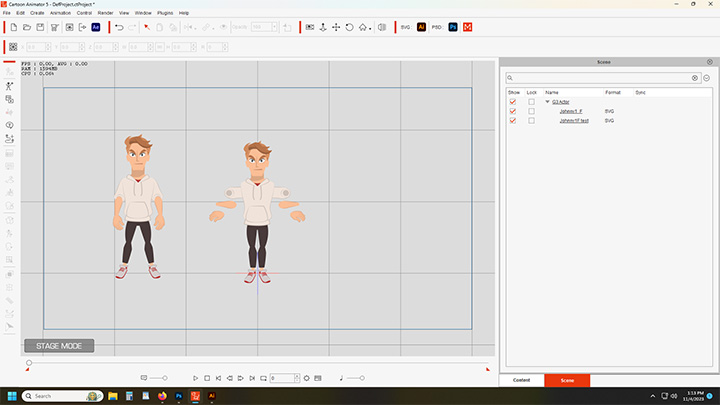
|
|
By Steven(RL) - 2 Years Ago
|
Hi,
Try the link below for export setting
https://docs.google.com/presentation/d/1QRV7nfO3Lkk2hYuJ6WUqvYdwZ4wbc2-gg13o9b6sDZ8/edit#slide=id.g16acc20a65a_0_391
If there still have problem, you can upload your file to our customer service
https://www.reallusion.com/CustomerSupport/UserEx/QForm.html
Steven Wu
|
|
By vealti - 2 Years Ago
|
Thanks, following that I'm able to save and import the new characters correctly. I do have to use the export as option every time I want to update even after I have saved the new character. If I try to do a normal save option from Illustrator even no a character that has been previously exported correctly it still does the disjointed arm thing. Maybe it has something to do with choosing the artboards option which doesn't show up in the save as command? I'm don't use Illustrator enough to know. But anyways, it's working fine now.
|