|
By mmapoodle - 2 Years Ago
|
Greetings all, ((I put in a ticket with Customer Support but I figured I'd ask here as well to see if anyone here can help me save my project.))
I've been making a werewolf animation for weeks now and all was going well until tonight when my computer crashed while saving the project (having to restart).
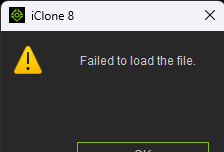
Upon reopening iClone8 I get an error "Failed to Load File".
New to the world of 3D animation, this is where I messed up - I didn't follow any project safety procedures:
- My filesize is a whomping 2GB (Didn't pay attention to how much it was ballooning, nor did I break up the project into segments to lighten the load)
- I don't have any backups. I didn't incrementally save the project.
I'll be quite devastated to lose weeks of work so I'm in desperate search of anything, anyone, or any process that can help me get this file to work.
Right now I'm at a loss of what to do, please advise.
Thank you!
|
|
By dionmarinos1974 - 2 Years Ago
|
|
I hate to say this But there a very good chance your work is lost . Unless you can revert your computer back to a previous date and im not even sure if that would work. It is so important that You create multiple files at multiple stages during development. I always keep a master file and work on at least 4 to 5 files and every once in a while I will up date the master file and carry one training the other files . with every new positive change saving often. In some cases saving to often can blow your project . but multiple files will prevent overwriting a crucial point in your project as well. I hope you are able to restore your file But again if you only had one file the odds are against you. Good luck.
|
|
By animagic - 2 Years Ago
|
You can see if RL Support can help restore the file: https://www.reallusion.com/CustomerSupport/UserEx/QSubmit.html?type=product.
If the file size is very small (I have had that happen) then restoring would not be possible.
|