|
By leelove - 3 Years Ago
|
I am a new Reallusion user but certainly not new to graphics and software. Started with photoshop 2.5 so I can normally figure things out or find an online resource.
But I have to admit, the Realliusion tutorials leave a lot to be desired.
1. They Gloss over the Basics
It is like they assume everyone knows the interface and exact which each function does.
2. Do not Explain How to Solve a Problem
Everything they do works perfectly, there do not seem to be point out pitfalls.
I am trying to teach myself CC4 and Headshot 2 and keep running into the same problems on every model. This is obviously user error but there is little to no tutorials that address these issues.
A. Mesh to Head Mode
I can not get this to work no matter what I do. I always receive "Muliple section detected. To use Mesh to Head please make sure you have only one model selected".
The only thing I have is one netural character how do I resolve this ?
Does any have a good and through headshot 2 step by step tutorial? Disappointed to find 99% of the YouTube searches for headshot 2 are overviews and reviews. :(
|
|
By Rampa - 3 Years Ago
|
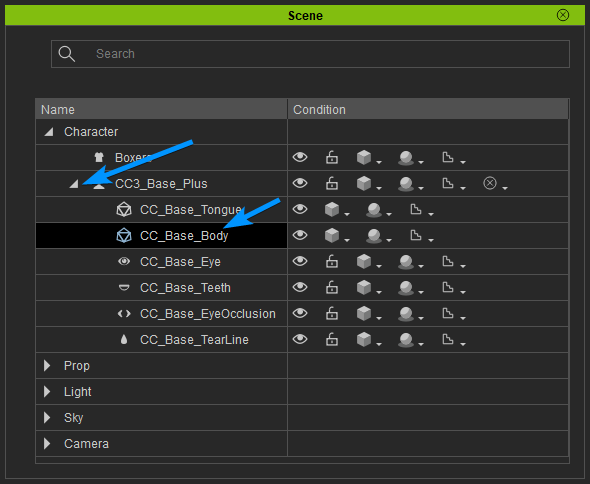
The character is made up of the body, the eyes, teeth, etc. So in this case, you want to select only the body. You can select just the body in the Scene Manager.
Click the tiny arrow in front of the character name to see the sub-objects of the character.
Select the body.
|
|
By leelove - 3 Years Ago
|
Rampa thanks for the quick reply and I will give this a try.
Lee
|
|
By Rampa - 3 Years Ago
|
|
If you importing a scan or sculpt mesh, it would just be one mesh to start with. Just be aware that there are sub-meshes if you get that message.
|
|