|
By mrtobycook - 2 Years Ago
|
Hi everyone,
I have a new plug-in coming soon, that imports a variety of formats (Rokoko Studio, FaceCap, LiveLink Face ARkit, LiveLink Face MetaHuman) and I've made a video that runs through everything you can do:
And there's also an example video showing the results of full body and face Rokoko import:
https://www.youtube.com/watch?v=ErAN_EmHM1w&ab_channel=TobyVirtualFilmer
I'll be making more soon, but just wanted to at least show something working.
If anyone is interested in testing the plug-in, please let me know! It's just me as the solo developer, so I would really appreciate people trying it before I release it properly LOL.
Toby.
|
|
By charly Rama - 2 Years Ago
|
|
Hi Toby. Nice work, could it import MH facial made with MHA ? I'm interested
|
|
By mrtobycook - 2 Years Ago
|
Yes, it will allow you.
You have to render only in Unreal thought. What I mean is, you can’t apply metahuman animator animation to cc4 characters or anything else and then render them outside of Unreal. All animation derived from MetaHuman Animator must be applied to a MetaHuman before rendering, and then rendered only inside Unreal Engine.
With MHA you can click to read their terms of service. And that’s how I read it. But it’s not 100% clear!
but to me It’s like when they make MetaHuman scene files available in Maya format (which they still do), but you can’t render in Maya legally. You can animate inside Maya, but then you have to go to unreal. They want all MetaHuman and MetaHuman Animator stuff rendered only within Unreal.
Luckily the iClone to unreal workflow is fantastic! So as long as you import the MHA animation then don’t render, but rather animate in iClone then transfer to unreal for rendering, I believe that is AOK! But that is not a legal opinion. I can’t get a clear answer unfortunately :)
|
|
By charly Rama - 2 Years Ago
|
|
Ok I see. Anycase, I'm interested of trying this plugin
|
|
By StyleMarshal - 2 Years Ago
|
|
Awesome !!! 👍 I wanne test it too 😁
|
|
By rosuckmedia - 2 Years Ago
|
|
Hi Toby Very cool,👍👍 I would also like to test it. Greetings Robert.
|
|
By charly Rama - 2 Years Ago
|
|
Thing that makes me smile is : If someone shows a video animation on youtube for example, how people can tell it was rendered at this software or this ? I think nobody can't.
|
|
By StyleMarshal - 2 Years Ago
|
I don't think there are problems for normal YT videos but if you make money with it you should do legal renderings 😁
Also it is not really clear if it is not allowed to use MHA "data" with other DCCs. Clear is that MHs have to be rendered in UE.
Epic is taking care of Meta Humans but the input of MHA is your own content generated by the engine.
|
|
By charly Rama - 2 Years Ago
|
|
Yeah, that's clear. Anycase, I never make money with my videos, just for fun :D
|
|
By mtakerkart - 2 Years Ago
|
Hi mrtobycook,
I'm really interested in your plugin but to stay in Iclone. As you can see Reallusion does everything it can to make use of their software very easy and quick to learn. That's why I would never produce film with Unreal because it is impossible by a one man Band. However I would be willing to learn how to do a facial mocap in unreal if your plugin would import the face animation into Iclone and then save it into IMotionPlus and apply it to all my CC4 characters in Iclone. I have already bought the mocapHelmet from JSFILMZ and I am ready to invest in an Iphone 12, I am also ready to buy the helmet with camera from FACEGOOD which is compatible with MetaHuman. MetaHuman's quality facial mocap is the only thing I need to be able to produce my movies in Iclone. I now master PopCorn particles and I can assure you that Iclone 8 is really surprising.
Marc
|
|
By mrtobycook - 2 Years Ago
|
MetaHuman Animator’s quality is fantastic, I agree. You can do all the things you said - stay in iClone to animate everything - and then render it in Unreal right at the end?
But I hear you, you want to stay entirely in iClone.
Right now, MetaHuman Animator is the only solution for ‘mesh based depth map 4d capture from iPhone’. All other solutions are arkit based, or just based on video (eg. Faceware). And as I said, it’s against epics terms if service to render MetaHuman Animator-derived animations outside of Unreal.
Another option you can check out is Facegood’s FOGO. It is released on July 17 as a beta. It is basically identical to MetaHuman Animator, seemingly. However, it may end up being very very expensive though. Avatary/Facegood tend to price their non-arkit solutions incredibly high.
|
|
By mtakerkart - 2 Years Ago
|
|
mrtobycook (7/5/2023)
MetaHuman Animator’s quality is fantastic, I agree. You can do all the things you said - stay in iClone to animate everything - and then render it in Unreal right at the end?
But I hear you, you want to stay entirely in iClone.
Right now, MetaHuman Animator is the only solution for ‘mesh based depth map 4d capture from iPhone’. All other solutions are arkit based, or just based on video (eg. Faceware). And as I said, it’s against epics terms if service to render MetaHuman Animator-derived animations outside of Unreal.
Another option you can check out is Facegood’s FOGO. It is released on July 17 as a beta. It is basically identical to MetaHuman Animator, seemingly. However, it may end up being very very expensive though. Avatary/Facegood tend to price their non-arkit solutions incredibly high.
Thank you for your answer.
I had the same question about the license agrement. 90% of my Props come from the UDK marketplace, many of which are offered free of charge. I put you here a copy of the liscence for a 2D use:
"i. Non-Engine Products (e.g., Rendered Video Files) You will not owe us any royalty payments for Distributing Products that (i) do not include any Engine Code,
(ii) do not require any Engine Code to run and (iii) do not include Starter Content in source format (“”) to any person or entity.
This means, for example, you will not owe us royalties for Distributing:
● rendered video files (e.g., broadcast or streamed video files, cartoons, movies,
or images) created using the Engine Code (even if the video files include Starter Content) or
● asset files, such as character models and animations, other than Starter Content,
that you developed using the Engine Code, including in Products that use or rely on other video game engines.
Please note that certain assets that we make available under separate agreement are available for use only with Unreal Engine.
marketplace, Do you think that can be apply in your case for video rendering ?
Marc
|
|
By mrtobycook - 2 Years Ago
|
It's not really 100% clear. But check out this page, which is the main page for MetaHuman Animator really:
https://www.unrealengine.com/marketplace/en-US/product/metahuman-plugin
It says "UE-Only Content - Licensed for Use Only with Unreal Engine-based Products"
I believe that means, based on previous MetaHuman-related things that have involved Maya animation, that you can animate externally, but render inside Unreal only. That's my understanding, but I could be wrong!
|
|
By mtakerkart - 2 Years Ago
|
I understand . The confusion is the term "render". Because for the game world "render" means
playing with interactions (video game, interactive VR ...) instead of the movie world when "render"
means only 2D videos.
Marc
|
|
By mtakerkart - 2 Years Ago
|
I have a request :D
Could you show an exemple of a facial MetaHuman animation apply in Iclone 8 on a CC4 character ?
Thank you in advance
Marc
|
|
By mrtobycook - 2 Years Ago
|
Sure thing. I just posted a new video, and if you go to 1min 58s you'll see the progress on the MetaHuman Animator import. If you watch the video I explain what is happening with MHA and what I still need to do. :-)
|
|
By mtakerkart - 2 Years Ago
|
Thank you so much. I am very enthusiastic and very interested.
Maybe like our much missed Mike Sherwood, Reallusion will contact you to develop your plugin :)
I suscribed to your Youtube video.
|
|
By Garry_Seven_of_one - 2 Years Ago
|
mrtobycook (6/30/2023)
Hi everyone, I have a new plug-in coming soon, that imports a variety of formats (Rokoko Studio, FaceCap, LiveLink Face ARkit, LiveLink Face MetaHuman) and I've made a video that runs through everything you can do: And there's also an example video showing the results of full body and face Rokoko import: https://www.youtube.com/watch?v=ErAN_EmHM1w&ab_channel=TobyVirtualFilmerI'll be making more soon, but just wanted to at least show something working. If anyone is interested in testing the plug-in, please let me know! It's just me as the solo developer, so I would really appreciate people trying it before I release it properly LOL. Toby.
Well all I can say is that you would need to be some sort of wizard to get MHA into iClone. I have Rokoko and have used MHA so would love to test it. I’m only interested in rendering in Unreal anyway so that’s no issue to me, but also technically MHA to a CC4 character? I can’t think how technically that could possibly work?
I would love it if we could do that, would be amazing. Love to test it.
|
|
By mrtobycook - 2 Years Ago
|
Garry check out my latest video - it shows the work in progess of MHA into iClone. (About the 2 minute mark) Lots of work to be done still, but it’s slowly getting there.
There are a few hundred control points with metahuman faces, and CC4 EXTENDED has a lot of the main ones, so is definitely a huge chunk of them that go to iClone :)
https://youtu.be/9QmD30P40Ow
|
|
By mrtobycook - 2 Years Ago
|
For anyone who's had trouble getting the new beta plugin to work, I've made a new version (0.03b) and a quick new instructional video:
|
|
By charly Rama - 2 Years Ago
|
|
no chance for me, followed exactly the steps (as others plugin loaded by script) but nothing happen when I open the script in load python
|
|
By mrtobycook - 2 Years Ago
|
|
Would you mind having a look at the console tab and reporting the error it gives? Here or on the private forum. Thanks so much charly!
|
|
By charly Rama - 2 Years Ago
|
|
I'll do that later cause I've got to go to work now :) in anycase, thank you so much Toby
|
|
By Garry_Seven_of_one - 2 Years Ago
|
mrtobycook (7/6/2023)
Garry check out my latest video - it shows the work in progess of MHA into iClone. (About the 2 minute mark) Lots of work to be done still, but it’s slowly getting there. There are a few hundred control points with metahuman faces, and CC4 EXTENDED has a lot of the main ones, so is definitely a huge chunk of them that go to iClone :) https://youtu.be/9QmD30P40Ow
Actually, I signed up to the beta shortly after posting my comment and watched the video, and it’s an intriguing idea.
So am I right in thinking that you are looking at the data from the exported MHA animation clip and then transposing them into extended CC4 blendshapes? I mean that’s the only way I can think you would be able to do it, and even then it must be a very difficult task with all of the MH control points and number of CC4 blendshapes.
I mean respect and kudos for you if you can pull it off.
In terms of the MH pipeline, I have got it working since the kit was originally produced but I find it overly complex, especially as my interest is in stylized characters, so have been using Zwrap to wrap to CC4 base mesh with some success. One thing that was bothering me about that pipeline is that the facial animation on the MH now with MHA is far superior in my opinion to anything else, so I’m at a crossroads whether to actually carry on this pipeline with Zwrap (and now headshot 2 that I’m trying out, started yesterday) on CC4 and animate this way or whether to then use the export head feature to send to MH creator and then incorporate that and actually use the Metahuman to animate. There are several issues for me going down the actual MH mesh road.
Firstly, I can’t get the eyes to be as stylized as I would like using the MH mesh as going beyond certain sizes and shapes of eyes etc breaks the animation due to the MH post process functions in the Unreal dual skeleton approach. I can create my own normal maps to get stylized features, but still it will be limited in creating the type of characters I want.
Secondly, I find the process of body and head animations for the MH difficult and time consuming compared with animating a single CC4 skeleton.
Thirdly, to get the body stylized as well presents similar issues which leaves things like the Mesh Morpher plug-in which is an option, but again the complexity for this is in the post process MH animation where a lot of adjustments have to be made.
I’ve also tried the hybrid approach with a MH head on a CC4 or other body mesh, and yes it does work, but again the complexity is with the masking of the head to body and results are very mixed for me.
I’ve actually documented these 2 different workflows and the steps involved, and the only real benefit of the MH workflow I can’t get with the CC4/Zwrap/Headshot 2/ is the quality of the MHA quality for facial animation.
If you can get this plug-in to produce something near that MHA quality, then for me that is the magic bullet, the missing link that streamlines the pipeline significantly.
I look forward to the progress and development of the plug-in, and thank you for your efforts. 👍
|
|
By mrtobycook - 2 Years Ago
|
|
If anyone has a chance, I'd love love if anyone trying the plugin could please open the Console Log, and see what the error is - copy and paste it and send to me via direct message on here? Would be amazing! Otherwise I can't problem solve unfortunately.
|
|
By mrtobycook - 2 Years Ago
|
Just an update everyone - there's a new version that I'm confident fixes the problem. Here's the release note on it:
IMPORTANT: July 7, 2023 11:30pm. NEW VERSION RELEASED! 0.04b. :-) I discovered a bug that meant NO version so far will work on any PC really, unless you happen to have a little-known package called 'numpy' installed. I apologize! I now have set up a separate testing PC with a clean install of Windows 10 and iClone, so that this won't happen anymore. ANYWAY, I've posted version 0.04b and I'm hoping that will now work for everyone. :-)
|
|
By rosuckmedia - 2 Years Ago
|
|
Hi Toby, Many thanks, it works.👍👍👍 Now I can do my first tests. For me the CSV import is the best. will report. Greetings Robert
|
|
By mrtobycook - 2 Years Ago
|
|
Garry_Seven_of_one (7/6/2023) Actually, I signed up to the beta shortly after posting my comment and watched the video, and it’s an intriguing idea. So am I right in thinking that you are looking at the data from the exported MHA animation clip and then transposing them into extended CC4 blendshapes? I mean that’s the only way I can think you would be able to do it, and even then it must be a very difficult task with all of the MH control points and number of CC4 blendshapes. I mean respect and kudos for you if you can pull it off.
Yes exactly! I have a large spreadsheet of all the values, which has taken a long time to compare and double check etc etc etc. There are some that are 1:1 matches, and some where the MetaHuman version is split into four quadrants on the mouth instead of two, etc etc. A lot of complexity to it. But I have a plan written out (in that spreadsheet), I'm just taking it step by step with the coding.
In terms of the MH pipeline, I have got it working since the kit was originally produced but I find it overly complex
Yes I completely agree. I've been using my 'frankenmetahuman' process [its a video I made with a man and a woman boxing] and that has made it easier - asingle body and head COMBINED in iclone, for metahumans. And it means that characters can touch etc perfectly and it all matches absolutely in Unreal at the end. Before I developed that technique, it all was just impossible for me.
I have a full-length tutorial made for that which is almost done, but I didn't get much up-take on that video haha so I think I'll wait and see if people start being interested to know more about it.
One thing that was bothering me about that pipeline is that the facial animation on the MH now with MHA is far superior in my opinion to anything else, so I’m at a crossroads whether to actually carry on this pipeline
That's so interesting. I definitely am not at all familiar with the particular challenges of stylized characters when it comes to MetaHumans! Yes the post process blueprints - in fact ALL the blueprints when it comes to MetaHumans - are incredibly complicated. Very difficult if you're trying to do non-humans, I would think, because they simply haven't officially been playing with that (Epic I mean) and problem solving the issues. Difficult!
Secondly, I find the process of body and head animations for the MH difficult and time consuming compared with animating a single CC4 skeleton.
Well exactly. That's why I use the "frankenmetahuman" thing, but of course there's no such thing as MetaHuman dummies for non-human characters yet, so maybe that wouldn't work as well for you as it has been for me :-)
If you can get this plug-in to produce something near that MHA quality, then for me that is the magic bullet, the missing link that streamlines the pipeline significantly.
I'm not sure there is any perfect solution - it's hard, because even once MetaHuman facial animation is inside iClone, it's still going to be difficult to wrangle. But yes, could be good! As long as - and I know I keep saying this on this thread - you are committed to rendering in Unreal (otherwise Epic will get v annoyed). :-)
I'm hoping that there, at some point soon, becomes a true official Reallusion workflow for (a) a single metahuman body and face inside of iClone (even if its CC4 EXTENDED blendshapes on the face, but the body is 1:1 the same as the 18 MetaHuman body formats). And (2) facial animation import. I know this plug-in will do it, but I really hope that Reallusion themselves come to the party and throw some developers at it. :-)
|
|
By charly Rama - 2 Years Ago
|
|
It works like a charm Toby. I can't wait to try the MHA importer
|
|
By mrtobycook - 2 Years Ago
|
So glad to hear it’s working for you, Charly :))
There’s still things to do with the livelinkface arkit - it’s not as good as Rokoko (various things like lip touch etc that can be refined) but yes it’s close!
MetaHuman Animator is going to take me a while. But hang in there, I’ll get it done eventually :) So far it looks bad but every hour I work on it, it looks better and better
|
|
By mtakerkart - 2 Years Ago
|
|
mrtobycook (7/6/2023)
[quote][b]Garry_Seven_of_one (7/6/2023)
Yes exactly! I have a large spreadsheet of all the values, which has taken a long time to compare and double check etc etc etc. There are some that are 1:1 matches, and some where the MetaHuman version is split into four quadrants on the mouth instead of two, etc etc. A lot of complexity to it. But I have a plan written out (in that spreadsheet), I'm just taking it step by step with the coding.
So if I understand correctly, the ArtKit system with LiveFace is less good for lack of control points than the metahuman animator?
|
|
By Yo Dojo - 2 Years Ago
|
I'm assuming Meta Human Animator facial mocap is superior to iClone? That's why you guys are working on this workflow? I just bought iclone, motionlive/ LiveFace, and wrinkles for a client project. The acculips is a pretty cool base to do facial mocap on top of. But it still needs more smoothing and complexity, because it can look really robotic.. The project I'm working on has a lot of fast talking.
I guess a drawback of MetaHuman would be that you aren't supposed to render them outside of Unreal. But I've had trouble getting iclone animations and wrinkles to transfer to a third party program, Cinema 4d. So I would say iClone isn't much better that MetaHuman as far as compatibility with other software.
Thanks for any insights, I'm super new to iClone and facial mocap
|
|
By mtakerkart - 2 Years Ago
|
|
Yo Dojo (7/6/2023)
I'm assuming Meta Human Animator facial mocap is superior to iClone? That's why you guys are working on this workflow? I just bought iclone, motionlive/ LiveFace, and wrinkles for a client project. The acculips is a pretty cool base to do facial mocap on top of. But it still needs more smoothing and complexity, because it can look really robotic.. The project I'm working on has a lot of fast talking.
I guess a drawback of MetaHuman would be that you aren't supposed to render them outside of Unreal. But I've had trouble getting iclone animations and wrinkles to transfer to a third party program, Cinema 4d. So I would say iClone isn't much better that MetaHuman as far as compatibility with other software.
Thanks for any insights, I'm super new to iClone and facial mocap
The Acculips is only for accurate english lipsync. It's not for emotional expressions. You must create it (puppet or facial mocap)
|
|
By Garry_Seven_of_one - 2 Years Ago
|
mrtobycook (7/6/2023)
Garry_Seven_of_one (7/6/2023) Actually, I signed up to the beta shortly after posting my comment and watched the video, and it’s an intriguing idea. So am I right in thinking that you are looking at the data from the exported MHA animation clip and then transposing them into extended CC4 blendshapes? I mean that’s the only way I can think you would be able to do it, and even then it must be a very difficult task with all of the MH control points and number of CC4 blendshapes. I mean respect and kudos for you if you can pull it off. Yes exactly! I have a large spreadsheet of all the values, which has taken a long time to compare and double check etc etc etc. There are some that are 1:1 matches, and some where the MetaHuman version is split into four quadrants on the mouth instead of two, etc etc. A lot of complexity to it. But I have a plan written out (in that spreadsheet), I'm just taking it step by step with the coding. In terms of the MH pipeline, I have got it working since the kit was originally produced but I find it overly complex
Yes I completely agree. I've been using my 'frankenmetahuman' process [its a video I made with a man and a woman boxing] and that has made it easier - asingle body and head COMBINED in iclone, for metahumans. And it means that characters can touch etc perfectly and it all matches absolutely in Unreal at the end. Before I developed that technique, it all was just impossible for me. I have a full-length tutorial made for that which is almost done, but I didn't get much up-take on that video haha so I think I'll wait and see if people start being interested to know more about it. One thing that was bothering me about that pipeline is that the facial animation on the MH now with MHA is far superior in my opinion to anything else, so I’m at a crossroads whether to actually carry on this pipeline
That's so interesting. I definitely am not at all familiar with the particular challenges of stylized characters when it comes to MetaHumans! Yes the post process blueprints - in fact ALL the blueprints when it comes to MetaHumans - are incredibly complicated. Very difficult if you're trying to do non-humans, I would think, because they simply haven't officially been playing with that (Epic I mean) and problem solving the issues. Difficult!
Secondly, I find the process of body and head animations for the MH difficult and time consuming compared with animating a single CC4 skeleton.
Well exactly. That's why I use the "frankenmetahuman" thing, but of course there's no such thing as MetaHuman dummies for non-human characters yet, so maybe that wouldn't work as well for you as it has been for me :-) If you can get this plug-in to produce something near that MHA quality, then for me that is the magic bullet, the missing link that streamlines the pipeline significantly.
I'm not sure there is any perfect solution - it's hard, because even once MetaHuman facial animation is inside iClone, it's still going to be difficult to wrangle. But yes, could be good! As long as - and I know I keep saying this on this thread - you are committed to rendering in Unreal (otherwise Epic will get v annoyed). :-) I'm hoping that there, at some point soon, becomes a true official Reallusion workflow for (a) a single metahuman body and face inside of iClone (even if its CC4 EXTENDED blendshapes on the face, but the body is 1:1 the same as the 18 MetaHuman body formats). And (2) facial animation import. I know this plug-in will do it, but I really hope that Reallusion themselves come to the party and throw some developers at it. :-)
Thanks for that. Just to clarify, when II say stylized, I mean humanoids like below which I’m working on with wrap and HS2: these are models from talented sculptor Matker Malitsky.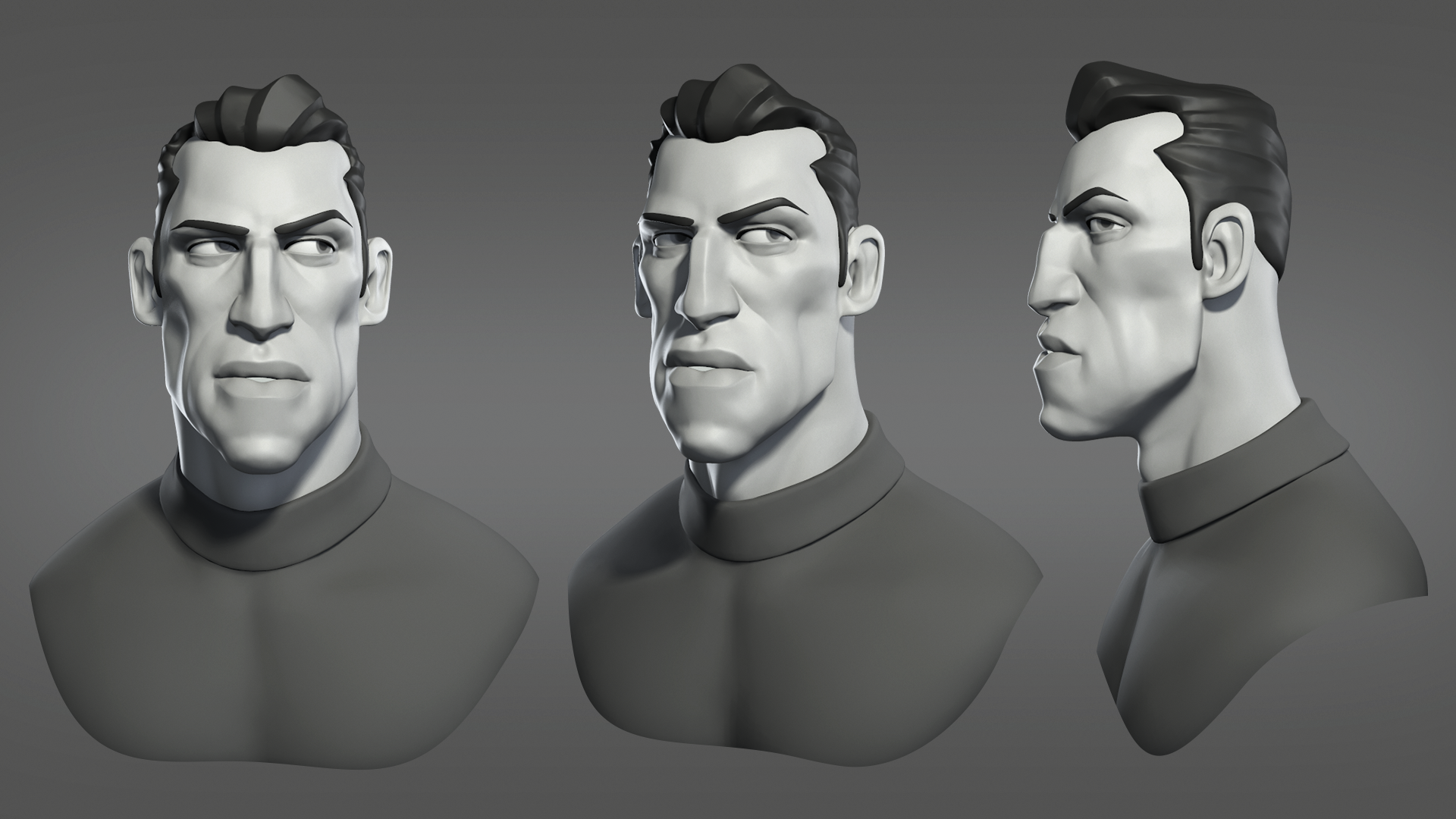
|
|
By mrtobycook - 2 Years Ago
|
@Garry Oh ok, interesting. I’d love to know more about your process, do you have a blog or YouTube I can check out? Sorry if I’ve already asked that or have already seen them. I’m a very visual person and sometimes I forget who is who on this darn forum, because there aren’t faces :)
@Yo Dojo Well, the MetaHuman Animator isn’t really “superior” to iClone - it’s just another tool to add. The whole MHA process is very cumbersome. IClone’s motion live and acculips system is amazing because it’s so so fast, and acculips is fantastic results for American-accented English speakers. If it’s looking robotic, I’d definitely say you should try adjusting the lip settings on the clip - I find ‘fast talking’ works great, or other ones, depending on speaker. Also, iClone 8 characters - with CC4 EXTENDED facial profile - have amazing expressions, just as good as MetaHuman in my opinion. So there’s a lot of advantages in staying with iClone/CC stuff. And yes, Epic is very strict about MetaHuman Animator being Unreal-rendered only, which is a massive drawback for many people because it’s much easier to get fast awesome results directly out of iClone or with the USD export to Omniverse. MHA is just another tool, and has drawbacks yep! Also keep in mind, lots of people have actually made great character animation short film/film/tv stuff with iClone/cc without unreal. It’s a proven, fantastic system. Anything with iClone + unreal is really just a test at this stage , in terms of professional level character animation. Just my opinion! :) so far, all finished professional-standard work with MetaHumans has used Maya. I’m a Maya guy and it is incredibly time consuming and you need a big team. IClone can be done by individuals; and it’s awesome :)
@mtakerkart Yes, ARKIT is inferior to MetaHuman Animator, because of the number of control points etc. Here’s a more detailed answer if it helps: It’s also about how they work, fundamentally - arkit is just looking at the iPhone’s camera and depth data in order to drive 52 blendshapes. MHA uses a “4d solve”, which means it uses the depth data from iPhone/stereoHMC to to recreate your entire facial mesh (ie: it’s like unlimited Blendshapes). At the moment, it then maps that down to the current MetaHuman Face ControlRig data (200+ controls). But in the future even the MetaHuman’s face rig will probably get better/bigger (400+), and the MetaHuman Animator process will still be effective.
|
|
By charly Rama - 2 Years Ago
|
Very promising. Go ahead Toby, we trust in you :) and I like your female voice :D
|
|
By mrtobycook - 2 Years Ago
|
😂 AMAZING, charly!
I didn’t think that little test recording would ever be public hahah. I’ll have to record some better ones :)
|
|
By mrtobycook - 2 Years Ago
|
By the way, for anyone browsing this thread, just to clarify:
The video charly made was using a very early beta of my new plugin. The lips still aren’t correct - I have a list of many things to do.
And this is just arkit, fyi. Charly made it using the little test recording from “LiveLink Face” app - set to arkit mode, NOT metahuman animator - that I include as part of test animations in the beta.
He has imported it into iClone using the plugin. So this is one of the first facial animation import examples EVER TO BE DONE with iClone. Congratulations charly!! :)
FYI everyone, you can download the free beta plugin now; at https://virtualfilmer.com
The plugin, even when released, will be completely free and open source. :)
|
|
By rosuckmedia - 2 Years Ago
|
|
Hi Charly nice test 👍 , I also did a test with Toby's templates. Hi Tobi, which iPhone are you using? I did my own test with my iPhone X, but unfortunately it didn't turn out very well. But it can only get better. You can do it Toby👍 . Greetings Robert
|
|
By mrtobycook - 2 Years Ago
|
@Rosuckmedia - don’t forget to make the “sound” subtrack visible for your character, then click drag it 15 frames to the right!
Every livelink face arkit audio recording with the app is 15 frames out of sync for some reason. But it’s easily fixed :)
And I’m using an iPhone 14 Pro Max mostly. I have a few different phones but that’s my primary one.
|
|
By charly Rama - 2 Years Ago
|
.Rob, your test is very fluid, I think that after matching the audio to video it's really good
So I've made a quick test recording a CSV with my iphone X and I love the result, and it's so quick. You record, you load the animation without many things to do. for once, no headaches. The interest is for non English language because as said before I think acculips makes english language animation very well at Iclone.
Toby, I know that you find imperfections on it, normal for genius people :D for my part it satisfy me for my story telling because expressions are real . Thank you dude
|
|
By rosuckmedia - 2 Years Ago
|
|
Hi Toby Hi Charlie, Thanks for the information. I'll try again tomorrow. Greetings Robert.
Cool second Test Charly👍👍👍
|
|
By mtakerkart - 2 Years Ago
|
|
charly Rama (7/7/2023)
.Rob, your test is very fluid, I think that after matching the audio to video it's really good
So I've made a quick test recording a CSV with my iphone X and I love the result, and it's so quick. You record, you load the animation without many things to do. for once, no headaches. The interest is for non English language because as said before I think acculips makes english language animation very well at Iclone.
Toby, I know that you find imperfections on it, normal for genius people :D for my part it satisfy me for my story telling because expressions are real . Thank you dude
Salut Charly ,
Alors la je suis vraiment intrigué !!!!
What is CSV ? Did you use LiveFace? Can you show us how you did it ? :D
Moi aussi je cherche desesperement a faire du facialmocap en Francais....
Merci
Marc
|
|
By StyleMarshal - 2 Years Ago
|
|
charly Rama (7/7/2023)
.Rob, your test is very fluid, I think that after matching the audio to video it's really good
So I've made a quick test recording a CSV with my iphone X and I love the result, and it's so quick. You record, you load the animation without many things to do. for once, no headaches. The interest is for non English language because as said before I think acculips makes english language animation very well at Iclone.
Toby, I know that you find imperfections on it, normal for genius people :D for my part it satisfy me for my story telling because expressions are real . Thank you dude
hahaha , so cool ! Charly your German is merveilleux , I like the french accent 😀
|
|
By charly Rama - 2 Years Ago
|
@ Marc, je t'assure c'est la chose la plus rapide que j'ai jamais vue. Et c'est vraiment performant.
csv is the little file made when you record the video on live face with your iphone. You just transfer it and the audio to your pc, and you load it with the Toby's plugin and that's it.
@ Bassline, Ich habe Deutsch gelernt und es hat mir sehr gut gefallen, aber wegen der Kopfschmerzen habe ich alles vergessen :D:D
|
|
By mrtobycook - 2 Years Ago
|
By the way everyone, I'm slowly slowly learning to code iOS apps - its taking a while for me to learn. I'm no programmer hahaha. But I'm doing that so I can make my own capture app, that ALSO captures the true spatial position of the phone (using something called SLAM in arkit). Why? So that we can all get cheap, 3d-printed mocap helmets, and the captures would also include head rotation and also height information etc. So that in theory we could import that data and have our bodies driven by math based on the position of the helmet (basically an "intelligent guess").
Anyway yeah that's all future ideas. Right now it's metahuman animator implementation! :-)
|
|
By mtakerkart - 2 Years Ago
|
|
charly Rama (7/7/2023)
@ Marc, je t'assure c'est la chose la plus rapide que j'ai jamais vue. Et c'est vraiment performant.
csv is the little file made when you record the video on live face with your iphone. You just transfer it and the audio to your pc, and you load it with the Toby's plugin and that's it.
@ Bassline, Ich habe Deutsch gelernt und es hat mir sehr gut gefallen, aber wegen der Kopfschmerzen habe ich alles vergessen :D:D
Ok, I'm a bit lost... Live face can record videoand CSV file?? or is it Live Link Face from Unreal ? I tried Live link face but it doesn't want to send the file by mail...
I'm on Windows 10.
Ok I think I found. It's live link face from unreal. Because the video is too big , I send it by wetransfer from my Iphone and I get this :

|
|
By mrtobycook - 2 Years Ago
|
|
Hi mtakerkart. go to the App Store on your iPhone and install the live link face app, then open it. Choose arkit. Record a take. Then click bottom left corner, to see your takes. Click on one, then click to share it - it will say it’s a zip file. Transfer to your pc. Then on your pc, unzip it. It will be a csv file and others. Upload the csv file using my plug-in. If you want audio, you need to transcode the movie file to a wav file (8 bit or 16 bit). Does that all make sense?
|
|
By mrtobycook - 2 Years Ago
|
|
The zip file is probably too big to email. Click on “save to files”. Then go into your files app, and find the file. Then transfer it to your pc however you like. You can save it to a Dropbox if you have Dropbox. Etc etc. or save to iCloud Drive and then access that via website. Or copy it to your Google drive, if you have gmail (it’s free).
|
|
By mtakerkart - 2 Years Ago
|
|
mrtobycook (7/8/2023)
The zip file is probably too big to email. Click on “save to files”. Then go into your files app, and find the file. Then transfer it to your pc however you like. You can save it to a Dropbox if you have Dropbox. Etc etc. or save to iCloud Drive and then access that via website. Or copy it to your Google drive, if you have gmail (it’s free).
Thank you for your answer. I updated my post ;)
|
|
By mrtobycook - 2 Years Ago
|
|
Oh I see. Ok that’s in the wrong format. When the app first opened, you chose metahuman instead of arkit. Just go into settings (the cog icon) and change to arkit then try again :)
|
|
By mtakerkart - 2 Years Ago
|
|
mrtobycook (7/7/2023)
By the way everyone, I'm slowly slowly learning to code iOS apps - its taking a while for me to learn. I'm no programmer hahaha. But I'm doing that so I can make my own capture app, that ALSO captures the true spatial position of the phone (using something called SLAM in arkit). Why? So that we can all get cheap, 3d-printed mocap helmets, and the captures would also include head rotation and also height information etc. So that in theory we could import that data and have our bodies driven by math based on the position of the helmet (basically an "intelligent guess").
Anyway yeah that's all future ideas. Right now it's metahuman animator implementation! :-)
OH MY GOD!!!!
I'm ready!!!!!
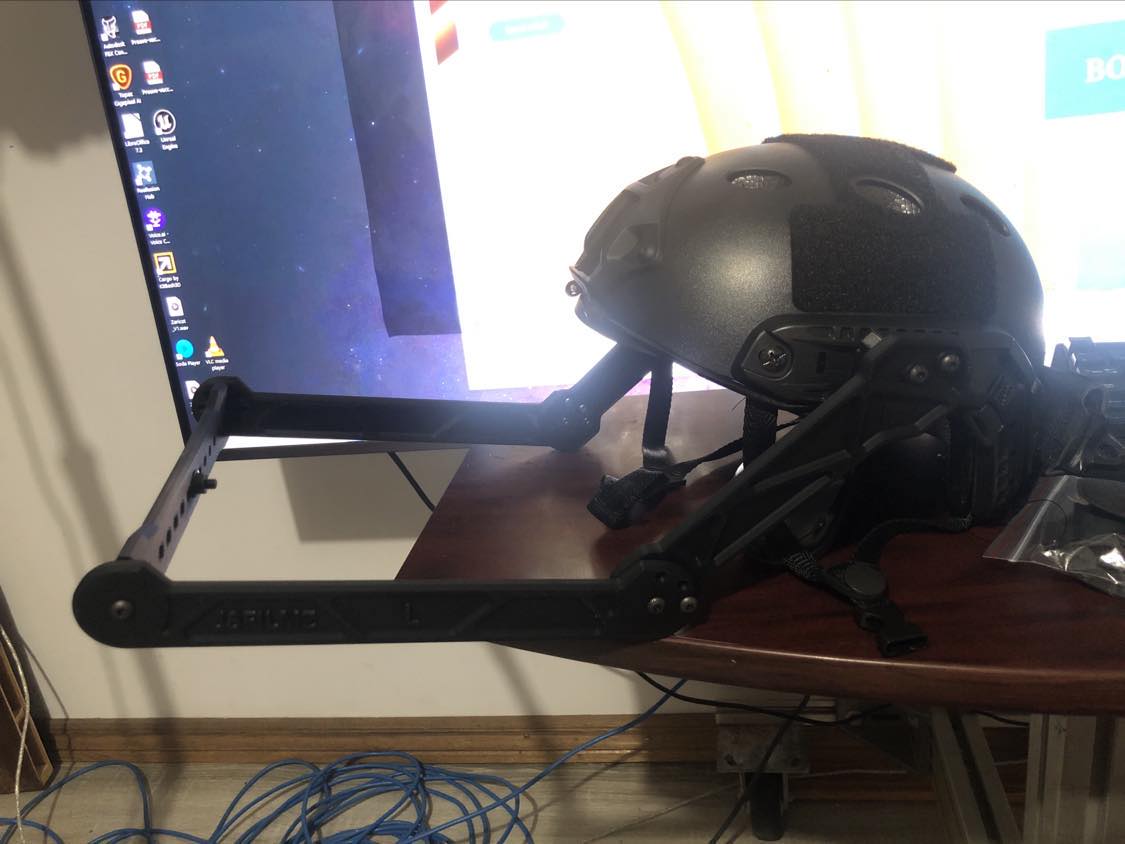
|
|
By charly Rama - 2 Years Ago
|
|
Yeah Mark, you got it :)
|
|
By rosuckmedia - 2 Years Ago
|
|
mrtobycook (7/8/2023)
Hi mtakerkart. go to the App Store on your iPhone and install the live link face app, then open it. Choose arkit. Record a take. Then click bottom left corner, to see your takes. Click on one, then click to share it - it will say it’s a zip file. Transfer to your pc. Then on your pc, unzip it. It will be a csv file and others. Upload the csv file using my plug-in. If you want audio, you need to transcode the movie file to a wav file (8 bit or 16 bit). Does that all make sense?
Hi Toby, Thanks very much,👍👍 I didn't know that, I used Google Drive now. I converted the movie file to Wave using XMedia Recode. Thank you again. Greetings Robert
|
|
By StyleMarshal - 2 Years Ago
|
mtakerkart (7/8/2023)
mrtobycook (7/7/2023)
By the way everyone, I'm slowly slowly learning to code iOS apps - its taking a while for me to learn. I'm no programmer hahaha. But I'm doing that so I can make my own capture app, that ALSO captures the true spatial position of the phone (using something called SLAM in arkit). Why? So that we can all get cheap, 3d-printed mocap helmets, and the captures would also include head rotation and also height information etc. So that in theory we could import that data and have our bodies driven by math based on the position of the helmet (basically an "intelligent guess").
Anyway yeah that's all future ideas. Right now it's metahuman animator implementation! :-)OH MY GOD!!!! I'm ready!!!!!
Is it the Teacher Dude helmet ? (Jae JSFilmz) , looks cool !
|
|
By mtakerkart - 2 Years Ago
|
Bassline303 (7/8/2023)
mtakerkart (7/8/2023)
mrtobycook (7/7/2023)
By the way everyone, I'm slowly slowly learning to code iOS apps - its taking a while for me to learn. I'm no programmer hahaha. But I'm doing that so I can make my own capture app, that ALSO captures the true spatial position of the phone (using something called SLAM in arkit). Why? So that we can all get cheap, 3d-printed mocap helmets, and the captures would also include head rotation and also height information etc. So that in theory we could import that data and have our bodies driven by math based on the position of the helmet (basically an "intelligent guess").
Anyway yeah that's all future ideas. Right now it's metahuman animator implementation! :-)OH MY GOD!!!! I'm ready!!!!! Is it the Teacher Dude helmet ? (Jae JSFilmz) , looks cool !
YES! It is :)
|
|
By rosuckmedia - 2 Years Ago
|
|
Here is my second test. It's not perfect yet, sometimes I don't even know what to say anymore when recording.😁😁😁 I shot it with the Iphone X at 60 FPS. Then I uploaded the file to Google Drive, and later downloaded to my Windows PC using Google Drive. I converted the move file to a wave file with a converter. Greetings Robert
|
|
By mtakerkart - 2 Years Ago
|
rosuckmedia (7/8/2023)
Here is my second test. It's not perfect yet, sometimes I don't even know what to say anymore when recording.😁😁😁 I shot it with the Iphone X at 60 FPS. Then I uploaded the file to Google Drive, and later downloaded to my Windows PC using Google Drive. I converted the move file to a wave file with a converter. Greetings Robert
I like your character!! If your willing to sell it I'll buy it ;)
For now I will wait the Toby's App to test it.
Toby chose the most efficient way. No real-time streaming using wifi. It was the worst thing to do and I never understood why the companies persist to use this system. Save the data on the iphone THEN import into Iclone. This is the most accurate way that we can have. I do the same thing with my Neuron suit, I record/save in their application then I import in Iclone. If I don't do this and stream to Iclone, I lose data.
Marc
|
|
By rosuckmedia - 2 Years Ago
|
|
Hi Mark, Thanks very much, Unfortunately I can't sell you the character, it's just a morph. But here you can buy the morph, just apply a different skin color and it's done. Your equipment is really very good. Yes, the paths you have to go are a bit cumbersome. It's a back and forth. You can already test Toby's app.
Greetings Robert
|
|
By mtakerkart - 2 Years Ago
|
rosuckmedia (7/8/2023)
Hi Mark, Thanks very much, Unfortunately I can't sell you the character, it's just a morph. But here you can buy the morph, just apply a different skin color and it's done. Your equipment is really very good. Yes, the paths you have to go are a bit cumbersome. It's a back and forth. You can already test Toby's app.
Greetings Robert
Ho! I have already bought Toko's morphs. The textures and wrinklesof your character are of very good quality. Did you improve them? I was talking about the facial mocap app that Toby is developing, not its plugin. ;)
Marc
|
|
By rosuckmedia - 2 Years Ago
|
|
Face importer plugin - Live Link Face I forgot I still have an iphone ethernet adapter, will try it today, maybe have better results. Has someone already tried this.?
HI Mark: Sorry I misunderstood. Yes I have used Reallistic Human Skin-Male Athletic and Wrinkle Essentials.
Greetings Robert
|
|
By mrtobycook - 2 Years Ago
|
You mean using the Ethernet adapter with my plugin? No, that won’t make any difference.
The huge difference is calibration. Are you making sure to calibrate before you record? Then there should be multiple CSVs. Use the one called “_cal”
|
|
By rosuckmedia - 2 Years Ago
|
|
Hi Toby Thanks Yes, I did a calibration, and I also use CSV.cal. I will do more tests.
Greetings Robert
|
|
By nikofilm - 2 Years Ago
|
Hello! I tried your plugin! I loved it! But it seems to me that there is some kind of bug. Look at the right chadt of the face and you will see a distortion of the lip and eyebrow!
|
|
By mrtobycook - 2 Years Ago
|
Thanks so much for trying it!
Yes absolutely you are correct! There are various things missing still in live link face, it has to do with firing both sides of the face for certain blendshapes (and also firing all four quadrants if the lips for some as well). I have a very long list of stuff that I need to program - they aren’t bugs as such, just stuff still yet to do. :)
The Beta program is very early - only started this week. But things will get finished over time! Thanks again for checking it out!
|
|
By mrtobycook - 2 Years Ago
|
Just an update for those folks patiently waiting for the MetaHuman Animator support to be added to the plugin.
I spent the weekend working on it, and I now have all of the "primary drivers" working. That is, CC4 EXTENDED is missing quite a few MetaHuman facial controls, so sometimes there might be multiple MetaHuman facial controls that have to drive a single control in CC4 EXTENDED. Well, I now have implemented the first stage of that, but I have a long way to go - implementing secondary and tertiary drivers etc.
For those interested, I've attached the Excel spreadsheet I'm working on. The excel is outdated now as the actual CODE is the latest version of this info, but at least it's something that people might be interested in seeing.
I've also added a text file that is a sample of the code that is "work in progress" - just how it deals with the controls in general. MetaHuman Face ControlRig has a total of 219 controllers. 102 of them are usable, in some way, inside iClone. So there's 102 that are in the CSV that Unreal exports. And then the script has to take those 102 and process them - rename them, duplicate some of them, and split some of them (because MH might use an X position of an eye control to define that eye's blink AND wide eyes, for example - but that has to be split up, so the negative values become the WIDE EYES and the positive are the blink, etc etc).
toby
|
|
By mtakerkart - 2 Years Ago
|
|
mrtobycook (7/10/2023)
Just an update for those folks patiently waiting for the MetaHuman Animator support to be added to the plugin.
I spent the weekend working on it, and I now have all of the "primary drivers" working. That is, CC4 EXTENDED is missing quite a few MetaHuman facial controls, so sometimes there might be multiple MetaHuman facial controls that have to drive a single control in CC4 EXTENDED. Well, I now have implemented the first stage of that, but I have a long way to go - implementing secondary and tertiary drivers etc.
For those interested, I've attached the Excel spreadsheet I'm working on. The excel is outdated now as the actual CODE is the latest version of this info, but at least it's something that people might be interested in seeing.
I've also added a text file that is a sample of the code that is "work in progress" - just how it deals with the controls in general. MetaHuman Face ControlRig has a total of 219 controllers. 102 of them are usable, in some way, inside iClone. So there's 102 that are in the CSV that Unreal exports. And then the script has to take those 102 and process them - rename them, duplicate some of them, and split some of them (because MH might use an X position of an eye control to define that eye's blink AND wide eyes, for example - but that has to be split up, so the negative values become the WIDE EYES and the positive are the blink, etc etc).
toby
Just out of curiosity and because I'm not a technician, Does this mean that using Live link face with 102 controllers will be superior than Liveface? In any case, I support you morally and if you decide to sell your plugin I'm ready to buy it. ;)
Thank you very much for being so involved for us :)
|
|
By mrtobycook - 2 Years Ago
|
|
Yeah, it's night and day different from liveface. I have it working to a massive degree and it's... amazing. :-)
|
|
By mtakerkart - 2 Years Ago
|
|
mrtobycook (7/12/2023)
Yeah, it's night and day different from liveface. I have it working to a massive degree and it's... amazing. :-)

|
|
By mrtobycook - 2 Years Ago
|
Lol.
What sort of content are people wanting to animate with metahuman animator and send to iClone?
I’ll make some samples.
Like, action movies? Sci fi? People talking to camera?
|
|
By mtakerkart - 2 Years Ago
|
|
mrtobycook (7/13/2023)
Lol.
What sort of content are people wanting to animate with metahuman animator and send to iClone?
I’ll make some samples.
Like, action movies? Sci fi? People talking to camera?
This is my style of character. I have some humanoides creatures too.

Could you make a talking to camera
as if you wanted to convince someone to use your plugin. No grimaces. just a conversation normal with emotion.
Thank you
|
|
By StyleMarshal - 2 Years Ago
|
mtakerkart (7/13/2023)
mrtobycook (7/12/2023)
Yeah, it's night and day different from liveface. I have it working to a massive degree and it's... amazing. :-)
LOL Marc 😂
@Toby , yes normal talking into a camera would be cool to see 😁
|
|
By mrtobycook - 2 Years Ago
|
Hi all,
Development of the plugin as far as METAHUMAN ANIMATOR is ongoing, but a bit slow as I only can work on this on one day of a weekend. :-)
You can see the issues with various visemes and sounds in this example. Some are close, others are not. LOL.
https://www.youtube.com/watch?v=fs1-1H5CJJI&ab_channel=TobyVirtualFilmer
This example was recorded with MetaHuman Animator on an iPhone 14 Pro Max using 'LiveLink' app. It was then transfered to unreal, where it was 'solved', and then exported as a CSV file and then imported into iClone. The video on the panel BEHIND the iclone character is just a reference video of the result inside Unreal with a MetaHuman - to compare them directly.
|
|
By rosuckmedia - 2 Years Ago
|
|
Hi Toby, thanks for the example. Are you exporting the CSV directly from Unreal.?
where can i find the csv in unreal engine 5
Greetings Robert
|
|
By StyleMarshal - 2 Years Ago
|
mrtobycook (7/20/2023)
Hi all, Development of the plugin as far as METAHUMAN ANIMATOR is ongoing, but a bit slow as I only can work on this on one day of a weekend. :-) You can see the issues with various visemes and sounds in this example. Some are close, others are not. LOL. https://www.youtube.com/watch?v=fs1-1H5CJJI&ab_channel=TobyVirtualFilmerThis example was recorded with MetaHuman Animator on an iPhone 14 Pro Max using 'LiveLink' app. It was then transfered to unreal, where it was 'solved', and then exported as a CSV file and then imported into iClone. The video on the panel BEHIND the iclone character is just a reference video of the result inside Unreal with a MetaHuman - to compare them directly.
Cool ! Looks really great so far , you are on the right way 👍
|
|
By charly Rama - 2 Years Ago
|
|
Yeah, go Toby, great work
|
|
By kissmecomix - 2 Years Ago
|
|
if your plugin can work with a webcam or, android phone count me in as a tester, especially since my system is as fancy as some of the people's stuff out there, I think that such as test is relevant.
|
|
By mtakerkart - 2 Years Ago
|
mrtobycook (7/20/2023)
Hi all, Development of the plugin as far as METAHUMAN ANIMATOR is ongoing, but a bit slow as I only can work on this on one day of a weekend. :-) You can see the issues with various visemes and sounds in this example. Some are close, others are not. LOL. https://www.youtube.com/watch?v=fs1-1H5CJJI&ab_channel=TobyVirtualFilmerThis example was recorded with MetaHuman Animator on an iPhone 14 Pro Max using 'LiveLink' app. It was then transfered to unreal, where it was 'solved', and then exported as a CSV file and then imported into iClone. The video on the panel BEHIND the iclone character is just a reference video of the result inside Unreal with a MetaHuman - to compare them directly.
it's cool!
just to understand, will we have to go through Unreal and then import the file into Iclone? Or will your plugin be able to import the .csv directly into Iclone?
THANKS
|
|
By mrtobycook - 2 Years Ago
|
|
Hi everyone,
A new version of my plugin is now available - now supporting MetaHuman Animator
You can download Beta version 0.05b by signing up for the Beta program at "virtualfilmer.com".
There's also more information on it (still a work in progress) at its new website
I've ended up splitting the plugin into two separate plugins, to make MetaHuman Animator and other formats work better. Once you sign up, check out info in the hidden forum for info about that.
cheers
Toby
aka VirtualFilmer
|
|
By rosuckmedia - 2 Years Ago
|
|
Hi Toby, Thank you for the new beta version.👍👍 I made my first test, Metahuman Animator CSV, with your samples, but had to use Performance Magik afterwards. to enhance the clip. Will do more tests. Thank you for your great work. Here my first Test. Greetings Robert.
|
|
By mrtobycook - 2 Years Ago
|
That’s awesome, Robert!
Yes, for metahuman animator data. performance Magik (or curve editor) is definitely needed each time - the raw MetaHuman data always has very very high “mouth close” Blendshape values. And the iClone heads just aren’t made to have… well, there’s LOTS of things that easily break iClone heads.
MetaHuman heads are made to work with basically… any combination of sliders activated! So the data just is super incompatible quite often.
For live link face ARKIT, I’ve found good results importing then using acculips on top.
|
|
By rosuckmedia - 2 Years Ago
|
|
Thank you , for the first test (video), I used Performence Magik twice. The first time I created a new clip The second time, I lowered the mouth settings a bit. worked fine Will also test Live Link Face Arkit later. Greetings Robert
|
|
By mrtobycook - 2 Years Ago
|
The main thing that’s different (in this new beta 0.05b) with the Livelink face arkit is that it’s truly “raw” now when you import with FACE ANIMATION IMPORTER. And that leaves more “room” to adjust things, I’ve found, afterwards.
See what you think of the performance Magik “recommended” settings for arkit. They definitely improve things a lot, to me. But it still isn’t perfect.
ARKIT is an imperfect science, but at least there’s a way to get it into iClone now from external source. I wonder if perhaps it’s better to record arkit into unreal itself - which has its own “fixes” for mouth touch issues. And then export it out again to iClone? I don’t know.
|
|
By rosuckmedia - 2 Years Ago
|
Hello, what am I doing wrong, I wanted to import from my UE 5.2 project Metahuman Animator import the CSV and audio. But it doesn't work. At the end comes the message. See video.
Greetings Robert
|
|
By mtakerkart - 2 Years Ago
|
|
mrtobycook (8/21/2023)
The main thing that’s different (in this new beta 0.05b) with the Livelink face arkit is that it’s truly “raw” now when you import with FACE ANIMATION IMPORTER. And that leaves more “room” to adjust things, I’ve found, afterwards.
See what you think of the performance Magik “recommended” settings for arkit. They definitely improve things a lot, to me. But it still isn’t perfect.
ARKIT is an imperfect science, but at least there’s a way to get it into iClone now from external source. I wonder if perhaps it’s better to record arkit into unreal itself - which has its own “fixes” for mouth touch issues. And then export it out again to iClone? I don’t know.
Thank you very much Toby!!
Before testing the plugin I would like to understand one thing.
Do I have to go through UDK to convert the .csv file in order to import it into Iclone? Can't we directly import the csv file generated by the liveLinkFace directly into Iclone with your plugin?
Thank you for your answer
|
|
By mrtobycook - 2 Years Ago
|
Hi guys,
@rosucksmedia - buddy check out the “getting started” info. MetaHuman Animator is v different from arkit. The stuff that is recorded by the phone is just a 3D mesh, it’s not mocap data. The mocap data is made by first importing it into unreal engine, then their process goes via the epic game servers to process it into mocap data (a lot of the processing is server-side, not on the client side, so it can’t be done on a phone or a pc). Check out the official video for an overview:
https://youtu.be/WWLF-a68-CE?si=jUwKyghiV-UAAYuV
So for my plugin to work, you first have to follow the instructions that I’ve put on this page:
http://www.faceTasker.com/getting-started
It involves creating an unreal project, then you have to process metahuman animator data, in unreal. Then I made a special script that exports the result as a CSV, and only then can you import it into iClone.
@mtakerkart Correct, the plugin is an importer of face mocap data. And there’s no mocap data in the raw recording made by iPhone when in metahuman animator mode (there IS when it’s in ARKIT mode, so yes you can import that directly into iClone using my plugin). In metahuman animator mode, the app on your iPhone is just saving a ‘complete’ raw 3D image of your face. It needs to go into unreal, to be turned into mocap data. Then you use my script to export it as a csv, and that csv can be imported into iClone. Check out the “getting started” info in the link above.
|
|
By mrtobycook - 2 Years Ago
|
|
@mtakerkart To clarify, you CAN just directly import livelink face data into iClone using my plugin - without Unreal - but only IF you record in “arkit” mode on livelink face app. If you use “metahuman animator” mode, you then need to go via unreal engine to process it.
|
|
By mtakerkart - 2 Years Ago
|
|
mrtobycook (8/21/2023)
@mtakerkart To clarify, you CAN just directly import livelink face data into iClone using my plugin - without Unreal - but only IF you record in “arkit” mode on livelink face app. If you use “metahuman animator” mode, you then need to go via unreal engine to process it.
I tested the Artkit system but it is not fluid. The data is intermittent. I made it with an Iphone X.
|
|
By rosuckmedia - 2 Years Ago
|
Hi Toby,
Thanks for the information. I did everything as in the description. However, I have problems with the last step, I don't know exactly what is meant. ?? I selected the sequence in the Unreal Content Browser. ?? Python ?? i think i found it, is that right ?  |
|
By mrtobycook - 2 Years Ago
|
@rosucksmedia yes that’s right! Sorry, I’m not at pc right now. I need to definitely make those instructions clearer! Thanks so much for all this feedback, I really really appreciate it.
@kart I will def have a look and try to problem solve in a few hours. I’m in australia at the moment, so its 3am 😂 but I def will have a look soon!
|
|
By mrtobycook - 2 Years Ago
|
|
@mtakerkart Oh yes I see what you mean! It stops and starts, that’s definitely very strange. I know that iPhone X is only JUST supported by livelink face app - maybe that’s the issue? But Solomon jagwe has used an iPhone X, I think, with arkit, and it works fine. Hmmm. Can you send me the csv, via private message on this forum? So I can I investigate?
|
|
By mtakerkart - 2 Years Ago
|
|
mrtobycook (8/21/2023)
@mtakerkart Oh yes I see what you mean! It stops and starts, that’s definitely very strange. I know that iPhone X is only JUST supported by livelink face app - maybe that’s the issue? But Solomon jagwe has used an iPhone X, I think, with arkit, and it works fine. Hmmm. Can you send me the csv, via private message on this forum? So I can I investigate?
I send you by email but you can get here if you want :
https://www.dropbox.com/scl/fi/1mlrdvx4nqe12w4bu0vyw/20230821_MySlate_4.zip?rlkey=mlyocft0jbhxcuxc4w8gf1moa&dl=0
Marc
|
|
By StyleMarshal - 2 Years Ago
|
rosuckmedia (8/21/2023)
Hi Toby, Thank you for the new beta version.👍👍 I made my first test, Metahuman Animator CSV, with your samples, but had to use Performance Magik afterwards. to enhance the clip. Will do more tests. Thank you for your great work. Here my first Test. Greetings Robert.
---------------------------------------
looks great 👍
|
|
By rosuckmedia - 2 Years Ago
|
Thx Bassline,👍
Here is my first test. Face importer plugin. MHA CSV and Audio Import. My work is not perfect yet, but you have many opportunities with, Performance Magik to improve the clip. Greetings Robert.
|
|
By mrtobycook - 2 Years Ago
|
|
Well done Robert!!
|
|
By StyleMarshal - 2 Years Ago
|
For a 0.05b version it works damn good 👍 , Runtime Retarget test :
|
|
By mrtobycook - 2 Years Ago
|
Wow bassline!! You’re so quick!! Looks so good. Yes I haven’t done the runtime Retarget yet, but I’m my tests it’s beautiful - perfect sync between them. (I’m using my franken-metahuman technique still, but hopefully will switch to use a runtime retarget workflow; and yes it’s all about perfectly matching the dummy sizing inside iClone, and I still don’t have clear in my head how that’s possible with a body that also has full cc4 extended facial profile)
I don’t have an external capture card here (ie. That can capture my monitor’s hdmi) so when I get back to usa I can’t wait to use it again. Whenever I do screen captures, it’s super choppy - but when I’m actually working in unreal / iClone it’s flawless.
|
|
By StyleMarshal - 2 Years Ago
|
|
Your Performance Magik is awesome ! I'll buy it when ready 😀
|
|
By mrtobycook - 2 Years Ago
|
Thanks bass. :crying:
I really appreciate your support buddy, and Robert and Marc! So good to have people trying it.
Means a lot to me!
|
|
By charly Rama - 2 Years Ago
|
|
Hi guys, I'm not at home yet, One month hollydays . Can't wait to go home to test all this. Thank you Toby for the great work you made
|
|
By rosuckmedia - 2 Years Ago
|
:
Hi Bassline, Very good 👍👍
|
|
By rosuckmedia - 2 Years Ago
|
|
One question: Is there a way to import the head rotation with MHA csv? Or should one do the head rotation in IC8 itself.
Greetings Robert
|
|
By rosuckmedia - 2 Years Ago
|
|
Today I did another test. Iphone X Live Link Face MHA. I turned my head in IC8. A bit too much. After the import I experimented again with Performance Magik. great tool (I've set the value of Expression to 80.)
It's all just a test
Greetings Robert.
|
|
By mrtobycook - 2 Years Ago
|
Great work Robert!!!! Wow. So awesome you’re testing it out so much.
Yes and very good question about the head animation.
Right now, the way you have to do it is quite time consuming and annoying, but works flawlessly:
http://facetasker.com/metahuman-animator-head-movement/
That’s a very very rough draft of instructions - I just posted it up now, because you asked! Hahaha.
I’m hoping to automate the process somehow but it’s very difficult to program!
UPDATE: if you’re already opened that page, refresh the page in your browser. I made some quick changes to clean it up.
|
|
By rosuckmedia - 2 Years Ago
|
|
Hello Toby Thank you, yes I will try it next time.👍 At least the head animation Greetings Robert
|
|
By mtakerkart - 2 Years Ago
|
Hi Toby ,
Just to say that I made a trial with an Iphone 12 and it works (ArtKist mode).
So it seams that it doesn't work with Iphone X.
|
|
By rosuckmedia - 2 Years Ago
|
|
mtakerkart (8/24/2023)
Hi Toby ,
Just to say that I made a trial with an Iphone 12 and it works (ArtKist mode).
So it seams that it doesn't work with Iphone X.
Hello Mark, very good, I also bought a new iPhone coming this week I look forward to the results.
Greetings Robert |
|
By charly Rama - 2 Years Ago
|
|
Hi Toby. Great work. I've just downloaded files and it's installed fine on IC8. My question is (sorry if it was answered already somewhere) to get the csv from MHA as yours for the sample, do we need to export from unreal or can we take the csv in take folder like the face importer ? I'll buy also performance magik, the price is ok for the work and time you spent on it
|
|
By mtakerkart - 2 Years Ago
|
|
charly Rama (8/25/2023)
Hi Toby. Great work. I've just downloaded files and it's installed fine on IC8. My question is (sorry if it was answered already somewhere) to get the csv from MHA as yours for the sample, do we need to export from unreal or can we take the csv in take folder like the face importer ? I'll buy also performance magik, the price is ok for the work and time you spent on it
Hi Charly ,
De ce que j'ai pu comprendre , seul le mode ArtKit permet une importation direct avec son plugin.
Pour le mode MetaHuman il faut passer par UDK . Chose que je ne ferais pas car cela demande des competences horsnorme
et ca demande trop de temps.
J'ai teste le mode Artkit avec un Iphone 12 et c'est vraiment ce qu'il y a de plus efficace (dans ce mode) pour ne perdre aucune
donnees. Je suis maintenant en buisness pour demarrer ;)
|
|
By charly Rama - 2 Years Ago
|
|
Thank you so much Mark. Je suis d'accord avec toi. Je vais squatter l'iphone 12 de madame :D.
|
|
By rosuckmedia - 2 Years Ago
|
|
Hello Face importer plugin. (Beta) 👍👍👍 Today I have Live Link Face Arkit for the first time, tried it with my new iphone 13 mini. I have to say it works much better than my IPhone X. Greetings Robert
|
|
By StyleMarshal - 2 Years Ago
|
|
hahaha , grossartig Rob , awesome 👍
|
|
By mtakerkart - 2 Years Ago
|
rosuckmedia (8/25/2023)
Hello Face importer plugin. (Beta) 👍👍👍 Today I have Live Link Face Arkit for the first time, tried it with my new iphone 13 mini. I have to say it works much better than my IPhone X. Greetings Robert
@Rosuckmedia Very cool Rosuckmedia. You have just confirmed to me that the range of Iphone mini works.:P @Toby I have a problem because of the morphology of my mouth. As you can see in this photo my lip comissures droop when at rest.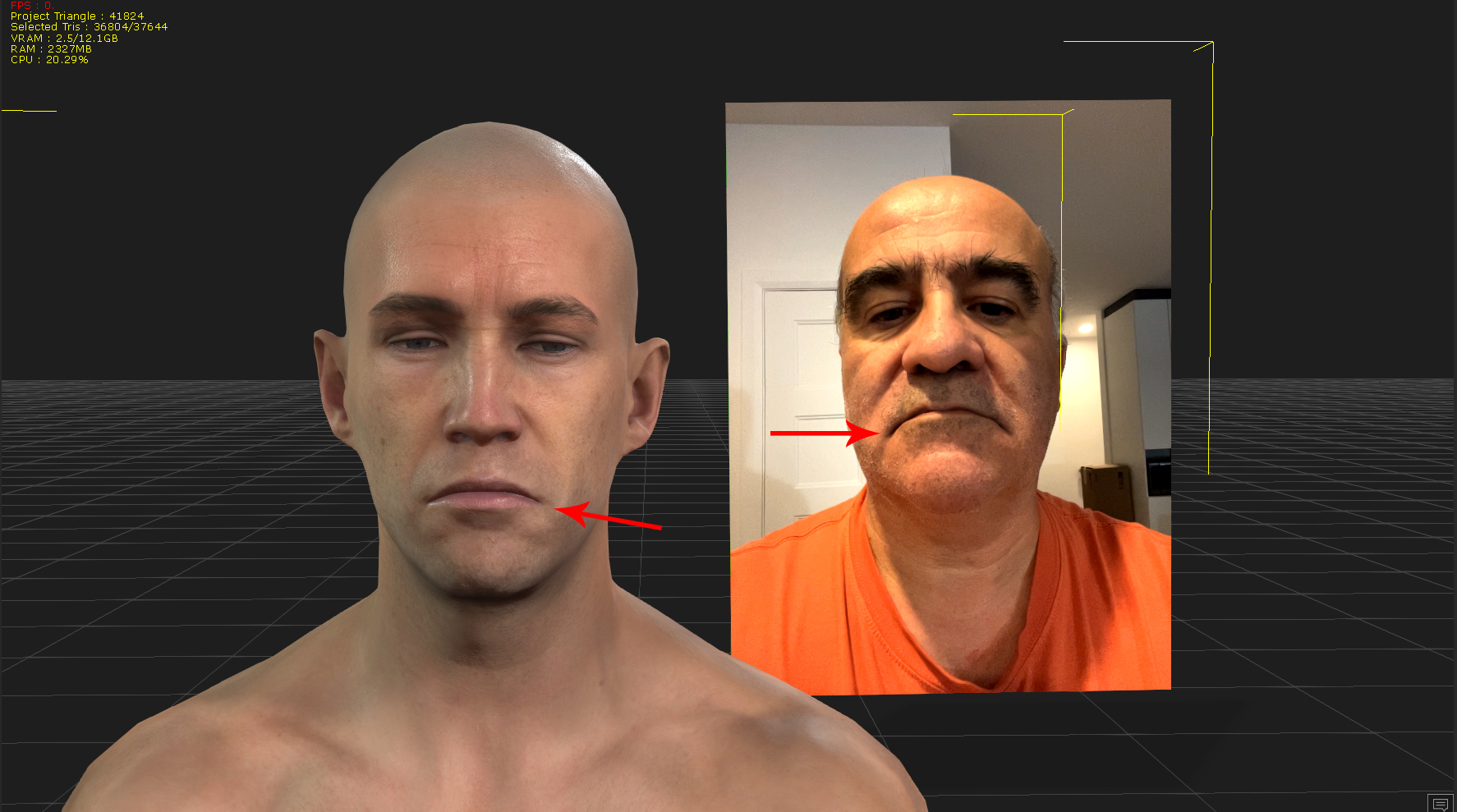 I did not find a way to calibrate livelinkface for ARKit mode which results in Livelinkface applying it to characters. I could fix it with the "Face key" panel but every frame has a keyframe and there isn't the possibility of applying/blending it from one shot to the entire timeline.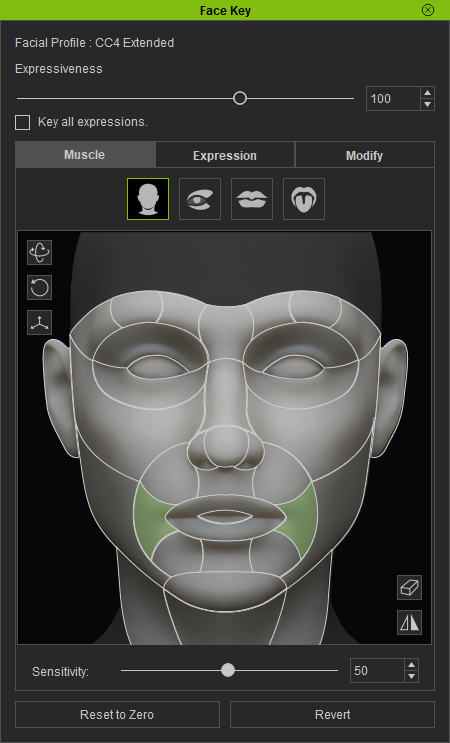 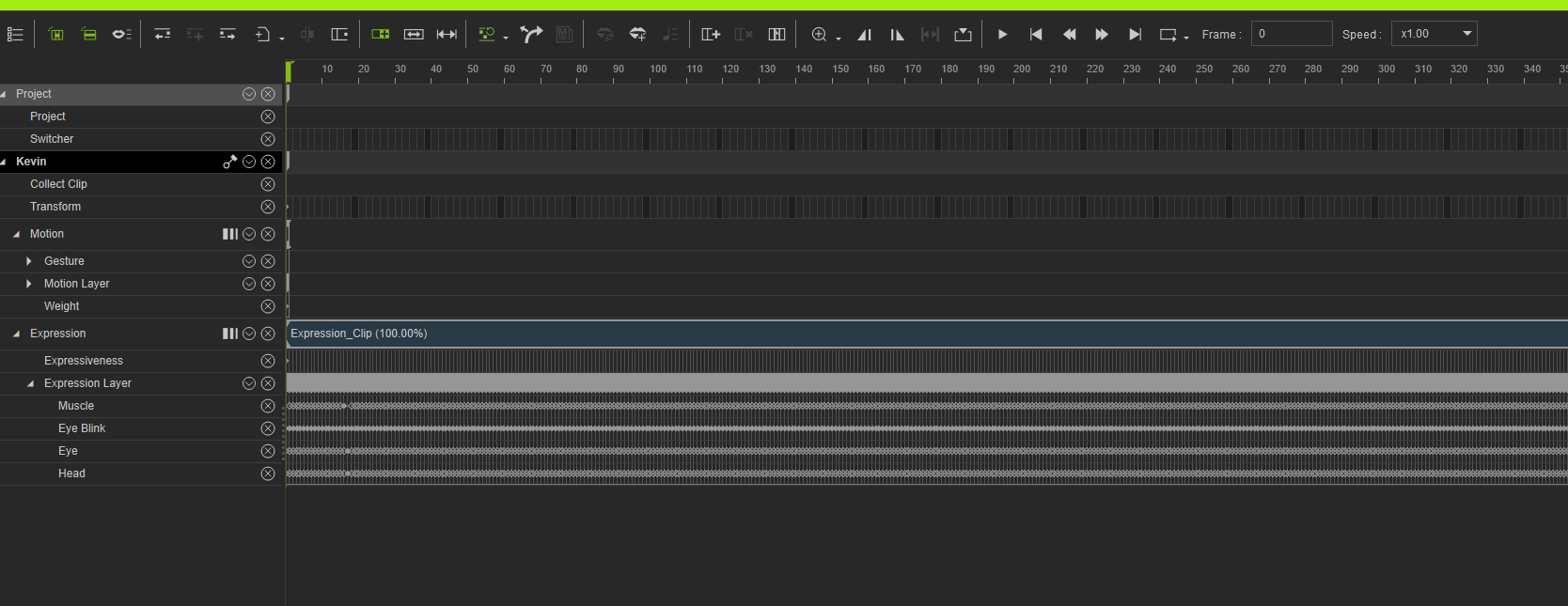 So I have 2 questions: 1- would it be possible to put our own values in the magic performance?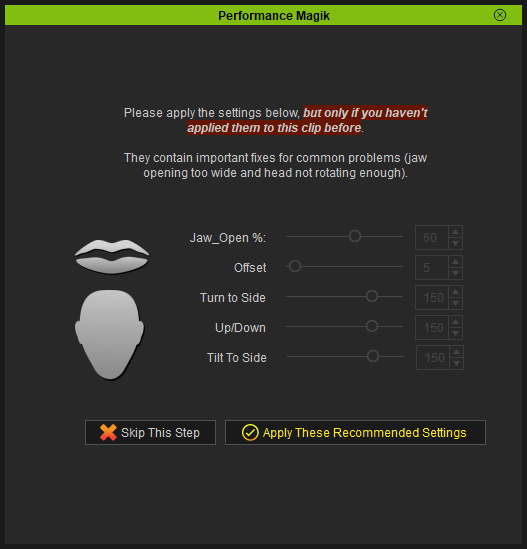 2- would it be possible to add other muscles settings? 2- would it be possible to add other muscles settings?
Thanks in advance
Marc
|
|
By charly Rama - 2 Years Ago
|
rosuckmedia (8/25/2023)
Hello Face importer plugin. (Beta) 👍👍👍 Today I have Live Link Face Arkit for the first time, tried it with my new iphone 13 mini. I have to say it works much better than my IPhone X. Greetings Robert
Heey Rob what a great test you've done here, love this pumpkin head :D:D:D
|
|
By mrtobycook - 2 Years Ago
|
Everyone’s tests look amazing! I’m slammed at work so I’m sorry I haven’t had a chance to reply properly to your messages.
Marc: there’s lots of ways to fix this, but the best way is to make sure you’re settings your calibration pose properly before you record. Are you definitely doing that? No  matter what shape your mouth makes when it’s “neutral”, it should then remember that. So no matter what your mouth does it should look good. matter what shape your mouth makes when it’s “neutral”, it should then remember that. So no matter what your mouth does it should look good.
But yes it’s definitely possible to add more features to performance magik and I definitely will.
You can also use the curve editor in iClone to really easily achieve what you’re asking.
|
|
By mtakerkart - 2 Years Ago
|
mrtobycook (8/26/2023)
Everyone’s tests look amazing! I’m slammed at work so I’m sorry I haven’t had a chance to reply properly to your messages. Marc: there’s lots of ways to fix this, but the best way is to make sure you’re settings your calibration pose properly before you record. Are you definitely doing that? No matter what shape your mouth makes when it’s “neutral”, it should then remember that. So no matter what your mouth does it should look good. But yes it’s definitely possible to add more features to performance magik and I definitely will. You can also use the curve editor in iClone to really easily achieve what you’re asking.
Thank you so much for your answer. It's better now with the calibration that I didn't find....
On other subject , I find this very interesting here :
http://filmicworlds.com/blog/solving-face-scans-for-arkit/
my knowledge being zero in programming I did not understand everything.
However he seems to say that the Arkit of the Iphone would have problems in certain situations.
"ARKit under-the-hood has a very specific meaning for each of the shapes. The solver on the iPhone expects the combinations of shapes to work a certain way. And there are many circumstances where two shapes are activated in a way that counteract each other. ARKit uses combinations of these shapes to make meaningful movements to the rig, but if the small movements in your rig don’t match the small movements in the internal solver then the resulting animation falls apart. And that’s why my previous tests of ARKit failed…"I noticed that sometimes the livelinkFace did not reproduce the shape of my lips correctly.
|
|
By info_282760 - 2 Years Ago
|
|
Looks awesome, How can I try it out?
|
|
By PavelTejeda - 2 Years Ago
|
first of all! I want to say thank you very much for the plugin! it's a miracle! but... I have a problem. recorded in rokoko legacy. and I can’t convert the face using blender. Here's a mistake. tell me what to do? THANK YOU!)

|
|
By mrtobycook - 2 Years Ago
|
Unfortunately it only works in Rokoko studio - check out the help instructions here:
https://virtualfilmer.com/iclone-plugins/iclone-plugin-face-animation-importer-rokoko-face/
|
|
By RowdyWabbid - 2 Years Ago
|
I have to say your plugin is awesome and I'm pretty chuffed with the results. I would definitely get Magik to support your endeavors. For some reason I can't get dollars or Accuface to run well but this just works for me and it's free. 😊
I made this pitch for funding and used your plugin to import the Livelink face data from my iPhone SE gen2.
|
|
By waxefil273 - 2 Years Ago
|
|
hello, how are you, hope you are well. i create metahuman face animation with my iphone phone, i want to import face animation to iclone for correct lip synchronisation. for this i want to try the plugin you created. when will you announce the full version?
|
|
By adamsteinpdx - Last Year
|
Any updates on a new version, or could someone please send me the Beta version? AdamSteinPDX at gee-male dotkom.
|
|
By mrtobycook - Last Year
|
Unfortunately my computer has been “in transit” (from an overseas work assignment) back to USA for a couple months, so there hasn’t been any progress unfortunately.
I will have a look at one of my backups and email the beta to you buddy!
|
|
By mrtobycook - Last Year
|
|
Okay, have sent it Adam! If you don't receive it, message me on this forum and I'll see if I can upload it somewhere for you.
|
|
By adamsteinpdx - Last Year
|
Got it, thanks. Installing was easy enough. I haven't been able to try the Metahuman Animator import because all the tutorial pages for exporting the processed file are down. I was having some Jittering problems w/ the ARkit but switching from 30 to 60 frames per second seemed to fix it. It's a cool plug in and I look forward to trying the finished model, or better yet, for an official Reallusion version. I made a quick demo of Macbeth 5:5, linked below. Cheers.
Macbeth 5:5
|
|
By quitasuenomocap - Last Year
|
Hey!
I would like to try the plug-in to import face animation to iclone. Can we get in touch?
|
|
By mrtobycook - Last Year
|
Hi @quitasuenomocap - I'm really sorry for the delay. I've just private messaged you on here. The best thing to do is to email me at toby at virtualfilmer.com and I'll send you the application, no problem! :-)
|
|
By mrtobycook - Last Year
|
The plugin is now available on the official Reallusion iClone plugin marketplace.
There's a free LITE version and a paid PRO version - the paid one includes an algorithm that fixes issues with the MetaHuman to CC conversion process.
FREE LITE VERSION: https://marketplace.reallusion.com/lite-face-animation-importer
PAID VERSION: https://marketplace.reallusion.com/pro-face-animation-importer
For more information and instructions, check out this page: https://virtualfilmer.com/iclone-face-animation-plugin/
|
|
By MookieMook - Last Year
|
Hello!
I've stumbled upon your post about a plug-in you've created and I just wanted to ask if it would work with CC3/CC4 Characters? I am currently trying to transpose a full body including facial animation from Rokoko studio into a CC4 characters so that I can then integrate it into Unity.
Thank you so much in advance!
Mook
|
|
By toystorylab - Last Year
|
|
Is there a way to export/convert to CSV from iClone facial animation to use in Unreal for non MH characters with ARkit?
|
|
By mrtobycook - Last Year
|
|
MookieMook (7/11/2024)
Hello!
I've stumbled upon your post about a plug-in you've created and I just wanted to ask if it would work with CC3/CC4 Characters? I am currently trying to transpose a full body including facial animation from Rokoko studio into a CC4 characters so that I can then integrate it into Unity.
Thank you so much in advance!
Mook
Yes, it’s for cc4 characters.
|
|
By mrtobycook - Last Year
|
|
toystorylab (7/21/2024)
Is there a way to export/convert to CSV from iClone facial animation to use in Unreal for non MH characters with ARkit?
Currently no, not that I know about. It would take a bit of programming but definitely possible to make as a new plugin.
|
|
By toystorylab - Last Year
|
mrtobycook (7/21/2024)
toystorylab (7/21/2024)
Is there a way to export/convert to CSV from iClone facial animation to use in Unreal for non MH characters with ARkit?Currently no, not that I know about. It would take a bit of programming but definitely possible to make as a new plugin.
Sent you PM...
|