|
By Fionn (RL) - 3 Years Ago
|
|
v2.0 (2.0.0615.1) released on June 19th, 2023 In this Headshot 2 release, the new Mesh Workflow features highly accurate mesh wrapping and texturing baking functions, which turns static head models into fully-rigged 3D faces for voice lipsync, facial expression, and full body animation. >> Learn more |
|
By wires - 3 Years Ago
|
|
Excellent new features list with incredible possibilities. Already purchased and installed and looking forward to testing. :cool::smooooth:
|
|
By eljofa - 3 Years Ago
|
Fantastic
Gonna be buying too!!
Congratulations
Cheers
|
|
By GRX - 3 Years Ago
|
I love it already. Significant improvements to my workflow.
|
|
By rosuckmedia - 3 Years Ago
|
|
Hello Fionn, thanks for the information. Question are the Headshoot Morphs for Headshot 2. been updated. Will Reallusion develop its own 3D scan app.
Greetings Robert
|
|
By Goatcheese - 3 Years Ago
|
|
Stoked! Cannot wait to try this tonight. :D
|
|
By Peter (RL) - 3 Years Ago
|
|
rosuckmedia (6/19/2023)
Question are the Headshoot Morphs for Headshot 2.been updated.
The Headshot Morph 1000+ from Headshot 1.0 is still used in Headshot 2.0. There isn't a new or updated pack for Headshot 2.0.
|
|
By rosuckmedia - 3 Years Ago
|
Hi Peter,
Many Thanks.
|
|
By thubbard - 3 Years Ago
|
Is there a recommended app to scan the face/head? I was hoping to use my iPhone to do that, so any recommendations would be helpful.
Thank you!
|
|
By K_Digital - 3 Years Ago
|
Have a couple of questions.
- Can someone point out the main difference beenween headshot 1 and 2 ?
(as far i understand, the main difference are the new model import and scanning options)
- Did anything change in regard of the Headshot 1 "auto" and "Pro" mode ?
( any improvements, can i use the model editing methods seen in the TUT video for photo auto and pro mode as well ? )
- Headshot 2 i currently 50% Off, will there be an Upgrade Offer for Headshot1 user after June ?)
Thanks in advance
|
|
By eljofa - 3 Years Ago
|
Hi
There is a BIG difference if You design cartoons.
Now with headshot 2, You model Your custom cartoon and bring it to headshot 2 and hs2 Will do the blendshapes for You.... So the character is ready to go.
Big advantage now. It streamlines Your Workflow Big time.
I am going to Buy it in a free minutes
Yes sir :))
|
|
By eljofa - 3 Years Ago
|
Yes sir!!!
Got headshot 2 now :) happy cartoonist :)
Cheers
|
|
By Sunglass - 3 Years Ago
|
Hi, just some coments about
- Align points need mirror option for simetrical faces
- Its very complicated when non human dont have similar human eyebrows and nouse formats and ears position, i just couldnt make it. I were totally lost im my attempt
so... need more info and tutorials before buy it because my particular interesting its on this 3 parts of body
|
|
By andrew.genaille - 3 Years Ago
|
Just bought but can’t try out till later.
But I’m going to try luma and Polycam out; But I thinks it’s more about the file you use to transfer; Both have Fbx and obj.
|
|
By Peter (RL) - 3 Years Ago
|
|
K_Digital (6/19/2023)
Have a couple of questions.
- Can someone point out the main difference beenween headshot 1 and 2 ?
(as far i understand, the main difference are the new model import and scanning options)
The big difference is the inclusion of the new Mesh to Head technology which allows you to import of heads from 3rd party sources, including scanned heads, and then convert them to a CC3+ head.
- Did anything change in regard of the Headshot 1 "auto" and "Pro" mode ?
( any improvements, can i use the model editing methods seen in the TUT video for photo auto and pro mode as well ? )
There are some "under the hood" improvements and UI changes but no new Auto or Pro features. Note: All the features of Headshot 1 are included in Headshot 2 so you don't need to keep both installed.
- Headshot 2 i currently 50% Off, will there be an Upgrade Offer for Headshot1 user after June ?)
There will always be a discount for existing CC and iClone users but the amount of the discount and any bonus products included may change.
|
|
By Kelleytoons - 3 Years Ago
|
So - given how little time I have for nearly anything nowadays - can someone (either Pete or some RL dev) give me the overview on this mesh thingee?
In particular, what I want to know is what we end up with when we go that route. Clearly it's not a CC3 or 4+ character - so is it more of a Metahuman type? And I assume Acculips DOES work with it, but things like CC clothing does not (so if you are bringing in your own mesh you had better have it wearing what it will, as you will NOT be able to change that). It's kind of bad that, after going through ALL the work (and it WILL be a ton of work) to get a character to work with Acculips and the rest of the motion in iClone that you can't also use the CC system of hair and clothing for it - couldn't the devs have worked *something* out so that clothing could be conformed the same way it is for a regular CC mesh?
I'm going to guess this will end up being a very niche update - folks wanting to go this route (but forgoing all the rest of CC's features) are not going to stay in the iClone universe. I could be wrong but I doubt it.
|
|
By Goatcheese - 3 Years Ago
|
|
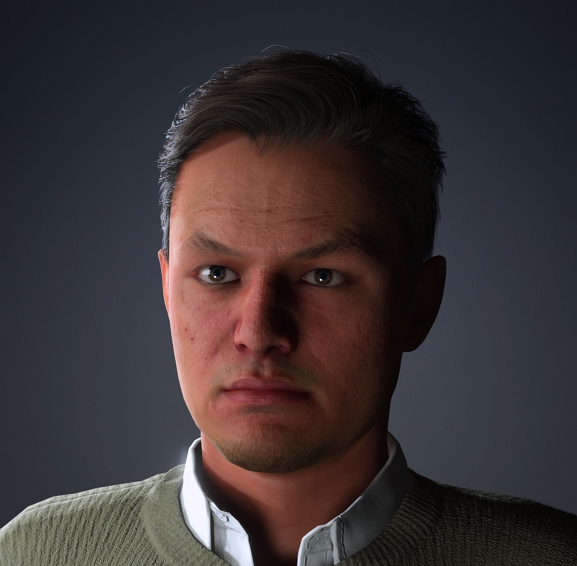
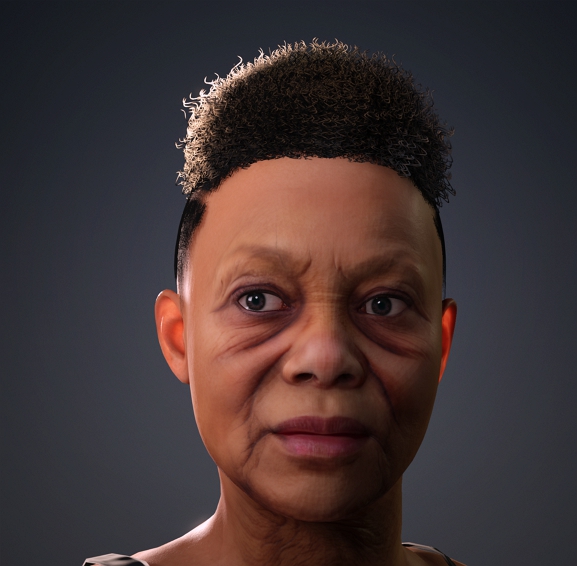
A few tests from existing scanned meshes I have. This tool is an absolute game-changer. I have noticed some blocky artifacts in the faces, might be something that I have done wrong myself? Otherwise, an absolutely splendid job from everyone at Reallusion!
|
|
By thubbard - 3 Years Ago
|
|
Sorry for a basic question: What software/hardware did you use to create the meshes?
|
|
By Kelleytoons - 3 Years Ago
|
Goatcheese (6/19/2023)
A few tests from existing scanned meshes I have. This tool is an absolute game-changer. I have noticed some blocky artifacts in the faces, might be something that I have done wrong myself? Otherwise, an absolutely splendid job from everyone at Reallusion!
So can I ask - what format does the body mesh end up? You can't put CC clothing on it, correct?
|
|
By Peter (RL) - 3 Years Ago
|
|
Kelleytoons (6/19/2023)
In particular, what I want to know is what we end up with when we go that route. Clearly it's not a CC3 or 4+ character - so is it more of a Metahuman type? And I assume Acculips DOES work with it, but things like CC clothing does not (so if you are bringing in your own mesh you had better have it wearing what it will, as you will NOT be able to change that). It's kind of bad that, after going through ALL the work (and it WILL be a ton of work) to get a character to work with Acculips and the rest of the motion in iClone that you can't also use the CC system of hair and clothing for it - couldn't the devs have worked *something* out so that clothing could be conformed the same way it is for a regular CC mesh?
I'm going to guess this will end up being a very niche update - folks wanting to go this route (but forgoing all the rest of CC's features) are not going to stay in the iClone universe. I could be wrong but I doubt it.
Hi Mike
I think you may have misunderstood the workflow. The resulting character generated by Headshot 2 and the "Mesh to Head" AI technology is a Standard CC3+ Base character. As with all Standard CC3+ Base characters you can interchange clothing, hair, use AccuLips and all other features of CC4 and iClone.
|
|
By Goatcheese - 3 Years Ago
|
|
@Mike You can indeed put CC clothes on them. :) Same with the hair etc. It takes a raw, 3D scan and turns it into a CC mesh. It basically "lays" the topology of the CC mesh over the scan. You can then further refine the mesh as you would a normal CC character (as it is a CC3+ base mesh at this stage), or change the textures, fix them up etc. I also rendered the characters in iClone using Acculips with some motions, but haven't uploaded them to showcase unfortunately.
|
|
By Jfrog - 3 Years Ago
|
Headshot 2 Looks like a great update.
It can be bought for 50% for a limited time but Is there any special upgrade path for Headshot 1 owners or is it the same price for all?
Thanks!
|
|
By Kelleytoons - 3 Years Ago
|
|
Peter (RL) (6/19/2023)
[quote]Kelleytoons (6/19/2023)
I think you may have misunderstood the workflow. The resulting character generated by Headshot 2 and the "Mesh to Head" AI technology is a Standard CC3+ Base character. As with all Standard CC3+ Base characters you can interchange clothing, hair, use AccuLips and all other features of CC4 and iClone.
Then you REALLY have confused me - a CC3+ mesh has a very certain number of verts (and in a certain order). When you bring in, for example, a Daz figure through Transformer it is remapped to that standard (so you lose verts in an HD character, for example). Are you saying this is the same thing here? That you bring in another mesh and it's REMAPPED to the CC3+ mesh? If so, don't you lose a lot of details, etc? Don't get me wrong, I'm impressed if this is what is happening, but it will also mislead a lot of folks who think they are bringing in their own mesh and using it in CC/iClone - it should be made very clear that it's still a remapped process and you WILL lose details (no way to avoid that).
(BTW, if this is the way it works I'm actually all for it - it would have been what I would have suggested. I just don't want folks to get upset down the road when they find this out).
Also (and, again, just not enough time to watch all the stuff to figure it out - this also means you are only remapping the head, correct? So you can't just bring in another mesh with a body and hope to preserve that, right? Again, I'm no opposed to this, but you should have people understand this or they will purchase on the theory they are then able to animate their own meshes (in fact, the promo I watched definitely implied that, saying it would "re-rig" the body mesh, which would NOT be what is happening if it's just remapped onto the CC3+ body).
|
|
By Goatcheese - 3 Years Ago
|
@Mike Nope, other than the shape that it takes from the scan, it also bakes a lot of the details to a normal map. It's basically like any scanned mesh that's used in games etc. All AAA studios retopo the scans and then just bake it from the high to low. This basically does the same thing, just with simplified steps for the user. Does it lose quality? It loses a lot of unnecessary vertices, yes, but the shape is still there, the rest of the stuff (for example, the wrinkles, skin details etc) get baked into a normal map. Check out what Detroit: Become Human did, for instance, they also used 3D scans yet they're optimized for realtime and they look absolutely incredible (I'm sure I saw them using Wrap3ds I think it's called in their process too? It's almost the exact same process Headshot 2.0 uses now.) Something I also forgot to mention is that Headshot 2.0 uses alignment points. The more you add, the more accurately it wraps. It's quite a popular method. If I wasn't in bed already, I would have shown you the raw scan and the CC mesh I got, it retains quite a lot of detail, especially for realtime use. :)
Edit: I don't think you can compare the Daz transformer to the method used in Headshot 2.0. They work in different ways. Think of Headshot 2.0 more as a shrinkwrapping technique based on alignment points. This results in more accurate meshes, because, well.... It's a "new" type of technology. (Not really new, but you get my drift, lol.)
|
|
By PRP1986 - 3 Years Ago
|
|
This looks very interesting. Is there any update to the 2D photo to 3D options or is Headshot 2 focused on mesh conversion only, with the 2D to 3D from Headshot 1 included without upgrades?
|
|
By Peter (RL) - 3 Years Ago
|
|
Kelleytoons (6/19/2023)
When you bring in, for example, a Daz figure through Transformer it is remapped to that standard (so you lose verts in an HD character, for example). Are you saying this is the same thing here? That you bring in another mesh and it's REMAPPED to the CC3+ mesh? If so, don't you lose a lot of details, etc? Don't get me wrong, I'm impressed if this is what is happening, but it will also mislead a lot of folks who think they are bringing in their own mesh and using it in CC/iClone - it should be made very clear that it's still a remapped process and you WILL lose details (no way to avoid that).
If you watch the video below from the current time it explains what happens during the generation process. This should help make it clearer. :)
https://youtu.be/CVLGXsJoosc?t=471
|
|
By Peter (RL) - 3 Years Ago
|
|
PRP1986 (6/19/2023)
This looks very interesting. Is there any update to the 2D photo to 3D options or is Headshot 2 focused on mesh conversion only, with the 2D to 3D from Headshot 1 included without upgrades?
There are no new features added to the Headshot 1 2D photo to 3D workflow. The big new addition in Headshot 2 is the Mesh to CC Head technology.
|
|
By Xodroc - 3 Years Ago
|
The Align Points method instantly made me think of R3DS Wrap, which lead me to purchase instantly for that alone, without looking very closely. I'm curious if it is R3DS's Wrap tech integrated or just similar.
Either way, even though the plugin is called "Headshot", if you have that kind of Wrap method available, should definitely expand to support bodies, not just heads. At least when it comes to the align points method.
The new scanning method also looks like a major step up. The original 2-photo method could just never compete if you wanted realism.
|
|
By Garry_Seven_of_one - 3 Years Ago
|
|
So I already use Zwrap and wrap3D software with CC characters, I can’t see any advantage here as it’s doing the same thing as far as I can see? Also I can’t see the symmetry option in x for points which they both have.If there are any unique features then I would consider upgrading from headshot 1 which was IMO a waste of money, otherwise will stay with wrap software
|
|
By mrmdesign - 3 Years Ago
|
|
Headshot2 is amazing! This is going to save me a lot of time and cut out my reliance on additional software! Great job RL!!
|
|
By yogdyr - 3 Years Ago
|
I have had very good results. thank you RL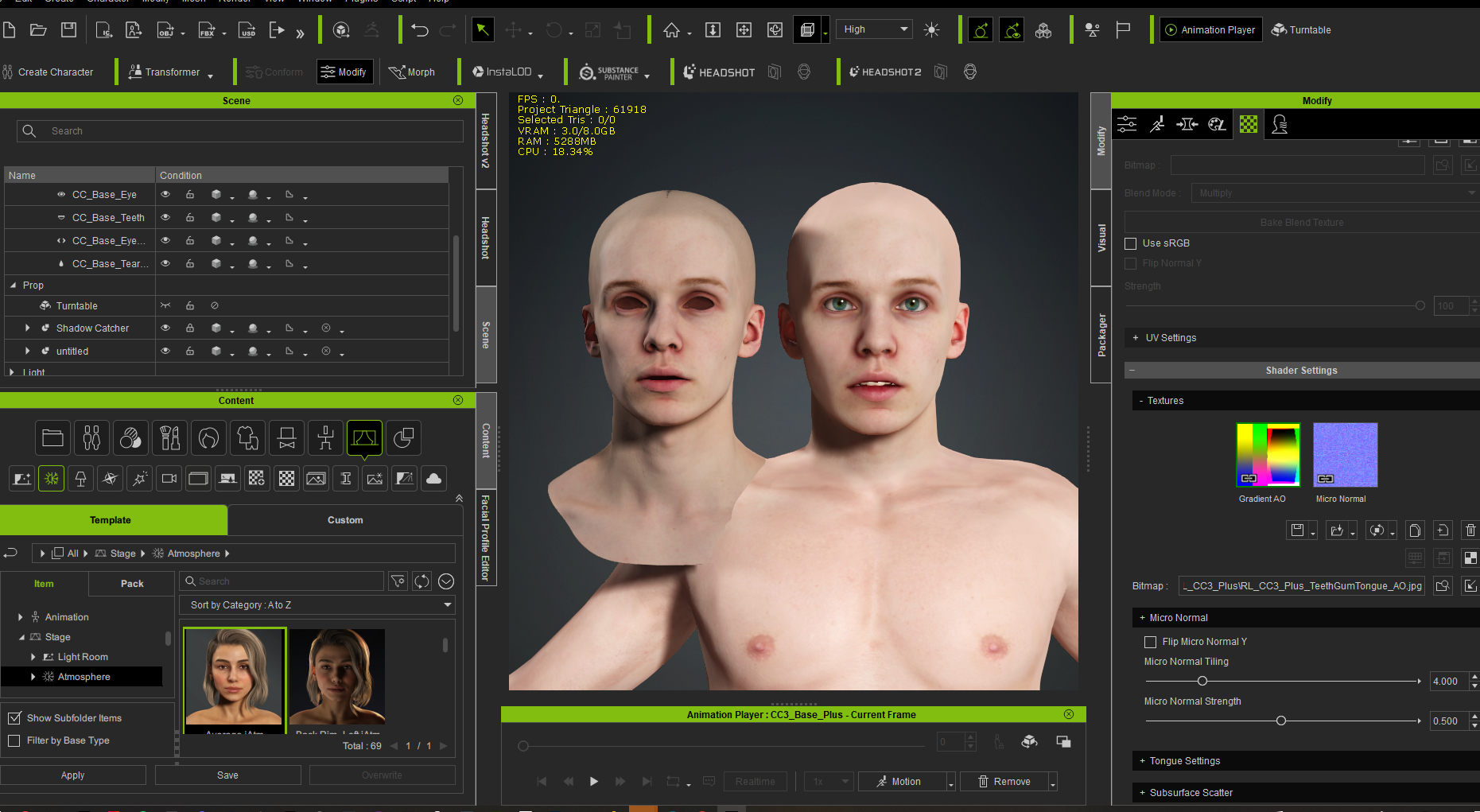 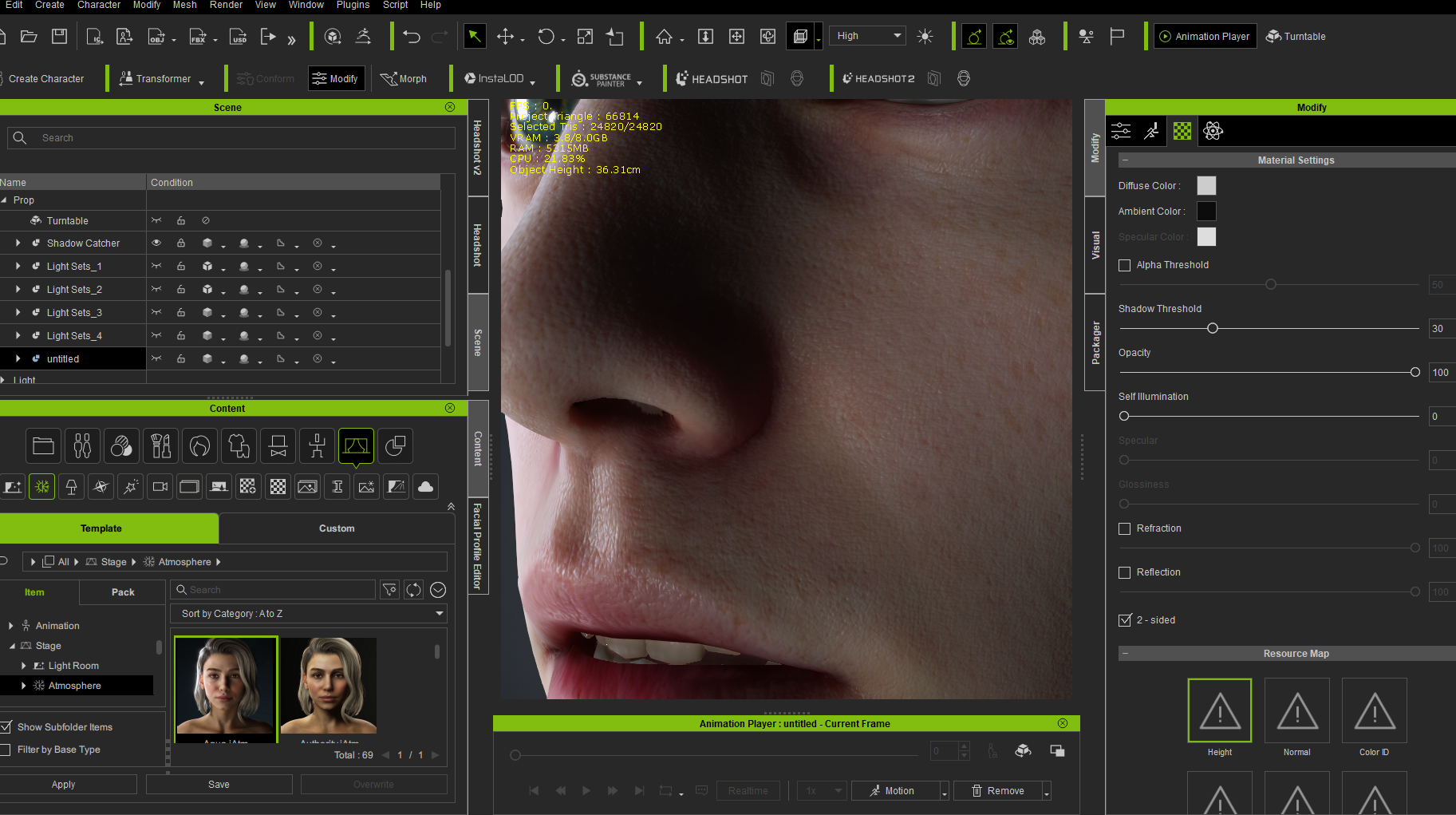
|
|
By thubbard - 3 Years Ago
|
|
Can I ask how you created the object/mesh/material to bring into Headshot?
|
|
By Goatcheese - 3 Years Ago
|
|
thubbard (6/20/2023)
Can I ask how you created the object/mesh/material to bring into Headshot?
The meshes are 3D scans. So they were either made using an iPhone/Kinect/any other 3D scanner or photogrammetry. There should be some tutorials on Youtube showing you how to do this. :) Keep in mind, they are scans, so if you ask how they are made, they are made by scanning a real human head.
|
|
By thubbard - 3 Years Ago
|
|
Sorry, I wasn't clear. Do you have any software recommendations to make such scans?
|
|
By eljofa - 3 Years Ago
|
|
I want to know too
|
|
By StyleMarshal - 3 Years Ago
|
Polycam is not bad , Lidar and photpgrammetry : https://poly.cam/ (Iphone/Android)
But there are a lot of others around
This guy here is using it for a head scan for UE5 Mesh2MH but Headshot 2 works the same
|
|
By animatedbeing - 3 Years Ago
|
I'm confused about the discount. I'm a prime member, I own Headshot v1 and I have a coupon for 50% of the upgrade price. But it does not work.
This is the answer I got from customer service:
"Since you are a Prime member, you will see a 50% off coupon (product coupon) in your coupon list. However, if you're also an existing CC member and only want to buy HS2 standalone, you won't be able to use the voucher as you already have the 50% discount."
What is the standalone version? Has anyone got the coupon to work?

|
|
By animatedbeing - 3 Years Ago
|
Just read the fine print:
- 50% off product coupon usage:
This 50% off product coupon will apply to the store List Prices (not the discounted prices).
This 50% off product coupon will apply to all Headshot 2 related single an/or bundle packages listed in Reallusion 3D stores including Headshot 2 standalone, and CC4/iClone8 bundles with Headshot 2 packages.
So there is no advantage to owning version 1 for prime members. We pay the same price as prime users that did not purchase version 1.
|
|
By StyleMarshal - 3 Years Ago
|
|
|
|
By rosuckmedia - 3 Years Ago
|
Hi Bassline,
Nicely meant, but the result doesn't knock my socks off 😁😁
Reallusion should develop its own scanner app.
Greetings Robert
|
|
By StyleMarshal - 3 Years Ago
|
|
it is just a tutorial Rob Socks Dude 😀
|
|
By brothertcoleman - 3 Years Ago
|
Can I edit the hair(Preserving Hairstyle),by morphing its shape like in the video if it’s from a photo and not a 3D scanned head?
Thanks
|
|
By 3dtester - 3 Years Ago
|
Hi there,
i read knowhere about it, so i am asking this question.
Does Headshot 2.0 finally support the usage of side photos?
With FaceGen for Daz, you get a better representation of the head / skull shape because of that.
Of course I like the 3D scan to mesh feature, but not everyone is able to do this workflow.
|
|
By Peter (RL) - 3 Years Ago
|
|
3dtester (7/14/2023)
Does Headshot 2.0 finally support the usage of side photos?
No, the photo features from Headshot 1 remain the same in Headshot 2 (single front facing photo only).
|
|
By 3dtester - 3 Years Ago
|
But why? I really don't understand this. The lack of side photo support is what it suffered from all the time.
I simply don't get it.
|
|
By HimAnI_Kev - 3 Years Ago
|
|
A quick question... I just purchased Headshot 2 and can't for the life of me figure out how to install it. I can download it from my account page, but where should it go so content can find it? Also my Reallusion Hub seems to be broken. I get a blank page that just beachballs... Looking forward to using Headshot 2. It simplifies a zBrush to CC process I've been struggling with. Thanks all...
|
|
By charly Rama - 3 Years Ago
|
Hi, Headshot 2 is a plugin for CC4. You have to open CC4 and find headshot2 at the list of your plugins

|
|
By K_Digital - 3 Years Ago
|
Finally purchased HS2. Had big trouble ( confusion and errors ) . HS1 and HS2 both can exist in the same install (CC4.31)
but using HS1 does not work properly anymore. I would suggest anyone using HS2, to uninstall HS1 or at least
not touching it at all.
Discovered on first a HS2 look a few new things like more masking options which were quite impressing.
Though one bug was carried over to HS2 ( https://www.reallusion.com/FeedBackTracker/Issue/Shift-Q-not-working-as-expected)
|
|
By Peter (RL) - 3 Years Ago
|
|
3dtester (7/14/2023)
But why? I really don't understand this. The lack of side photo support is what it suffered from all the time.
I simply don't get it.
The main selling point of Headshot 1 is the quick and the easy creation of characters from a just single photo. Once you add in a profile image the process becomes a lot more complex and prone to errors. We found this with CrazyTalk which offered a similar front and side photo creation process but was very prone to problems, especially if the front and side photos did not match perfectly.
So it's not to say that side profile images won't ever be supported, but if it is to be supported then I think the process must work well enough to maintain the USP of Headshot which is getting great results while being quick and easy to use for everyone.
|
|
By yorgon - 3 Years Ago
|
|
I tried "Headshot 2". It's good, but I was surprised that there is no symmetry feature when doing point alignment. Have you forgotten the point alignment feature or will you add it soon?
|
|
By ismailov.dima - 3 Years Ago
|
|
that no one knows why, after installing headshot 2 in the viewport, it is very slow(5-10fps)? a laptop with Windows 11? 32 GB of RAM ,3070 mobile?
|