|
By McCloud Media - 2 Years Ago
|
|
Hello, just purchased a new laptop for my work with a 4k monitor. This is the first 4k display I've ever had, and while all my other apps look fine, CC4 looks bigger than normal, and there is only a small window for the view port. Now I did notice my scaling is set at 250%, but if I scale it down, all my other software's text and icons are much too small. Was wondering how this issue could be fixed so it displays the same as my 1080p desktop screen. But without adjust the scaling or having to change the resolution of my screen anytime I want to use it.
|
|
By animagic - 2 Years Ago
|
I have a 4k monitor and my scaling is set at 125%, which works fine for the applications I use, including various Adobe programs (mainly Photoshop and After Effects). Magix Vegas Pro, Audacity, Microsoft Office, etc.
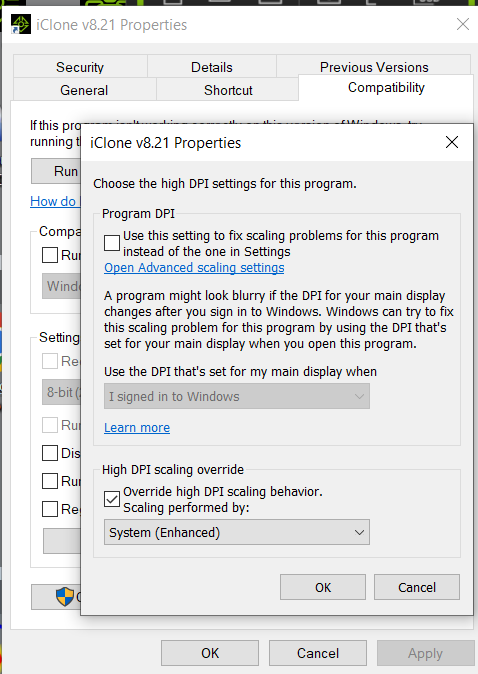
If text is too small for the UI, you can change the Compatibility settings.
Right-click the desktop icon for the program and select Properties. Click the Compatibility tab, and the click Change high DPI settings.
In the dialog that opens, check 'Override high DPI scaling behavior..." and select System (Enhanced) from the dropdown menu. Click OK and OK again.
BTW, does your laptop support a 4k monitor?
|
|