How do you save Eyelashes as Custom content?


https://forum.reallusion.com/Topic531271.aspx
Print Topic | Close Window

By jerome.dipietro - 2 Years Ago
There are Actor Templates for Eyelashes which can be applied to a character but I can't work out how to save my own.

The Eyelashes have their own morphs which I've tweaked, and are also elements of the Base_Body mesh (I've slightly moved those too).

How do I save those changes so that I can apply them to other characters (but only the eyelash tweaks (i.e. morphs and position change)?

Any help much appreciated
By wetcircuit - 2 Years Ago
there are 2 eyelash asset types: under Actor, and under SkinGen 'Makeup'

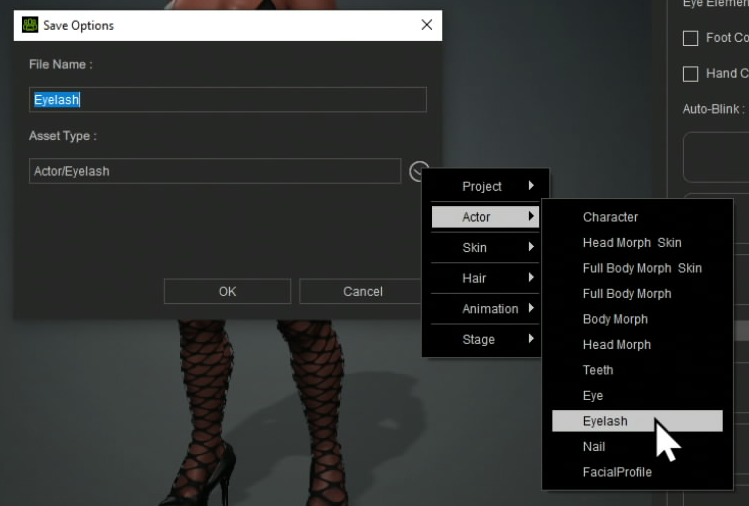
The eyelash under Actor saves normally, picking from the AssetType dropdown menu during the save process.
I'm assuming this is the morphs-only.

https://forum.reallusion.com/uploads/images/1cc5aa7c-b3fc-4333-8a10-3be6.png

the 2nd Eyelash type saves under SkinGen 'Makeup'
I'm assuming this is the texture-only

1. Activate the SkinGen Appearance editor
2. now saving SkinGen templates is possible (Full Makeup, Eye Makeup, Eyelash…)
3. select Eyelash from the AssetType dropdown during the save process.
By jerome.dipietro - 2 Years Ago
Thanks @wetcircuit super helpful as always.

I hadn't realised that by selecting the category and then pressing save, I'd get the specific morphs being saved.

Sadly my position transform of the eyelash meshes isn't being saved (you're right, it's just the morph or the material) but it's a start