Root issue when looping motion


https://forum.reallusion.com/Topic530511.aspx
Print Topic | Close Window

By mtakerkart - 2 Years Ago
Ok I know it's a very old problem but I thought that iclone 8 resolved this sooo old root issue with the one click "Align Position and Direction" feature.
I bought this package here :
https://www.reallusion.com/ContentStore/Pack/mech-constructor-heavy-robot

There're only perform motions. I didn't find a tutorial to avoid this issue...
What I'm missing to get a loopable perform motion ?


By rosuckmedia - 2 Years Ago
Hi Mark,
I also have this content, and the same problem.
I did it all manually with keyframes back then.
But it would be nice if someone has a good solution.
Greetings Robert
By mtakerkart - 2 Years Ago
Thank you rosuckmedia . I found a way but it's tedious ; I export each animation one by one. Remove the (not root but Hip) motion in blender then import in Iclone.
The curious thing is that Iclone  curve editor didn't see the Hip motion. Blender do.....

https://forum.reallusion.com/uploads/images/42406357-3015-41ab-a42d-d0cf.jpg

https://forum.reallusion.com/uploads/images/b90fe4e3-cfba-4729-a2ed-3223.jpg

I didn't use the motion director yet but do you thing it will be problematic ?
By rosuckmedia - 2 Years Ago
I just tried it out.
Motion Director does not work with this character.
Will try more tests tomorrow.
By toystorylab - 2 Years Ago
Yeah, I bought these in December 2017
and I had a long back and forth mail conversation (between 12.28.17 and 01.21.18) with developer...

I  got both Mech Constructor Packs...
All the motions "realign" to the start point...
So wenn i let the bot walk and do another walk, the bot restarts at the beginning.
How do i get a long walk, walk left, walk straight, run,... without having the bot slide back???
And how do i get the wheels spinned?
I even can't make a subprop out of them in 3dXchange?
Damn, that's not what i expected ;-(
There used to be a ``Reset Motion Root`’ button in the iClone animation settings but it does not seem to work with Props in iC7…
The workaround is to attach the robot to a moving dummy and scale the dummy animation to fit the walk
but this is also a challenge because I cannot find the button to remove horizontal translation from the animation segment in iC7…
Duh ☹ This is how the animation was provided to me by Slava … … Hum… I will need to dig into this…. Give me a few days…
I apologize for this..
thanx for the quick reply!
And i am looking forward to have the whole bunch of robots working like they should.
That the tanks don't have real working tracks is reasonable for the price they cost,
but that the wheels don't spin when "rolling" is a nogo...
So at least they should be available as a single object so we can spin them ourselves.
Some "rolling" animations seem to start a spinning (stop abruptly) of a single wheel but that's all.
So i see one wheel spin a bit, the rest does not spin at all ;-(
I can imagine this means additional work for you, but for the moment most of the packs is useless...
Just a small update…
I am able to repeat the animations perfectly in 3ds Max with a setting that resets the motion root after each animation.
I am waiting for feedback from RL on how this  can be done in iClone 7 as I could not find a way to make it work. ☹
RL are off for the holiday so this could take a few days…
I can of course generate longer baked walk and run animations and bring them into iClone
but this still is not enough because applying a turn motion will still bring pack the object at the origin
which is not desired so I need to wait for an answer from RL on this before wasting too much time.  
I will keep you posted .. Hope you are not on a tight deadline !!!
thanx for the update...
I hope RL can help to find a solution and i have the mechs working soon.
No tight deadline 
RL will fix the issue in an upcoming version  of iClone, something like 7.21 …
In the meantime, I have generated longer walk and runs which I will upload this weekend.
I will post a message when ready.
thanx for the update.
Longer walks work but "turns" are still not possible (moves back to origin) and wheels are not spinning ;-(...
Hope everything works after patch!!
This was a lot of work. I did not do the turns because for turns, you can have the character follow a path.
The only alternate fix would be to add all rotation motions neutral, i.e. without translations
but then you would need to attach the prop to a dummy and have the dummy move forward…
Unfortunately, the real fix is really on the Reallusion side. But it is in the pipeline.

Never heard again from him and I was too frustrated to ask for further updates as he states problem is on RL side...

Seems this was never fixed...

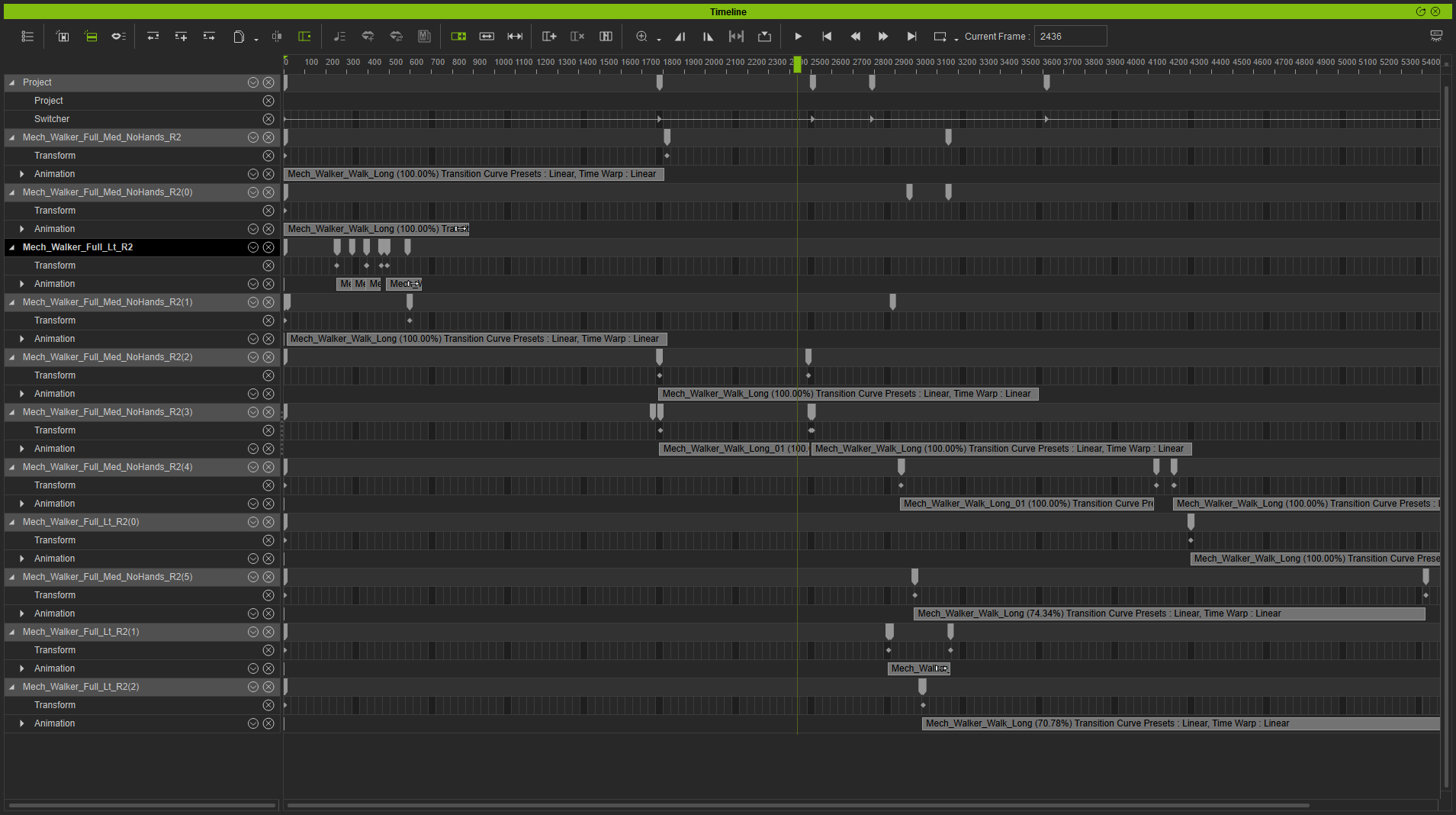
I have no time to dig deeper into this but I found the project (IC7 May 2019) where I used those walkers.
I remember I found a workaround, kinda "keyframe + pushing forward + keyframe" when adding new motion,
it was definitely not a one click solution and frustrating...

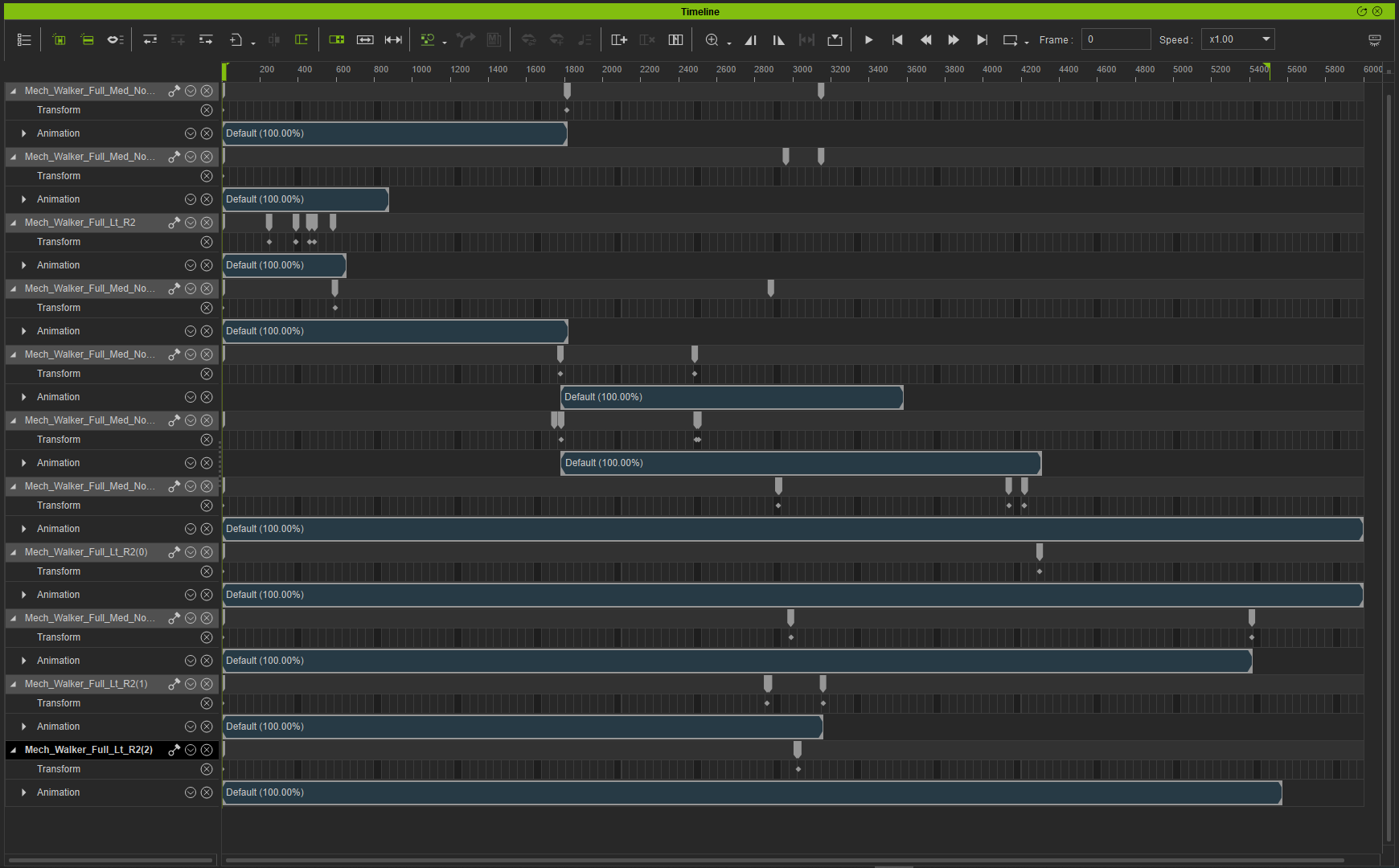
Project in IC8:

Timeline Walkers IC8
https://forum.reallusion.com/uploads/images/f714289d-d96e-442e-a07f-49f1.png
Timeline Walkers IC7
https://forum.reallusion.com/uploads/images/2241f3fe-788f-4e6d-aba3-611c.png
I also would have expected this would work now, it seems it doesn't... :pinch:
By mtakerkart - 2 Years Ago
rosuckmedia (1/6/2023)
I just tried it out.
Motion Director does not work with this character.
Will try more tests tomorrow.

This mech is not a Character but a prop. I though that motion Director works only with Character....

@toystorylab

I found my way with blender to avoid this but it is teadious. My Animation pipeline was and will be allways having a static Root/Hip  and attach
my character to a dummy cube. It's for me the fastest way in Iclone to adjust the speed or the position of the character move.
I did it with the Acculips challenge (The mechSpider guy) :


By Sunglass - 2 Years Ago
have the same problem with props, i was looking and his motion clips dont have the same ajustments as avatar has. Maybe this can be a good future update

https://forum.reallusion.com/uploads/images/4e1d4271-8a48-438c-b32e-cade.png
By 4u2ges - 2 Years Ago
Actually this issue has been fixed in iC8. The only problem, those props were made in IC7 and the only solution what Mark did  - through Blender.

@Robert
Remember we were trying to solve the issue with Open/Close door a while back. It now works fine in IC8 when adding both to perform.

I would also suggest to contact developer (if they still around), ask to redo the perform list in IC8 and update the pack.


By rosuckmedia - 2 Years Ago
Hi Mark
Sorry of course this is not a character.
Motion Director only works with Charakter.
Cool video are these your own particles.👍

Hi Gurgen,
Yes I remember, 
Thanks a lot
Greetings Robert
By toystorylab - 2 Years Ago
I wrote the developer:

the issue popped up in Reallusion Forum again...


Member 4u2ges says the issue was solved in IC8:
Actually this issue has been fixed in iC8. The only problem, those props were made in IC7.
I would also suggest to contact developer, ask to redo the perform list in IC8 and update the pack.

So, if you find time for this, you could make some happy customers, as the Mech Constructor props are still visually great!

Let's hope he is willing to do an update! ;)
By toystorylab - 2 Years Ago
Wow, developer already answered:

Hum, this is an iClone limitation due to a missing feature in iC7,
The only way for me to fix those issues in iC7 is to regenerate longer motions (e.g. 1800 frames)
in Max for the transformational motions and then provide an update to the product.
I will try to do that in the coming days

And this is what I replied:

Yeah, but when I got it right, the issue was solved in IC8, so if you would redo those performs in IC8, it should work.
Did you check that forum link I sent you? Or don't you have IC8? 
Anyway, thanx for reply and I'm (others surely too) looking forward to any solution you can provide...
By mtakerkart - 2 Years Ago
toystorylab (1/7/2023)
Wow, developer already answered:

Hum, this is an iClone limitation due to a missing feature in iC7,
The only way for me to fix those issues in iC7 is to regenerate longer motions (e.g. 1800 frames)
in Max for the transformational motions and then provide an update to the product.
I will try to do that in the coming days

And this is what I replied:

Yeah, but when I got it right, the issue was solved in IC8, so if you would redo those performs in IC8, it should work.
Did you check that forum link I sent you? Or don't you have IC8? 
Anyway, thanx for reply and I'm (others surely too) looking forward to any solution you can provide...


Thank you toystorylab to take time for that. Indeed as you said making a longer animation won't fixe the problem because if we add an another perform after a longer walk
it will shift back to the motion origin of the next motion...

rosuckmedia (1/7/2023)
Hi Mark
Sorry of course this is not a character.
Motion Director only works with Charakter.
Cool video are these your own particles.👍

Hi Gurgen,
Yes I remember, 
Thanks a lot
Greetings Robert


Thank you Robert
Did you see my last pack ?


https://marketplace.reallusion.com/iclone/author/Takerk'ART

By 4u2ges - 2 Years Ago
Couple of more notes.
The motions are obviously built with bones tweaking, but the forward root motion must be created with Transform (otherwise it's not going to work right).
In addition, the perform motions are no longer embedded but rather referenced from external .iMotionPlus files. Therefore all perform motions should be supplied as well.

Here is a basic example:


By 4u2ges - 2 Years Ago
One more idea.
I do not have that pack, but did you guys try to rebuild perform list?
You have to use Pack in Perform list editor, then clear perform list and reapply all motions back from saved list.

By toystorylab - 2 Years Ago
4u2ges (1/7/2023)
One more idea.
I do not have that pack, but did you guys try to rebuild perform list?
You have to use Pack in Perform list editor, then clear perform list and reapply all motions back from saved list.

Thanx for suggestion. 
Not in the studio now but will test tomorrow... 
By rosuckmedia - 2 Years Ago
Hi Pieter
Thx for Info.

Hi Mark 
Great particles.
From which package comes this particle.
https://forum.reallusion.com/uploads/images/09ed8d2f-b2aa-450a-8ddf-0246.png

Hi Gurgen,
Thank you very much, I may try it tomorrow.

I have found a small solution for me.
I had not tried it before.
I do not think that this content is updated.
Greetings Robert


By 4u2ges - 2 Years Ago
Hi Robert,
That is great! At least you can extend with little effort.

Here is another method with Curve Editor. Basically translating root bone motion into object move.
But allows to extend after initial clip fix.


By mtakerkart - 2 Years Ago
4u2ges (1/7/2023)
Hi Robert,
That is great! At least you can extend with little effort.

Here is another method with Curve Editor. Basically translating root bone motion into object move.
But allows to extend after initial clip fix.


As you can see in my thread below the problem is that the curve editor didn't see any move...
By mtakerkart - 2 Years Ago
rosuckmedia (1/7/2023)
Hi Pieter
Thx for Info.

Hi Mark 
Great particles.
From which package comes this particle.
https://forum.reallusion.com/uploads/images/09ed8d2f-b2aa-450a-8ddf-0246.png

Hi Gurgen,
Thank you very much, I may try it tomorrow.

I have found a small solution for me.
I had not tried it before.
I do not think that this content is updated.
Greetings Robert


WOW! Cool Robert. Finally more simple that I though :)

I created the particle in the editor . You can download it here :

By 4u2ges - 2 Years Ago
As you can see in my thread below the problem is that the curve editor didn't see any move...                               

But you are looking at Z, while Move forward is Y (in iClone) ;)
And once you fix it, you can add it to perform and remove the old one (that is what developer should actually do).

By mtakerkart - 2 Years Ago
4u2ges (1/8/2023)
As you can see in my thread below the problem is that the curve editor didn't see any move...                               

But you are looking at Z, while Move forward is Y (in iClone) ;)
And once you fix it, you can add it to perform and remove the old one (that is what developer should actually do).


Oh! You're right. I really understand why I missed this.... if I had known this thread would not have existed :blink:

Thank guys . I have 2 ways to fix this ;)

https://forum.reallusion.com/uploads/images/89e3b7f0-792b-4382-9643-0041.jpg 
By rosuckmedia - 2 Years Ago
Hi Mark,
Thank you very much.
Will soon also buy some.

Hi Gurgen,
Thanks for the tip.

Greetings Robert
By toystorylab - 2 Years Ago
Method Robert works for straight walk, but not for turn...
Method 4u2ges Curve editor works fine, for turns you need to do this with all values.
With this method I was able to let Mech walk in an endless circle using "Legs_Heavy_Walk_Turn_47_R"


By toystorylab - 2 Years Ago
4u2ges (1/7/2023)
One more idea.
I do not have that pack, but did you guys try to rebuild perform list?
You have to use Pack in Perform list editor, then clear perform list and reapply all motions back from saved list.

Hm, never done this before...
When I open "Perform List Editor" and click "Pack",
I get prompted to select a folder on my PC, when I do so, nothing happens.
I expected it would save all performs so I can reapply...
What am I doing wrong?
By 4u2ges - 2 Years Ago
What am I doing wrong?

I do not think you're doing something wrong.
Just a couple of updates back it used to work and now it does not.
I just tried to extract motions from cat and a dog (which I successfully did in the past) and it does not work anymore (not in IC, nor in CC). :crazy:
https://www.reallusion.com/FeedBackTracker/Issue/Pack-button-in-Perform-List-Editor-does-not-extract-motions-anymore

By toystorylab - 2 Years Ago
4u2ges (1/8/2023)
What am I doing wrong?

I do not think you're doing something wrong.
Just a couple of updates back it used to work and now it does not.
I just tried to extract motions from cat and a dog (which I successfully did in the past) and it does not work anymore (not in IC, nor in CC). :crazy:
https://www.reallusion.com/FeedBackTracker/Issue/Pack-button-in-Perform-List-Editor-does-not-extract-motions-anymore


Hm,  that sucks! :pinch:
By 4u2ges - 2 Years Ago
toystorylab (1/8/2023)
4u2ges (1/7/2023)
One more idea.
I do not have that pack, but did you guys try to rebuild perform list?
You have to use Pack in Perform list editor, then clear perform list and reapply all motions back from saved list.

Hm, never done this before...
When I open "Perform List Editor" and click "Pack",
I get prompted to select a folder on my PC, when I do so, nothing happens.
I expected it would save all performs so I can reapply...
What am I doing wrong?


I am getting old I guess :Whistling:
I got the reply to my FT ticket, that is was never possible to extract embedded motions with Pack button within the Perform List.
Well, that is apparently true. But, you still can extract those motions with one click.
I finally recalled how I did it a few months back.... ;)

And that makes all motions to loop!

1. Send (or open) your prop with Embedded Perform List motions to (in) CC
2. Go to "Character" top menu and select "Convert to Creature".
3. The message would popup saying that Perform was found in current prop and if you want to keep it.
4. Hit OK, select folder and all perform motions would be extracted and saved in .rlMotion format.
5. At this point the  Prop is converted to Creature and the perform list is re-populated automatically.
6. Send your Prop (converted to Creature) back to iClone and all perform motions would now loop.

By toystorylab - 2 Years Ago
Oh, will test that as soon I'm in the studio!
Curious if this will work for our robots...
Let you know!
Thanx
By rosuckmedia - 2 Years Ago

Hi Gurgen,
Wow, you are a genius, it works.👍👍👍👍👍
Many many thanks
Greetings Robert
By toystorylab - 2 Years Ago
Yo, works... Thanx!
Though there is one pack of four that does not work:
https://www.reallusion.com/ContentStore/Pack/mech-constructor-spiders-and-tanks
Maybe someone else has this pack and wants to test...