|
By misuta.nout - 4 Years Ago
|
Hey y'all,
so i'm using up a background video for the so-called Roto-"feature". FYI, it's a skateboarder doing a kickflip.
For animating properly, the view needs to be set to "orthographic" for obvious reasons. BUT I can only do that when I don't have an actual camera in the scene, am I correct? The cameras themselves can't be set to orthographic afaik.
Thing is, I'm setting up the view to match the character height / position and keyframe away. Yet I will need to switch to other viewing angles from time to time for further adjustments, also for obvious reasons.
But then I will have to set up my orthographic view again by eye, each and every time? If it's not matched exactly as before, the position of my bones will be offset ever so slightly -> which will produce a sub-optimal result in the long run.
What i'm asking is this: Is there a way to "store" my orthographic view?
Thanks a bunch for helping out!
|
|
By sonic7 - 4 Years Ago
|
Not 100% sure on what you're heading for, but I can confirm that yes, "orthographc" view is only available in the preview camera. (under modify panel > camera - and only switchable to that mode when nothing is selected in the scene).
As far as I know, the preview camera can't be stored - it's a non-key frameable "free/wild" view. (correction, the preview camera can be key-framed)
Someone with an understanding of your technique might chime in with an approach for you ....
|
|
By misuta.nout - 4 Years Ago
|
Thanks for your clarification, Sonic7.
I can only hope someone knows about a hack/workaround for that missing feature.
cheers!
|
|
By wires - 4 Years Ago
|
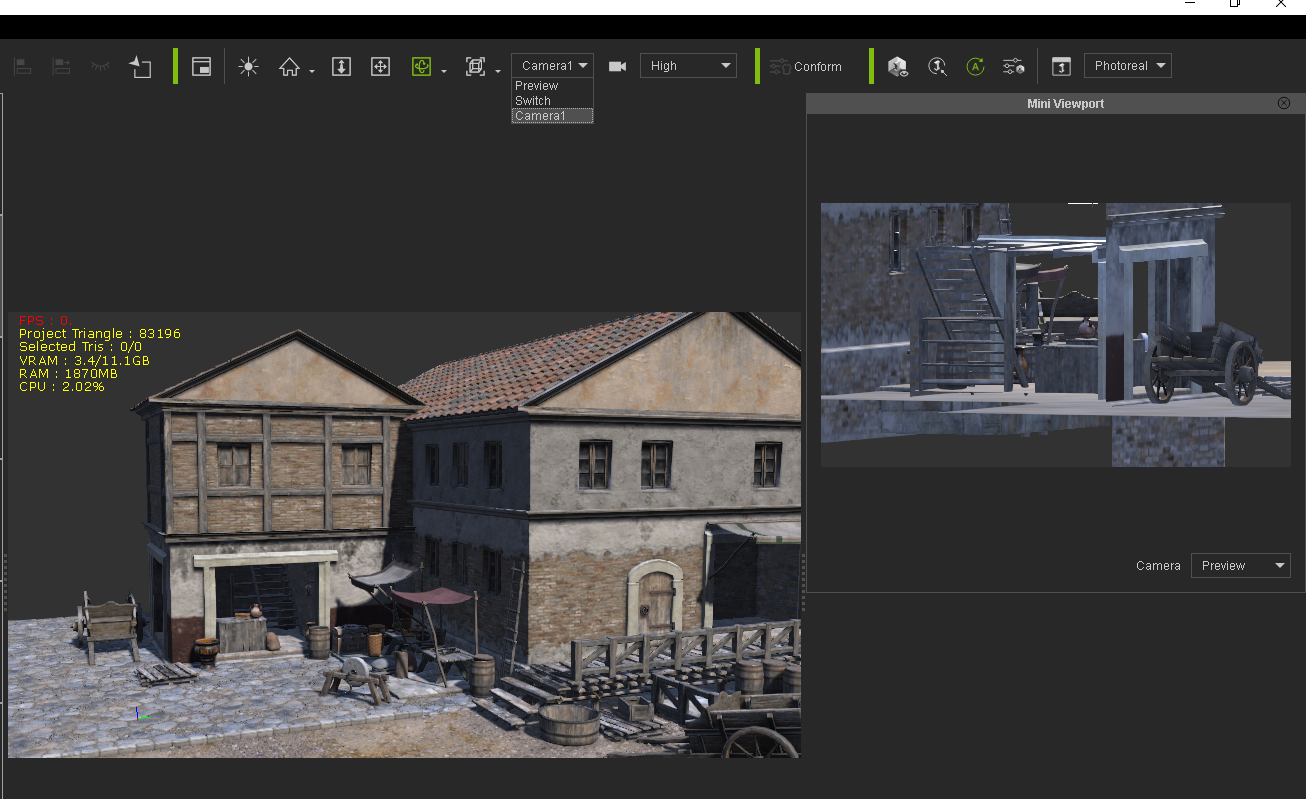
Set the Preview camera view up as you need it. Next add a new camera to the scene that can be used as required. Open the Mini Viewpoint window - F8 or check it in the Window menu. Make sure that the Preview camera is loaded in the Mini Viewport. In the main scene window you can now change between the Preview camera for timeline work and any other camera view for adjustments or control by selecting the required one from the Camera drop down menu.
|
|
By misuta.nout - 4 Years Ago
|
Thanks a bunch Gerry, that might just do the trick. Cheers!
|