|
By dvnmedia - 4 Years Ago
|
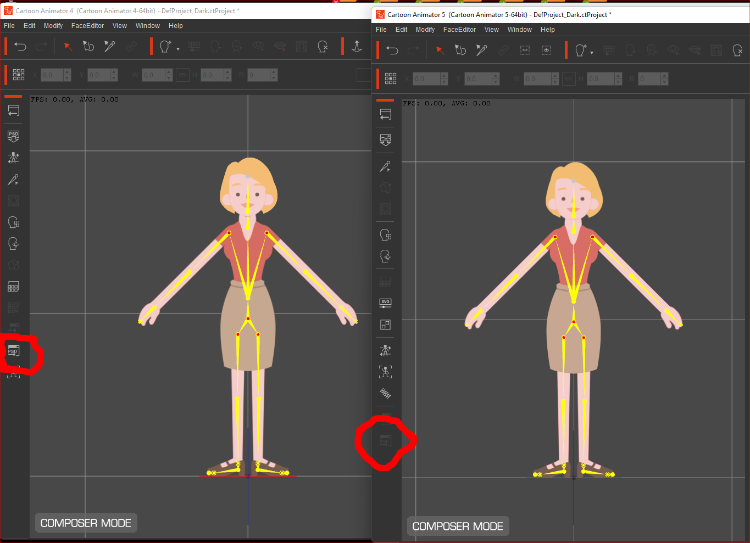 When I try to launch PSD Editor in compose mode the icon on the left hand side is grayed out so can't be executed. When I try to launch PSD Editor in compose mode the icon on the left hand side is grayed out so can't be executed.
It still works in in Cartoon Animator 4 but I can't get it to work in Cartoon Animator 5, so I can't tweak the G3 characters.
Also is there anyway to load the included vector characters into an editor to personalise them, or do I have to create them from scratch.
|
|
By Peter (RL) - 4 Years Ago
|
Hi...
The Launch PSD Editor still works in CTA5 as it did in CTA4 but the issue here is that all the default embedded characters have been updated to the new SVG (Vector) format in CTA5 so PSD Export won't work. You can see that PSD Export still works by dragging the same character shown from CTA4 into CTA5.
So, to clarify, if you have a SVG (Vector) character you can't use the "Launch PSD Editor" option. However, if you have a Raster based character built from the PSD Templates then you can use the "Launch PSD Editor" and it will work just as it did in CTA4.
Please Note: The ability to Launch a SVG character to a SVG compatible editor is coming in a future update.
|
|
By dvnmedia - 4 Years Ago
|
Thanks for the reply, I didn't realise so much of the existing content had been updated to vector.
Looking forward to the export to SVG Editor in a future update.
|
|
By jtompki4 - 4 Years Ago
|
Will the older character packs (Campus Hero, 360 Head Maker, Vector Buddies) be updated to the new SVG format soon?
|