|
By paultweet01 - 4 Years Ago
|
Hello guys.
Unfortunately I have a small monitor, so cant change to a higher resolution.
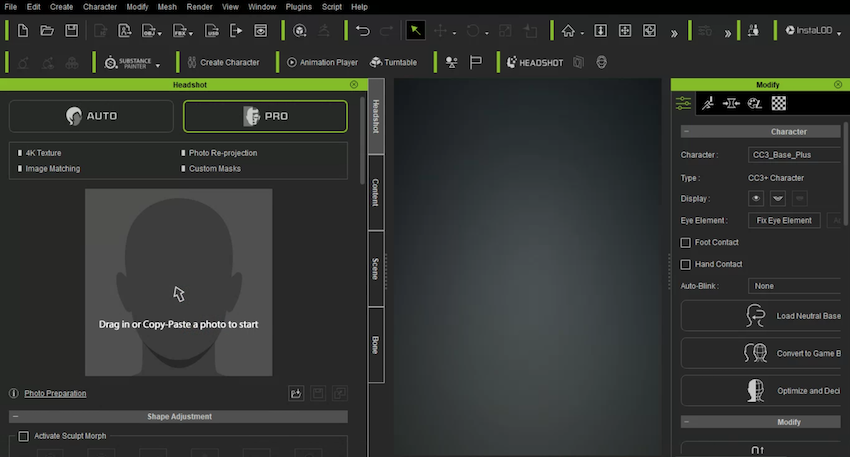
Is there a way to reduce the side panels (already in the minimum width format), so that I can have more space to work with the character?
Thanks
Paulo
|
|
By Peter (RL) - 4 Years Ago
|
Hi...
What is your screen resolution? You really need a minimum of 1920 x 1080 for CC4 to display correctly.
If you are using a lower resolution, then you can go to Window on the Menu Bar and deselect unneeded side panels to give you a larger viewport area.
|
|
By michaelrbarton - 4 Years Ago
|
|
If you have an HDTV, you can use that for a monitor.
|
|
By Xodroc - 3 Years Ago
|
|
Is there a solution for this yet? My Laptop Resolution is 3840x2160, and yet the interface doesn't fit the screen properly, important buttons from certain panels are inaccessible, etc. That said, the size of the laptop monitor is only 15.6", for some reason my desktop with the same resolution and a larger monitor works just fine.
|
|
By greenwilliesjrsss - 3 Years Ago
|
|
Having the same problem on my laptop with higher than 1920 x 1080 resolution, yet the UI for CC4 is not displaying everything. This is the only software giving me this issue.
|
|
By animagic - 3 Years Ago
|
Sometimes Windows sets the display scale to a high value like 300. In Display Settings check the scale. I have a 3840x2160 display with the scale at 125% and have no issues.
I have never encountered a case where RL software changed the display resolution or the scale.
|
|
By Xodroc - 3 Years Ago
|
|
animagic (1/23/2023)
Sometimes Windows sets the display scale to a high value like 300. In Display Settings check the scale. I have a 3840x2160 display with the scale at 125% and have no issues.
I have never encountered a case where RL software changed the display resolution or the scale.
Thanks, That indeed seems to be a factor, mine is 250%. Problem is 125% would require a magnifying glass to read anything on my screen, 175% is usable for CC4, but pretty much rules out multitasking so not really an acceptable solution.
|
|
By greenwilliesjrsss - 3 Years Ago
|
|
animagic (1/23/2023)
Sometimes Windows sets the display scale to a high value like 300. In Display Settings check the scale. I have a 3840x2160 display with the scale at 125% and have no issues.
I have never encountered a case where RL software changed the display resolution or the scale.
EUREKA!! Why is this software the only one that had an issue with that though? Anyways thanks man! I can see the whole interface!
|
|
By animagic - 3 Years Ago
|
To increase the font size of the interface, try the following:
- Right click the short-cut on your desktop and select Properties.
- Once there, select the Compatibility tab.
- Click Change high DPI settings.
- On the dialog that opens, under "High DPI scaling override", select System (Enhanced) from the drop-down.
This should make things more readable.
|
|
By Xodroc - 3 Years Ago
|
|
Thanks, it's a bit cramped still but usable now!
|
|
By rsdha - 3 Years Ago
|
|
I think the team needs to prioritize some of the usability issues with the UI. The UI is laggy, behaves erratically on multiple monitor screens, and generally not a very good experience. This really dwarfs some of the great features that the application can perform and is ultimately used for, but is it a pain to use half the time.
|
|
By Mana.Lucine - 3 Years Ago
|
|
rsdha (2/4/2023)
I think the team needs to prioritize some of the usability issues with the UI. The UI is laggy, behaves erratically on multiple monitor screens, and generally not a very good experience. This really dwarfs some of the great features that the application can perform and is ultimately used for, but is it a pain to use half the time.
You are righteous, IC & CC user interfaces are totally occupied by large windows and tabs. You can not feel free to edit or animate inside a screen with these huge boxes around.
|