|
By Brucek5 - 4 Years Ago
|
I can't seem to find anywhere on the Internet about iClone's very strange Bones/Joint rigging, making not attritive to use with other 3D applications where animation is retargeted (exporting FBX or BVH"). Here's my list:
1. The biggest issue is the bones not have a common "up-vector" or in other words, the bones axis are not the same. In the middle body, "z" points up, legs, point down, feet point back. No matter what app I load an iClone file (Cinema 4D, Blender, DAZ 3D, Autodesk SDK, the axis are not same.
2. There's no logic to the rigging rotational values. You should be able to zero out all bone rotations and get a default pose (like a "T" or "A"). If you zero an iClone figure you get a mess. You can't simply export it in a standard pose and then zero the rotations because the values are so far from zero you get gimble oscillations. I'm guessing Motion Builder users are having the bone rig, re-rigged, because files I've used that have come from Motion Builder are not like iClone files.
I started to write some Python code to try to fix the bone 3D rotational matrix math, but after going through two up-vector changes had had to stop and ask why am I the only one seeing this mess?
|
|
By AutoDidact - 4 Years Ago
|
|
Brucek5 (10/11/2022)
I can't seem to find anywhere on the Internet about iClone's very strange Bones/Joint rigging, making not attritive to use with other 3D applications where animation is retargeted (exporting FBX or BVH"). Here's my list:
1. The biggest issue is the bones not have a common "up-vector" or in other words, the bones axis are not the same. In the middle body, "z" points up, legs, point down, feet point back. No matter what app I load an iClone file (Cinema 4D, Blender, DAZ 3D, Autodesk SDK, the axis are not same.
2. There's no logic to the rigging rotational values. You should be able to zero out all bone rotations and get a default pose (like a "T" or "A"). If you zero an iClone figure you get a mess. You can't simply export it in a standard pose and then zero the rotations because the values are so far from zero you get gimble oscillations. I'm guessing Motion Builder users are having the bone rig, re-rigged, because files I've used that have come from Motion Builder are not like iClone files.
I started to write some Python code to try to fix the bone 3D rotational matrix math, but after going through two up-vector changes had had to stop and ask why am I the only one seeing this mess?
Hi, What method you are using to retarget exported Iclone Data(FBX,BVH) in your target application? I have exported BVH to Daz Studio genesis figures, from the Old 3DX change app, for years as the 3DX app has profiles for the Daz genesis figures,
giving me a perfect FK baked BVH for Daz studio My current pipeline involves export FBX motion data from CC3 and retargeting it to the IK/FK Control rig of Auto rig pro for Blender. Again because Auto rig pro has profile preset for the Reallusion CC3 Character rigs. When I import a CC3 FBX into Bender ,from CC3 pipeline, and “clear all rotations” the figure returns to whatever the rest pose was in back in CC3. Also animated Avatars exported from CC3 pipeline( with the C4D target preset) import fine with body and facial animation into C4D R21 for me. So my again question here is : Into what Primary external application are you importing Avatars exported from IC/CC? What version of Iclone/CC are you using to export to that external application and by what method??
|
|
By Brucek5 - 4 Years Ago
|
Hi AutoDidact,
Thanks for the reply. To make sure we're on the same page on the term "re-targeting" as how I know it means. You are able to use a character created by another 3D application, and import a motion created by iClone? To make my question more clear, I'll give an example: You can open DAZ and add a native DAZ character to your scene. Then using using some kind of option I've yet to find in a Reallusion application, you can export a BVH file and import into DAZ and successfully animate the DAZ character as created in iClone?
I re-asked this question because everything I have found on doing such a thing, first requires the user to import the native DAZ character into their 3D-Exchange application that basically destroys the original joint rig, and converts to iClone's strange rig, So in this case you could import back into DAZ with iClone animation because it's no longer a DAZ character (and not even close to anything else). From that point on, you can only use iClone to perform animation, nothing else.
In my case, my main 3d application is Cinema-4D and I created my character rigging based on common practices. I'm able to re-target animations from other applications such as DAZ, Mixamo, Motion-Builder and purchased BVH files because other than the joint rig pose design (A-Pose, T-Pose, etc.) they follow the same standard rigging practice. I wrote Python code in Cinema-4D to correct the joint rotational matrix of joints such as shoulders, forearms and thigs, to fix the offset due to the different pose design. But other than iClone, I've never had to correct axis up-vectors.
In the picture below I show all the iClone joint vectors (the direction the colored lines point). I counted seven areas where the up-vector changed.

The next image is from Mixamo, and a DAZ character and other applications would be the same. Notice there is only ONE up-vector. In addition, all joint rotations are zero and match a standard design pose.
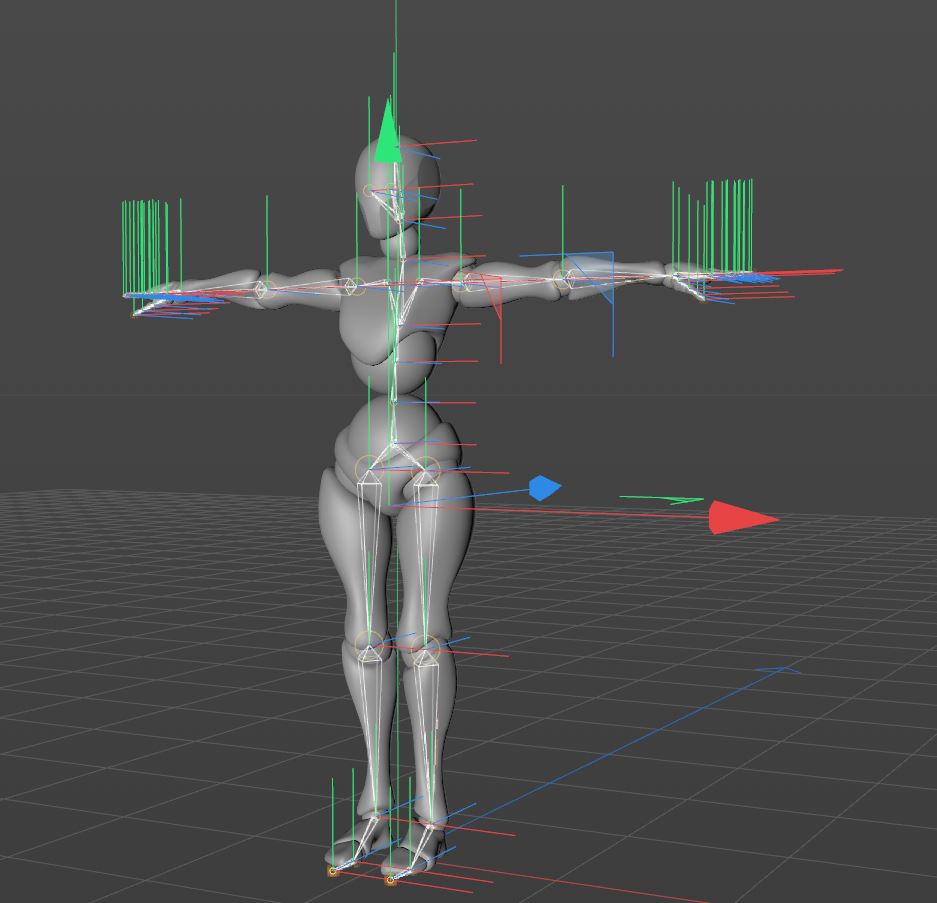
Below is a iClone character with all it's joint rotations zero. It doesn't look like any standard design pose I've ever seen.

These are not just offsets, the rig is twisted because the rig wasn't designed with just one axis coordinate system (up-vector), but some reason seven.
Am I still missing something?
Thanks, Bruce.
|
|
By AutoDidact - 4 Years Ago
|
You can open DAZ and add a native DAZ character to your scene. Then using using some kind of option I've yet to find in a Reallusion application, you can export a BVH file and import into DAZ and successfully animate the DAZ character as created in iClone?
This is correct. the old 3DXchange application was a general purpose retargeter that happened to have built in mapping profile for Daz genesis1-8 and Maya Human IK and Max biped. As well as the ability manually bone map any FBX imported biped rig for imotion retargeting. You import your Daz figure as FBX and apply Native imotions to it and export those retargeted motions back to Daz as bespoke BVH files with the Daz skeleton hierarchy.
That is exactly what you see in the “combat motions” video I posted earlier..the Daz genesis 8 male with BVH from iclone. Note that 3DXchange is no more, however its functionality has been split across IC8/CC4. I still use IC7&CC3 Pipeline so others here can tell you how it works now in IC8/CC4.
In my case, my main 3d application is Cinema-4D and I created my character rigging based on common practices. I'm able to re-target animations from other applications such as DAZ, Mixamo, Motion-Builder and purchased BVH files because other than the joint rig pose design (A-Pose, T-Pose, etc.) they follow the same standard rigging practice.
I was C4D user up until R21 that I still have installed over on my old 2017 imac. I Now use Blender with Auto rig pro for character animation.
Right now Reallusion’s business model seems based on you exporting your IC/CC Characters to other 3DCC’s & game engines. Or Buying actor core motions and importing them into your external application for retargeting with local native tools . I can import an animated CC3 figure into C4DR 21 ,via FBX, and have it “play back “just fine body and facial animation as baked FK ,of course.
Now you say you are “creating you character rigging in C4D based on common practices”..that is fine. However Maxon C4D does NOT have a true general purpose retargeting system liIke AutodeskMaya, Motionbuilder or Blender (with Autorig pro) or Rigify with the FREE rokkoko or Expy kit General retargeters.
Certainly not one with retargeting to a human IK control rig other than that limited mixamo control rig from years ago when R21 was new.
I am not encountering any issues with the “upvectors” from CC3 Data imports because Blender( with ARP) has a profile for the CC3 rig along with the major industry rigs in use today.

Perhaps you can cobble a more complete python solution for C4D
|
|
By Rampa - 4 Years Ago
|
Here you go.
|
|
By Brucek5 - 4 Years Ago
|
Hi AutoDidact;
Thanks for the reply again. I will look at your videos as I still have 3DExchange and haven't found such a process.
You're correct that Cinema-4D doesn't have have strong re-targeting tools, though they did introduce a new motion re-target system in R26.
I did create a fairly complex Python script (screen capture below) well before R26, and enables more options for me. It reads a CSV file based on what I'm kind of character I'm re-targeting and gives me the option to read the joint values instead of key frames so I can capture rig motion created by rig controllers and added dynamics and noise reduction. Creating the CSV file takes time, putting in axis corrections, rotation offsets, rotational orders, invers axis, joint parent/child relationships, etc. When I decided to try out iClone, I was floored on how it was rigged. It looked like there was no thought behind it with odd values at given positions and axis constantly changing, which result in my script taking longer because it's performing a new joint tree matrix calculation for almost every joint on every frame. This what prompted me to make this forum posting to see if this was for real before continuing to create the rest of the definition file. The closer I can get an exported iClone rig to something similar to other rig, the more efficient it will be to use.

|
|
By AutoDidact - 4 Years Ago
|
Thanks for the reply again. I will look at your videos as I still have 3DExchange and haven't found such a process. Hi , Make sure you have 3Dxchange PIPELINE for IC7 The non pipeline version of 3DX is only for importing models into iclone which is quite useless for anyone planning to render deliverables elsewhere.:rolleyes: If you do not have the pipeline version your only otheroption to export Iclone created motion out to C4D,Daz etc
is via FBX export from CC3 pipeline or buy the upgrade to IC8/CC4.
The closer I can get an exported iClone rig to something similar to other rig, the more efficient it will be to use.
That is part of the reason I invested the $40 USD in ARP for blender as it gives me perpetual access to my entire library of imotions ,past ,present & future Via FBX export from CC3 pipeline. Finally , have you tried the re-rigging your iclone character with the FREE stand alone accurig tool from Reallusion? It has export presets for R18 & up
I have not even had time to try an export to my C4D R21 But perhaps it exports a “cleaner” C4D rig from which you can start your retargeting process with your python script.
|
|
By Brucek5 - 4 Years Ago
|
Hi AutoDidact,
I was unable to find a video on your channel where you used 3Dxchange to convert an iClone motion rig to a DAZ rig. Can you point me to one of your videos that is closest to this subject where the rig is corrected? BTW - I do have 3Dxchange 7 Pipeline.
To clarify, I do not have an iClone character nor plan on making one. I'm only looking at using iClone for producing animations the same way I've been able to use Mixamo, DAZ and most recently Cascadeur. All I want is the animated bones, and I remove all the mesh objects,, their morphs and materials.
I don't have any problem importing iClone into Cinema-4D. The iClone character will animate and look the same in Cinema-4D just as it did in iClone, it's just the bone rig is so difficult to retarget it from. If I can get 3Dxchange 7 Pipeline to convert an iClone character animation to a rig similar to DAZ or Mixamo, I would be pleased.
On an unrelated yet positive note, the latest iClone AccuLips-AI does a descent job of speech animation. I wrote a Cinema-4D script that will import an iClone FBX file and extract the animated face morphs used for speech, and transfer them to my Cinema-4D character with extra code to smooth the transitions and apply additional face morphs for added realism.

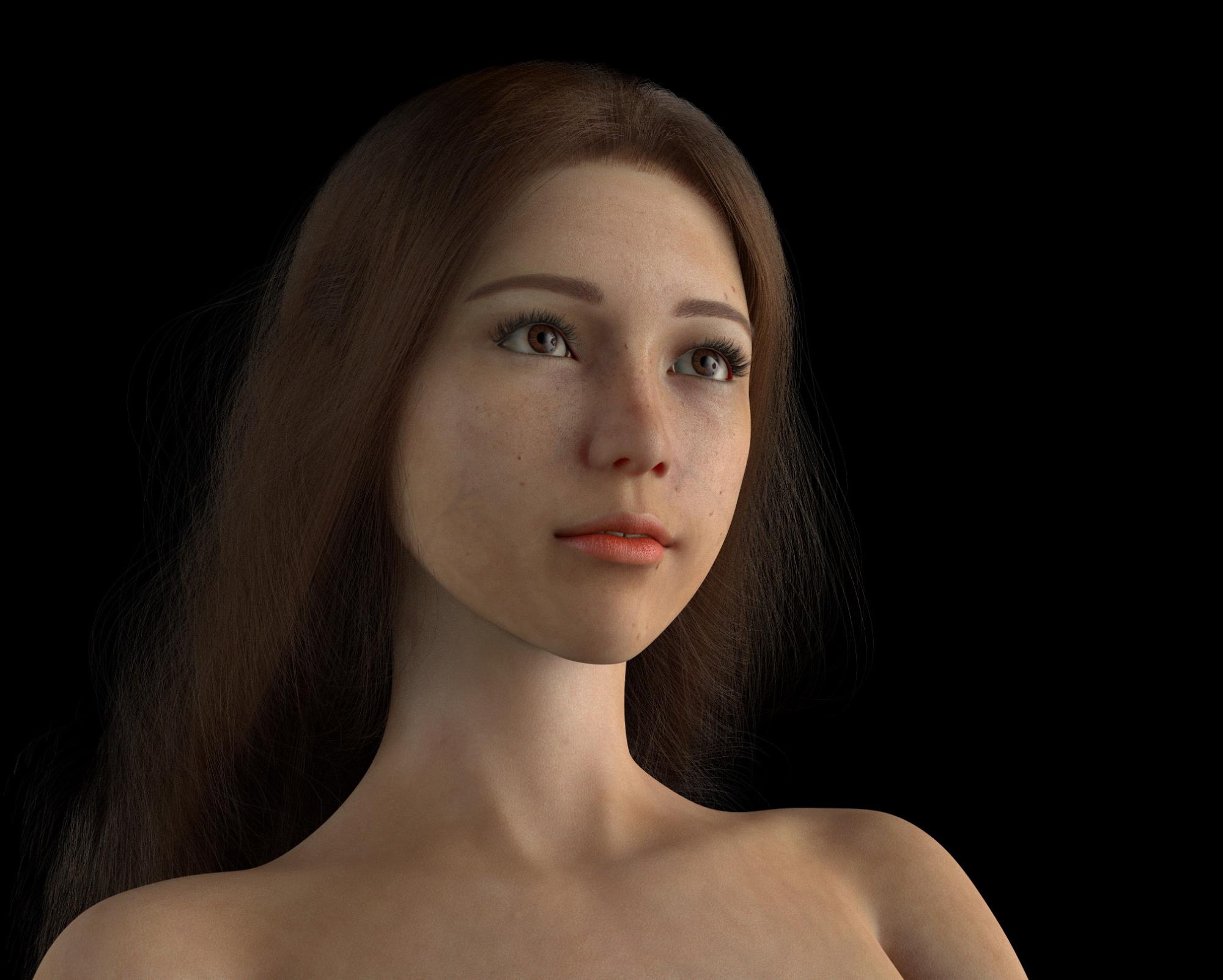
This is a low resolution render of one of my characters that I created and animate.
|
|
By AutoDidact - 4 Years Ago
|
|
Hi in this old video where I create an animation in iclone and retarget it to a genesis figure and export the BVH It does not show me importing and using it in Daz studio but such results be seen in the “Combat motions” video at the beginning of this thread. this was my method to retarget imotion to Daz studio for many years . I'm only looking at using iClone for producing animations the same way I've been able to use Mixamo, DAZ and most recently Cascadeur. All I want is the animated bones, and I remove all the mesh objects,, their morphs and materials Yes this is all I use Iclone,Mixamo for as well, as My meshes are from Daz and sketch fab and re-rigged with ARP. If I can get 3Dxchange 7 Pipeline to convert an iClone character animation to a rig similar to DAZ or Mixamo, I would be pleased. 3Dxchange pipeline exports a BVH that has the Daz genesis hierarchy base on whatever version of genesis you first imported into 3DX as FBX (1,2,3,8) This is something I imagine you would have tried already as you already have 3DX pipeline.
That is the only way it works back in Daz studio.
I have sold commercial motion files to the Daz community using Iclone and 3DX
On an unrelated yet positive note, the latest iClone AccuLips-AI does a descent job of speech animation. I wrote a Cinema-4D script that will import an iClone FBX file and extract the animated face morphs used for speech, and transfer them to my Cinema-4D character with extra code to smooth the transitions and apply additional face morphs for added realism. . Awesome!! it is quite the shame that, all these years later, Maxon is still leaving these important features to be cobbled by the end users or shoved off to commercial third parties like Insydium but I digress.
|
|
By 4u2ges - 4 Years Ago
|
Just do not forget to set "Limits Off" for the entire bones hierarchy in DAZ before importing BVH.
Otherwise some motions would not behave as expected.
|
|
By AutoDidact - 4 Years Ago
|
|
4u2ges (10/12/2022)
Just do not forget to set "Limits Off" for the entire bones hierarchy in DAZ before importing BVH.
Otherwise some motions would not behave as expected.
Great point sir!! I actually have a daz script that turns of all limits, that I give to all of my commercial clients, from the Daz community. But for those importing bespoke BVH from Iclone to Daz here is what 4U2ges is describing.
|
|
By Brucek5 - 4 Years Ago
|
All,
I actually made some progress!
AutoDidact: I spent some time looking at your videos and helped me look deeper into the different Reallusion apps and versions of them and how they now perform differently than the pervious versions before iClone 8 and CC4 that I tried before.
Rampe: I watched your video again and decided to try it, even though my perception was CC4 was just going to convert the DAZ figure to a iClone figure as it has done in the past. When I looked at the BVH file it created, I noticed it had the DAZ bone names, so I imported it into DAZ and it successfully re-targeted.
4u2ges: I found out why the limits need to be turned off. My first import the hip followed correctly, but after about 100 frames the figured started to "float" in the air. I looked at the animation data and noticed once the hip rotated over 180 deg., the key frames in only that axis stopped. I tried it a second time wit the limits off and that problem stopped. I export a FBX from DAZ and my Cinema-4D Python re-targeting code worked perfectly.
Tomorrow I'm going to try skipping that DAZ import part, because now that I have the character already converted by CC4, I want to see if I can directly import into Cinema-4D. I also want to see what the FBX file format iClone now creates. Odd that it's the animation editing app, but doesn't export animation BVH files like CC4 does which isn't designed for animation. I'm hoping I don't have edit in iClone, export to CC4, export to DAZ, and finally import into Cinema-4D.
I'm surprised Reallusion hasn't made a tutorial or have anything in their documentation on how to do what you guys helped me accomplish over the last couple of days. I hadn't found anything in the Cinema-4D Maxon (licensed users with maintenance access only) forums and support on using iClone at all, but I do find a bunch on using Blender, Motion-Builder (which is really costly) and Cascadeur. I used to also have have Maya and 3DS-Max which is stronger in character animation than Cinema-4D that I have, but I had to dropped the others when Autodesk bought them and they didn't allow the software uses without the subscription. Cinema-4D is now going this route as well as Insydium (X-Particles) and Redshift that I have, but if I drop the maintenance, I can still use the versions that bought when they had puerperal licenses. Maxon also provides me the best support than any application I have where I get an expert reply within hours. I placed a ticket with Reallusion a couple of months ago on this subject you guys helped me with and have yet to hear back even after paying almost $1,000 on software updates.
I'll add a final posting on this topic tomorrow when I find out if I can skip the multiple exporting steps.
Thanks again for your help!
Bruce Kingsley.
|
|
By AutoDidact - 4 Years Ago
|
your short DAZ video didn't show how the character got into 3Dxchange and what was done to make it convert it to a DAZ figure. At the end, 3Dxchange exported the same messed up rig. I couldn't find any DAZ worded presets nor could find any mention in the 3Dxchange documentation. Well since you seem to have upgraded to CC4then use Rampa’s method to export Daz formatted BVH file for C4D But FWIW ,this is how we have done it for over decade with 3DXchange. well documented on the Reallusion youtube channel in the past as well. I hadn't found anything in the Cinema-4D Maxon (licensed users with maintenance access only) forums and support on using iClone at all, but I do find a bunch on using Blender, Motion-Builder (which is really costly) and Cascadeur. As I noted before. Reallusion seems to reasonably assume you have some modern means to retarget in your receiving app. During my years ,as a C4D user, from version RDLX7 -R21,I have witnessed a mass exodus from the user base
and ALL of them were Character animators & or VFX artist who left for Autodesk and SideFX and more recently Blender since the UI overhaul back with version 2.8x.
|
|
By Brucek5 - 4 Years Ago
|
Hi AutoDidact,
I'm sorry if my response sounded negative in light with all the time you've spent helping me. :( I'll see if I can edit it out of my posting.
Though as I stated in my last posting, I submitted a customer support ticket to Reallusion on this topic months ago, and if they never replied to my ticket where they could have directed me to tutorial videos or documentation. This is why I posted this question to this forum. They didn't reply, they just closed the ticket as "no solution" and would be very disappointed if they did his because they assumed something. As a paying customer, I felt I did my best to get an answer from the app supplier before hitting up other customers on a forum.
Maxon has lost a bunch of existing customers (mostly hobbyist people like myself) for multiple reasons, but have gained others. I don't think 3D characters and animation is their product target. But what ever their customer targets are, they have enough cash to buy other companies such as Redshift, Red Giant, and Z-Brush in just the last two years (stock holders don't like cash spent without growth). But I don't want to go down the path of who makes the best 3D software which is like debating who makes the best truck. They all have their pros and cons, hence why I have, and paid for so many 3D apps including Reallusion (I paid more to Reallusion this year than Maxon and my plug-ins products combined). FYI - 3D is just one of my personal hobbies for stress relief of being a 45 year senior aerospace engineer/manager creating software (some that is AI) that performs aircraft components and weapon actuation control emulation for qualification. Though this background helped me write my custom scripts.
Thanks again for your help and I'll post later what I find on limiting the export steps.
Bruce Kingsley.
|
|
By AutoDidact - 4 Years Ago
|
Hi AutoDidact, I'm sorry if my response sounded negative in light with all the time you've spent helping me. I'll see if I can edit it out of my posting.
No worries mate.:D if i had known you had access to CC4 I would have simply referred you to a recent video of the current DAZ format BVH export process like the one Rampa posted.
3DXchange is an old 32 bit app that has now passed it’s operational lifespan as far as Reallusion is concerned.
I am still using IC7/CC3 yet even I no longer use 3DX anymore for retargeting as my blender ARP rigs support CC3 motion exports directly
|
|
By Brucek5 - 4 Years Ago
|
Good news!
Now that I have a non-iClone character imported and converted by CC4, all I have to do is select this existing character in my iClone scene, apply animation, and export as FBX. The exported FBX maintains my original non-iClone character rig, bone names, up-vectors and rotations that I can directly import into Cinema-4D as a motion source without doing anything else. It's now my fastest means of creating animation. I might look at what the iClone scripting provides to possibly make it a "one-click" operation.
Thanks for everyone that helped especially AutoDidact that spent much of his personal time driving to help find a solution!
Now I can share this with the Cinema-4D community.
Case closed.
Bruce Kingsley
|
|
By AutoDidact - 4 Years Ago
|
Glad to hear its all sorted.
|
|