|
By Peter (RL) - 4 Years Ago
|
|
Dear Character Creator Users,
We have now released Character Creator 4.12. However, as with all updates there may still be a few bugs, glitches or other annoying issues remaining.
Important: If you do find any bugs, issues or glitches in Character Creator 4.12, please can you report them first in the Feedback Tracker. Then feel free to discuss the issues in this thread but do try to include a link back to the original Feedback Tracker report or your tracker number.
As always it will help us greatly if we can keep all technical issues in the one place (this thread). This will help the development team keep track of any problems.
Please do try to provide your full system specifications and a detailed description of the problem when reporting issues and include screenshots and/or a workflow video whenever possible. If you can provide specific steps so we can try and reproduce the problem that will be even better.
Many thanks and have fun with Character Creator 4.
|
|
By OB1Flow - 4 Years Ago
|
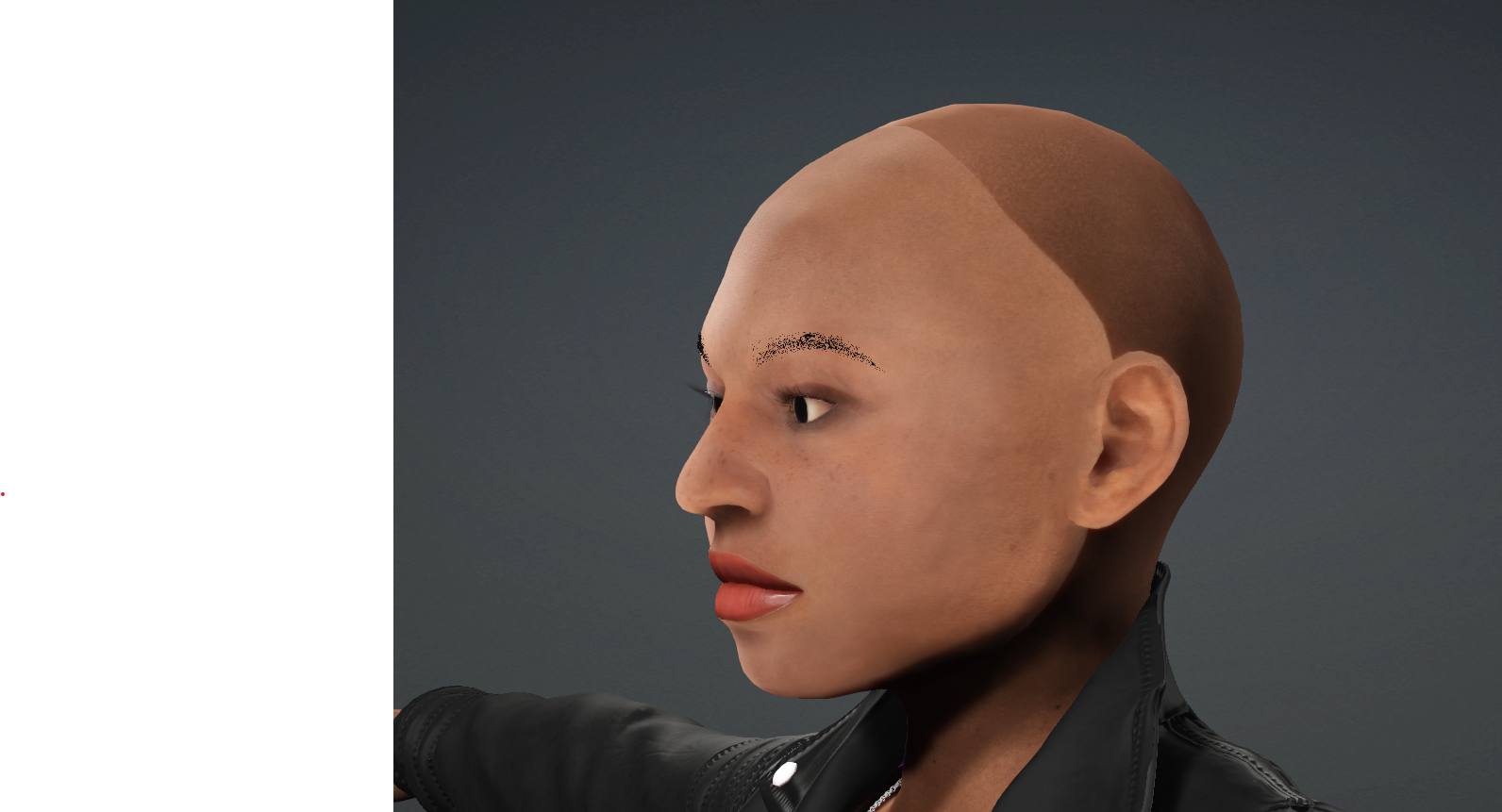
https://www.reallusion.com/FeedBackTracker/Issue/Genesis-8-1-face-texture-doesn-t-match-head-body
Transformer has issues with face texture when baked.
|
|
By pritesh.s - 4 Years Ago
|
https://www.reallusion.com/FeedBackTracker/Issue/FBX-export-with-custom-rlMotion-animations-fails-to-export-complete-animations
Trying to export as FBX with multiple custom rlMotion animations results in animation tracks with just a static pose across the whole animation track (seems to export fine from iClone 8.1, but can only do one clip at a time from iClone)
|
|
By Peter (RL) - 4 Years Ago
|
|
Character Creator v4.11 released today, Oct. 17th, 2022 Bug fixes.
Fixed: • TAA does not take effect for rendered videos. • Watermarks appear when purchased content is applied (ex: Headhost sliders). • Defects in skin weights caused by merging identical mesh with merged materials.
Quick Reminder: If you do encounter any issues after the 4.11 update, please report them first in the Feedback Tracker so the issue can be logged and looked into. Thanks.
|
|
By Tigernaut - 4 Years Ago
|
Unfortunately I'm still having the watermark Issue in v4.11
Any thoughts?
|
|
By wires - 4 Years Ago
|
When trying to apply skin textures to a character in CC 4.12 I get the following error message:
57% of original size (was 892x635) - Click to enlarge
CC is referencing CC3 files and I have never had any RL content saved or stored on my D drive.
Feedback Tracker issue 9059.
|
|
By Peter (RL) - 4 Years Ago
|
|
Character Creator v4.12 released, Nov. 17th, 2022 Added: Search items by parent folder name. Thumbnails can be adjusted to be extra-large, large, or medium. New List and Details view. Animated thumbnails for motion assets. Ability to sync Template and Custom categories. New navigation bar below the Template and Custom tabs. It displays the content folders by hierarchy. New icons for major content info on top of the content thumbnails.
Enhanced:
Enhanced drag-and-drop behaviour for folders and files.
Quick Reminder: If you do encounter any issues after the 4.12 update, please report them first in the Feedback Tracker so the issue can be logged and looked into. Thanks.
|
|
By Peter (RL) - 4 Years Ago
|
Unfortunately, there does appear a rather serious issue with textures being reported missing since the 4.12 update.
We do apologise for the inconvenience this causes and will do everything to get a fix out as soon as possible.
|
|
By Peter (RL) - 4 Years Ago
|
We have now released a hotfix for the issue which should help until the next update is ready.
Please download the hotfix using the link below.
How to Install =========== . Make sure you have installed the latest official versions of iClone and Character Creator. . Make sure the programs are closed. . Unzip the hotfix files. . Run the hotfix.bat . For iClone: double click the "IC8ReplaceSG.bat" . For Character Creator: double click the "CC4ReplaceSG.bat" . Problem should be resolved.
Resolved Issue =========== . Some shared textures cannot be found when loading a character when CC3 or IC7 is not installed. . After opening the iClone7 and then opening iClone8, the Content Manager failed to initialize.
|
|
By Zeronimo - 4 Years Ago
|
After applying the 2 hotfixes, the problem still remains when I load the Template project --> 1-Talking kevin
Edit : CC4
|
|
By jeffkirkland - 4 Years Ago
|
|
Zeronimo (11/22/2022)
After applying the 2 hotfixes, the problem still remains when I load the Template project --> 1-Talking kevin
Edit : CC4
Just installed the hotfix and tested with the Talking Kevin project and no issues at all here. Everything seems to be working as expected.
|
|
By jeffkirkland - 4 Years Ago
|
|
Zeronimo (11/22/2022)
After applying the 2 hotfixes, the problem still remains when I load the Template project --> 1-Talking kevin
Edit : CC4
Just installed the hotfix and tested with the Talking Kevin project and no issues at all here. Everything seems to be working as expected.
|
|
By ken_1171 - 4 Years Ago
|
Hi,
I have a question. Both IC8 and CC4 Smart Libraries have stopped detecting new purchases since the beginning of November. They can detect and install software updates, but won't show new purchases from the content store. It tells me to refresh it, but the products won't show. They cannot be installed using the ".rlcontent" downloaded files either - those are still incompatible with CC4/IC8. This is CC 4.12.1114.1, which has updated today.
What can I do? I would appreciate any hints.
Thanks,
--=Ken
|
|
By Peter (RL) - 4 Years Ago
|
|
ken_1171 (11/23/2022)
Hi,
I have a question. Both IC8 and CC4 Smart Libraries have stopped detecting new purchases since the beginning of November. They can detect and install software updates, but won't show new purchases from the content store. It tells me to refresh it, but the products won't show. They cannot be installed using the ".rlcontent" downloaded files either - those are still incompatible with CC4/IC8. This is CC 4.12.1114.1, which has updated today.
What can I do? I would appreciate any hints.
Thanks,
--=Ken
Hi Ken
If you have tried refreshing and content still doesn't appear, please try searching for the new content purchases. It may just be that you are having problems locating them. Make sure you are on the Pack tab when searching and put the name of the purchased content pack in the search box and hit Return.
If it still can't locate your content, it may be that your Content Manager Database has a problem. In this case try resetting the database which should resolve the problem.
Please use the link below to find instructions:
https://kb.reallusion.com/Product/53044/How-do-I-restore-the-Smart-Content-Managers-database-to-the-default
|
|
By ken_1171 - 4 Years Ago
|
Hi Ken If you have tried refreshing and content still doesn't appear, please try searching for the new content purchases. It may just be that you are having problems locating them. Make sure you are on the Pack tab when searching and put the name of the purchased content pack in the search box and hit Return. If it still can't locate your content, it may be that your Content Manager Database has a problem. In this case try resetting the database which should resolve the problem. Please use the link below to find instructions: https://kb.reallusion.com/Product/53044/How-do-I-restore-the-Smart-Content-Managers-database-to-the-default
Hi Peter,
Thanks for the feedback! I have searched for the contents, but they are not there. First time I start CC/IC after making the purchases, they notify me that new contents were detected, then it shows me a progress bar for a few minutes, but when I search for the new contents, I can't find them. The Smart Library has a section called "New Purchase", but nothing shows there. When I refresh it, the progress bar shows again, but in the end, it still claims there is nothing to show, even when it said there were new contents detected before. It shows plenty on "Purchased Items", but nothing on "New Purchase". This only started happening earlier this month. It was working before.
I understand what you mean about resetting the database, but I assume that would result into redownloading everything I have ever purchased since 2010, which might take the whole day. Maybe because of DRM + encryption/decryption, even the smallest item takes a long time to process. Is there another way that doesn't require redownloading my entire library?
Thanks,
--=Ken
|
|
By Peter (RL) - 4 Years Ago
|
|
ken_1171 (11/25/2022)
I understand what you mean about resetting the database, but I assume that would result into redownloading everything I have ever purchased since 2010, which might take the whole day. Maybe because of DRM + encryption/decryption, even the smallest item takes a long time to process. Is there another way that doesn't require redownloading my entire library?
Thanks,
--=Ken
Hi Ken
Resetting the database won't mean you need to download all your content again. For purchased content packs you have already installed, just double click the pack thumbnail in Content Manager and it will detect the content is already there and make it available immediately. It won't download it again.
|
|
By ken_1171 - 4 Years Ago
|
|
Hi Ken
Resetting the database won't mean you need to download all your content again. For purchased content packs you have already installed, just double click the pack thumbnail in Content Manager and it will detect the content is already there and make it available immediately. It won't download it again.
Hi Peter,
Thanks. I have tried resetting the database for CC4, running the BAT file from an elevated prompt to make sure it has admin rights, but it gives the following error message:
====================
Invalid parameter(s) RESET { SESSION } ====================
I then tried running the BAT file to reset the iC8 database, but got the same error. Any suggestions?
--=Ken
|
|
By Zeronimo - 4 Years Ago
|
Peter (RL) (11/25/2022)
ken_1171 (11/25/2022)
I understand what you mean about resetting the database, but I assume that would result into redownloading everything I have ever purchased since 2010, which might take the whole day. Maybe because of DRM + encryption/decryption, even the smallest item takes a long time to process. Is there another way that doesn't require redownloading my entire library?
Thanks,
--=KenHi Ken Resetting the database won't mean you need to download all your content again. For purchased content packs you have already installed, just double click the pack thumbnail in Content Manager and it will detect the content is already there and make it available immediately. It won't download it again.
Hi Peter
I ran the procedure "Reset CC4 Database and Registery.bat". once finished, I restarted CC4 I had to reload all the packs of Project, Actor, Skin, Makeup, Hair, Cloth, Accessory, Animation, Stage and Props I loaded the project Template --> Item --> 1. Talking Kevin, and the problem remains
EDIT: I did not execute the restore procedure for iClone 8 and I do not have this error with the same project.
I don't know if this has an impact, but in my case CC3 and CC4 are installed on 2 different physical drives
CC3 and iClone7 are installed on F:/Program Files/Reallusion and F:/Users/Public/Documents/Reallusion CC4 and iClone8 are installed on H:/Reallusion and H:Users/Public/Documents/Reallusion
Database is on C:/ProgramData/Reallusion
|
|
By ken_1171 - 4 Years Ago
|
|
I can't even run the BAT file. I get the error listed above.
|
|
By Peter (RL) - 4 Years Ago
|
ken_1171 (11/26/2022)
Hi Peter, Thanks. I have tried resetting the database for CC4, running the BAT file from an elevated prompt to make sure it has admin rights, but it gives the following error message: ==================== Invalid parameter(s) RESET { SESSION } ==================== I then tried running the BAT file to reset the iC8 database, but got the same error. Any suggestions? --=Ken
I have tested the "Reset CC4 Database and Registry.bat" file and it worked without any problems.
Do you perhaps have CC4 and iClone 8 open when running the Bat file? If so, please close them down and try again.
If the issue persists, then unfortunately you will need to contact Technical Support so they can investigate further. Plese use the link below to contact Support.
https://www.reallusion.com/CustomerSupport/UserEx/QForm.html
|
|
By Peter (RL) - 4 Years Ago
|
Zeronimo (11/26/2022)
Hi Peter I ran the procedure "Reset CC4 Database and Registery.bat". once finished, I restarted CC4 I had to reload all the packs of Project, Actor, Skin, Makeup, Hair, Cloth, Accessory, Animation, Stage and Props I loaded the project Template --> Item --> 1. Talking Kevin, and the problem remains
EDIT: I did not execute the restore procedure for iClone 8 and I do not have this error with the same project.
I don't know if this has an impact, but in my case CC3 and CC4 are installed on 2 different physical drives
CC3 and iClone7 are installed on F:/Program Files/Reallusion and F:/Users/Public/Documents/Reallusion CC4 and iClone8 are installed on H:/Reallusion and H:Users/Public/Documents/Reallusion
Database is on C:/ProgramData/Reallusion
Hi Zeronimo
The advice I gave to Ken for resetting the database was for an unrelated issue. You don't need to reset the database for the SkinGen missing textures bug in CC 4.12.
The full fix for this bug will be coming soon but if the current hotfix has not worked for you in resolving the problem, then I would also advise contacting Support about this and let them know.
https://www.reallusion.com/CustomerSupport/UserEx/QForm.html
|
|
By ken_1171 - 4 Years Ago
|
Hi Peter,
I have figure this out. If I just double-click the batch files, Win10 stops them by claiming they need elevated credentials. I then tried running them from an elevated shell instead, but that gets me the "Invalid Parameters" error. What I should had done was to use the context menu to "Run as Admin" instead. That works. Once this is done, the database rebuilds itself, and now my new purchases now show up. Yay! ^___^
HOWEVER, it then tells me that a whole bunch of my contents (130+) are NOT installed, when they actually are. It goes through 2 pages of contents just to realize they are already installed, skip them, and go to the next one, taking a while to process each one. This process takes around 30 mins, while CC4 becomes unresponsive. If I select to install them all, CC4 starts Ok, but then becomes unresponsive, freezes up (no CPU, disk, or network activity), and needs to be restarted. I have to select a few at a time to avoid that, which is more work and takes even longer.
It would be Ok and dandy if I didn't have to go through this every time the database glitches out, and I have to reset it. I think this is the 3rd time - twice with CC3, and now again with the just installed CC4. It's all working now. I hope it lasts. :)
Thanks,
--=Ken
|
|
By that.west.african - 4 Years Ago
|
Ee
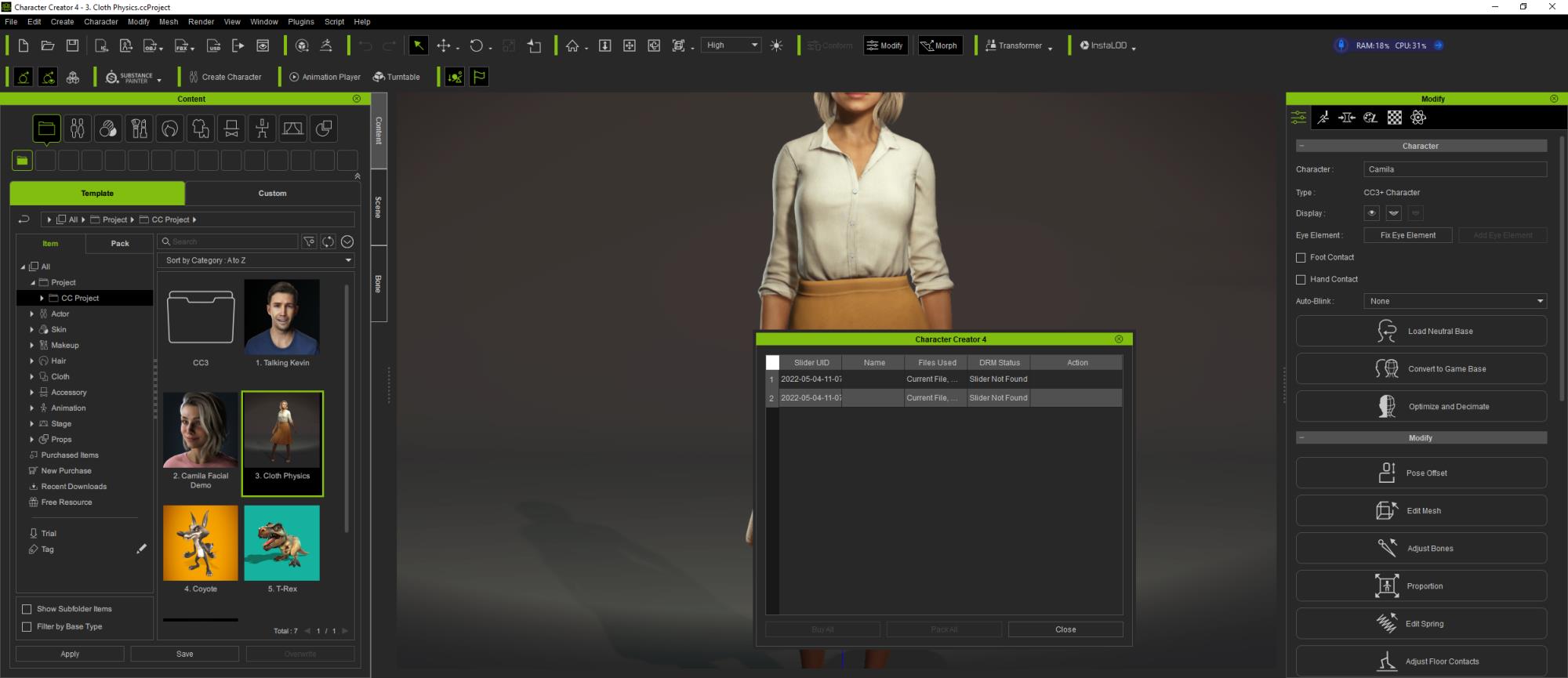
Everytime I open CC4 I get this.. with vanished sliders even though the pack is installed
|
|
By path.to.the.future - 4 Years Ago
|
Feedback Tracker number Issue 9100
Model becomes inconsistent after exporting with morph Problem: I'm trying to add morphs to my characters, but CC4 can't output consistent models. For example, after the base model, you export another version, with pregnant belly, and import both into Blender. You can zoom in and see in Xray mode that the top of head and arms don't match. I tried with both official and custom sliders, same thing happens. There is a compounding factor that I couldn't understand too, since the effect is much worse on my character that I imported from CC3. Since it moves the body away from the eyes and mouth, it makes shapekey-making essentially impossible. This problem didn't happen in CC3. Steps to reproduce problem: 1. Export base model. 2. Apply Pregnant slider (and possibly many other sliders) to max and export. 2. Import both versions into Blender and compare. Expected result: Unless it's a full body morph, the program should output consistent models with changes only in desired area. 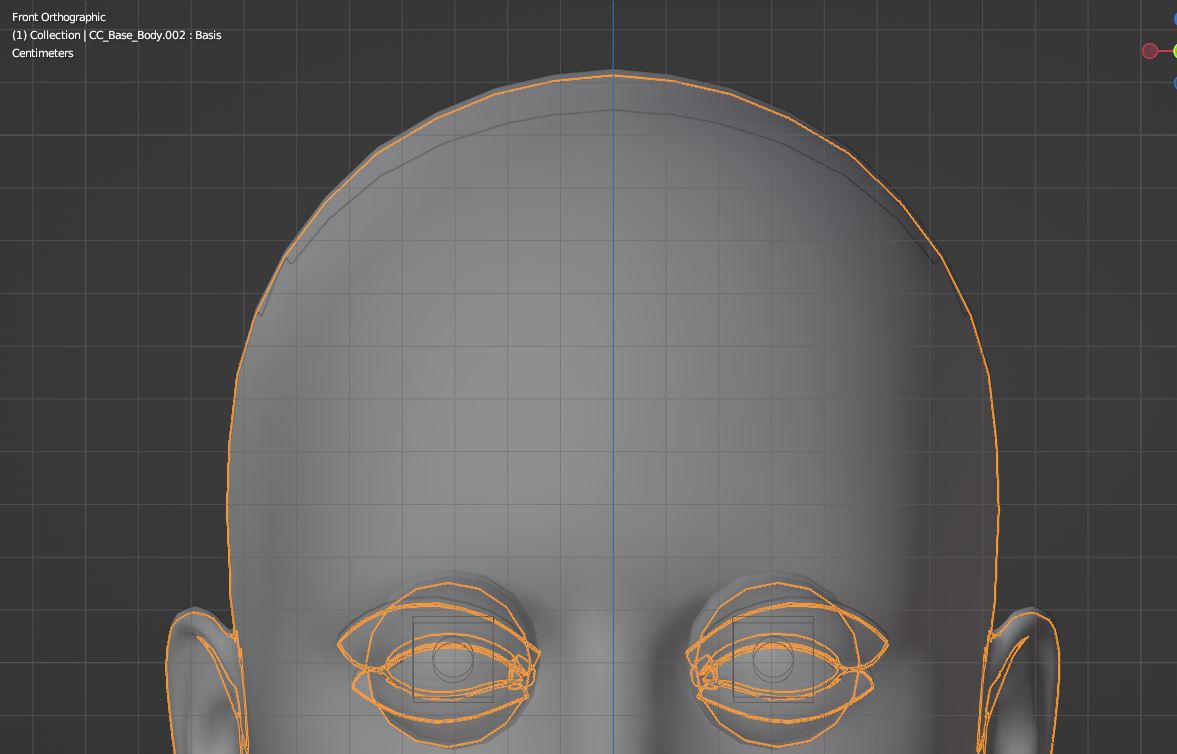 Actually just saw that the whole body doesn't match up to leg, just from one slider that isn't supposed to morph full body.   |
|
By facr73 - 4 Years Ago
|
I'm having an issue trying to download trial content but not purchased content .
Every time I try to download only the download icon is present but no download.
I0ve tried to uninstall and reinstall but the problem persists!
Anyone has the same problem?
|
|
By 4u2ges - 4 Years Ago
|
You should not download anything anymore. All purchases (including trial) would automatically land in your content manager.
Trial items particularly in "Trial" folder at the bottom. Just use Refresh button while in Template/Pack (or Item - depends on content) tab to sync content and it should appear (presumably :))
From there just install it.
A lot of people for some reason are having issue with that (including my own customers).
So I made this quick video:
|
|
By facr73 - 4 Years Ago
|
Hi 4u2ges thanks for replying.
Yes, that's what I do. I go to the Trial location and click to download as you can see in the image below, And it stays in that state forever. But I can download any purchased content!

|
|
By 4u2ges - 4 Years Ago
|
Ahhh, OK. You are right!
It's getting stuck with mouse cursor flashing while in Content Manager.
They might have an issue of some sort with trial content download routine on server...
They better fix it!
I have a customer, who kept complaining they cannot see trial content just today. Maybe that is what they meant!
|
|
By 4u2ges - 4 Years Ago
|
Here is my screenshot with stuck install/download...

RL, Please fix it ASAP!
|
|
By shan_joseph - 4 Years Ago
|
I am having the exact same problem reinstalled. Am tearing my hair out, glad to know its not just me.
It gets stuck at 10% and my mouse keeps timing out.
|