|
By 3CPU - 4 Years Ago
|
* Edit Reasons:
* Launch of CC4 is resolved - I suggest running a registry cleaner and then restart the computer.
* As for other issue: I have been in contact with RL Tech Support over the past two days to resolve UI scale and believe me I tried various Windows Settings > Ease of Access > Scale % and Font %, if these settings are set too high, some of the panels such as the Export to FBX will not display all the settings including the export and cancel buttons. This experience may vary based on size and type of monitor in use. I have a 43 inch 4K display. Settings, a personal choice and consider visual impairment! And wise to avoid eye strain even for people with good eye sight. RL Tech Support suggested I post a Feedback Tracker "Solution," CC4 preferences, scale UI widgets and fonts, these options are available in other software and makes the whole UI experience so much better, so I thought that be a good suggestion for CC4.
Again, thanks to everyone for chiming in on this topic, I wish you all good health and prosperity.
--------------------------------------------------------------------
Original Post:
My PC Specs:
Windows 10 Pro, I keep this bad boy well maintained for optimal perf'.
Intel 10600K - works beautifully in Blender (Eevee) with large scenes.
32GB of DDR4
6GB VRAM (GPU)
43 inch monitor, 4K resolution.
At first I was able to launch CC4, two days later it failed. I sent at an estimated 6 messages and replies to Reallusion support regarding CC4 failure to launch, but they provided absolutely no solution and failed to respond to other issues.
I am new to CC4, perhaps fellow Reallionist may have had similar issues, and provide clues that will lead me on path to solve this.
There are other serious issues with the products I purchased from Reallusion that I cannot disclose, but have given Reallusion support enough time to respond in a satisfactorily manner.
For perspective:
I am able to run Blender scene 350ft spaceship with interior consisting of large curved image displays, computer workstations and chairs, and large graphics encased in glass, a display of a futuristic computer PCB and hardware. This scene and another city scene with trees all runs great, rendered in UHD (4K) in less than a minute. I manage this because I disable parts of the scene that are not visible, and I clean out unused materials. I am saying this because my computer runs great and has not crashed, and I have over 30 years experience with computers. But nonetheless, I am new to Reallusion but disappointed they were unable to solve the issues as explained above. I spent $600 on Reallusion products that are not functioning at all, CC4 will not launch.
|
|
By michaelrbarton - 4 Years Ago
|
I have no problem starting and using CC4.
My PC Specs are
CPU Xeon E3 1230 V2 3.30 GHz 4 cores 8 threads
RAM 20GB DDR3
GPU GTX 970 4GB
250 GB HDD
W10
My specs are low compared to most IC and CC users.
If my PC is able to run the program, there has to be something
your PC is missing. Your PC goes above and beyond the specs.
It can't be Reallusions' fault. I am no expert on PCs.
I am just listing my specs to show that a lower end PC can run CC4
without any problem other than not having enough video RAM to have some more fun.
|
|
By mark - 4 Years Ago
|
I'll assume you have tried uninstalling and reinstalling CC4?
|
|
By Peter (RL) - 4 Years Ago
|
|
3CPU (8/8/2022)
My PC Specs:
Windows 10 Pro, I keep this bad boy well maintained for optimal perf'.
Intel 10600K - works beautifully in Blender (Eevee) with large scenes.
32GB of DDR4
6GB VRAM (GPU)
43 inch monitor, 4K resolution.
You've omitted any details about the most important component. Which graphic card do you have and do you have the latest drivers installed?
|
|
By TonyDPrime - 4 Years Ago
|
@3CPU
Does this resemble what is occurring in your case
iC8 and CC4 Won't Load - Stuck on "Please Wait...."
And do indeed check what GPU driver you have, as Peter stated. If outdated, it could be an issue, even though it worked days before without having changed anything.
Also what might happen is over time Win10 shuts down or activates certain processes that may affect other processes from running, in my case rebooting is a workaround allowed me to access CC4 again.
|
|
By playlogic - 4 Years Ago
|
Hi,
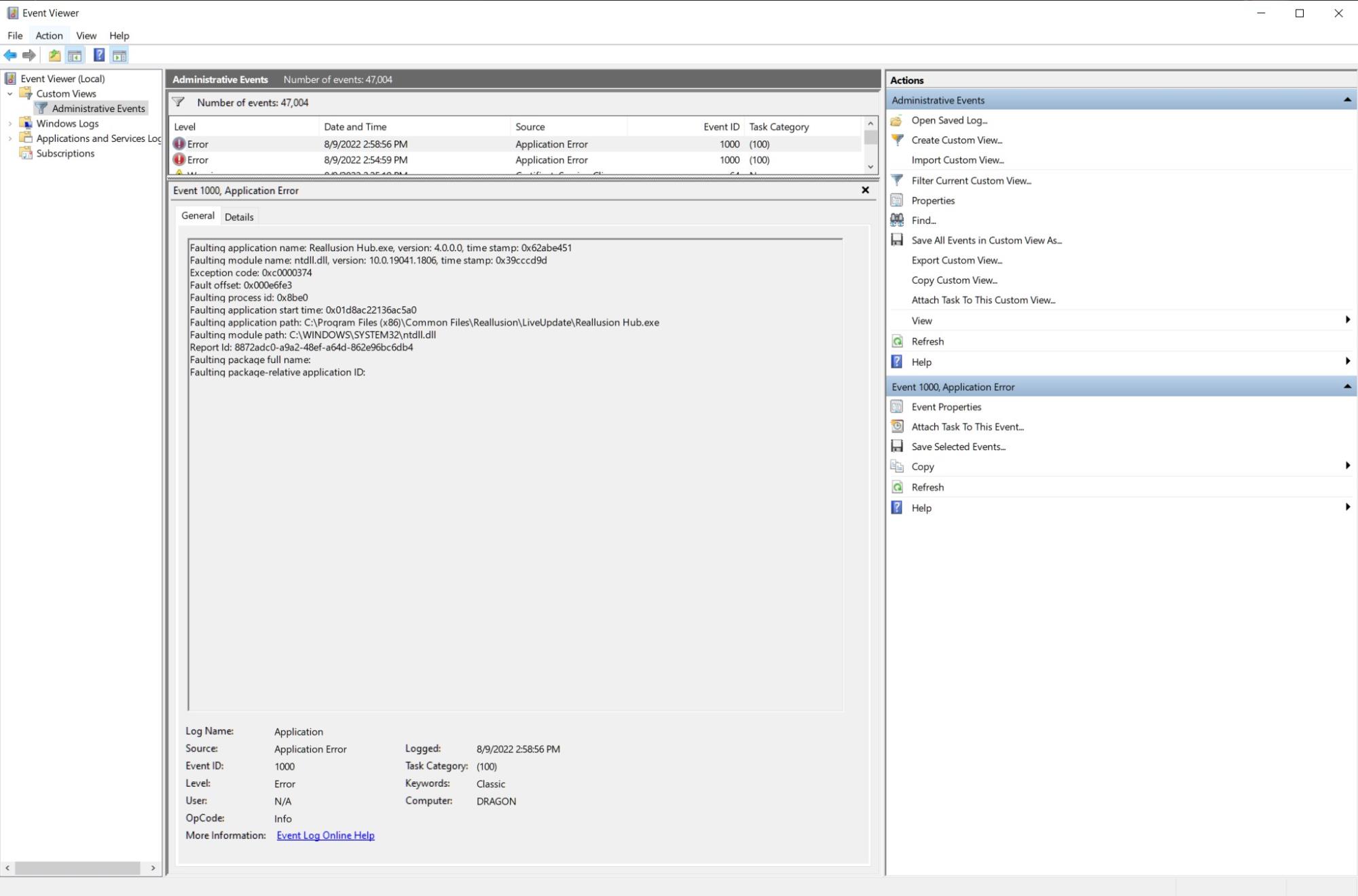
You mentioned you were a experience computer user; If the program is not launching, check your event viewer to see if the program is throwing
a error...may give you a place on where to start looking for the error or something to get to support. Here an issue I was having with Reallusion Hub.
|
|
By 3CPU - 4 Years Ago
|
|
michaelrbarton (8/9/2022)
I have no problem starting and using CC4.
My PC Specs are
CPU Xeon E3 1230 V2 3.30 GHz 4 cores 8 threads
RAM 20GB DDR3
GPU GTX 970 4GB
250 GB HDD
W10
My specs are low compared to most IC and CC users.
If my PC is able to run the program, there has to be something
your PC is missing. Your PC goes above and beyond the specs.
It can't be Reallusions' fault. I am no expert on PCs.
I am just listing my specs to show that a lower end PC can run CC4
without any problem other than not having enough video RAM to have some more fun.
Awesome! Thanks for chiming in, gives me hope -- I did a registry clean up and checked for updates (already updated) and of course I restarted to refresh the system. And guess what? CC4 Launched. I suppose the install did not go as smooth. Therefore, I highly recommend others who have launch issue to try the registry cleaner, I used CClean (not the best) but it got CC4 to launch.
Unfortunately there are other issues not related to my computer that are not yet resolved. Reallusion Tech Support is working on it, I hope will get resolved soon. I may have narrowed it down to lack of broader support for monitors. CC4 System Recommendation do not mention display/monitor. I did everything so far such as, checked for updates, tried the display scale settings, and of course I forwarded logs to Reallusion Tech Support. Wish me luck, hopefully I will get this mess sorted out soon so that I am able to access all important settings in CC4. I am using a Sony XBR 43 inch TV 3840x2160 native resolution (yes I know, it's not true 4K), it appears (literally) that only Reallusion is the issue because all other software such as Blender, Unity and Unreal Engine work fine.
My Suggestion to the Devs:
Make the panels in CC4 smaller, correct the scale issue to be compatible with all display/monitors. And all panels such as the Export to FBX dockable -- then have an option for one-click hide all panels -- rather than using the shortcut ctrl+6 because it removes the toolbar. That's fine for preview (ctrl+6) but not so fine for other workflow reasons.
Thanks to everyone for chiming in -- I sincerely appreciate it.
|
|
By animagic - 4 Years Ago
|
|
About using a 4k monitor: I'm have a Dell 4k monitor (also 3840x2160) and it works without problems. I'm using a display scale factor of 125%.
|
|
By 3CPU - 4 Years Ago
|
|
animagic (8/10/2022)
About using a 4k monitor: I'm have a Dell 4k monitor (also 3840x2160) and it works without problems. I'm using a display scale factor of 125%.
On my display the maximum it can go is 225% and Font Size of 135% without cutting off some important areas of the UI. That said, what is sorely missing in CC4 is no option to adjust scale of widgets and fonts, fonts in the panels are so tiny I have great difficulties with that. I asked tech support about CC4 .ini file to see if tweaks can be done and if not? I will proceed with a refund. I did plan to also purchase iClone 8, but at this point in time, I hardly have words to express just how depressed I feel. I sincerely hope Reallusion can provide this ini tweak with plans for a future update that will include above mentioned solution.
|
|
By playlogic - 4 Years Ago
|
3CPU (8/10/2022)
animagic (8/10/2022)
About using a 4k monitor: I'm have a Dell 4k monitor (also 3840x2160) and it works without problems. I'm using a display scale factor of 125%. On my display the maximum it can go is 225% and Font Size of 135% without cutting off some important areas of the UI. That said, what is sorely missing in CC4 is no option to adjust scale of widgets and fonts, fonts in the panels are so tiny I have great difficulties with that. I asked tech support about CC4 .ini file to see if tweaks can be done and if not? I will proceed with a refund. I did plan to also purchase iClone 8, but at this point in time, I hardly have words to express just how depressed I feel. I sincerely hope Reallusion can provide this ini tweak with plans for a future update that will include above mentioned solution.
I agree with you that Reallusion needs to update their UI code to be more flexible; I currently use a 50" Samsung Q90B as my main monitor at a 125% with no issues. If you are still having issue...maybe looking into the DPI scaling options
via the compatibility options in the properties menu
|
|
By animagic - 4 Years Ago
|
|
playlogic (8/10/2022)
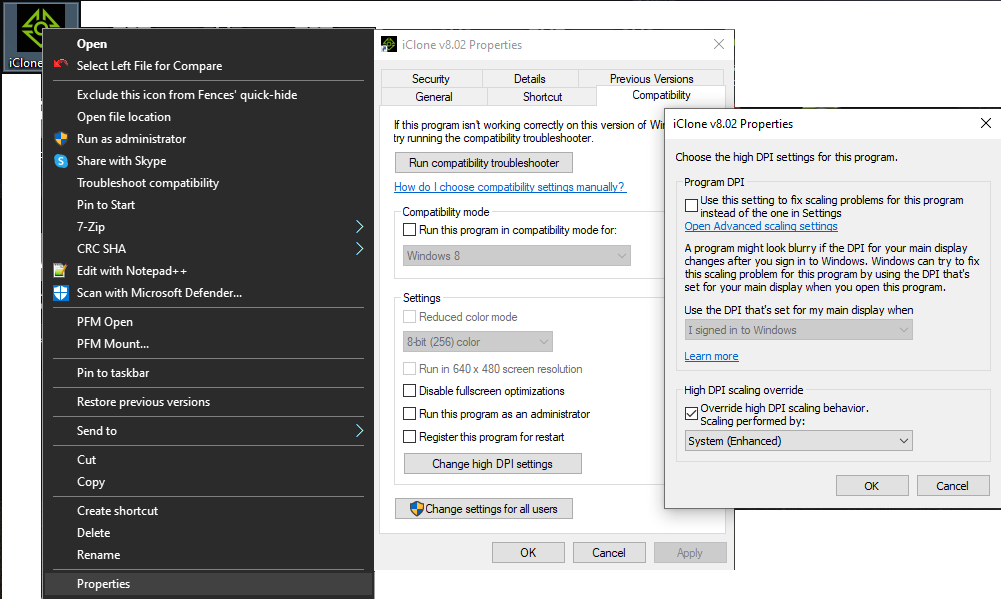
If you are still having issue...maybe looking into the DPI scaling options
via the compatibility options in the properties menu
I forgot to mention that (it was late...:doze: ) but that is what I do, and as a result I have no trouble reading the UI text.
To change, right-click the desktop shortcut to iClone or CC, and select Properties and then proceed as shown below.
|
|
By 3CPU - 4 Years Ago
|
Thanks for the suggest regarding dpi, I forgot about that setting.
You guys are the best! This is a great community.
Greatly appreciate your help and this I'm sure will help others.
|
|
By 3CPU - 4 Years Ago
|
Update: Resolved
Adjusting Windows Display Scale, Font and DPI is a compromise but will suffice. Now I can get back to work and hope that sometime in the future, Reallusion will add UI Scale Options in preferences.
BTW, I should point out to anyone who happens to stumble on this topic, there are additional settings in Windows Display > Advanced Scale Settings > 100 to 500 %, Windows says: not recommended! Why? if set too high, all the drop-down menus will not function properly, it's a complete mess lol. Not to worry it can be undone. Wow I'm done tweaking, I need to get back to work.
|
|
By TonyDPrime - 4 Years Ago
|
I wonder whether doing the CC cleaner or reinstall parts would rectify anything as far as CC4 not loading on an ongoing basis, it may have been coincidentally that by taking these steps you wind up rebooting the PC, which itself may serve to restore Win 10 processes to a state whereby CC4 can load.
Hope everything functions normally, but if you run into this problem again, you could track whether rebooting your PC restores it to a working state. Then after, if loading issues continued, review drivers to see if they are not older than the latest CC4 update.
|